
You've published the page, checked it in a browser, and still can't find it in Google. That usually means the issue isn't “Google being slow,” it's something in the indexing pipeline, a missing verification step, a sitemap problem, a canonical mismatch, or a blocker that makes the URL discoverable but not indexable. The workflow that works is the one that respects Google's own order of operations and then checks the reasons a page is still excluded instead of blindly resubmitting it.
Table of Contents
- Verify Your Site and Prepare Pages for Crawling
- Submit Sitemaps and Request Indexing for Priority URLs
- Diagnose and Fix Common Indexing Blockers
- Monitor Index Status and Coverage Reports
- Scale Indexing with Architecture and Internal Linking
- Automate Indexing Workflows with Nuwtonic
Verify Your Site and Prepare Pages for Crawling
A page that exists in your CMS but never appears in search usually fails earlier than people think. The first move is proving ownership in Google Search Console, because every meaningful indexing action depends on that property being set up correctly.
Choose the verification method that fits your stack
Google Search Console supports several ownership routes, and the right one depends on how your site is hosted. DNS TXT verification is usually the cleanest option when you control your domain registrar, HTML file verification is often easiest when you can edit the root of the site, and a Google Analytics tag works well when tracking is already installed and stable.
The point isn't to pick the fanciest method. It's to choose the method that you can keep verified without breaking every time a theme changes, a CMS update lands, or a developer swaps templates. Once ownership is verified, you can work the way Google expects, with a property that surfaces crawl and index diagnostics.
A verified property is the difference between guessing and seeing the actual indexing state.
For platforms with tricky rendering or framework-specific issues, a technical audit before submission saves time later. If you're dealing with JavaScript-heavy publishing workflows, a resource like optimize Angular apps for SEO can help you check whether the page is reachable in a way Google can interpret.

Clean the page before you ask for indexing
Verification doesn't make a bad URL indexable. Before you move on, confirm the page returns a 200 status code, isn't blocked by robots.txt, and points to the correct canonical URL. Google's indexing workflow can fail when the URL has crawl, redirect, canonical, or noindex problems, so the cleanest request is always the one sent after those blockers are removed. That sequence is part of Google's standard indexing pipeline, not a workaround for edge cases, as explained in Google's own guidance on indexing flow and URL Inspection behavior (Google's indexing workflow).
A practical habit I use on client sites is to shortlist only the pages that deserve search visibility right now. That means canonical versions only, no parameter variants, no duplicate paths, and no drafts that still have temporary directives attached. Google can ignore or de-prioritize noncanonical pages when building the index, so sending the wrong URL wastes time and makes the problem harder to read.
Build the priority list before submission
I don't submit everything manually. I start with the homepage, top category pages, and a few pages that matter most commercially or editorially. That keeps the process focused and makes it obvious which URLs need crawl priority first.
Use this stage to confirm three things:
- The page is live: It loads without errors and returns the expected content.
- The page is allowed: It isn't blocked by robots rules or hidden by an unintended noindex directive.
- The page is canonical: The URL you plan to submit is the one you want indexed.
When those three checks pass, the rest of the workflow gets much easier. If they don't, every request after that is just noise.
Submit Sitemaps and Request Indexing for Priority URLs
Once the site is verified and the target pages are clean, the next move is submission with intent. The scalable path is the sitemap. The surgical path is URL Inspection for pages that need priority crawl attention.
Submit the XML sitemap in Search Console
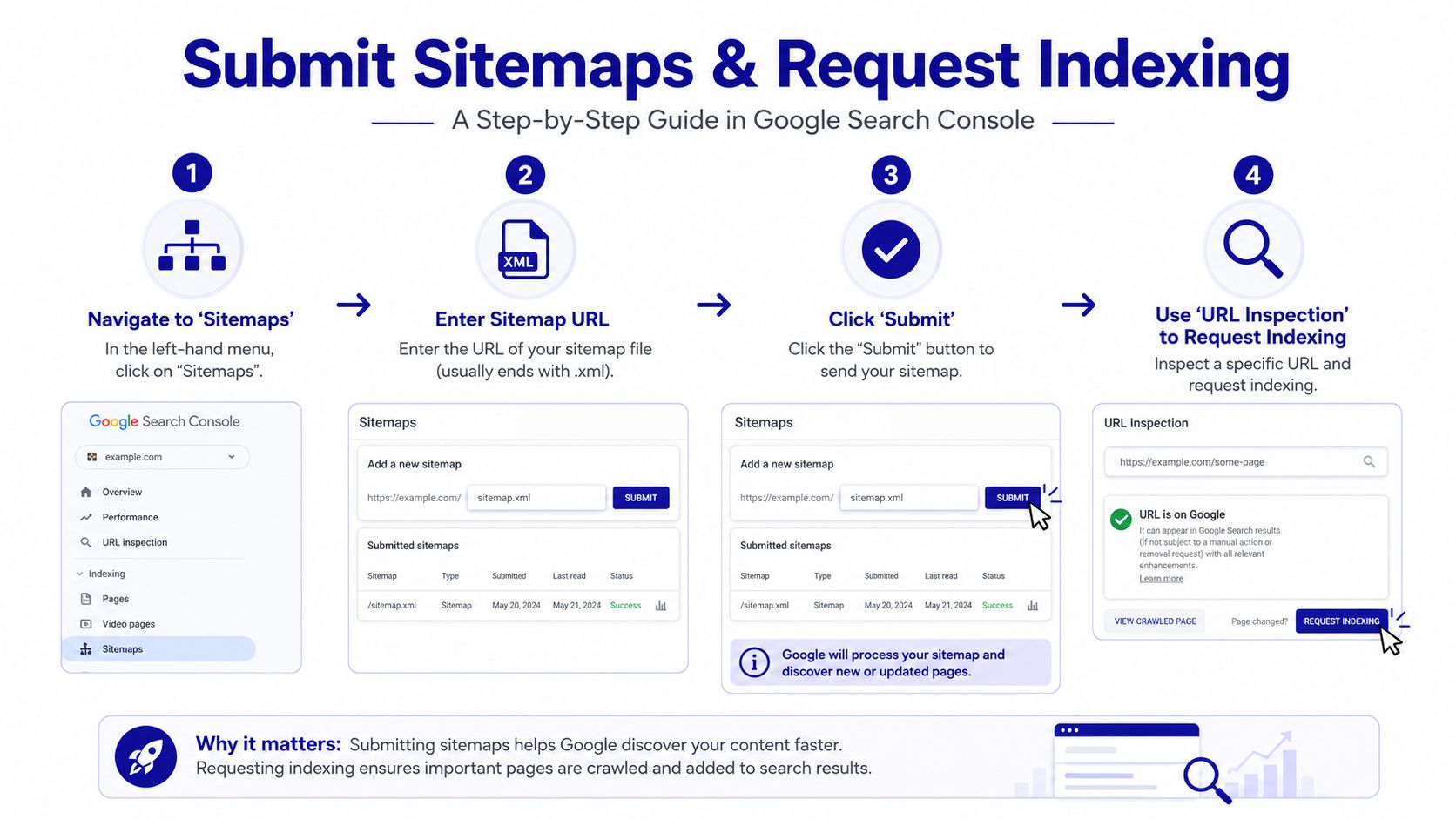
Google Search Console supports sitemap submission under the Sitemaps section, which is where you give Google a structured map of the URLs you want discovered. Conductor's step-by-step navigation is straightforward, use the left-hand Index menu, open Sitemaps, and submit the XML file there (Conductor's sitemap and URL Inspection guide).
That step matters because a sitemap is not just a submission form, it's a crawl discovery layer. On larger sites, especially sites that publish often, it's the most reliable way to keep new and changed URLs visible without depending on manual inspection requests every time.
A clean sitemap does three jobs at once. It helps Google find new content, it reinforces canonical URL selection, and it reduces the chance that important pages stay buried in the internal link graph. If you need a baseline structure, the AEO-friendly sitemap blueprints resource is useful as a practical reference for sitemap organization.
Use URL Inspection for the pages that matter most
URL Inspection is the precise tool for a priority page, such as a new service page, a launch announcement, or a fixed URL that should re-enter the index quickly. The sequence matters. Paste the exact URL into the top field, click Test Live URL first, confirm it's crawlable and indexable, then click Request Indexing.
That live test is not optional. Google recommends checking the live URL before requesting indexing because the request can fail if the page has crawl, redirect, canonical, or noindex issues. If the live test shows a problem, fix that first. Otherwise, you're asking Google to revisit a URL that still can't qualify for indexing.
Request indexing after the page is genuinely ready, not before. Otherwise, you turn a useful tool into a repeated error signal.
Use the right tool for the right job
Sitemaps handle breadth. URL Inspection handles urgency. If you rely on inspection requests for every URL update, you're fighting the system instead of using it. Sitemaps are how Google finds the site at scale, and inspection is how you bump a specific page when timing matters.
On one site, a fast sitemap update can be enough. On another, an important page needs a manual check after a content release because internal links haven't propagated yet. That's the trade-off. The more isolated the page, the more useful URL Inspection becomes, but the better the architecture, the less often you need it.
For a broader process view, I keep one internal reference handy for crawl workflow troubleshooting, how to get Google to crawl your site, because indexing and crawling often get confused in practice even though they fail for different reasons.
Diagnose and Fix Common Indexing Blockers
Pages that are submitted but still excluded usually aren't suffering from one mysterious issue. They're usually tripping over one of a few repeat offenders, and Google Search Console often tells you which one it is if you read the Pages report and URL Inspection output carefully.
Read the symptom before changing the page
The fastest way to waste time is to fix the wrong layer. If a URL is reported as Crawled - currently not indexed or Discovered - currently not indexed, the page has likely been found but doesn't yet qualify for indexation, or Google hasn't allocated it crawl priority. That's different from a hard block such as noindex, robots exclusion, or a canonical pointing elsewhere.
Google's own SEO Starter Guide is blunt about content quality and structure. It says indexing depends on unique, high-quality content, warns publishers not to copy content “in part or in its entirety,” and recommends content that is well organized, broken into paragraphs and sections, and supported by headings (Google SEO Starter Guide). If a page is thin, duplicated, or hard to parse, the fix isn't a rerun of Request Indexing.
| GSC Status | What It Means | Action to Take |
|---|---|---|
| URL is on Google | The page is indexed | Check whether it's the correct canonical and whether the snippet matches the page's intent |
| URL is not on Google | The page is not indexed | Inspect blockers, fix the issue, then test live URL again before requesting indexing |
| Crawled - currently not indexed | Google fetched it but hasn't indexed it yet | Improve uniqueness, internal linking, and canonical clarity |
| Discovered - currently not indexed | Google knows the URL but hasn't crawled it yet | Strengthen sitemap inclusion and internal links, then let crawl revisit it |
Fix the block, not the symptom
Each common blocker has a different root cause.
- robots.txt disallow rules: If the path is blocked, Google may know the URL exists but can't fetch it. Remove the disallow rule for pages meant to rank.
- Unintended noindex tags: A page can be fully accessible in a browser and still excluded because the HTML says not to index it. Remove the directive where indexing is intended.
- Wrong canonical tags: If the canonical points to a different page, Google will often treat that other URL as the primary version. Point the canonical to the actual page you want indexed.
- Redirect chains: Long or messy redirects make crawling slower and less predictable. Replace chains with a clean final destination.
- Server errors: 4xx and 5xx responses stop crawling or reduce trust in the URL. Fix the response first, then resubmit.
A useful diagnostic habit is to check the exact URL in Search Console before touching templates or plugins. The Pages report and URL Inspection often surface the issue directly, which is faster than guessing in the CMS.
The internal x-robots-tag header can also block a URL even when the HTML looks fine, so don't limit checks to visible page markup. A focused reference like x-robots-tag is worth keeping nearby when a page behaves correctly in the browser but still refuses to index.
Stop re-requesting pages that are still broken
Repeated requests don't cure a crawl or canonical problem. They just create more waiting while the underlying issue remains. Google's workflow is consistent here, fix the page, confirm live crawlability, then request indexing once the URL is eligible.
Nuwtonic's GSC-integrated audit layer can surface these issues, rank them by impact, and push approved CMS-ready fixes through its On-Page SEO Audit & Auto-Fix module, which is useful when the same blocker pattern keeps showing up across many URLs. That doesn't replace human review, but it does reduce the time spent hunting through templates for the same mistake over and over.
Monitor Index Status and Coverage Reports
A submitted URL is not the same thing as an indexed URL. The only way to know whether the work landed is to watch the Pages report, read the status reason, and verify the page has moved into the indexed set.
Use Search Console as the source of truth
The cleanest check is the Pages report in Google Search Console. That report shows which URLs are indexed, which are excluded, and why. For a single page, the URL Inspection status is even more direct, because if GSC shows “URL is on Google,” the page is already indexed, while “URL is not on Google” means it needs investigation before another request is worth sending (Semrush on checking indexed pages and GSC status).
The site: operator is useful, but only as a spot-check. It's a rough glimpse into indexed presence, not a complete inventory of what Google knows about your site. Search Console is the authoritative source because it shows exclusion reasons, not just visible search results.
If you want to know whether indexing succeeded, read the Pages report first, not the search result count.
Track the status before and after fixes
The practical workflow is simple. Check the page in URL Inspection, note the status, fix the blocker if there is one, then return after re-crawl and see whether the status has changed. Don't treat a single request as proof of success.
GSC Index Status Meanings
| GSC Status | What It Means | Action to Take |
|---|---|---|
| URL is on Google | Indexed and eligible to appear in search | Review snippet quality and internal links, then monitor |
| URL is not on Google | Not indexed | Inspect the exclusion reason and resolve it |
| Crawled - currently not indexed | Crawled but not chosen for index | Strengthen content quality, internal links, and canonical signals |
| Discovered - currently not indexed | Known but not crawled yet | Improve discoverability through sitemap and link architecture |
I also like comparing GSC status with a sitewide technical audit when the pattern repeats across a section of the site. A service like UK technical site audit for local businesses is useful context if you're comparing how another technical team structures diagnostics, especially when local landing pages keep slipping in and out of coverage.
Scale Indexing with Architecture and Internal Linking
Manual requests work for a handful of pages. They don't scale when the site grows, the content cadence speeds up, or the crawl paths get messy. Long-term indexing success comes from making discovery automatic through architecture.
Make new URLs easy to find
Google-oriented guidance consistently points to XML sitemaps, strong internal linking, and stable discoverability because Googlebot can't index what it can't reliably reach. Pages isolated from the internal link graph or buried too far down are less likely to be discovered quickly, while pages linked from important hub pages are easier to crawl and re-crawl. I've seen this matter more than repeated manual submissions on sites that publish often.
A flat architecture helps more than a clever one. Your homepage should connect to category or hub pages, and those hubs should connect to deeper pages that deserve search visibility. Breadcrumbs help too, because they reinforce hierarchy and give crawlers another route through the site.
Keep important pages within a few clicks of authority
If a page is important, it shouldn't be orphaned. Link it from a relevant hub, a related article, or a category page that already gets crawled regularly. That's how you help Google re-find the page without depending on inspection submissions every time the content changes.
Structured data can also help Google read the page more cleanly. It won't magically force indexing, but it does improve machine readability and clarifies the page's role in the site.
For a practical lens on this, the internal linking audit is a helpful reference when you're mapping which pages need stronger connections and which ones are currently stranded.
Build for re-crawl, not just first discovery
Many teams optimize for the first crawl and forget the second one. That's a mistake. Re-crawl matters because updates, fixes, and content refreshes only matter if Google comes back and sees them.
I'd rather see a site with a durable internal link structure than one that depends on repeated manual requests. The former makes indexing repeatable. The latter makes it fragile.
Automate Indexing Workflows with Nuwtonic
The cleanest indexing workflow is the one that catches blockers before humans have to chase them. That's where an audit-driven operating layer becomes more useful than a pile of separate tools.
Turn Search Console signals into ranked work
Nuwtonic connects to Google Search Console, surfaces ranked issues, and turns query and trend data into prioritized actions through its GSC Performance Dashboard. That matters because indexing problems rarely show up as a single obvious failure. They show up as a cluster of weak signals, a missing canonical here, a crawl issue there, a page that should be indexed but isn't.
The platform's On-Page SEO Audit & Auto-Fix module can handle metadata, schema, alt text, and content elements with CMS pushes, while maintaining change control through previews and permissioned access. That workflow is useful when a team wants the operational benefits of automation without losing review.
Reduce latency between detection and fix
The biggest win isn't novelty, it's speed. When the audit layer lives next to GSC data, the team sees what's broken, what matters most, and what can be fixed first. That shortens the gap between “this URL should be indexed” and “this URL is ready to request.”
It also helps with consistency. Manual indexing often depends on whether someone remembers to check the right report on the right day. A connected workflow makes that less likely to slip.
Use automation to support, not replace, judgment
Automation works best when it handles repetitive checking and routing, while humans approve the actual change. That's the right line for indexing work too. Let the system surface exclusions, duplicate signals, and structural gaps, then use a human review step before pushing fixes live.
If your team manages a growing site, a key advantage is fewer blind spots. Pages get found, blockers get flagged earlier, and the indexation process stops being a one-off scramble every time new content ships.
If you want a cleaner indexing workflow on your own site, start by verifying your GSC property, then audit the URLs that matter most, and use a system that surfaces blockers before they waste another crawl cycle. Explore Nuwtonic if you want to connect Search Console data, technical audits, and reviewable fixes in one place.


