Free Keyword Clustering Tool
Turn raw keyword lists into clear topic clusters you can publish against. Use free mode for up to 50 keywords, or unlock advanced 200+ keyword clustering for complete topical depth.
What Is Keyword Clustering and Why It Matters
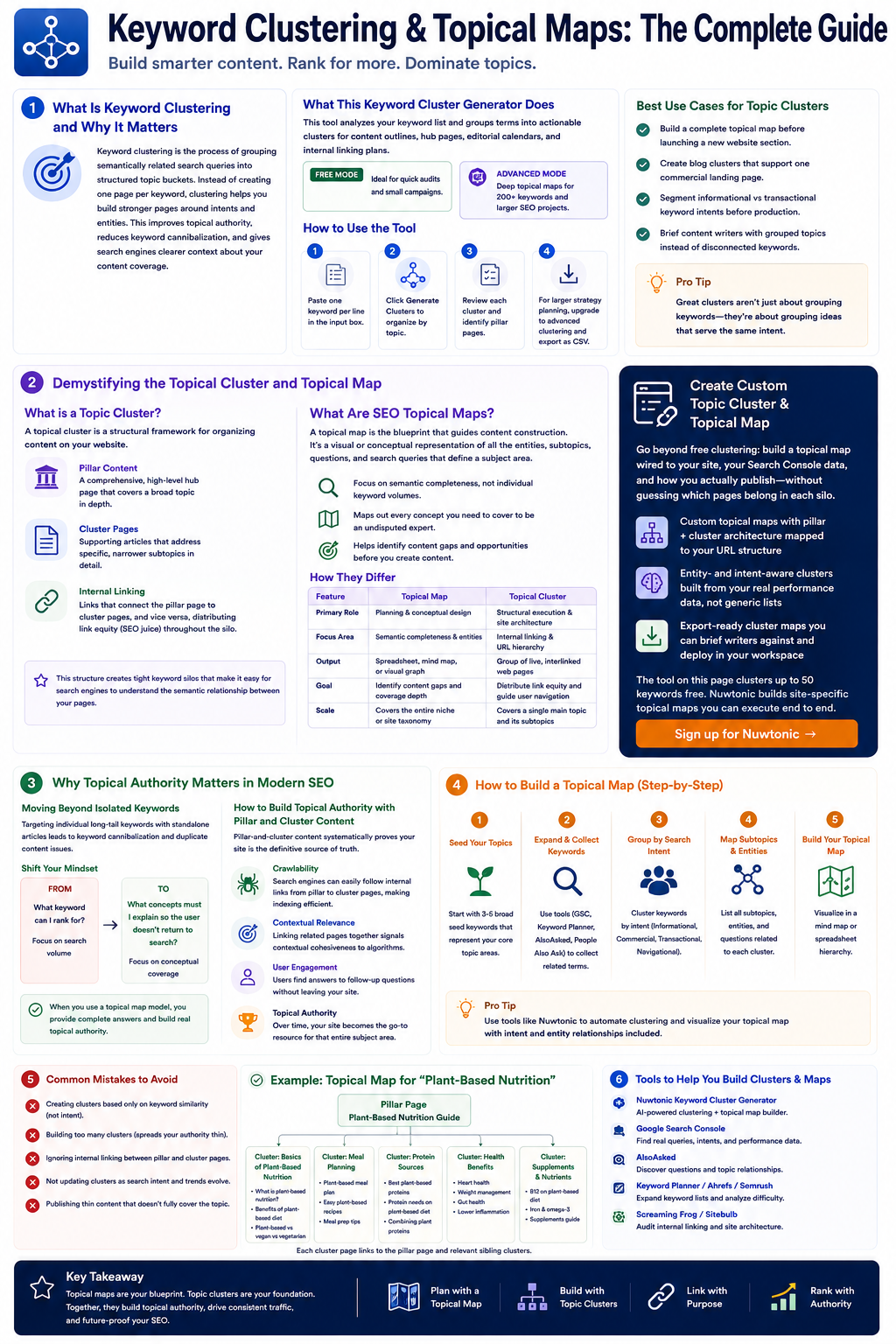
Keyword clustering is the process of grouping semantically related search queries into structured topic buckets. Instead of creating one page per keyword, clustering helps you build stronger pages around intents and entities. This improves topical authority, reduces keyword cannibalization, and gives search engines clearer context about your content coverage.
What This Keyword Cluster Generator Does
This tool analyzes your keyword list and groups terms into actionable clusters you can use for content outlines, hub pages, editorial calendars, and internal linking plans. Free mode is ideal for quick audits and small campaigns. Advanced mode is designed for deep topical maps and larger SEO projects.
How to Use the Tool
Paste one keyword per line in the input box.
Click Generate Clusters to organize your keywords by topic.
Review each cluster and identify pillar pages or supporting articles.
For larger strategy planning, upgrade to advanced clustering for 200+ keywords and export your clusters as CSV.
Best Use Cases for Topic Clusters
Build a complete topical map before launching a new website section.
Create blog clusters that support one commercial landing page.
Segment informational vs transactional keyword intents before production.
Brief content writers with grouped topics instead of disconnected keywords.
Demystifying the Topical Cluster and Topical Map
Look, let's break this down into plain English. While people often use these terms interchangeably, they refer to two completely different stages of the content planning and execution process. Confusing them is like confusing a blueprint of a house with the actual physical framing.
What is a Topic Cluster?
At its core, a topic cluster (or topical cluster) is a structural framework for organizing content on your website. It consists of three primary components:
- Pillar Content: A comprehensive, high-level hub page that covers a broad topic in depth.
- Cluster Pages: Supporting articles that address specific, narrower subtopics in detail.
- Internal Linking: Hyperlinks that connect the pillar page to the cluster pages, and vice versa, distributing link equity (or as some call it, SEO juice) throughout the silo.
This structure creates tight keyword silos that make it incredibly easy for search engine crawlers to understand the semantic relationship between your pages.
Create Custom Topic Cluster & Topical Map
Go beyond free clustering: build a topical map wired to your site, your Search Console data, and how you actually publish—without guessing which pages belong in each silo.
- Custom topical maps with pillar + cluster architecture mapped to your URL structure
- Entity- and intent-aware clusters built from your real performance data, not generic lists
- Export-ready cluster maps you can brief writers against and deploy in your workspace
The tool on this page clusters up to 50 keywords free. Nuwtonic builds site-specific topical maps you can execute end to end.
Sign up for NuwtonicWhat Are SEO Topical Maps?
If a topical cluster is the physical structure of your content, a topical map is the blueprint that guides its construction. What is a topical map is essentially a visual or conceptual representation of all the entities, subtopics, questions, and search queries that define a specific subject area. Instead of focusing on individual keyword search volumes, a topical map focuses on semantic completeness. It maps out every single concept you need to cover to be considered an undisputed expert on a topic.
How They Differ
To make this concrete, let's compare the two concepts side-by-side:
| Feature | Topical Map | Topical Cluster |
|---|---|---|
| Primary Role | Planning & conceptual design | Structural execution & site architecture |
| Focus Area | Semantic completeness & entities | Internal linking & URL hierarchy |
| Output | A spreadsheet, mind map, or visual graph | A group of live, interlinked web pages |
| Goal | Identify content gaps and coverage depth | Distribute link equity and guide user navigation |
| Scale | Covers the entire niche or site taxonomy | Covers a single main topic and its subtopics |
Why Topical Authority Matters in Modern SEO
Don't just throw random keywords together and expect Google to reward you. The algorithm has evolved. It's no longer about who has the most keywords stuffed into a meta tag; it's about who provides the most comprehensive, authoritative answer to a user's query.
Moving Beyond Isolated Keywords
I've seen too many teams get bogged down in keyword research instead of focusing on creating meaningful connections between topics. In my past projects, we used to target individual long-tail keywords with standalone articles. The result? We ended up with massive keyword cannibalization and duplicate content issues because different pages were competing for the same search intent. When you transition to a topical map model, you shift your focus from search volume to conceptual coverage. You stop asking, "What keyword can I rank for?" and start asking, "What concepts must I explain so the user doesn't have to go back to the search results to find answers?"
How to Build Topical Authority with Pillar and Cluster Content
Building topical authority is about proving to search engines that your site is the definitive source of truth for a specific subject area. When you build a pillar-and-cluster structure, you are systematically demonstrating this depth of knowledge. Let's look at how this works under the hood:
- Crawlability: When search engine spiders land on your pillar page, they follow the internal links to your cluster pages. This clear path makes indexing your site highly efficient.
- Contextual Relevance: By linking related pages together, you signal to algorithms that your content is contextually cohesive.
- User Engagement: Users can easily find answers to follow-up questions without leaving your site, which increases dwell time and reduces bounce rates.
The Role of Search Intent in Semantic SEO
Many marketers overlook the importance of search intent when building topical maps, leading to missed opportunities. Search intent isn't just a filter in your keyword tool; it's the fundamental driver of how your content should be structured. When mapping out your clusters, you must align each page with one of the primary intent types:
- Informational: "What is a topical map?" (Best suited for cluster pages or pillar intros)
- Investigational: "Topical map tools comparison" (Best suited for mid-funnel comparison guides)
- Transactional: "Hire a topical mapping service" (Best suited for landing pages)
If you map a highly transactional keyword to a purely informational blog post, you will struggle to rank—no matter how many internal links you point at it.
Step-by-Step: How to Complete a Topical Map SEO
So, how do we turn this theory into a practical, repeatable workflow? Let's break down the exact steps I use when building out a topical map from scratch.
Step 1: Broad Subject Identification and Entity Mapping
Before you open any keyword research tool, you need to understand the core entities of your niche. An entity is a distinct, well-defined concept or thing that search engines recognize.
For example, if your core topic is "Coffee brewing," your primary entities might include:
- •Brewing methods (Pour over, French press, Espresso)
- •Equipment (Grinders, Scales, Kettles)
- •Ingredients (Coffee beans, Water quality, Roast profiles)
Start by mapping these entities out. This gives you a conceptual skeleton before you even think about search volume.
Step 2: Running a Comprehensive Content Audit and Gap Analysis
Once you have your entity map, it's time to perform a thorough content audit. Look at your existing pages and map them to your new entity structure.
- Do we already have a page that covers this entity?
- Is the content up-to-date and matching the correct search intent?
- Where are the content gaps (entities we haven't written about yet)?
This step prevents you from writing duplicate content and helps you prioritize your content production pipeline.
Step 3: Translating the Map into a Site-Wide Architecture
Now, you need to turn your conceptual map into a physical site structure. This is where you decide your URL taxonomy and category systems. For a scalable, search-engine-friendly structure, I recommend using a Sitewise custom topical map approach. This ensures that your technical SEO, URL structures, and internal linking strategies perfectly mirror your topical map.
An ideal URL structure for a cluster looks like this:
example.com/coffee/ (Pillar Page)
example.com/coffee/french-press/ (Cluster Page)
example.com/coffee/pour-over/ (Cluster Page)
Advanced Implementation: Creating and Clustering Content
How to Create a Topic Cluster
When actually building the cluster, I always advise clients to start with the supporting cluster pages before finalizing the pillar page.
Why? Because it's much easier to write a comprehensive summary (the pillar) when you've already done the deep-dive research on the individual subtopics (the clusters). Here is the sequence I recommend:
- Write the cluster pages: Focus on highly specific, long-tail queries.
- Draft the pillar page: Keep it high-level but comprehensive. It should introduce each subtopic and link out to the dedicated cluster pages for those wanting a deeper dive.
- Implement the internal linking: Ensure every cluster page links back to the pillar page using descriptive anchor text, and ensure the pillar page links to every cluster page.
How Do You SEO Cluster of Similar Keywords?
One of the biggest pitfalls in modern SEO is creating separate pages for keywords that share the exact same search intent. To avoid this, you must learn What is keyword clustering and how to cluster keywords. If two keywords return highly similar search results on Google, they belong on the same page. Do not create one page for "how to make pour over coffee" and another for "pour over coffee instructions." Cluster them together under a single, comprehensive guide.
How to Cluster Long-Tail Keywords for Multiple Countries
If you are operating a multi-regional or international website, keyword clustering becomes slightly more complex. You cannot assume that search intent or topical relationships are identical across different countries. When clustering for multiple regions, follow these guidelines:
- •Analyze local search intent: A term that is informational in the US might have transactional intent in the UK.
- •Keep language-specific clusters isolated: Do not mix internal links between different language versions of your clusters (e.g., don't link a Spanish cluster page to an English pillar page).
- •Use hreflang tags correctly: Ensure search engines understand the relationship between translated versions of your pillars and clusters.
Evaluation, Comparison, and the Future of AI Search
As search engines transition into Answer Engines (think Google Search Generative Experience, Perplexity, and ChatGPT), the way we design and evaluate topical maps must evolve.
How to Compare Two Topic Maps
If you are auditing a competitor or trying to choose between two different content strategies, you need a structured way to compare topical maps. I evaluate maps based on three core dimensions:
- Breadth: How many distinct subtopics or entities does the map cover?
- Depth: How deep does the map go into long-tail variations and niche questions?
- Intent Alignment: Does the map balance informational, investigational, and transactional pages, or is it heavily skewed toward one type?
How to Create a Topical Map for AI Search
AI search engines don't just look at keywords; they look at conceptual relationships and direct answers. To optimize your topical map for AI search, you need to design your content to be highly structured and easily parsed by Large Language Models (LLMs).
- •Use Schema Markup: Implement structured data (like Article, FAQ, or Product schema) to explicitly define the relationships between your entities.
- •Answer Questions Directly: Use clear H3 questions followed immediately by concise, direct answers (ideal for featured snippets and AI summaries).
- •Prioritize First-Party Data: AI engines value unique data, proprietary studies, and expert quotes over rehashed generic content.
Measuring Success and Tracking Cluster Performance
How do you know if your topical cluster is actually working? You can't just look at individual page rankings. You need to track the performance of the cluster as a cohesive unit. Monitor these metrics:
- Aggregate Organic Traffic: Is the total traffic to all pages in the cluster increasing over time?
- Keyword Footprint: Is the cluster ranking for an increasing number of long-tail variations?
- Internal Link CTR: Are users actually clicking through your cluster links to read more of your content?
SERP-Based Keyword Cleanup & Whole-Topic Keyword Research
Sign up to run full keyword research: clean noisy lists with live SERP signals, cluster by intent across an entire topic, and connect research to publishing—without spreadsheets and five separate tools.
- SERP-based keyword cleanup to merge duplicates, drop zero-intent terms, and fix cannibalization
- Whole-topic keyword clustering with primary and secondary roles for every page
- One workflow from research → topical map → outlines so your team ships faster
Free mode gives you a quick cluster sample. Nuwtonic runs end-to-end topic and keyword research at scale.
Sign up for NuwtonicFrequently Asked Questions About Topic Clusters and Topical Maps
Keyword Clustering and Topical SEO Questions Answered
How many keywords can I cluster for free?
Free mode supports clustering for up to 50 keywords from your input list.
What does advanced clustering include?
Advanced mode generates 200+ keywords, deeper long-tail variants, and broad topical groupings for full strategy planning.
Can I download my keyword clusters?
Yes. In advanced mode, you can copy all clusters or download the result as a CSV file.
Why should I cluster keywords before writing content?
Clustering helps you avoid duplicate targeting, align intent properly, and create stronger topic authority in search results.
Does this help with Google AI Overviews?
Yes. Better topical structure and intent coverage improve your content foundation for traditional search and AI summary surfaces.
Try our other free SEO and AI tools
We have gathered some of our free tools that might help you in your SEO efforts.
Filter what tools to see
Free Meta Title Generator
Generate high-CTR title tags optimized for Google search results using AI-driven templates.
AI Overview Keyword Finder
Detect keywords that trigger AI overviews and assess citation opportunities with volatility signals.
Low Competition Keyword Finder
Find weak SERPs, forum-heavy opportunities, and keywords where lower-authority sites can still win.
Reddit Keyword Finder
Extract recurring questions, pain points, and buying intent patterns from Reddit and forums.
Question Keyword Tool
Find FAQ-style keywords and common user questions.
Buyer Intent Keyword Finder
Specifically filters for commercial and transactional keywords.
Zero Search Volume Keyword Finder
Uncovers emerging or hidden keywords that traditional volume tools miss.
Free SEO Title Length Checker
Check if your page titles fit within pixel limits to avoid truncation.
Free Meta Description Generator
Create compelling meta descriptions that summarize your content and boost click-through rates.
Free Meta Description Length Checker
Check if your meta descriptions fit within pixel limits to avoid truncation.
Free Google SERP Preview Tool
Simulate how your page title and meta description may appear in Google search results.
Free Schema Markup Checker
Validate your structured data to ensure it is readable by search engines and error-free.
Free Rich Results Test
Determine if your page is eligible for rich results in Google Search with our validation tool.
Free Alt Text Checker
Identify missing, empty, or duplicate alt text values across images.
Free AI Alt Text Generator
Generate descriptive, accessibility-compliant alt text for your images instantly.
Free Image Filename Generator
Convert plain text into SEO-friendly, hyphenated image filenames.
Free On-Page SEO Audit Tool
Run an on-page SEO audit for SEO services pages, technical SEO audit checks, and SEO optimization improvements.
Free H1 Tag Checker
Identify the presence and content of H1 heading tags on any webpage.
Free Heading Structure Checker
Audit your H1-H6 tags to ensure a logical and SEO-friendly document structure.
Free Canonical URL Checker
Identify declared canonical URLs and analyze canonical-related signals on any page.
Free EEAT Audit Tool
Analyze your content for Google's Experience, Expertise, Authoritativeness, and Trustworthiness signals.
Free AIO & GEO Audit Tool
Optimize your content for AI Overviews and Search Generative Experience with a detailed formatting audit.
Free Broken Link Checker
Scan a page to identify links that return error responses or cannot be reached.
Free Redirect Checker
Analyze URL redirection behavior to identify redirect types and destination URLs.
Latest SEO and AI related articles
Browse all articles
Best AI Writer: How To Choose the Right Tool in 2026

How to Create an SEO-Friendly XML Sitemap

11 ChatGPT SEO Strategy for B2B Companies (0 to 90 Days)
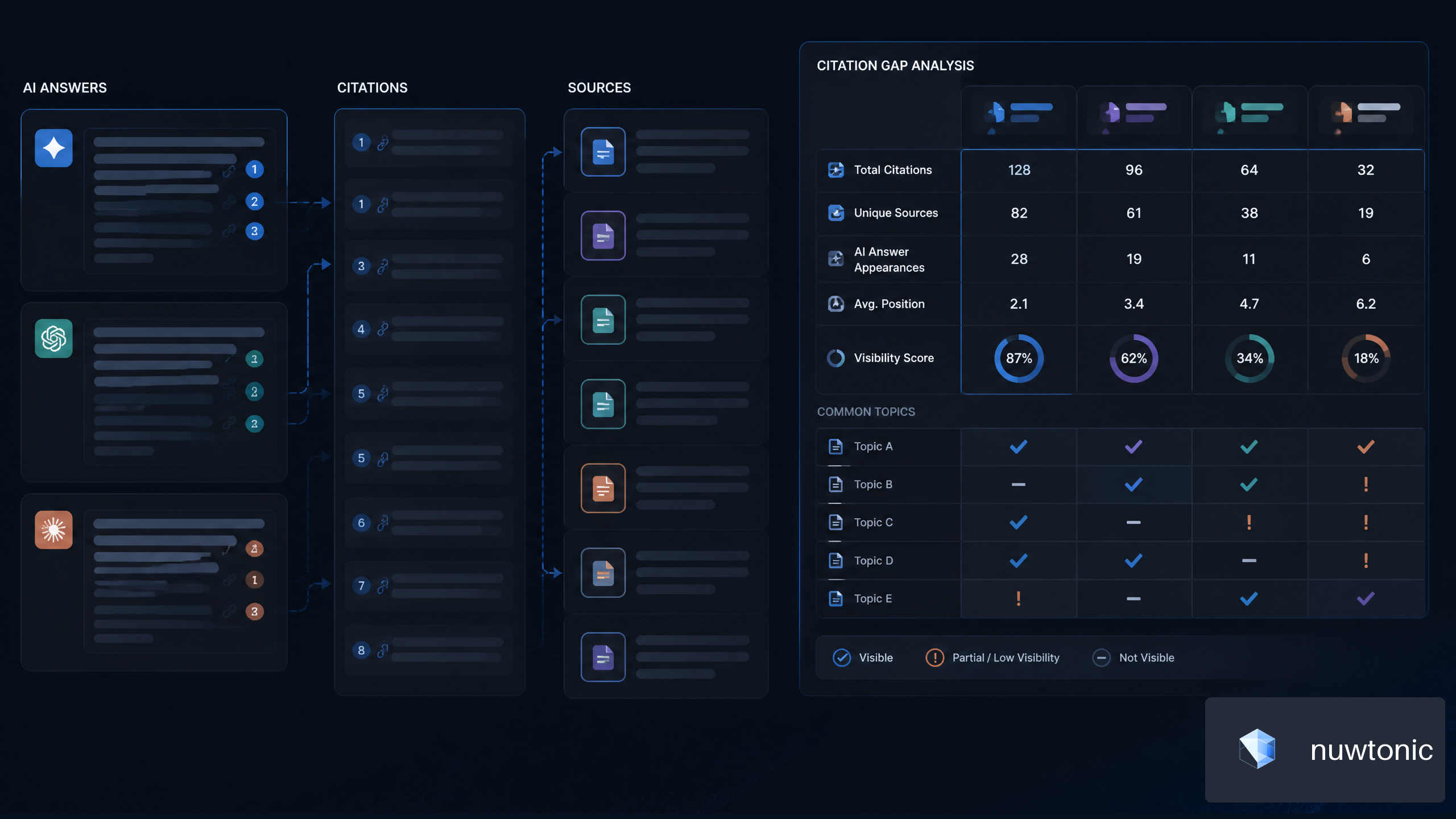
7 Strategies for AI Citation Gap Analysis for SaaS Companies
Best CMS for SEO 2026: Complete Guide & Tips