You open Google Search Console, inspect a URL that should be indexable, and get hit with “noindex detected in X-Robots-Tag.” You check the HTML. Nothing. You check the CMS SEO settings. Nothing. You check robots.txt. Still nothing.
That's where the X-Robots-Tag becomes less of a documentation topic and more of an operations problem. In real audits, the trouble often isn't the directive itself. It's where the directive is being injected: a CDN rule, a server config, a preview environment, a plugin, or a layer your content team never touches. If you only inspect page source, you'll miss it.
This is the practical guide I wish more teams had on hand. It covers what the X-Robots-Tag actually does, how it differs from meta robots, how to implement it on common stacks, and most importantly, how to debug the hidden header problems that burn hours on live sites.
Table of Contents
- What the X-Robots-Tag Is and Why It Matters for SEO
- X-Robots-Tag vs Meta Robots A Technical Comparison
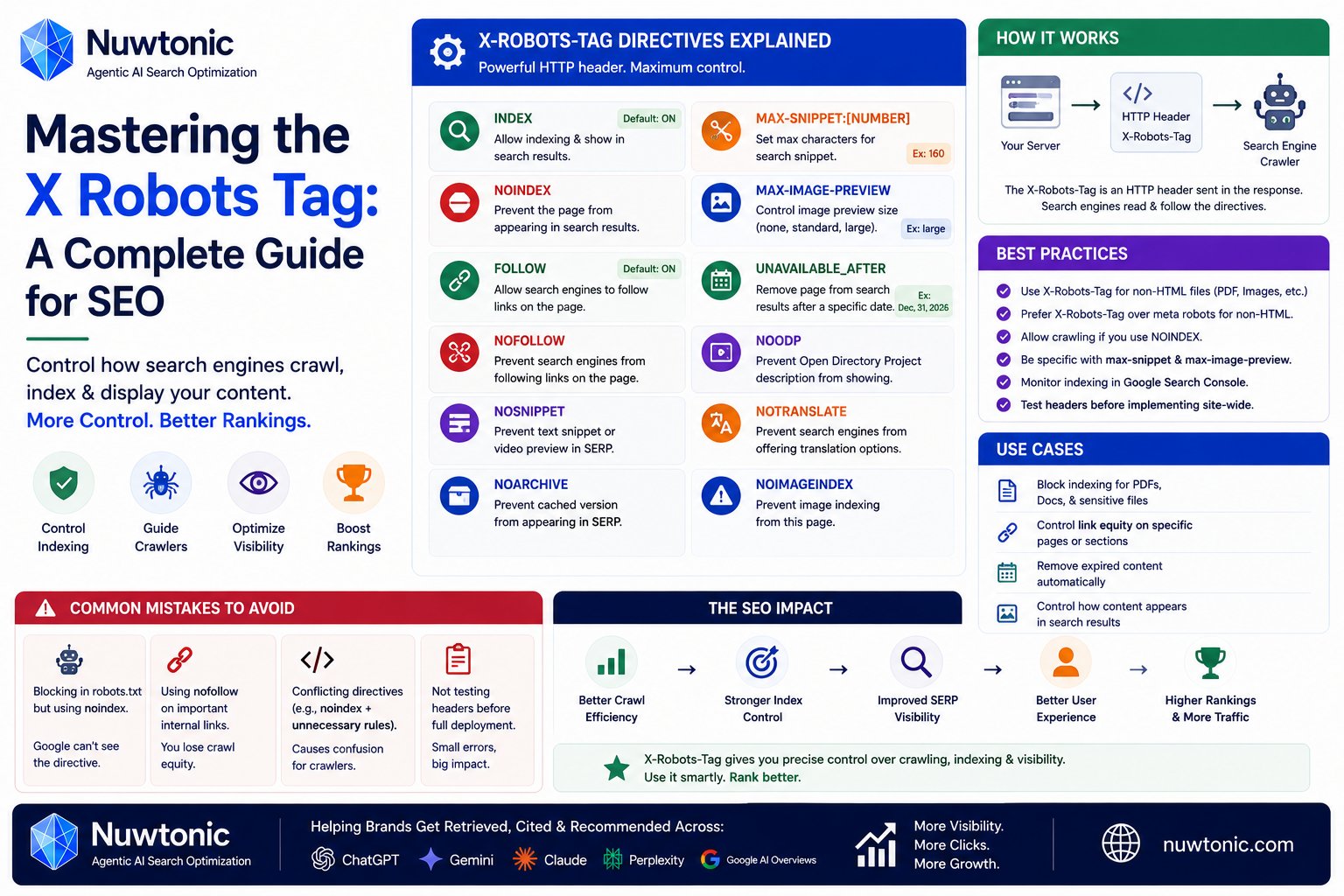
- All X-Robots-Tag Directives Explained
- Hands-On Implementation Across Different Servers
- Advanced Use Cases and Strategic SEO Scenarios
- How to Debug and Verify Your X-Robots-Tag Setup
- An Implementation and Audit Checklist
What the X-Robots-Tag Is and Why It Matters for SEO
The X-Robots-Tag is an HTTP response header that tells crawlers how to treat a resource. Think of it as a bouncer at the building entrance. It decides what search engines are allowed to do before they ever get inside. A meta robots tag is more like a sign posted inside one room of the building. Useful, but narrower.
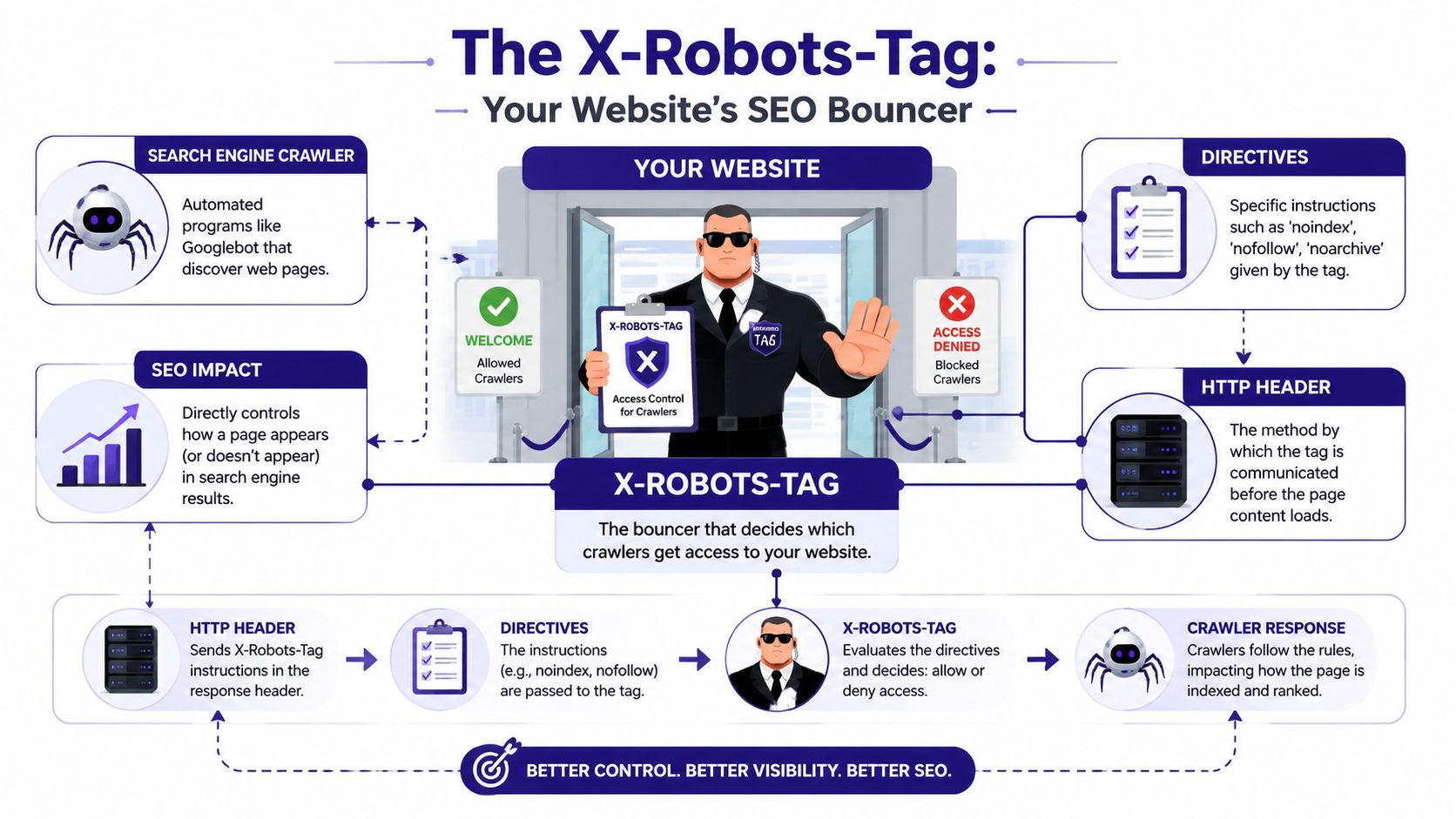
That difference matters because the X-Robots-Tag works at the HTTP layer, not inside HTML. It can be applied to pages, PDFs, images, videos, and other file types that don't have an HTML <head>. That makes it the control point for assets whose governance is often overlooked until those assets start surfacing in search.
A strong way to frame it is this: the meta robots tag controls a document that has already loaded, while the X-Robots-Tag controls the server response delivering that document or file. If your site ships whitepapers, product sheets, media kits, image libraries, or downloadable documentation, you need header-level control.
According to Fastly's discussion of X-Robots-Tag behavior, the X-Robots-Tag has become the de-facto standard for controlling search engine behavior on non-HTML resources, and 60% of indexed search results include non-HTML assets like product PDFs, image galleries, and video transcripts.
Where it fits in a real SEO stack
Most sites don't need to choose between meta robots and the X-Robots-Tag. They need both.
Use the X-Robots-Tag when you need:
- File-type control: Block or limit indexing on PDFs, images, or video files.
- Bulk rules: Apply one server rule to an entire directory or file pattern.
- Earlier enforcement: Send crawler instructions in the response header itself.
- Infrastructure-level governance: Handle resources where editors can't edit page head markup.
Practical rule: If the asset isn't an HTML page, the X-Robots-Tag usually isn't optional. It's the only place you can reliably control indexing behavior.
Why teams misuse it
The usual mistake isn't misunderstanding noindex. It's misunderstanding scope.
Teams often assume a CMS plugin or page-level setting covers the whole site. It doesn't. A CMS can control HTML pages well enough. It can't reliably govern every PDF, image variant, export file, feed, or redirected response unless the infrastructure also cooperates. That's why the X-Robots-Tag belongs in technical SEO audits, server reviews, and deployment checklists, not just in on-page workflows.
X-Robots-Tag vs Meta Robots A Technical Comparison
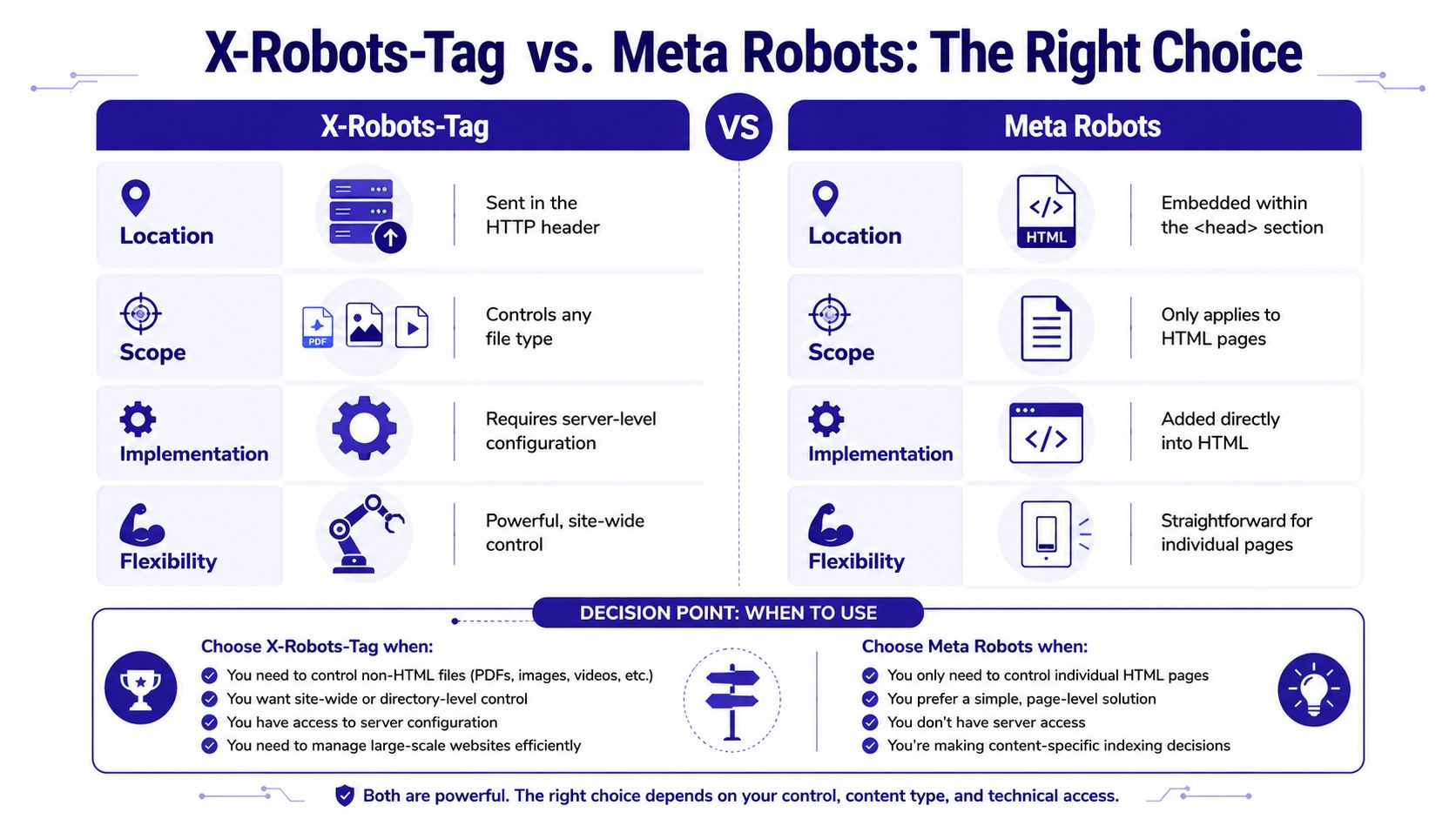
These two controls do the same job at a high level. They tell crawlers whether to index content, follow links, and show snippets. The difference is where they live, what they can govern, and which one wins when they conflict.
The shortest useful comparison
| Control | Lives in | Works on | Best use |
|---|---|---|---|
| Meta robots | HTML <head> |
HTML pages only | Per-page control managed in templates or CMS |
| X-Robots-Tag | HTTP response header | Any resource type | Bulk rules, non-HTML assets, infrastructure-level enforcement |
The key technical distinction is implementation layer. The meta robots tag is part of the document. The X-Robots-Tag is part of the response. That means crawlers can process the header before they parse the HTML.
What happens in conflicts
Real mistakes happen in such scenarios. An HTML page says index, but a server or CDN adds X-Robots-Tag: noindex. The team checks source code, sees nothing wrong, and assumes Google is wrong.
Google's handling is clear. As summarized in this technical explanation of precedence, the robots meta tag and the X-Robots-Tag serve identical functional purposes but differ significantly in implementation. The meta tag is HTML-only, while the X-Robots-Tag is an HTTP header for any resource. Google states that conflicting rules favor the most restrictive directive, and since the X-Robots-Tag is processed at the HTTP layer before HTML, a noindex in the header will always override an index command in a meta tag, making it the ultimate authority.
That's the rule that prevents SEO disasters, but it also creates confusing audits when the restrictive directive lives outside the codebase your team is reviewing.
When to choose each one
Use meta robots when:
- You're controlling individual HTML pages.
- Editors need page-level control inside a CMS.
- The decision belongs to templates or content workflows.
Use X-Robots-Tag when:
- You're handling non-HTML assets.
- You need one rule for a directory, subdomain, or file pattern.
- The instruction must come from the web server, CDN, app layer, or object storage.
If your team needs a refresher on page-level controls, this guide on using meta tags for SEO is the complementary piece. Just don't treat it as a substitute for header-level directives.
A page can look indexable in source code and still be blocked at the response layer. That's why header inspection is mandatory in technical SEO.
All X-Robots-Tag Directives Explained
The X-Robots-Tag accepts the same kind of crawler directives you already know from meta robots. The practical difference is where you send them.
Core directives you'll use most
noindex
Function: tells compliant crawlers not to index the resource.
Common use case: PDFs, internal search results, staging environments, and filtered URL sets you don't want in search.
Example:
X-Robots-Tag: noindex
nofollow
Function: tells crawlers not to follow links from the resource.
Use it carefully. In practice, it's usually a narrower tool than teams think.
Example:
X-Robots-Tag: nofollow
noindex, nofollow
Function: combines both instructions.
Common use case: temporary environments, utility pages, exports, and files with no search value.
Example:
X-Robots-Tag: noindex, nofollow
nosnippet
Function: prevents text snippets and similar preview behavior in search.
Common use case: pages or files where you want visibility control without allowing descriptive snippets.
Example:
X-Robots-Tag: nosnippet
noarchive
Function: asks search engines not to show a cached version.
Common use case: sensitive documentation, frequently updated assets, or content where stale cached copies are a problem.
Example:
X-Robots-Tag: noarchive
Extended directives worth knowing
max-snippet:[number]
Function: limits snippet length.
Use case: when you want some snippet visibility, but not full excerpt exposure.
Example:
X-Robots-Tag: max-snippet:50
noimageindex
Function: tells search engines not to index images associated with the content.
Use case: pages where images shouldn't appear independently in image search.
Example:
X-Robots-Tag: noimageindex
max-image-preview:[setting]
Function: limits image preview size.
Use case: balancing search appearance with tighter media control.
Example:
X-Robots-Tag: max-image-preview:large
max-video-preview:[setting]
Function: controls video preview length.
Use case: video pages or media assets where preview exposure needs tighter boundaries.
Example:
X-Robots-Tag: max-video-preview:-1
unavailable_after:[date]
Function: tells search engines the content should be treated as unavailable after a specified date.
Use case: expiring campaign pages, event materials, temporary promotions, or licensed documents.
Example:
X-Robots-Tag: unavailable_after: 25 Jun 2026 15:00:00 GMT
Two rules that save time
Comma-separated directives are normal:
Example:X-Robots-Tag: noindex, nofollow, nosnippetAvoid conflicting instructions:
Don't setindexin HTML andnoindexin the header unless you have a deliberate reason and have documented the override.
Audit tip: When a URL behaves strangely, don't stop at the first directive you find. Check whether another layer is sending a stricter one.
Hands-On Implementation Across Different Servers
The X-Robots-Tag is the practical tool for non-HTML indexing control. As explained in HTTP.dev's reference on the header, the X-Robots-Tag HTTP header is the exclusive mechanism for applying noindex directives to non-HTML resources such as PDFs, images, and videos, because these file types lack an HTML <head> section. Implementing the header via server configuration allows for bulk enforcement of visibility rules that meta tags cannot achieve.
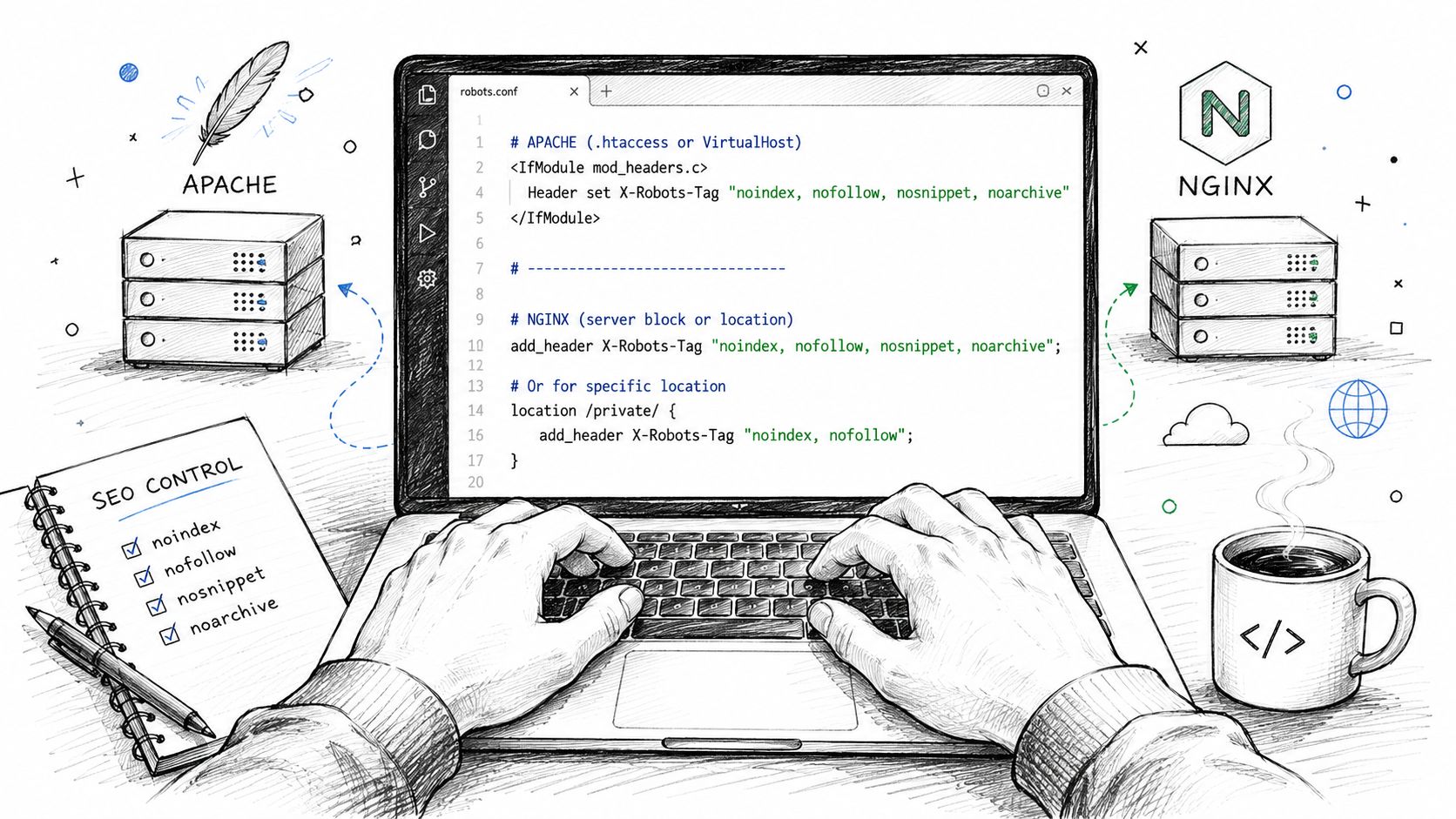
The examples below are the ones that solve real operational problems: all PDFs, a specific directory, and response-layer rules in CDN or storage environments.
Apache with .htaccess or httpd.conf
Apache is straightforward when mod_headers is available.
Noindex all PDFs
<FilesMatch "\.pdf$">
  Header set X-Robots-Tag "noindex, nofollow"
</FilesMatch>
Noindex everything in a directory
<Directory "/var/www/html/private-downloads">
  Header set X-Robots-Tag "noindex, nofollow"
</Directory>
Apply different rules to images
<FilesMatch "\.(jpg|jpeg|png|gif)$">
  Header set X-Robots-Tag "noindex"
</FilesMatch>
What works well in Apache is pattern-based control. What doesn't work well is scattering these rules without documentation. If a staging rule survives a deployment and starts matching production paths, you get invisible indexation problems fast.
Nginx in site config
Nginx handles this cleanly in server or location blocks.
Noindex all PDFs
location ~* \.pdf$ {
    add_header X-Robots-Tag "noindex, nofollow";
}
Noindex a specific folder
location /internal-search/ {
    add_header X-Robots-Tag "noindex, nofollow";
}
Suppress snippets on selected media files
location ~* \.(mp4|webm)$ {
    add_header X-Robots-Tag "nosnippet";
}
Keep one thing in mind. Nginx inheritance can trip teams up. A rule you thought applied only to one block may not behave the way you expect unless you test the exact URL response after reload.
Here's a walkthrough worth watching before pushing rules live:
Cloudflare with Transform Rules or Workers
Cloudflare is where “hidden header” problems show up often. The HTML is fine. The origin is fine. But a Worker or edge rule adds a header on the way out.
Worker example adding a noindex header
export default {
  async fetch(request, env, ctx) {
    const response = await fetch(request)
    const newResponse = new Response(response.body, response)
    newResponse.headers.set("X-Robots-Tag", "noindex, nofollow")
    return newResponse
  }
}
Pattern-based logic for PDFs only
export default {
  async fetch(request) {
    const response = await fetch(request)
    const newResponse = new Response(response.body, response)

if (new URL(request.url).pathname.endsWith(".pdf")) {
  newResponse.headers.set("X-Robots-Tag", "noindex, nofollow")
}

return newResponse

  }
}
What works: edge logic for bulk asset control.
What fails: forgetting that preview, staging, or experiment rules may still be active after launch.
AWS S3 with object metadata
If files are served directly from S3 or through a delivery layer that respects object metadata, you can attach the header at upload time or update it on existing objects.
Typical pattern:
- Choose the object set: PDFs, exports, gated assets, old docs.
- Assign metadata/header behavior:
X-Robots-Tag: noindex - Verify the served response: don't assume the storage layer and delivery layer match.
This method is useful for document libraries where the site code never touches the file response. It's less useful if another layer rewrites headers later.
Implementation rules that prevent rework
- Target by pattern, not by file one at a time: Server rules scale better.
- Keep a header inventory: Apache, Nginx, Cloudflare, app middleware, storage, and plugins should all be listed.
- Test the live response: A config that looks correct in version control still needs a real header check.
- Separate staging from production rules: Don't let environment logic drift.
Advanced Use Cases and Strategic SEO Scenarios
The X-Robots-Tag becomes valuable when the problem isn't “how do I add noindex,” but “where exactly should noindex live so the right assets disappear and the right ones stay visible.”
Scenario one, the indexed staging site
A team launches a redesign on a temporary host, then forgets that the environment is still crawlable. HTML fixes help if every page is templated correctly. But infrastructure-level X-Robots-Tag: noindex is cleaner because it can apply across the whole environment, including utility paths and non-HTML files.
That matters on preview platforms and duplicate-host setups. A host-level rule is harder to miss than a template-level rule.
Scenario two, faceted navigation and parameter sprawl
Filters can create massive URL variation. Not every filtered state deserves indexing. Instead of trying to hard-code page logic for every possible variant, teams often apply targeted noindex controls to filtered sections or internal search paths while preserving crawl access where needed.
For paginated category structures, don't confuse pagination with junk URLs. Such confusion often leads to sites over-blocking. If you're reviewing how pagination should be handled before layering on noindex logic, this resource on pagination in SEO is a useful companion.
Don't use the X-Robots-Tag as a blunt instrument. The goal is controlled indexation, not wiping out whole sections because filters are messy.
Scenario three, leaked internal PDFs
This one shows up constantly on enterprise sites. Sales PDFs, outdated product docs, internal onboarding decks, and archived collateral all end up indexable because nobody considered them part of SEO governance.
The X-Robots-Tag is the precise fix because those files don't have HTML head markup. You can apply header rules by extension or directory and stop treating document libraries like they're outside search strategy.
Common strategic mistakes
- Blocking CSS or JavaScript unintentionally: Don't let broad patterns catch assets that rendering depends on.
- Using
nofollowreflexively: Use it only when you want to restrict link following behavior. - Leaving expiring content live forever:
unavailable_afteris useful when a page has a real end date. - Mixing canonical and noindex carelessly: These signals need a clear purpose, not guesswork.
How to Debug and Verify Your X-Robots-Tag Setup
Most guides often prove inadequate here. The hard part usually isn't writing the rule. It's finding the layer that's already writing one you didn't know existed.
Over 30% of noindex detected in X-Robots-Tag errors reported in Google Search Console are resolved by inspecting infrastructure layers like Cloudflare Workers or server-side plugins rather than changing page code, according to this discussion of hidden X-Robots-Tag issues.
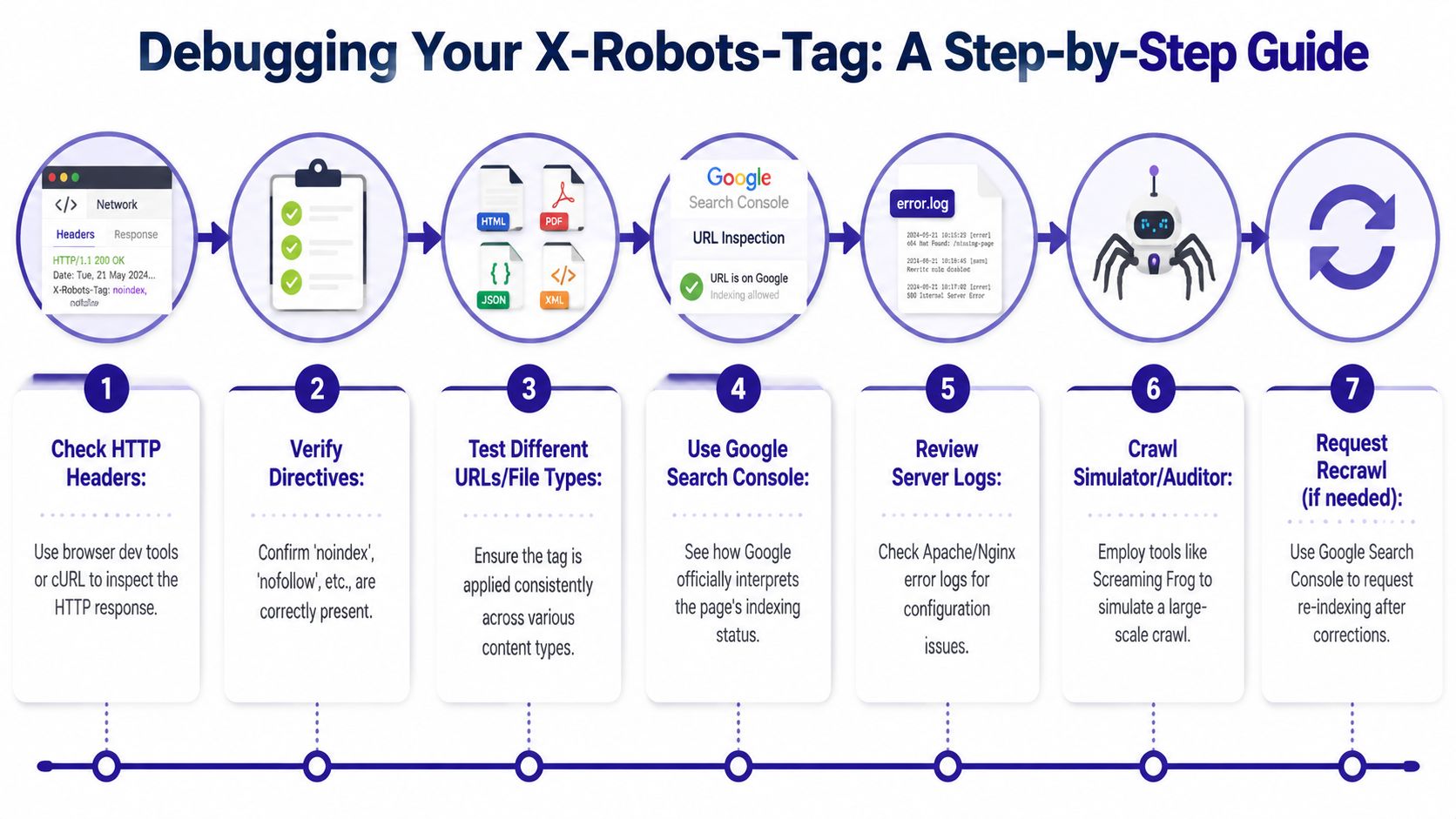
Start with the response header, not the HTML
Open browser DevTools and inspect the Network response headers for the exact URL. Don't rely on page source. The header may never appear there.
Then move to curl because you need a clean, repeatable check.
Basic header check
curl -I https://example.com/file.pdf
Simulate Googlebot
curl -I -A "Googlebot" https://example.com/page/
Bypass cache where possible
curl -I -A "Googlebot" -H "Cache-Control: no-cache" https://example.com/page/
If the header appears in curl but not in your template logic, you're looking at a server, CDN, middleware, or plugin issue.
Hunt hidden headers in infrastructure layers
Check these in order:
Origin server config
Apache.htaccess,httpd.conf, Nginx site configs, app middleware.CDN and edge layers
Cloudflare Workers, Transform Rules, response header rules, host-based logic.Platform-level behavior
Preview deployments, staging hosts, temporary environments.SEO and security plugins
Some plugins inject headers dynamically and won't leave an obvious footprint in HTML.Storage and file delivery layers
Document repositories, object metadata, proxy services.
Troubleshooting rule: If Google says there's an X-Robots-Tag and you can't find it in source, trust the header report first and expand the search outward from the origin.
Confirm what Google is seeing
Use URL Inspection in Search Console to validate whether Google is reporting the URL as blocked by X-Robots-Tag. If you're untangling related crawl-control problems, this guide on fixing the submitted URL blocked by robots.txt error in GSC helps separate robots.txt issues from header-level issues.
For sitewide checks, use a crawler that captures response headers. Screaming Frog is a good example because it can surface the X-Robots-Tag column at scale. That's how you catch pattern-based mistakes that only affect a directory, file type, or environment.
A fast diagnostic workflow
- Check one affected URL in DevTools
- Repeat with
curl -I - Repeat with Googlebot user-agent
- Bypass cache
- Compare origin vs CDN behavior
- Review plugins, workers, and transforms
- Retest after every change
- Request recrawl if needed
An Implementation and Audit Checklist
Use this as the short version when you're deploying or auditing the X-Robots-Tag.
Planning
- Choose the correct layer: Use meta robots for HTML page-level controls. Use X-Robots-Tag for non-HTML assets, bulk rules, and infrastructure-level logic.
- Define the directive clearly: Decide whether the resource needs
noindex,nofollow,nosnippet,noarchive, or a combination. - Map scope before touching config: File type, directory, host, environment, or individual route.
Implementation
- Write rules where they belong: Apache, Nginx, CDN, application middleware, or storage metadata.
- Target patterns carefully: Match only the files or paths you intend to control.
- Avoid conflicting signals: Don't leave indexable HTML directives in place when a stricter header is meant to win.
- Document every header source: Origin, CDN, platform, plugin, and storage layer.
Verification
- Inspect the live response header: Use DevTools and
curl -I. - Test with Googlebot user-agent: Especially when the issue appears only in Search Console.
- Check multiple URLs: One HTML page, one PDF, one image, one affected directory path.
- Crawl at scale: Use a header-aware crawler to spot pattern errors.
- Recheck after cache clears and deploys: Hidden headers often persist because a previous layer still serves them.
The X-Robots-Tag is simple in theory. In production, it's a coordination tool across servers, CDNs, platforms, and SEO workflows. Teams that treat it that way avoid the worst indexing surprises.
If you manage technical SEO across multiple sites, Nuwtonic helps you find issues like hidden indexing directives faster, connect them to real search impact, and turn audits into reviewable fixes. It's built for teams that need one workspace for technical SEO, content operations, and AI search visibility without losing control over what gets changed.