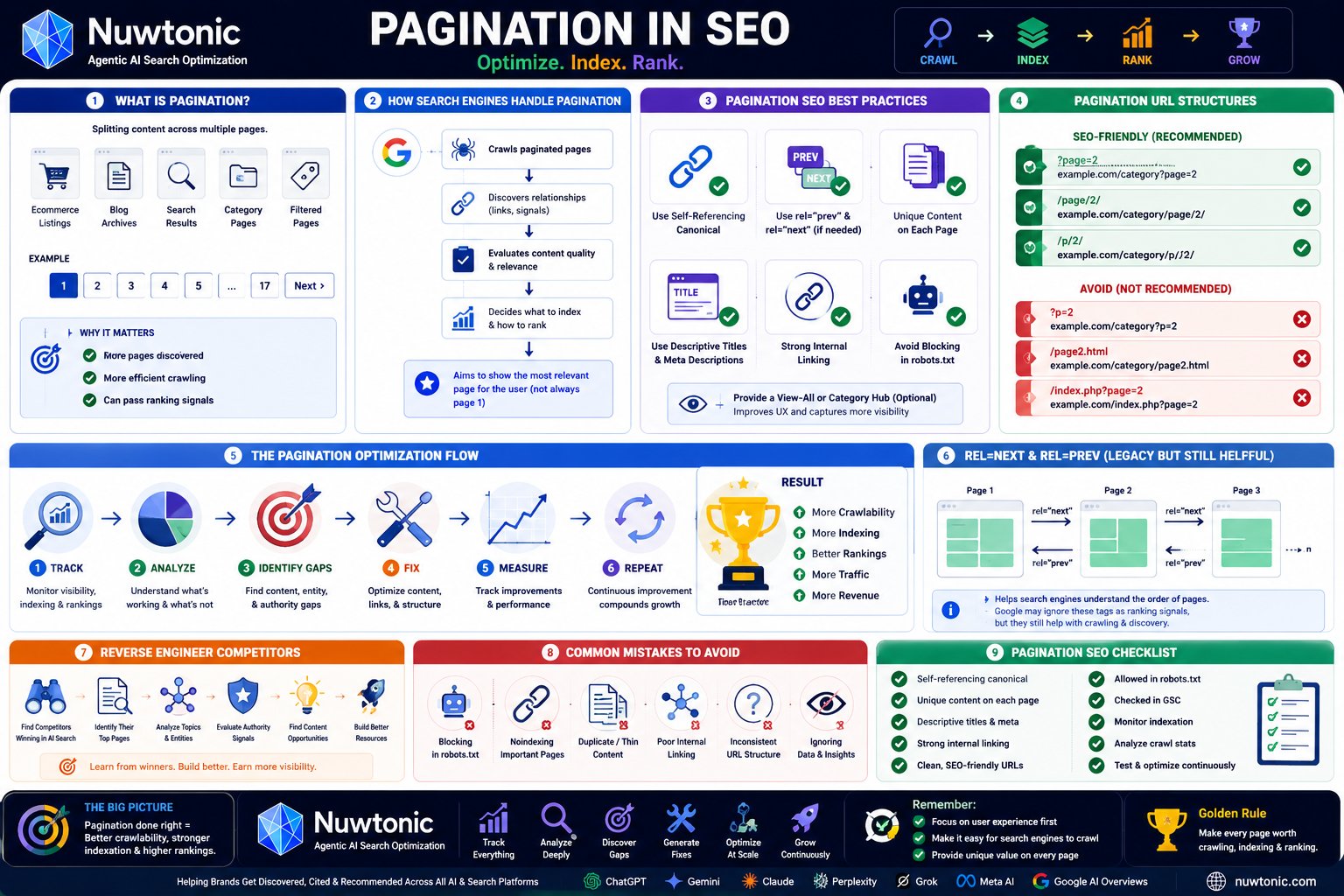
The worst pagination advice in SEO is still the most common: remove it, noindex it, or canonical everything to page 1. That advice treats pagination as a defect. On most real sites, it's not a defect. It's infrastructure.
A category archive, article index, resource hub, marketplace listing, or forum thread needs a way to expose large sets of URLs. The SEO question isn't whether pagination exists. The question is whether the implementation helps crawlers discover inventory efficiently, preserves ranking pathways to deeper content, and keeps users moving without friction.
That's why I don't treat pagination in SEO as a cleanup task. I treat it as an architectural decision. A bad setup creates crawl waste, duplicate-like pages, and weak internal linking. A strong setup turns long content sets into organized, crawlable pathways that support both visibility and UX.
Table of Contents
- Rethinking Pagination SEO Beyond 'Just Fix It'
- Why Unmanaged Pagination Is a Critical SEO Concern
- Comparing Pagination Implementation Methods
- Actionable SEO Best Practices for Pagination
- Pagination in Practice for E-commerce and Content Sites
- A Step-by-Step Pagination Audit and Remediation Workflow
- Conclusion Turning Pagination from a Problem to a Strategic Asset
Rethinking Pagination SEO Beyond 'Just Fix It'
The blanket claim that pagination is always bad for SEO doesn't hold up in practice. A well-documented case study found that an e-commerce site with over 67% of its indexed URLs classified as paginated pages saw no automatic ranking collapse, which is a useful reminder that Google can handle a large pagination footprint when crawl demand and architecture are sound, as shown in this pagination indexing case study.
That single point changes the conversation. If a site can sustain visibility with most indexed URLs sitting inside paginated sequences, then pagination itself isn't the enemy. Poor implementation is.
The outdated mindset usually creates two bad outcomes. First, teams overreact and deindex useful listing pages that help users and crawlers reach deeper inventory. Second, developers inherit vague SEO requirements like “make pagination invisible to Google,” which often leads to broken canonicals, weak internal links, or JavaScript-heavy interfaces that hide content pathways.
The strategic question to ask instead
A better question is this: which paginated pages should be indexable, how should they canonicalize, and how should the sequence support discovery of deeper URLs?
That framing is operational. It forces decisions on template logic, internal linking, metadata, and parameter control. It also aligns SEO with business goals. A retailer might want deeper category pages indexable because page 4 contains products not linked elsewhere with enough prominence. A publisher might prefer stronger archive consolidation if older pages add navigation value but little standalone ranking value.
Practical rule: Don't start a pagination project by asking how to eliminate pagination. Start by asking what role each paginated sequence plays in discovery, indexing, and conversion.
What modern pagination work looks like
Strong pagination work usually includes:
- Clear URL patterns:
/category/page/2or?page=2can both work if they're stable and crawlable. - Intentional canonical logic: each page either stands alone with a self-reference or consolidates intentionally to a View All or base page.
- Crawlable navigation: next and previous states need real links, not decorative controls.
- Controlled sprawl: filter and sort combinations can't be allowed to multiply low-value URLs unchecked.
Treat pagination as a controlled system, not an SEO liability. That's where the gains come from.
Why Unmanaged Pagination Is a Critical SEO Concern
Pagination doesn't usually fail in one dramatic way. It leaks value through hundreds or thousands of small decisions. When those decisions stack up, the site becomes harder to crawl, harder to index cleanly, and harder to use.
From a crawl-efficiency standpoint, pagination requires deliberate decisions about whether to index numbered pages or consolidate a series into a base or View All page, because that choice affects index bloat and crawl budget, as outlined in Amsive's pagination implementation guidance.
Where the damage actually happens
Think of Googlebot like a librarian with a limited reading list for the day. If your site gives that librarian one clean shelf of category pages, product pages, and article hubs, the librarian gets through the important material. If your site generates endless page combinations, duplicate-like paginated sets, and weakly differentiated list pages, the librarian spends time on paperwork instead of the books that matter.
That's crawl budget in practical terms. It's not a mystical penalty. It's an allocation problem.
A messy pagination setup also confuses indexing signals. When page 2, page 3, and page 4 all look nearly identical to page 1, and the site adds sort or filter variants on top, crawlers have to decide which URLs deserve attention. They don't always choose the version you want.
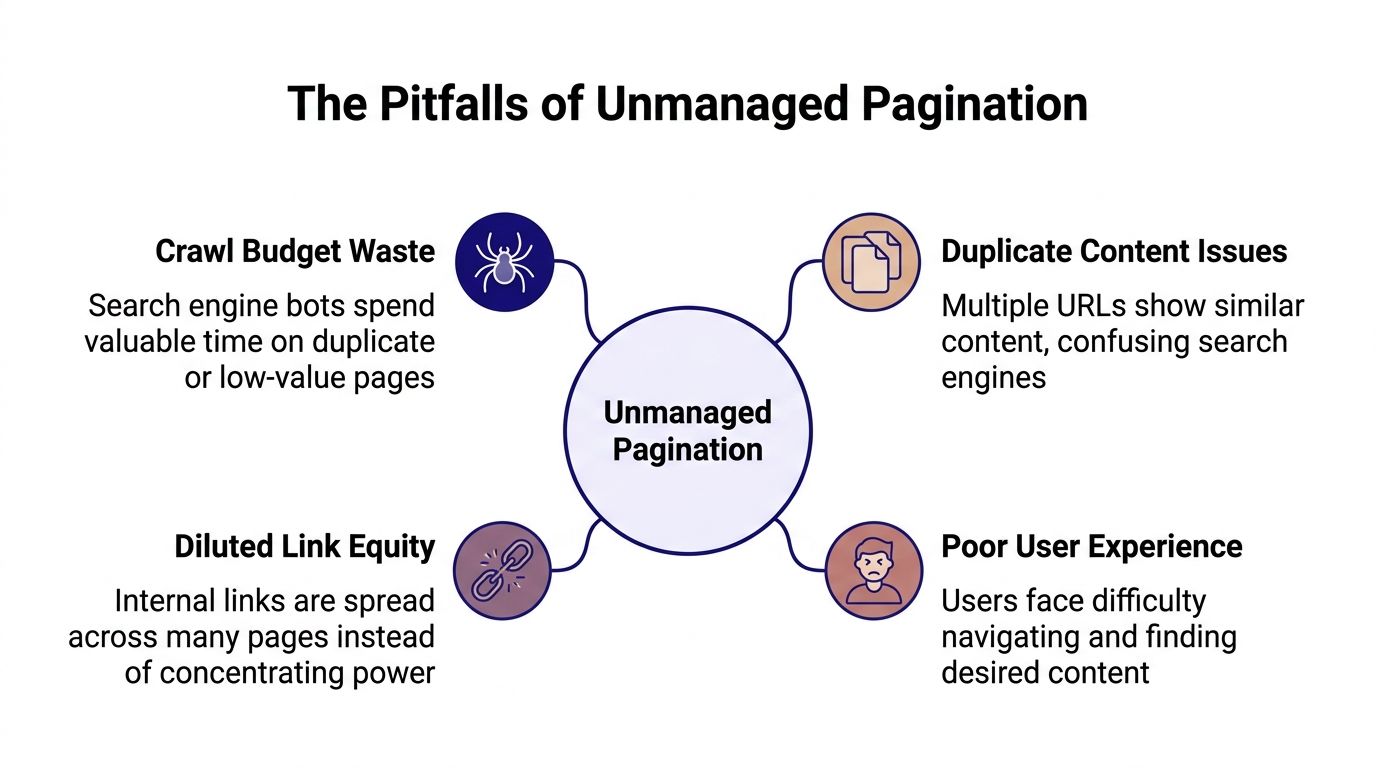
The four business risks
| Risk | What it looks like | Why it matters |
|---|---|---|
| Crawl budget waste | Bots repeatedly hit low-value paginated or parameterized URLs | Important product or content URLs may get crawled less efficiently |
| Index bloat | Too many near-duplicate list pages enter the index | Search results quality weakens and reporting becomes noisy |
| Diluted link equity | Internal links spread across too many low-priority URLs | Important category and item pages receive less concentrated authority |
| Poor UX | Users click deep into long sequences with weak navigation context | Engagement and discovery suffer, especially on mobile |
Unmanaged pagination rarely kills rankings overnight. It slowly diverts crawl attention and internal authority away from the URLs that deserve it.
The UX side is often underestimated. A pagination sequence can be technically valid and still perform badly for users. If visitors have to click through long archives, interact with thin pages, or move through repetitive URL states, those pages stop helping anyone.
Use this quick diagnostic list when reviewing a site:
- Too many low-value URLs: Are filters and sorts multiplying paginated pages into large parameter sets?
- Weak sequence logic: Can users and crawlers move through pages with standard links?
- Redundant indexation: Are pages being indexed that add little beyond item shuffling?
- Buried commercial pages: Are key products or evergreen posts only reachable deep in a weak sequence?
When pagination is unmanaged, SEO teams usually feel the symptoms before they identify the cause. Rankings become inconsistent. Crawl patterns look noisy. Discovery of deep URLs slows down. The root issue is often architecture, not content quality.
Comparing Pagination Implementation Methods
Most pagination debates go wrong because teams compare UX patterns without comparing crawler behavior. SEO doesn't care whether the interface looks modern. SEO cares whether the system exposes content through stable, crawlable URLs and clear canonical signals.
At the technical level, each paginated page should use a unique, stable URL and a self-referencing canonical so search engines treat it as an independent indexable entity rather than a duplicate of page 1, as explained in this technical pagination best-practices guide. If you're auditing canonical behavior at scale, a canonical URL checker is useful for spotting sequences that incorrectly point multiple pages back to the first URL.
Traditional numbered pagination
This is still the most reliable baseline for pagination in SEO. Each page has a distinct URL. The sequence is obvious. Internal links can be rendered as plain HTML anchors. Crawlers don't need to guess where the next set of listings lives.
Best use cases include:
- E-commerce category pages
- Blog archives
- Forums and directories
- Large resource libraries
Its weakness isn't the format. Its weakness is lazy implementation. If page titles repeat, canonicals collapse to page 1, and navigation relies on scripts instead of links, the advantages disappear.
Canonicalizing to page 1
This is one of the most common mistakes on large sites. It sounds tidy. In reality, it often tells crawlers that pages 2 and beyond aren't worth independent consideration.
Use this only when the business intent is true consolidation. If a View All page exists and performs well, or if deeper pages carry little standalone value, consolidation can make sense. If deeper pages contain unique products, articles, or meaningful discovery paths, canonicalizing them all to page 1 usually shuts off useful ranking and crawling opportunities.
Field note: If page 2 contains items users can't reach efficiently from page 1, don't canonical page 2 away and expect search engines to preserve that discovery path.
View All pages
A View All page can be excellent when the full set is manageable and the page remains usable. It centralizes ranking signals and reduces the need to index many near-duplicate pagination URLs. It also simplifies reporting because one canonical page carries the primary authority.
Use it when:
- the item set is reasonably contained
- performance remains acceptable
- users benefit from seeing everything in one place
Avoid it when the page becomes unwieldy, heavy, or difficult to use. A View All page that degrades load behavior or buries product interaction can solve one problem and create another.
Infinite scroll and Load more
These patterns can improve UX. They can also break crawlability when implemented carelessly.
The rule is simple. If content loads dynamically, the underlying content still needs discoverable URL states and crawlable links. A smooth front-end interaction does not remove the need for a crawlable back-end structure.
Here's a practical comparison:
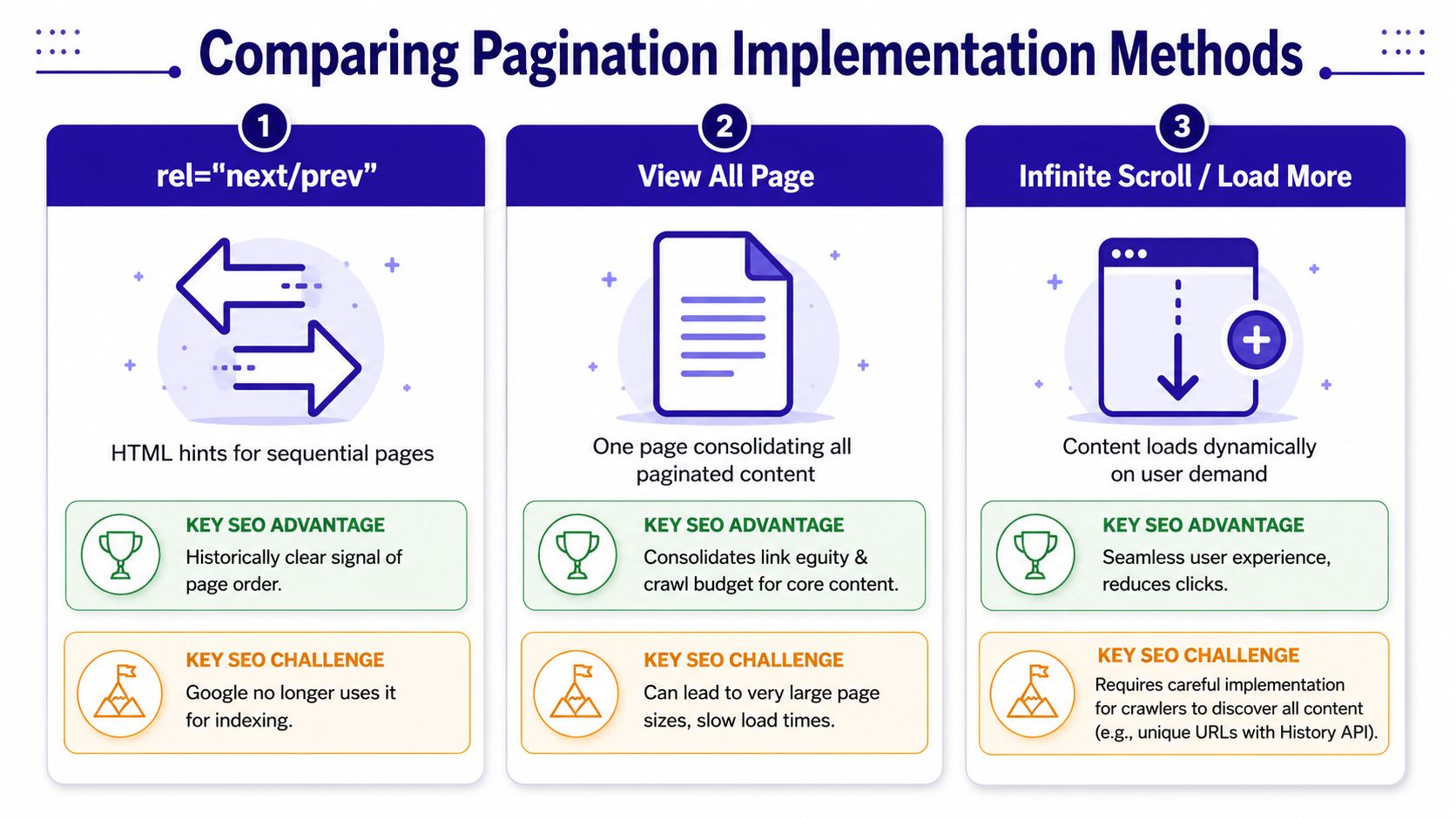
| Method | Good for users | Good for crawlers | Main risk |
|---|---|---|---|
| Numbered pagination | Yes | Yes | Often implemented with weak canonicals or thin metadata |
| View All | Sometimes | Yes, when used intentionally | Large page size and poor performance |
| Infinite scroll / Load more | Often | Only when paired with crawlable URLs | Hidden content and missing link paths |
Parameter-heavy pagination
Many enterprise sites often find themselves losing control. The core pagination may be fine, but layered sorting and filtering create URL variants that multiply the crawl surface. A simple /category?page=2 becomes a web of combinations that differ only slightly.
When that happens, the technical issue isn't “pagination” in isolation. It's pagination plus uncontrolled parameters.
Watch for these patterns:
- Sort variants indexed alongside the base sequence
- Filter combinations attached to every page number
- Duplicate title tags across parameterized pages
- Canonical conflicts between filtered and paginated states
The right method depends on the inventory, content depth, and user behavior of the section. But the wrong method is predictable every time: a setup that hides content from crawlers, spreads authority across junk URLs, or collapses useful pages into page 1 by default.
Actionable SEO Best Practices for Pagination
There are a few rules in pagination that aren't optional anymore. Ignore them and the rest of the implementation becomes cleanup work.
Google's pagination guidance for ecommerce states that search treats paginated URLs such as ?page=2 or /page/2 as separate pages and expects each page to use its own self-referencing canonical rather than canonicalizing all pages back to the first URL, as documented in Google's pagination and incremental page loading documentation.
The non-negotiable implementation rules
Start with the template.
Give every paginated page a unique URL
The URL must change for each state in the sequence. Hash fragments don't create a reliable pagination system for search.Use self-referencing canonicals on indexable paginated pages
If page 3 is meant to exist as an indexable page, its canonical should point to page 3.Render crawlable next and previous links with real
<a>elements
Buttons without crawlable href attributes aren't a substitute. If a crawler can't follow the sequence, discovery weakens fast.Write distinct metadata for page 2 and beyond
Add page numbering to titles and descriptions. This helps avoid duplicate metadata and clarifies the role of the URL.
What teams should standardize in templates
The easiest pagination wins come from template logic, not one-off page edits.
- Canonical template rule: If the page is indexable, self-reference it.
- Title template rule: Append the page number to the listing title.
- Navigation rule: Output previous and next links in plain HTML.
- Parameter rule: Prevent filtered and sorted variants from generating uncontrolled indexable states.
- Empty-state rule: If a paginated URL has no listings, don't let it remain a valid, indexable shell.
Healthy pagination is usually boring. Stable URLs, predictable canonicals, clean links, and differentiated metadata do most of the work.
Teams also need to separate crawlability from indexation. Not every variant deserves indexing, but the main sequence should still support discovery of the items it contains. That distinction matters on commerce sites with filters and on publishers with archives, tags, and search-result pages.
One more operational point: document pagination rules in QA checklists. Most pagination regressions happen after redesigns, JS rewrites, or CMS template changes. If canonical and link logic aren't part of release validation, they break without detection.
Pagination in Practice for E-commerce and Content Sites
Pagination decisions get easier when you look at the site type first. A category listing and an editorial archive may both use page numbers, but they don't serve the same purpose.

E-commerce category pagination
On e-commerce sites, pagination often carries real commercial weight. Deeper pages may expose products that aren't strongly linked from page 1, especially in broad categories with large catalogs. That means category pagination is partly an internal linking problem, not just a UI pattern.
The complexity increases when faceted navigation enters the picture. A clean category sequence can turn chaotic when every filter and sort option creates another paginated branch. That's why category audits should review pagination and faceted states together, not separately. A strong e-commerce SEO audit workflow should check whether the base category path is protected while parameter sprawl stays controlled.
A workable e-commerce model usually looks like this:
- Base category sequence stays crawlable
- Main paginated pages use self-canonicals if they deserve indexing
- Filter and sort variants are constrained
- Titles and on-page copy help distinguish deeper pages
- Product discovery doesn't rely only on client-side interactions
Content archives and blog pagination
On content sites, pagination has a different job. It helps crawlers and users reach older articles that still matter. That's especially important on blogs with evergreen posts buried in archives.
The mistake here is assuming archive pages are always low value. Sometimes they are. But sometimes they're the only consistent crawl path to older URLs that still attract search demand, links, or conversions. If those archive sequences become weak, older content gets buried.
A sensible content-site approach often includes:
| Site type | Pagination priority | Main concern |
|---|---|---|
| E-commerce category | Product discovery and index control | Filters and sort parameters |
| Blog archive | Reach older articles and preserve crawl paths | Thin archive pages and poor metadata |
| News or publisher archive | Organize recency and topical clusters | Fast-changing listings and shallow differentiation |
A paginated blog archive doesn't need to rank for broad head terms to be useful. It does need to remain a dependable crawl path to deeper content.
For content teams, the practical work is editorial as much as technical. Archive templates need usable intro copy, sensible metadata rules, and clean linking. Otherwise the pages become repetitive wrappers around article cards, which weakens both UX and index quality.
A Step-by-Step Pagination Audit and Remediation Workflow
A pagination audit should end with fixes, not screenshots and theory. The workflow below is the one I'd give a technical SEO team, a developer, and a content lead if the goal is to clean up pagination systematically.
Pagination can create thin and duplicate-like patterns when pages beyond the first have little unique text and mainly shift lists of products or articles, which is why pagination shouldn't be used on thin pages, as noted in this pagination quality guide. For page-level template checks beyond pagination alone, an on-page SEO audit tool helps validate metadata, canonicals, and structural elements at scale.

Step 1 through Step 3 find the real pagination footprint
Step 1. Export paginated URLs from Google Search Console
Pull URL patterns that include /page/, ?page=, and known archive structures. You're looking for what's indexed, what's excluded, and which sections generate the most paginated states. This tells you whether the footprint is contained or sprawling.
Step 2. Crawl the site by pattern
Use Screaming Frog or a similar crawler to isolate paginated URLs. Check status codes, canonical targets, title tags, meta robots directives, and internal inlinks. Most pagination problems reveal themselves here: canonicals pointing to page 1, orphaned deep pages, missing prev/next anchors, and parameter explosions.
Step 3. Map sequence logic manually on live templates
Open representative page types in a browser. Test desktop and mobile. Click through category pages, archive pages, filter combinations, and JS-driven listing states. Verify whether the visible UX matches the crawlable HTML implementation.
Step 4 through Step 6 fix templates and validate outcomes
Step 4. Classify each pagination set by intent
Not every sequence should be treated the same. Separate them into buckets:
- Indexable sequence: category pages or archives that deserve independent indexing
- Consolidated sequence: sets that should canonicalize to a View All or base page
- Crawlable but deprioritized variants: parameterized states useful for users but not for search visibility
This classification prevents blanket rules that create new problems.
Step 5. Push template-level remediations
Fix the templates, not individual URLs.
A solid remediation list usually includes:
- Canonical correction: replace page-1 canonicals on deeper URLs with self-references where needed
- Metadata differentiation: append page numbers and section names automatically
- Link markup repair: ensure next, previous, and page-number links render as crawlable anchors
- Parameter containment: stop sort and filter combinations from generating uncontrolled indexable pagination paths
- Thin-page improvement: add enough useful context on archive and listing templates so deeper pages aren't bare wrappers
Don't audit pagination one URL at a time if the issue is in the template. Fix the rule once and validate the pattern.
Step 6. Re-crawl and monitor post-fix behavior
Run the same crawl after deployment. Compare canonical targets, inlink counts, indexability, and metadata uniqueness. Then monitor Search Console for how paginated sets are being crawled and indexed after the change.
A clean pagination workflow also needs ownership:
| Team | Responsibility |
|---|---|
| SEO lead | Defines which sequences should index, consolidate, or stay controlled |
| Developer | Implements URL, link, canonical, and template rules |
| Content team | Improves archive copy, title logic, and page-level differentiation |
| QA | Validates release changes across desktop, mobile, and parameter states |
The highest-impact pagination fixes are usually small. A canonical rule. A link-rendering change. A metadata template. The impact comes from applying them across every sequence consistently.
Conclusion Turning Pagination from a Problem to a Strategic Asset
Pagination isn't something serious sites can easily avoid. Large catalogs, archives, and content hubs need structured paths through long sets of URLs. The primary task is deciding which sequences should rank, which should consolidate, and which should stay available for navigation without bloating the index.
That's why strong pagination in SEO is less about suppression and more about control. Stable URLs, self-referencing canonicals where appropriate, crawlable links, parameter discipline, and regular audits turn pagination into a useful discovery layer instead of a source of crawl waste.
Teams that handle pagination well usually get two benefits at once. Users can move through listings without friction, and search engines can understand how those listings are organized. That combination is what makes pagination valuable.
Treat pagination as part of your site architecture. Audit it like infrastructure. Fix it at the template level. When you do that, pagination stops being an SEO liability and starts acting like a strategic asset.
If you want a faster way to surface pagination issues, prioritize fixes using Google Search Console data, and push reviewable SEO updates without juggling separate tools, Nuwtonic gives teams one workspace for technical SEO, content operations, and AI search visibility.