TL;DR Summary
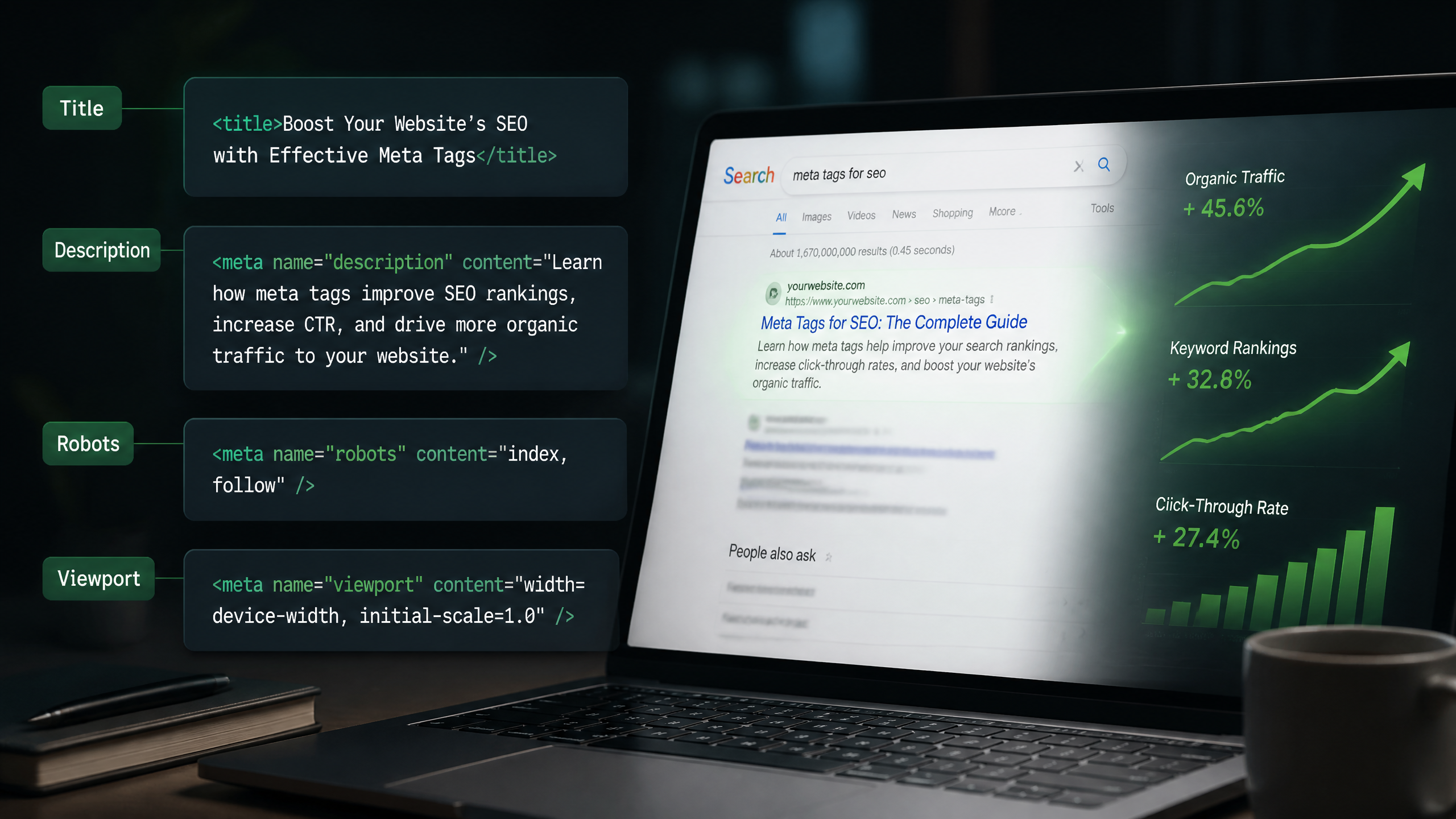
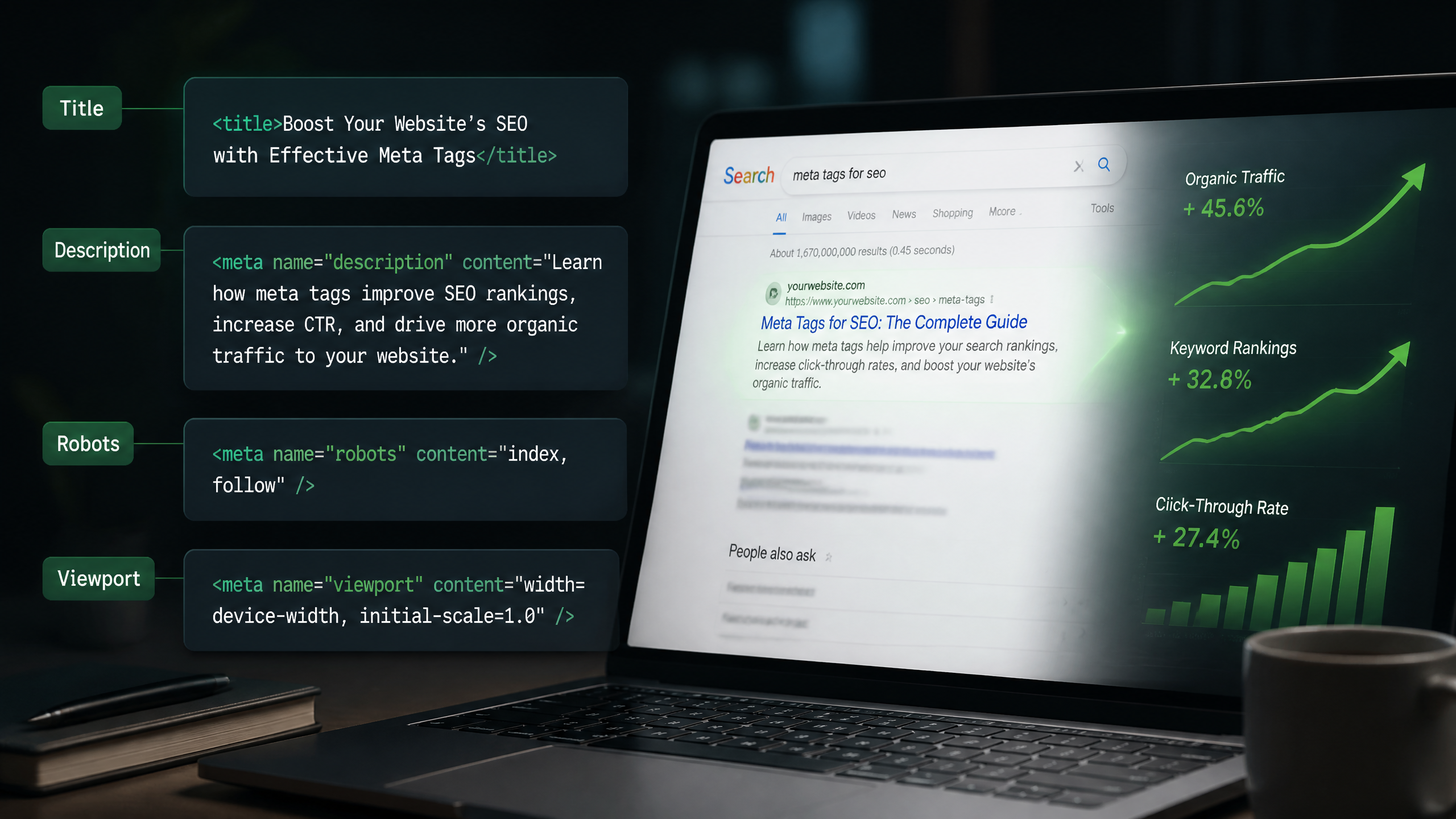
Not all meta tags are created equal. In 2026, some tags dictate whether your site gets crawled and indexed at all, while others act as "organic ad text" to win clicks. This guide breaks down exactly how to use meta tags for SEO—separating the high-impact signals from the dead weight, explaining how to control Google's title rewrites, and outlining advanced tactics for AI crawlers, e-commerce, and international scale.
Key Takeaways
• Title tags remain a high-impact direct ranking factor, while meta descriptions act as critical indirect drivers by influencing organic CTR.
• Google frequently rewrites titles that are too long, too short, or stuffed with keywords; keeping titles within 55–60 characters (or 600 pixels) is your best defense.
• Meta robots directives (like noindex, nofollow, and nosnippet) are critical for controlling site crawl equity and indexing behavior.
• AI search crawlers (like OpenAI and Anthropic) can be managed using specific user-agents in your metadata and robots.txt to protect your content while optimizing for citations.
• Canonical tags are non-negotiable for consolidating duplicate content and protecting your site's ranking power.
Table of Contents
Which Meta Tags Still Matter in 2026 (and Which Are Dead)
Meta Tags vs. Ranking Factors: What Actually Influences Rankings
How Google Rewrites Meta Titles and Descriptions
Meta Tag Optimization by Search Intent
CTR Engineering Using Meta Tags
Meta Robots Directives Explained Completely
Canonical Tag Mistakes That Kill SEO
Meta Tags for AI Search & LLM Crawlers
Meta Tags for International SEO
Large-Scale Meta Tag Automation
Meta Tag Audit Framework & CMS Implementation
Advanced Meta Tag Myths & Testing Methodology
Frequently Asked Questions (FAQ)
Sources and References
Which Meta Tags Still Matter in 2026 (and Which Are Dead)
The Core Tags Google Actively Uses
Alright, let's break this down. Too many SEO guides make meta tags sound like rocket science; the basics are pretty straightforward if you know what to look for. In the modern search ecosystem, Google relies on a tight, highly specific set of meta tags to understand, render, and display your pages in the SERP.
According to Google's official documentation on special tags, the search engine actively supports tags that control indexing, directory display, and document presentation. The absolute essentials include the title tag (technically an HTML element but grouped here for simplicity), the meta description, the meta robots tag, the canonical link element, and the viewport tag for mobile rendering. If your site lacks these, you are essentially flying blind in search results.
The Bing Differences and Niche Tags
While Google dominates the conversation, Bing still commands a notable chunk of search volume, especially across corporate environments. Bing generally respects the same core metadata as Google, but it places a slightly heavier emphasis on clean, structured page-level tags. Additionally, tags like hreflang for multilingual targeting and charset for character encoding remain critical.
In fact, a developer discussion on Stack Overflow's developer consensus highlights that proper document declaration (like the charset="utf-8" meta tag) is vital for ensuring browsers and search crawlers render your page's text accurately, preventing bizarre encoding glitches that can ruin your user experience and readability.
Deprecated and Completely Dead Tags
Let’s address the elephant in the room: meta keywords. I still see people spending hours meticulously crafting comma-separated lists of keywords in their page headers. Let me make this clear—meta keywords are completely dead and have been for over a decade.
According to research from WordStream's analysis of meta tags, meta keywords are officially deprecated by almost every major search engine and offer zero ranking benefit. Using them in 2026 is worse than a waste of time; it actually hands your competitors a neat, organized list of the exact terms you are targeting on a silver platter. Keep them out of your HTML.
Meta Tags vs. Ranking Factors: What Actually Influences Rankings
Direct Ranking Signals vs. Indirect Drivers
Here's the deal: most users confuse basic meta tags with direct ranking signals. They assume that writing a great meta description will magically push their page to position one. It won't.
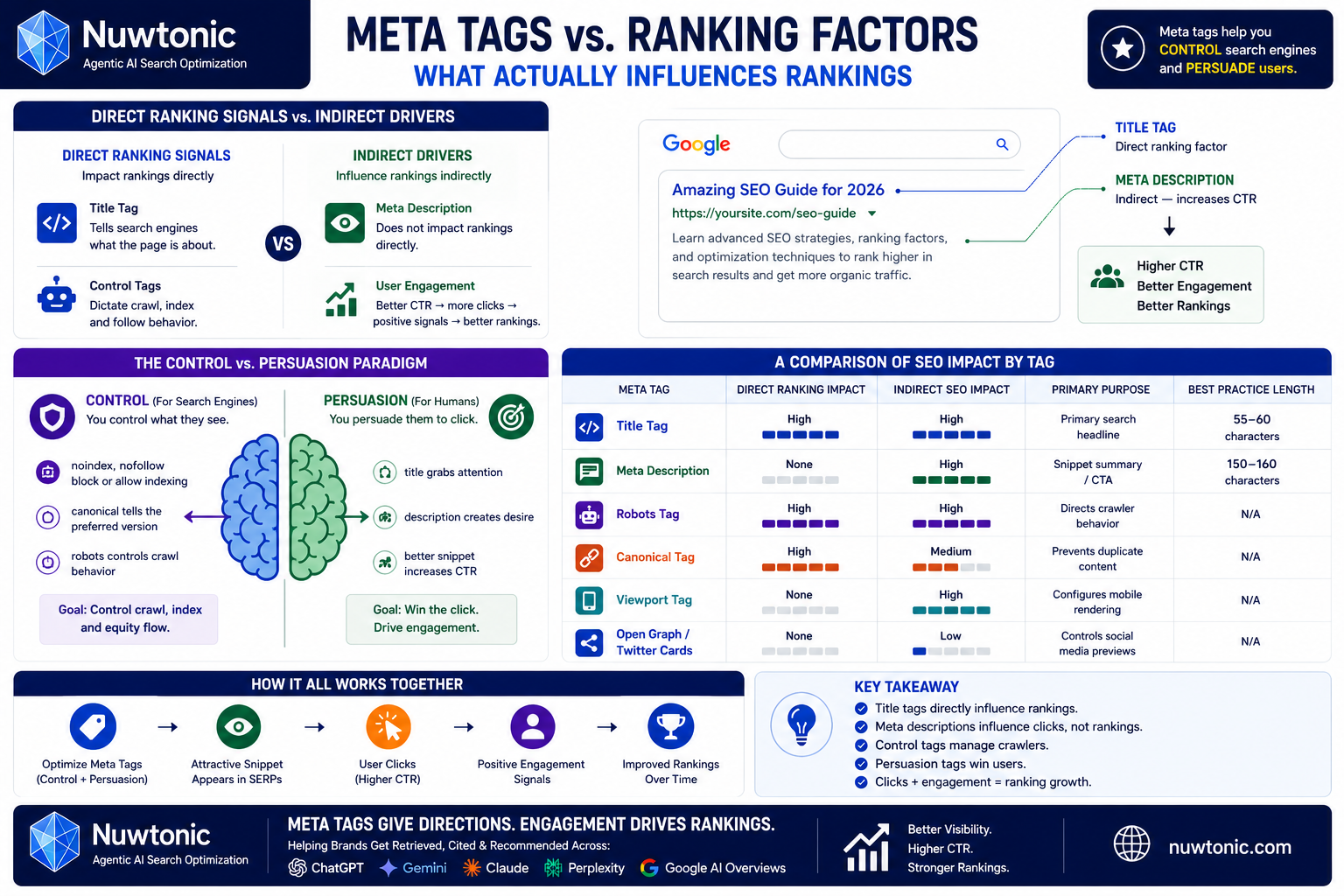
Your title tag is a heavy-hitting, direct ranking factor because it tells search engines exactly what the page is about. The meta description, on the other hand, does not directly influence rankings. Instead, it acts as "organic ad text," driving user clicks. If your description is compelling, your click-through rate (CTR) goes up, sending positive user-engagement signals back to the algorithm.
The Control vs. Persuasion Paradigm
When figuring out how to use meta tags for SEO, you must divide your efforts into two buckets: control and persuasion.
• Control tags (like noindex, nofollow, and canonicals) dictate crawl behavior. They tell search engines what they are allowed to see, index, and follow.
• Persuasion tags (like titles and descriptions) are written for human eyes. They exist to win the click once your page actually appears in front of a searcher.
A Comparison of SEO Impact by Tag
To make this concrete, let's look at how the primary meta tags stack up against each other in terms of search engine influence:
Meta Tag | Direct Ranking Impact | Indirect SEO Impact | Primary Purpose | Best Practice Length |
|---|---|---|---|---|
Title Tag | High | High (CTR, Relevance) | Primary search headline | 55–60 characters |
Meta Description | None | High (CTR, UX) | Snippet summary / CTA | 150–160 characters |
Robots Tag | High (Indexing) | High (Crawl Equity) | Directs crawler behavior | N/A |
Canonical Tag | High (Consolidation) | Medium (Link Equity) | Prevents duplicate content | N/A |
Viewport Tag | None | High (Mobile Usability) | Configures mobile rendering | N/A |
Open Graph / Twitter | None | Low (Social Shares) | Controls social media previews | N/A |
How Google Rewrites Meta Titles and Descriptions
Triggers and Pixel Width Thresholds
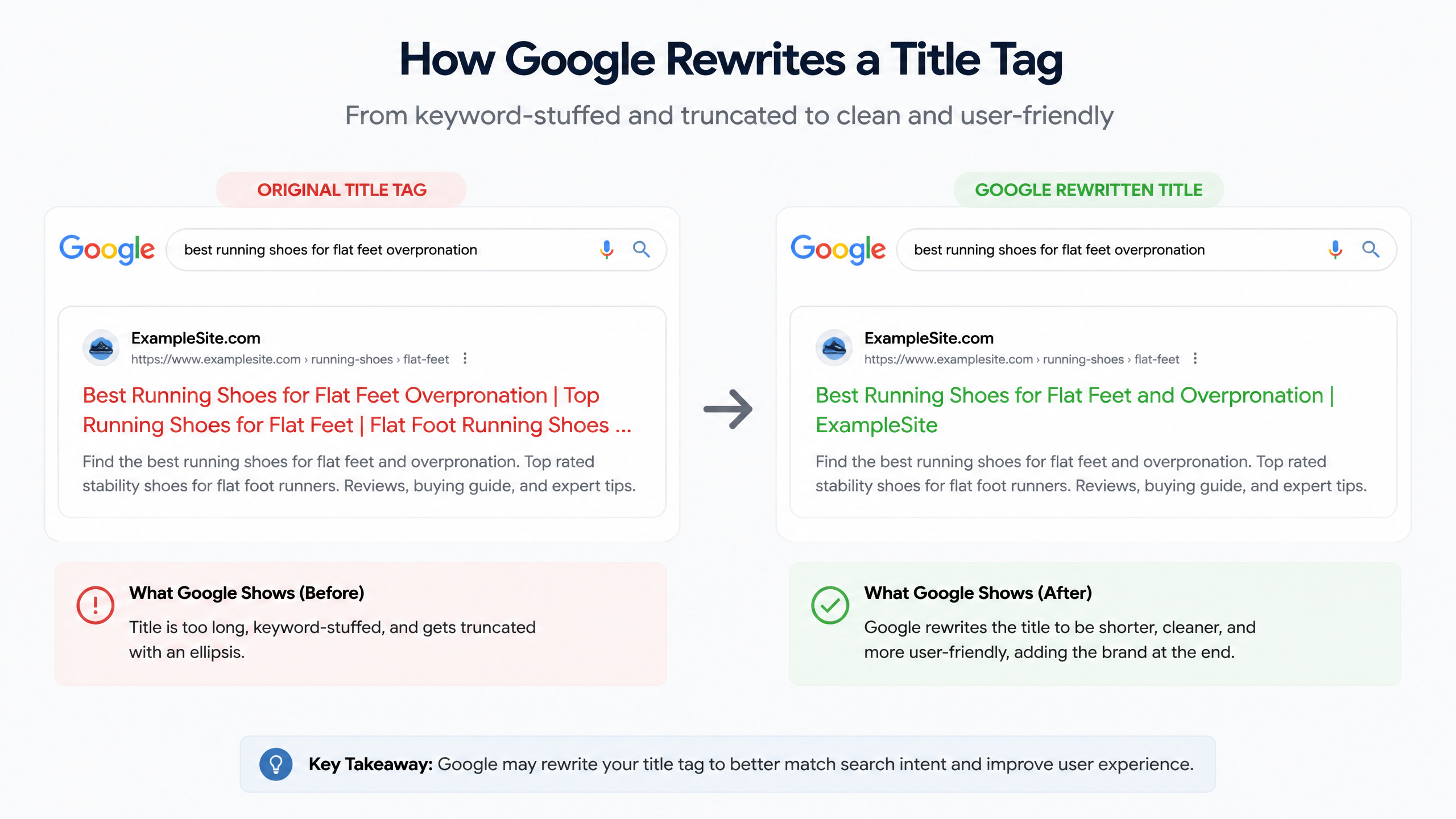
I've seen sites get penalized for keyword stuffing in their meta tags when a cleaner approach would have sufficed. But even if you avoid penalties, Google might just decide to rewrite your metadata anyway. Google rewrites title tags and meta descriptions whenever it feels your custom tags don't adequately answer the user's search query or fit the screen.
This rewriting is heavily dictated by physical screen space. While we talk about character counts, search engines actually measure in pixels. Title tags are truncated if they exceed roughly 600 pixels (which usually translates to about 55–60 characters). If you go over this limit, Google will clip your title with an ellipsis (...) or replace it entirely with a heading from your page.
Over-Optimization and Query-Dependent Rewrites
If you stuff your title tag with repetitive keywords—for example, "Best Shoes, Cheap Shoes, Buy Shoes Online"—Google's algorithms will flag this as over-optimization. When this happens, Google will dynamically rewrite your title to make it look more natural to searchers.
Similarly, if a user searches for a highly specific long-tail query that exists in your body copy but isn't reflected in your meta description, Google will extract a snippet of text from your page and display that instead of your custom meta description. This is why aligning your metadata with search intent is so critical.
Brand Name Insertion Patterns
Google also loves to append your brand name to the end of your title tag if you leave it out. If your title is short, Google will often add — [Brand Name] to the end. To maintain control over how your brand is presented, it is always best to build this brand insertion directly into your title templates, placing your primary keyword at the front and your brand name at the end.
Meta Tag Optimization by Search Intent
Informational and Commercial Pages
Different search intents require entirely different meta tag formulas. For informational pages (like blog posts or guides), your titles should focus on clarity, learning outcomes, and questions. For commercial investigation pages (like comparison articles or tool roundups), your metadata should highlight value, objectivity, and quick decision-making.
According to The Ohio State University's SEO content guidelines, each page should use a unique primary keyword mapped across the title tag, meta description, and body content to prevent keyword cannibalization and ensure searchers find the exact information they expect.
Product and Category E-commerce Pages
For transactional e-commerce pages, your meta tags need to highlight purchase-ready information like price, shipping, and availability.
Page Type | Title Template | Meta Description Template | Key Elements to Include |
|---|---|---|---|
Category Page | `[Category] Online: Shop Best [Products] | [Brand]` |
|
Product Page |
|
| Price, Key Features, CTA |
Local SEO and SaaS Landing Pages
For local businesses, including your geographic location in the title tag is non-negotiable. For SaaS landing pages, your focus should be on the primary benefit or pain point solved by your software.
• Local SEO Title: [Service] in [City, State] | [Brand]
• Local SEO Description: Looking for professional [Service] in [City]? Contact [Brand] today for a free estimate. Licensed and insured.
• SaaS Title: [Software Category] for [Target Audience] | [Brand]
• SaaS Description: Streamline your [Process] with [Brand]. Automate tasks, save time, and scale your operations. Try it free today!
CTR Engineering Using Meta Tags
Curiosity Gaps, Power Words, and Brackets
If you want to win the click in a crowded SERP, you need to treat your metadata like a paid ad. One highly effective tactic is using brackets or parentheses in your title tags. Adding elements like [Step-by-Step Guide] or (Updated for 2026) draws the eye and makes your listing stand out from the sea of plain text.
Additionally, utilizing power words—such as Proven, Effortless, Complete, or Fast—can dramatically increase emotional engagement. Just make sure you don't cross the line into clickbait; if your page content doesn't deliver on the promise of your title, users will immediately bounce, harming your long-term rankings.
Emotional Modifiers and Entity Inclusion
Including specific entities and numbers in your titles provides immediate cognitive clarity. Searchers love numbers because they promise structured, easily digestible content.
For example, instead of writing "How to Clean Your Gutters," try "5 Easy Steps to Clean Your Gutters (Without Climbing a Ladder)." The second option addresses a primary user pain point (fear of heights/falling) and promises a fast, simple solution.
Measuring CTR Uplift in Search Console
Rewriting your tags is only half the battle. You need to know if your changes actually worked.
According to iFactory's insights on metadata performance, monitoring your performance in Google Search Console (GSC) for at least two weeks after implementing new tags is critical to determining whether your adjustments successfully drove higher CTRs or improved keyword rankings.
To do this:
Note the date you updated your meta tags.
In GSC, navigate to the Performance report and filter by the specific URL.
Compare the 14 days before the change to the 14 days after.
Look for an upward trend in average CTR and total clicks, keeping an eye on whether average position remained stable or improved.
Meta Robots Directives Explained Completely
The Crawl and Index Control Directives
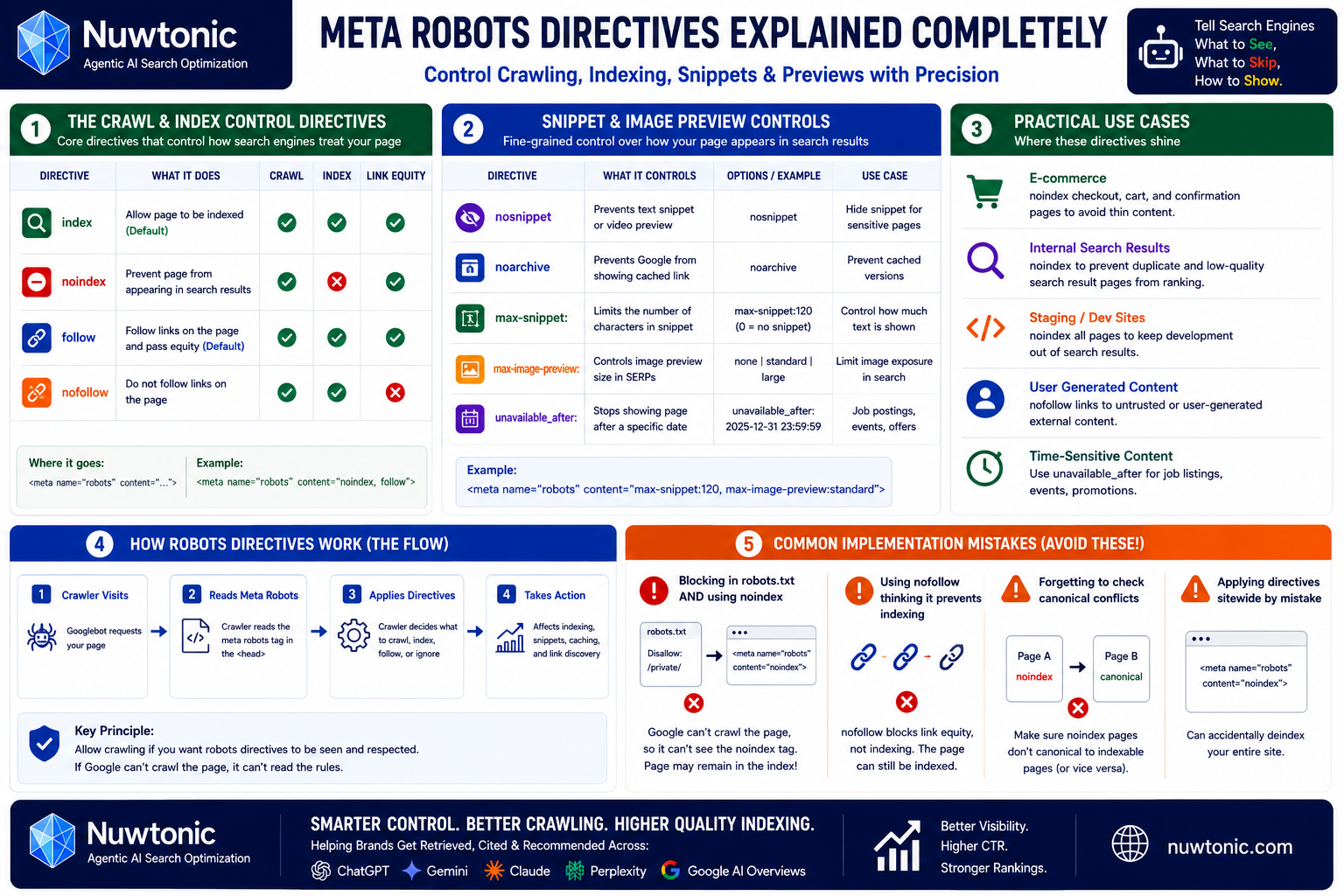
Many SEOs completely misunderstand how to use the meta robots tag, often leading to self-inflicted indexing disasters. The meta robots tag is placed in the <head> of your HTML and tells search engine crawlers exactly how to treat the page.
• index: Tells crawlers to index the page and display it in search results (this is the default behavior).
• noindex: Explicitly instructs search engines not to show this page in search results. This is vital for utility pages like checkout confirmation screens, internal search results, or staging sites.
• follow: Tells crawlers to follow and pass link equity through the links on the page.
• nofollow: Instructs crawlers not to follow the links on this page. This is useful for untrusted content or paid links.
Snippet and Image Preview Controls
Google also supports highly granular directives that allow you to control how your search snippets appear. These are especially useful if you want to protect your content or control your brand presentation in search results.
• nosnippet: Prevents a text snippet or video preview from appearing in the search results altogether.
• noarchive: Prevents Google from displaying a cached link for the page.
• max-snippet:[number]: Specifies the maximum number of characters Google can display in your search snippet.
• max-image-preview:[setting]: Controls the size of the image preview (options include none, standard, or large).
• unavailable_after:[date]: Tells Google to stop indexing and displaying the page after a specific date and time—ideal for limited-time job listings or event pages.
Practical Use Cases and Implementation Mistakes
One of the most common mistakes I see is combining conflicting directives. For example, if you place a noindex tag on a page, but also block that page in your robots.txt file, Google crawlers will never be able to see the noindex tag because they are blocked from crawling the page in the first place. The page can still remain in the index if it has external links pointing to it! Always allow crawling if you need search engines to see and respect a noindex directive.
Canonical Tag Mistakes That Kill SEO
Self-Referencing and Pagination Pitfalls
Canonical tags are your primary tool for resolving duplicate content issues. A canonical tag tells search engines: "Yes, these pages look identical, but this specific URL is the original masterpiece that you should index."
As a baseline rule, every single page on your site should have a self-referencing canonical tag. This means that https://example.com/blog-post should have a canonical tag pointing to https://example.com/blog-post. This prevents parameters, tracking codes, or session IDs from creating duplicate versions of your pages in Google's index.
However, when it comes to pagination (like /category?p=2), do not canonicalize page 2 back to page 1. This will cause search engines to stop crawling the products or articles listed on page 2. Instead, let page 2 have a self-referencing canonical tag.
Parameter URLs and Faceted Navigation
Faceted navigation—common on e-commerce sites where users filter by size, color, or price—is a notorious canonical killer. If every filter combination generates a new URL, you can quickly end up with thousands of duplicate pages.
To prevent this, ensure that all filtered parameter URLs point their canonical tags back to the main, unfiltered category page. This consolidates all link equity and ranking power into a single, highly authoritative URL.
Troubleshooting Canonicalization Issues
If you aren't sure if your canonicals are working, you can use this simple troubleshooting workflow:
[Is the page a duplicate or variant?]
├── YES ──> Point the canonical tag to the original, preferred URL.
└── NO ──> Ensure the page has a self-referencing canonical tag pointing to itself.
Always verify your implementation by running the target URL through Google Search Console's URL Inspection tool to confirm that Google has selected the same user-declared canonical URL.
Meta Tags for AI Search & LLM Crawlers
OpenAI and Anthropic Crawler Directives
Welcome to 2026, where optimizing for traditional search engines is only half the battle. Now, you also have to manage how Large Language Models (LLMs) and AI search engines (like ChatGPT, Claude, and Perplexity) crawl and utilize your content.
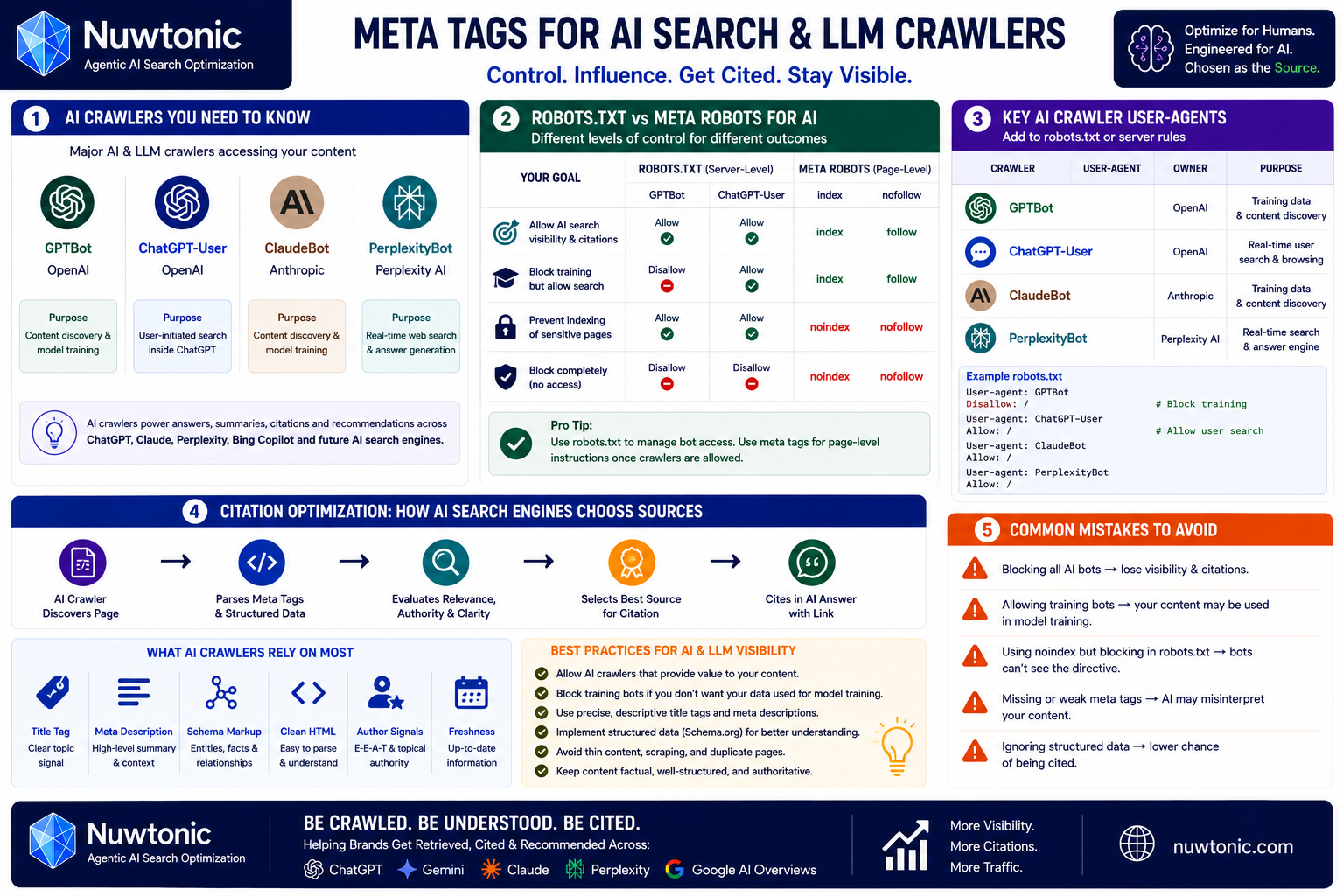
AI agents use specific user-agents to scrape web content. To manage how these bots interact with your site, you can target them directly in your metadata and server configurations. The primary user-agents for the major AI crawlers include:
• GPTBot (OpenAI)
• ChatGPT-User (OpenAI user-initiated search)
• ClaudeBot (Anthropic)
• PerplexityBot (Perplexity AI)
Robots.txt vs. Robots Meta Tags for AI
While you can block these bots at the server level using your robots.txt file, using meta-level directives gives you much tighter control. If you want your content to be cited as a source in AI search answers but don't want your data used to train future LLM models, you need a nuanced approach.
For instance, blocking GPTBot in your robots.txt prevents OpenAI from using your site for training, while allowing ChatGPT-User ensures that users searching inside ChatGPT can still find, access, and link to your real-time website content.
Citation Optimization Implications
To ensure your site is easily parsed and cited by AI search engines, you must prioritize clean, semantic HTML metadata. This means using precise title tags, structured schema markup, and clear meta descriptions that summarize the core facts of your page. AI crawlers rely heavily on these high-level summaries to quickly determine if your page is the most authoritative source to cite in an LLM-generated answer.
Meta Tags for International SEO
Hreflang Implementation and x-default
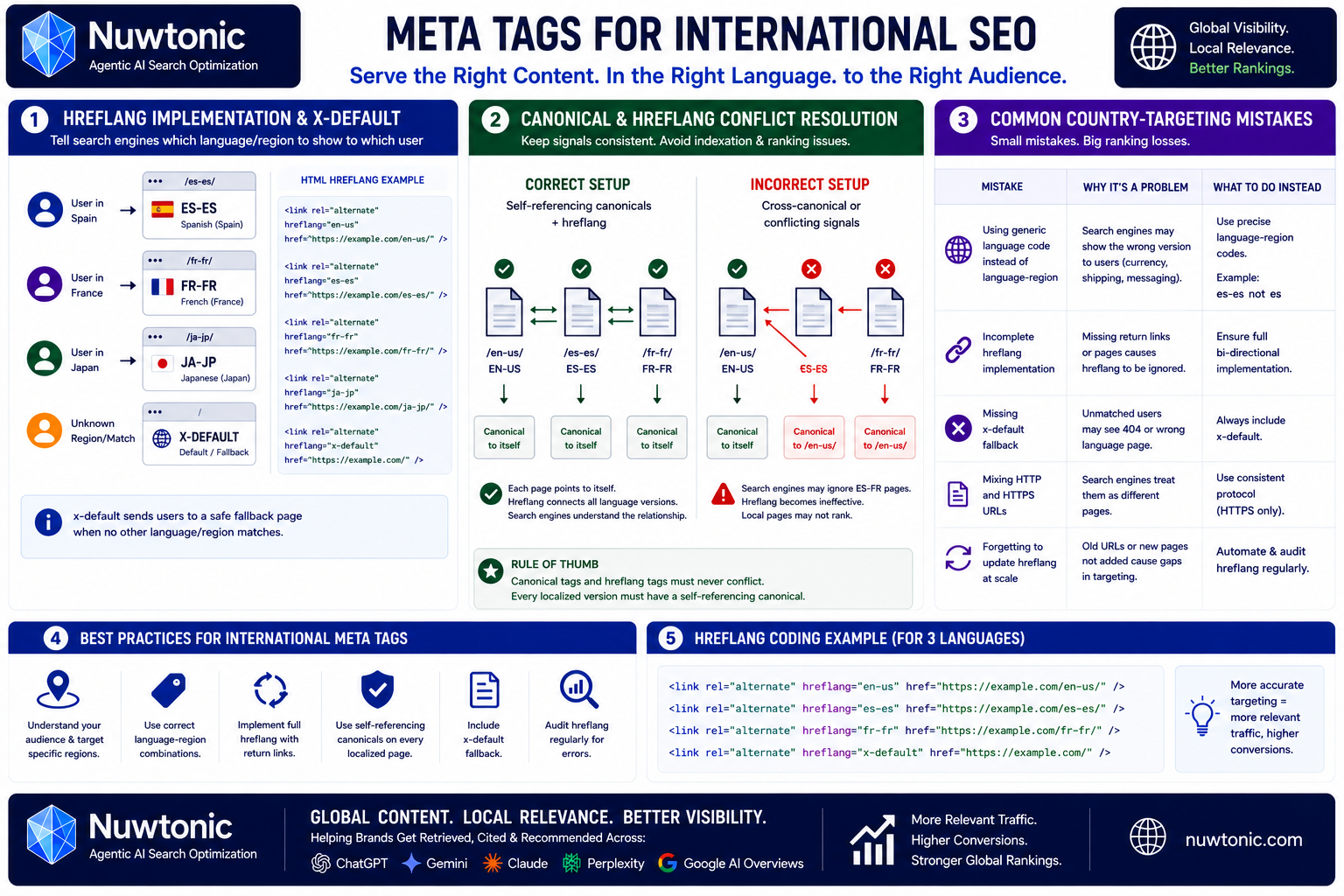
If you are targeting multiple countries or languages, hreflang tags are your best friend. These tags tell search engines which language version of a page to display to users based on their location and language settings.
html
The x-default directive is highly important; it tells search engines where to send users who do not match any of your specified language or regional settings.
Canonical and Hreflang Conflict Resolution
One of the most common international SEO mistakes is pointing your canonical tag to a different language version of a page.
Rule of Thumb: Canonical tags and
hreflangtags must never conflict. Every localized version of a page must have a self-referencing canonical tag pointing to itself, not to the default English version. If you canonicalize the Spanish page to the English page, Google will ignore the Spanish page entirely, rendering yourhreflangtags useless.
Common Country-Targeting Mistakes
Avoid using generic language codes when you actually want to target specific regions. For example, using hreflang="es" targets all Spanish speakers worldwide, whereas hreflang="es-es" specifically targets Spanish speakers in Spain. Be precise with your language-region combinations to prevent search engines from displaying the wrong currency, shipping options, or local messaging to your international audience.
Large-Scale Meta Tag Automation
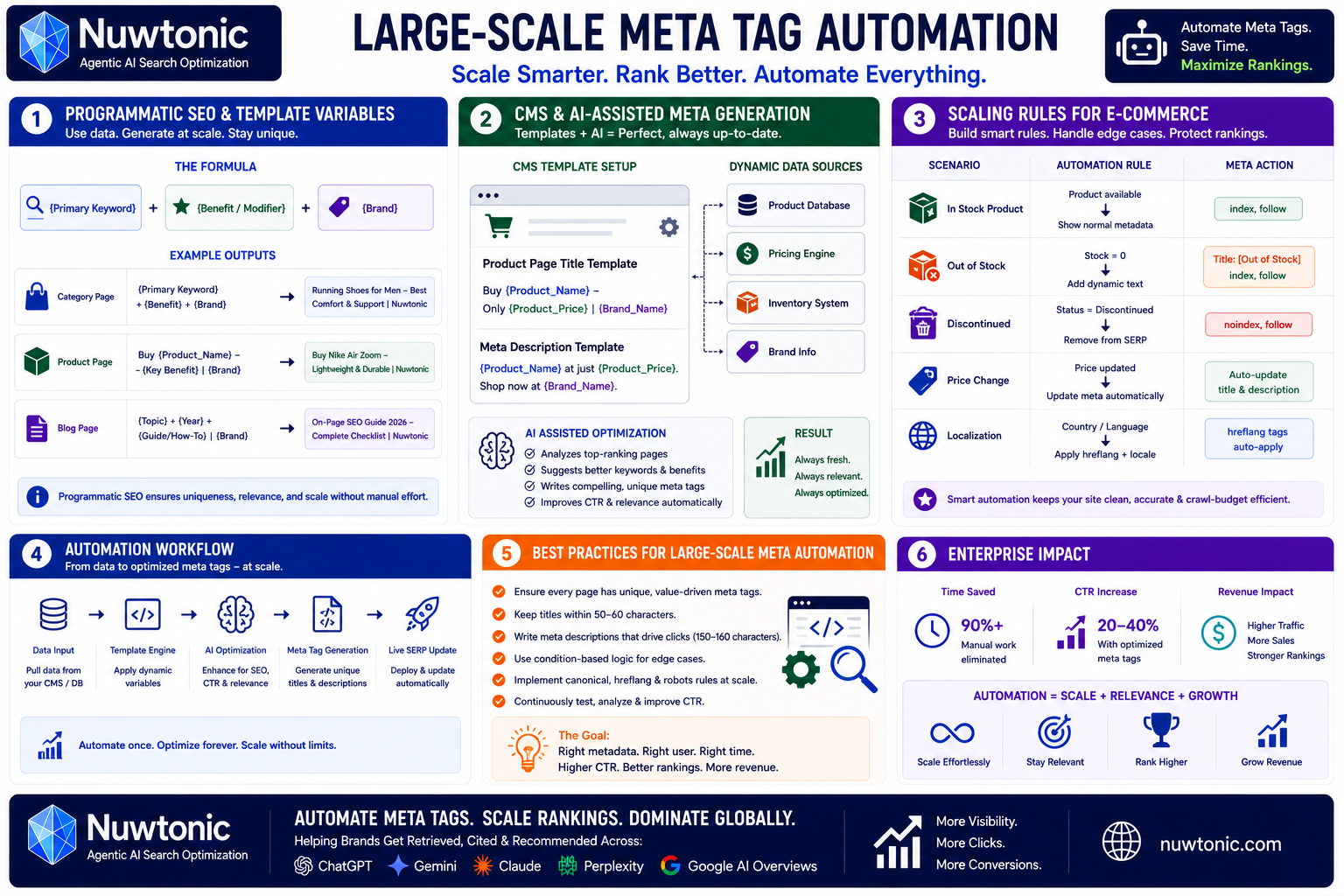
Programmatic SEO and Template Variables
If you are managing an enterprise site or a massive e-commerce store with thousands of pages, writing individual meta tags manually is completely out of the question. This is where programmatic SEO and dynamic templating come into play.
By using structured database variables, you can automatically generate unique, highly optimized metadata for every page on your site. The classic formula looks like this:
{Primary Keyword} + {Benefit/Modifier} + {Brand}
CMS and AI-Assisted Generation
Modern CMS platforms allow you to set global rules for your metadata. For instance, in an e-commerce setup, your product page title template might look like this:
Buy {Product_Name} - Only {Product_Price} | {Brand_Name}
This ensures that if a product's price changes in your database, your title tag updates automatically in the SERP, keeping your metadata accurate and enticing without manual intervention.
Scaling Rules for E-commerce
When automating metadata at scale, you must build in fail-safes to handle edge cases. For example, if a product goes out of stock, your template should dynamically append [Out of Stock] or temporarily adjust the meta robots tag to noindex if the product is gone permanently. This keeps your crawl budget focused on your active, revenue-generating pages.
Meta Tag Audit Framework & CMS Implementation
The Prioritized Audit Checklist
To ensure your site is fully optimized, you need a structured framework to audit your existing meta tags. Use this prioritized checklist to identify and resolve issues:
Critical Errors: Check for missing or duplicate title tags and unintended
noindextags.Performance Blockers: Identify truncated titles (> 60 characters) and missing meta descriptions.
Crawl Efficiency: Audit canonical tags to ensure they are self-referencing and free of conflicts.
Advanced Standards: Verify
hreflangimplementation and check for AI crawler configurations.
Platform-Specific Implementation
Implementing these tags looks slightly different depending on the Content Management System (CMS) you use:
• WordPress: Utilize plugins like Yoast SEO, Rank Math, or SEOPress to easily set global templates and edit individual page metadata.
• Shopify: Edit titles and descriptions directly within the product or page editor under the "Search engine listing preview" section.
• Webflow: Access page settings to input custom meta titles, descriptions, and Open Graph settings without writing code.
• Custom HTML: Place your meta tags directly inside the <head> block of your HTML document, ensuring they appear before the <body> tag.
Technical Troubleshooting Decision Tree
If you run into indexing or display issues, use this quick troubleshooting guide to find the root cause:
• Page not showing in search? Check if a noindex directive is active in your robots meta tag or if the page is blocked in robots.txt.
• Google showing the wrong title? Check if your title tag is over 60 characters, stuffed with keywords, or fails to match the searcher's intent.
• Duplicate pages ranking? Verify that your canonical tags are implemented correctly and pointing to the preferred URL.
• Low organic click-through rate? Rewrite your meta description to include a clearer call-to-action, a power word, or structured data.
Advanced Meta Tag Myths & Testing Methodology
Debunking Legacy SEO Myths
Let’s set the record straight on a few common myths that continue to plague the SEO industry. First, writing a longer meta description will not make you rank higher. Google does not use description length as a ranking signal. Second, exact-match keyword titles are not always the best option; search engines are smart enough to understand synonyms, and writing for human readability always wins in the long run.
How to A/B Test Meta Tags
If you want to maximize your organic performance, you should treat your metadata like a scientific experiment. To run a clean meta tag A/B test:
Select a group of similar pages (e.g., 20 product pages in the same category).
Split them into two groups: a control group (no changes) and a variant group (new titles/descriptions).
Run the test for at least 14 to 30 days.
Analyze the performance in Google Search Console, comparing the change in clicks, impressions, and CTR between the two groups to determine statistical significance.
Real-World Case Studies and Traffic Recoveries
In my experience, simple metadata fixes can yield massive results. I once worked with an e-commerce site that was suffering from a massive traffic drop. After auditing their setup, we discovered they had accidentally implemented duplicate canonical tags across all their category pages, pointing thousands of unique products back to the homepage.
By correcting the canonical tags to be self-referencing and updating their automated title templates to include specific product attributes, we saw a 42% recovery in organic search traffic within 30 days. It wasn't rocket science—it was just clean, technical execution of the basics.
Frequently Asked Questions (FAQ)
Do meta keywords still help rankings?
No. Major search engines, including Google and Bing, completely ignore the meta keywords tag. Focus your time on writing compelling title tags and meta descriptions instead.
What's the difference between a title tag and a meta description?
A title tag is a direct ranking signal that serves as the main clickable headline in search results. A meta description is a short summary of the page that acts as ad copy to encourage searchers to click on your listing.
How long should a title tag be?
To prevent truncation, keep your title tags between 55 and 60 characters (or under 600 pixels). This ensures your entire headline is visible on both desktop and mobile devices.
When should I use noindex versus canonical tags?
Use noindex when you want a page to be completely hidden from search results (like a thank-you page). Use a canonical tag when you have multiple similar versions of a page and want to consolidate their ranking power into a single, preferred URL.