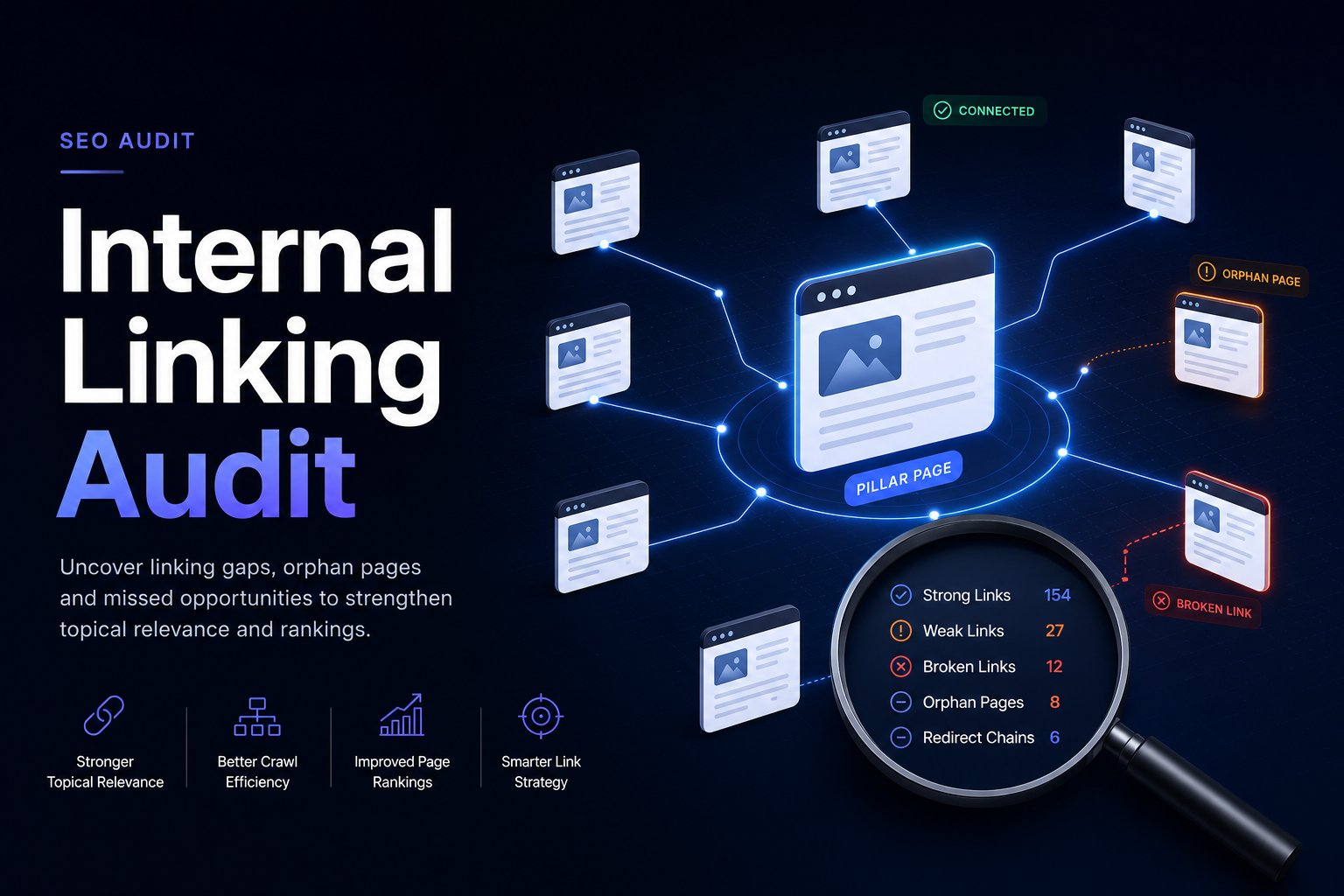
Your site keeps publishing. New articles go live, product pages get updated, older posts get refreshed, and traffic still feels flat. Rankings drift without a clear technical failure. Important pages sit on the site, but they don't pull their weight. That's usually when internal linking stops being a housekeeping task and becomes a growth problem.
A solid internal linking audit exposes why strong pages aren't passing enough value to the URLs that matter, why some content is effectively invisible, and why teams keep producing content without improving the site's overall architecture. The difference between a weak audit and a useful one is simple. A weak audit lists issues. A useful audit tells you exactly what to fix first, where to add links, which pages should carry more authority, and how to prove the changes mattered.
Table of Contents
- Why Your Internal Links Are a Hidden Growth Lever
- Assembling Your Audit Toolkit and Data Exports
- The Core Analysis Workflow Finding Quick Wins
- Advanced Analysis for Link Equity and Hub Pages
- Building a Prioritized Action Plan for Execution
- Measuring Impact and Establishing an Audit Cadence
- Frequently Asked Questions
Why Your Internal Links Are a Hidden Growth Lever
A lot of sites don't have a content problem. They have a connection problem. Good pages exist, but they're buried, unsupported, or disconnected from the rest of the site.
That's why an internal linking audit matters. It's not just about finding broken links. It's about deciding which pages deserve visibility, then making sure the site structure supports that decision.
Industry best practices call for a quarterly structural audit to reassess crawl depth, indexation gaps, and authority distribution, so orphan pages with zero internal links get fixed before they hurt visibility, especially when important URLs sit deeper than 3 clicks from the homepage, as noted in this quarterly internal linking audit guidance.
The three jobs a good audit actually does
First, it fixes discoverability. If a page has no incoming internal links, or it sits too deep in the architecture, Google has a harder path to it and users almost never find it through normal browsing.
Second, it improves authority routing. Not every page should receive the same internal support. Commercial pages, core service pages, and strategic category pages usually need stronger internal reinforcement than archive pages or low-priority updates.
Third, it improves user journeys. Better internal links don't just help crawlers. They reduce dead ends. They move people from informational content to comparison pages, product pages, service pages, or related problem-solving content.
Practical rule: If your strongest pages don't point clearly to your most valuable pages, your site is wasting authority.
Many teams already sense this problem but frame it too narrowly. They look for a plugin, a list of broken URLs, or a way to automate link insertion. That helps, but it doesn't fix structural drift. If you're trying to understand how to fix content connection problems, the fundamental answer usually sits at the architecture level, not just inside isolated articles.
Why this keeps showing up on mature sites
The longer a site lives, the more likely it is to accumulate:
- Orphaned content that was published and forgotten
- Misaligned authority flow where strong pages mostly link laterally instead of strategically
- Shallow editorial thinking where links get added for relevance, but not for rankings
- Decayed pathways caused by redirects, outdated URLs, and old navigation assumptions
This is one reason internal links matter well beyond basic crawlability. If you need a general refresher on that broader role, this explanation of why internal links are important for SEO is useful, especially for aligning teams before the audit starts.
Assembling Your Audit Toolkit and Data Exports
Most bad audits fail before analysis begins. The team crawls the site, glances at a few reports, and starts prescribing fixes without building a complete working dataset. That creates blind spots fast.
You need three inputs. Google Search Console, a crawler, and a backlink or link-analysis platform if you use one. The point isn't tool vanity. The point is getting enough raw data to compare crawlability, internal support, and search visibility at the URL level.
Start with search and crawl data
Export the reports you'll use, not everything the platform offers.
From Google Search Console, pull:
- Performance data by page and query for the URLs you care about
- Links data so you can review internally linked pages and compare support against importance
- Coverage and indexing views for pages with visibility potential but weak internal pathways
From your crawler such as Screaming Frog or Sitebulb, export:
- All URLs
- Inlinks or all_inlinks-style exports
- Status codes
- Crawl depth
- Anchor text
- Redirect targets
From your link-analysis environment, export anything that shows:
- Pages with strong internal authority
- Under-linked priority URLs
- Link placement opportunities
- Anchor patterns
A broken-link sweep also belongs in the prep phase. If you want a lightweight way to validate obvious issues before deeper analysis, use a dedicated broken link checker.
Here's a visual reference for the kind of working environment teams usually build around this process.

Build one working audit folder
Don't scatter exports across email attachments, cloud drives, and local folders. Create one audit folder with clear file naming. I usually separate it into:
| File group | What goes in it | Why it matters |
|---|---|---|
| Crawl exports | URLs, inlinks, status codes, depths | Structural diagnosis |
| Search data | Page performance, query visibility | Prioritization |
| Page inventory | Priority pages, money pages, hubs, legacy URLs | Business context |
| Fix log | Issue, source page, target page, anchor text, owner | Execution control |
Analysis often grows complicated swiftly. A page may be weak for multiple reasons at once. It can rank in striking distance, have low internal support, sit too deep in the crawl, and receive links through redirects. If your exports aren't joined cleanly, you'll miss that overlap.
Good audits don't begin with recommendations. They begin with a URL inventory that lets you compare importance against support.
What most teams forget to export
The common misses are predictable:
- Anchor text exports so you can find vague anchors like generic calls to action
- Source page data so you know exactly where a new link should be inserted
- Final destination URLs for redirects, so editors don't keep linking to outdated paths
- Page type labels so you can distinguish blog posts, product pages, service pages, hubs, and utilities
Without those fields, the audit turns into abstract advice. With them, you can hand a writer or developer a fix list they can implement immediately.
The Core Analysis Workflow Finding Quick Wins
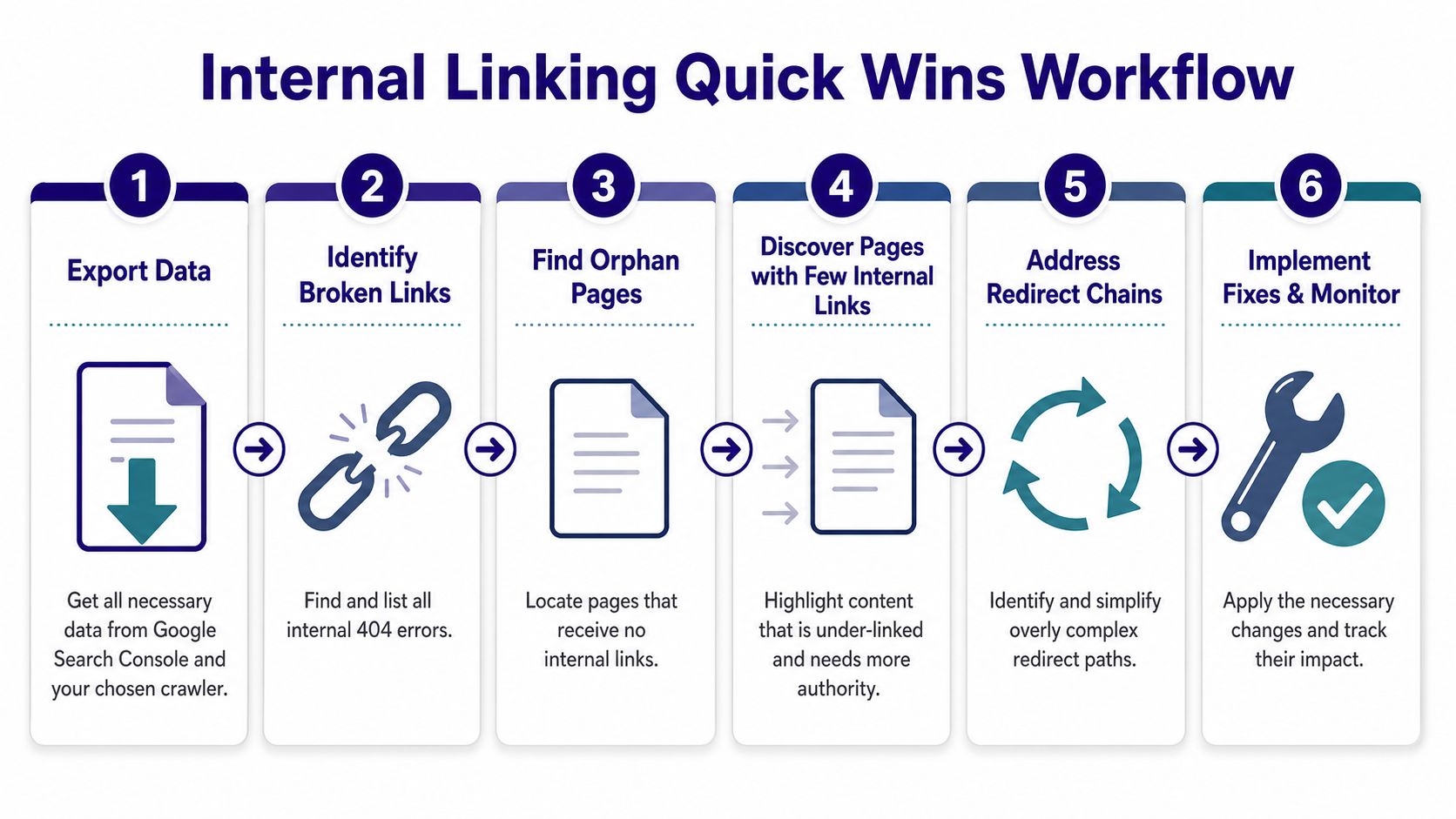
The fastest gains usually come from cleanup, not strategy decks. Broken internal links, orphan pages, buried commercial URLs, and redirect chains waste value every day they stay live.
Start the quick-win phase with a visible workflow.
Run the triage checks first
Essential content should stay under 3 clicks from the homepage. When auditing, filter the crawl for Crawl Depth > 3 and sort Unique Inlinks from lowest to highest to surface buried or under-linked priority URLs, as described in this crawl depth and unique inlinks workflow.
That single filter combination finds a surprising amount of waste. It exposes pages that are technically live but structurally weak.
Use this triage order:
Internal 404s first
These are the easiest fixes with the clearest downside. They break user flows and stop authority from reaching the intended destination.Orphan pages next
A URL with no incoming internal links is disconnected by definition. If it matters, link it. If it doesn't, decide whether it should remain indexable or be retired.Redirecting internal links
Internal links should point directly to the final URL, not to a redirected version. That keeps crawl paths cleaner and removes avoidable friction.Deep pages with weak support
A page can be indexed and still underperform because it's buried and under-linked. Those often become the best “quick strategy” wins after the pure technical fixes.
A short walkthrough helps if you want to see how another practitioner handles the process in real time.
Use simple filters that expose hidden losses
You don't need a complicated model to find immediate opportunities. In a spreadsheet, create filtered views like these:
View A. Priority pages with low Unique Inlinks
Cross-reference your business-priority URL list with the lowest-supported pages.View B. Crawl Depth above target
Then manually check whether those pages deserve stronger navigation support, contextual links, or both.View C. Internal links to redirected URLs
Replace source links with direct destination URLs.View D. Pages with weak or generic anchor text
Look for anchors that don't describe the destination well.
A useful edge case is the strike distance page. Some audits specifically flag pages in Google Search Console positions 11–20 with fewer than 5 internal inbound links as strong opportunities, alongside other anchor and placement issues, in this internal linking audit guide with strike distance checks. Those pages often need support more than rewriting.
When a page already shows search demand and sits just outside stronger visibility, a few well-placed internal links can outperform another round of content edits.
Document fixes while you analyze
Don't wait until the end to start writing recommendations. As you find an issue, log:
- Target URL
- Problem type
- Recommended source page
- Suggested anchor text
- Implementation owner
That habit is what separates an audit from a report dump. By the end of the quick-win pass, you should already have a usable execution list for content and development teams.
Advanced Analysis for Link Equity and Hub Pages
Cleanup solves leakage. Growth comes from deliberate authority flow.
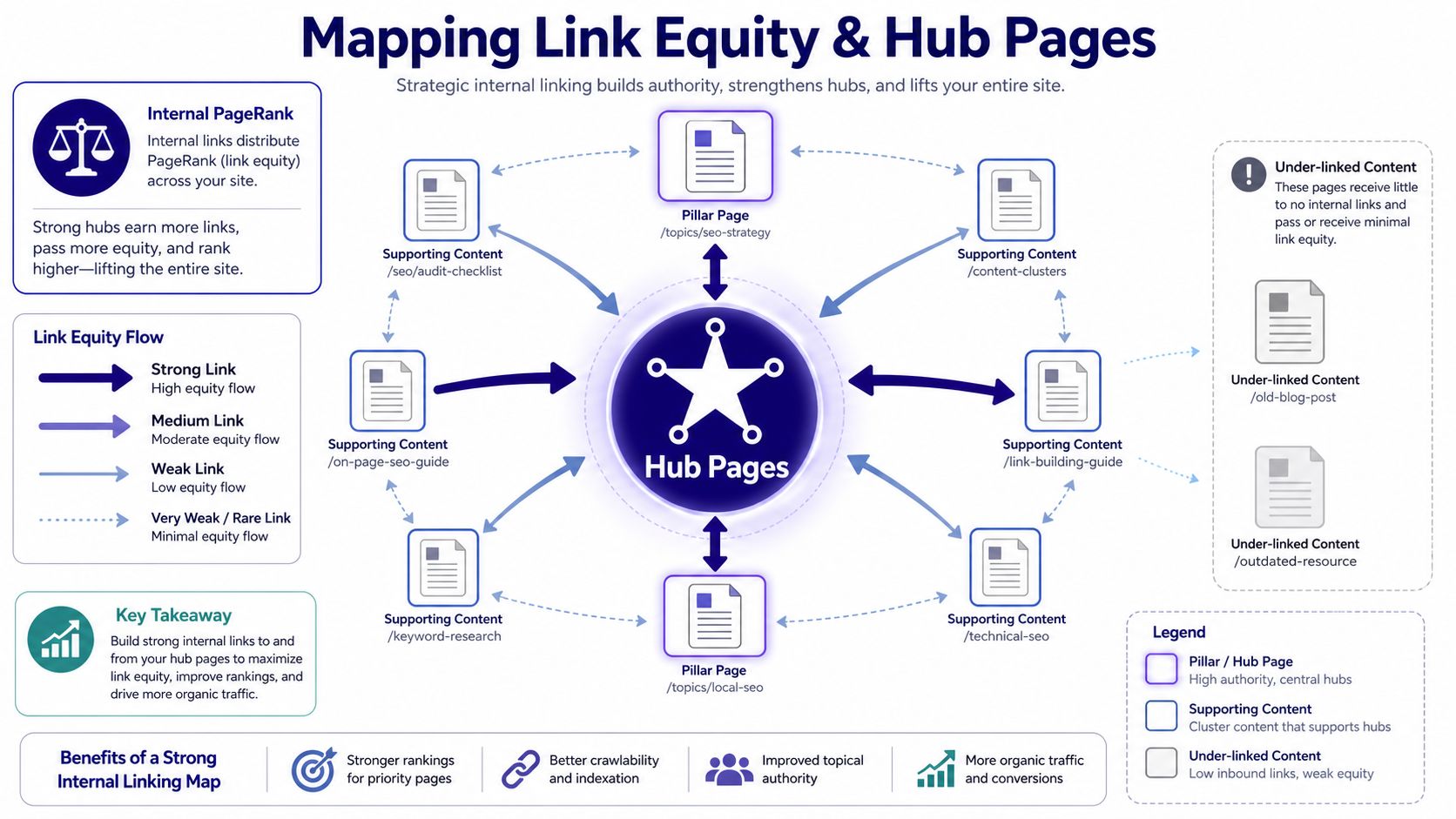
Most sites don't need more random links. They need better distribution from strong pages to strategic pages. That means identifying the URLs that already carry authority internally, then deciding where that value should go.
Find the pages that should distribute authority
An effective audit doesn't stop at “this page has some links.” It asks whether the right pages have the highest support. One recommended baseline is at least three internal links on each page, combined with review of reports like Best by Links, Link Score on a 0–100 scale, orphan pages with 0 inlinks, and opportunities surfaced through N-grams, as outlined in this internal linking metrics guide.
That gives you a practical sequence:
- Identify pages with strong internal authority
- Identify commercial or strategic pages with weak internal support
- Map source-to-target opportunities from the first group to the second
- Review body copy for unlinked keyword phrases that can become contextual links
If your tooling supports topical mapping, a clustering workflow helps. A dedicated topic cluster tool can make those relationships easier to model before you touch templates or editorial calendars.
Build hub structures instead of random cross-links
The strongest internal architectures usually look less like a blog archive and more like a set of hub-and-spoke systems. A hub page consolidates the main topic. Supporting pages link back to it, and related supporting pages link laterally where that improves understanding and navigation.
This matters most on commercial sites. Product families, solution pages, category pages, and buying guides often need explicit structural reinforcement. If you work in product-heavy environments, this guide for mastering product SEO is useful context because it forces the same core question internal linking should answer. Which pages drive discovery, and which pages convert that discovery into action?
A quick diagnostic table helps:
| Situation | What usually goes wrong | Better fix |
|---|---|---|
| Strong blog traffic, weak commercial rankings | Informational content links mostly to other informational content | Add contextual paths to service, category, or money pages |
| Large product catalog | Category logic exists but contextual pathways are thin | Build hub pages that route users and bots into clusters |
| Legacy resource center | Old high-authority pages point to outdated URLs | Rewire those pages to current strategic targets |
Check mobile link visibility before calling a fix complete
A desktop-only review misses a real structural problem. Some audits overlook mobile-first internal linking physics, where powerful pages link to money pages but the link sits below the fold on mobile. That gap matters because mobile dominates B2B SEO traffic, yet many audits still evaluate links as if desktop behavior is the only thing that counts, according to this mobile-first internal link audit perspective.
That changes how I assess “good placement.” A link buried deep in a long intro, hidden inside an accordion, or pushed low by mobile layout may technically exist but perform poorly.
A link that exists only for the crawler isn't enough. Important internal links need to be visible where real users actually encounter them.
Check your key pages on a phone. Not a responsive preview alone. A real device if possible. You'll often find that the pages you thought were passing authority are doing it from positions users rarely reach.
Building a Prioritized Action Plan for Execution
An audit that ends in a spreadsheet full of issue tabs usually dies in a project manager's backlog. Teams don't implement audits. They implement ranked tasks with clear owners.
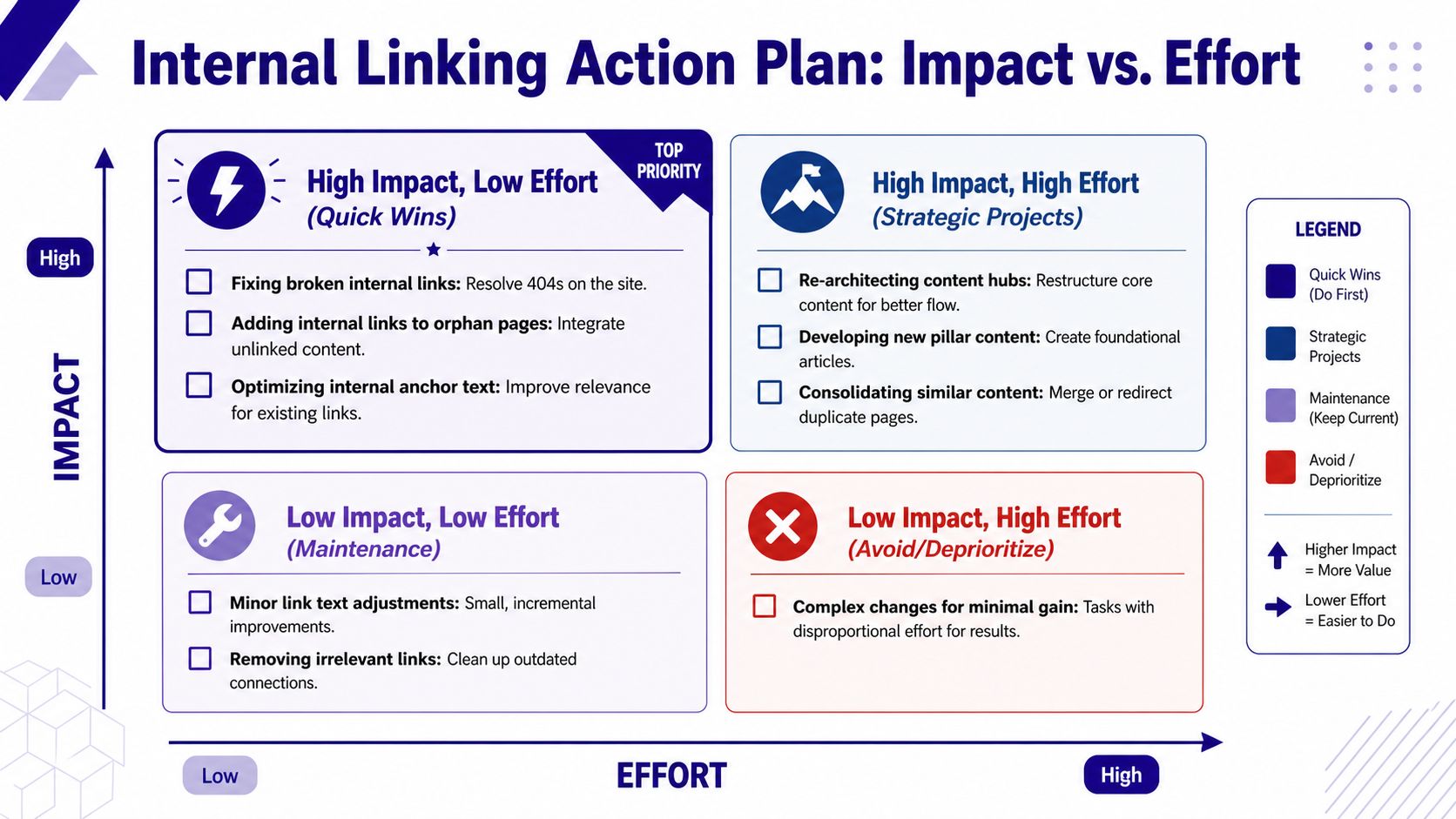
That's why the execution plan matters more than the findings deck. The audit deliverable should be a ranked action list where each row contains five elements: the priority page, the problem, the specific fix, an effort estimate, and the expected impact, sorted by impact over effort, as laid out in this internal linking audit reporting framework.
Turn findings into a ranked backlog
A useful action plan doesn't organize work by issue type alone. It organizes work by business return.
For example, fixing a redirecting internal link on a low-value archive page may be easy, but it won't matter much. Adding strong contextual links from an authoritative guide to a weak commercial page may take slightly more editorial effort, but the payoff is usually better.
Use categories like these:
Quick wins
Broken links, redirect replacements, obvious orphan fixes, anchor text upgrades on high-value pages.Strategic projects
Hub creation, navigation revisions, cluster rewiring, legacy content consolidation.Maintenance work
Minor cleanups that improve consistency but won't move much on their own.Low-return tasks
Changes that consume engineering or editorial time without clear upside.
A practical impact versus effort model
You don't need an elaborate scorecard. You need judgment that's consistent.
Here's a simple way to think about it:
| Impact | Effort | Usually prioritize when |
|---|---|---|
| High | Low | The page is commercially important and already has search potential |
| High | Higher | The issue affects a hub, template, or major content group |
| Lower | Low | Fold into maintenance cycles |
| Lower | Higher | Deprioritize unless required for broader site cleanup |
Platform migration reality matters. If your CMS is messy, even clean recommendations can stall. Teams moving or restructuring content often underestimate implementation friction. If that sounds familiar, these contentful data migration steps are a good example of the operational detail that often determines whether internal linking recommendations get shipped.
What a usable action row looks like
A practical action row should read like an instruction, not a diagnosis.
For example:
Priority page
/enterprise-seo-services/Problem
Low internal support from relevant high-authority informational pagesSpecific fix
Add contextual link from /technical-seo-checklist/ using anchor tied to enterprise SEO services topic, and add secondary link from /seo-audit-guide/ where service transition is naturalEffort estimate
Low for editorial updatesExpected impact
Better authority flow to a money page that already aligns with existing informational demand
That format helps writers, developers, and stakeholders for different reasons. Writers know what to add. Developers know what to update in templates or modules. Stakeholders can see why the change matters.
If a task can't be implemented from the row itself, the row isn't finished.
Measuring Impact and Establishing an Audit Cadence
Internal linking work gets ignored when teams can't show what changed. The fix is to measure at the URL level and keep the observation window clean.
Measure by URL not by sitewide noise
Sitebulb points out a real gap in the field. Teams are told to monitor results after adding internal links, but most guidance doesn't offer a controlled framework for isolating the impact of a single link addition. A practical need is a link addition experiment measured across a 60-day window for the target URL, separate from broader site changes, as described in this internal link audit methodology gap analysis.
Use that idea in a simple way:
- Pick a target URL.
- Log the exact date the link change went live.
- Note the source page, anchor text, and placement.
- Avoid changing the target page during the observation window if you can.
- Check Google Search Console page-level performance over time.
You're not trying to prove causation with laboratory precision. You're trying to reduce noise enough to make a defensible case.
Use a recurring rhythm
For active content sites, a full internal linking audit should run quarterly, with monthly checks for broken links and redirect chains. More dynamic or content-heavy sites may need monthly audits for freshness and structural consistency, according to this internal link audit checklist and cadence guidance.
That cadence works because internal linking problems compound subtly. New pages launch without links. old links point to redirects. priority pages lose structural support as the site grows. Treat the audit as part of routine SEO operations, not a one-time cleanup.
Frequently Asked Questions
How many internal links should a page have
There isn't one universal number that fits every template, but there are practical baselines. One recommendation is at least 5 internal links per page, with 2–5 contextual links per 1,000 words, and 5–10 contextual links for content around 2,000 words, as outlined in this internal link density and baseline guide. Use that as a floor, not a target to force. A key measure is whether the links help users move logically and support pages that matter.
Should you use nofollow on internal links
Rarely. For normal site navigation and editorial linking, keeping internal links crawlable is usually the right move. Internal nofollow often creates confusion and weakens the purpose of the link graph. If a page shouldn't be part of your search-facing architecture, solve that with a broader indexing and site-structure decision rather than scattering nofollow across internal pathways.
How is an internal linking audit different from a technical SEO audit
An internal linking audit is narrower and more action-oriented. It focuses on crawl depth, inlinks, orphan pages, anchors, redirecting internal links, and authority distribution between pages. A technical SEO audit is broader. It includes indexing behavior, rendering, canonicals, structured data, performance issues, and more. Internal linking should sit inside your technical SEO program, but it deserves its own workflow because the fixes often require editorial judgment, not just developer changes.
If you want a faster way to move from internal linking findings to reviewable fixes, Nuwtonic is built for that execution gap. It connects GSC data, audit signals, and workflow controls so teams can prioritize issues, prepare fixes, and ship updates without losing visibility between analysis and implementation.