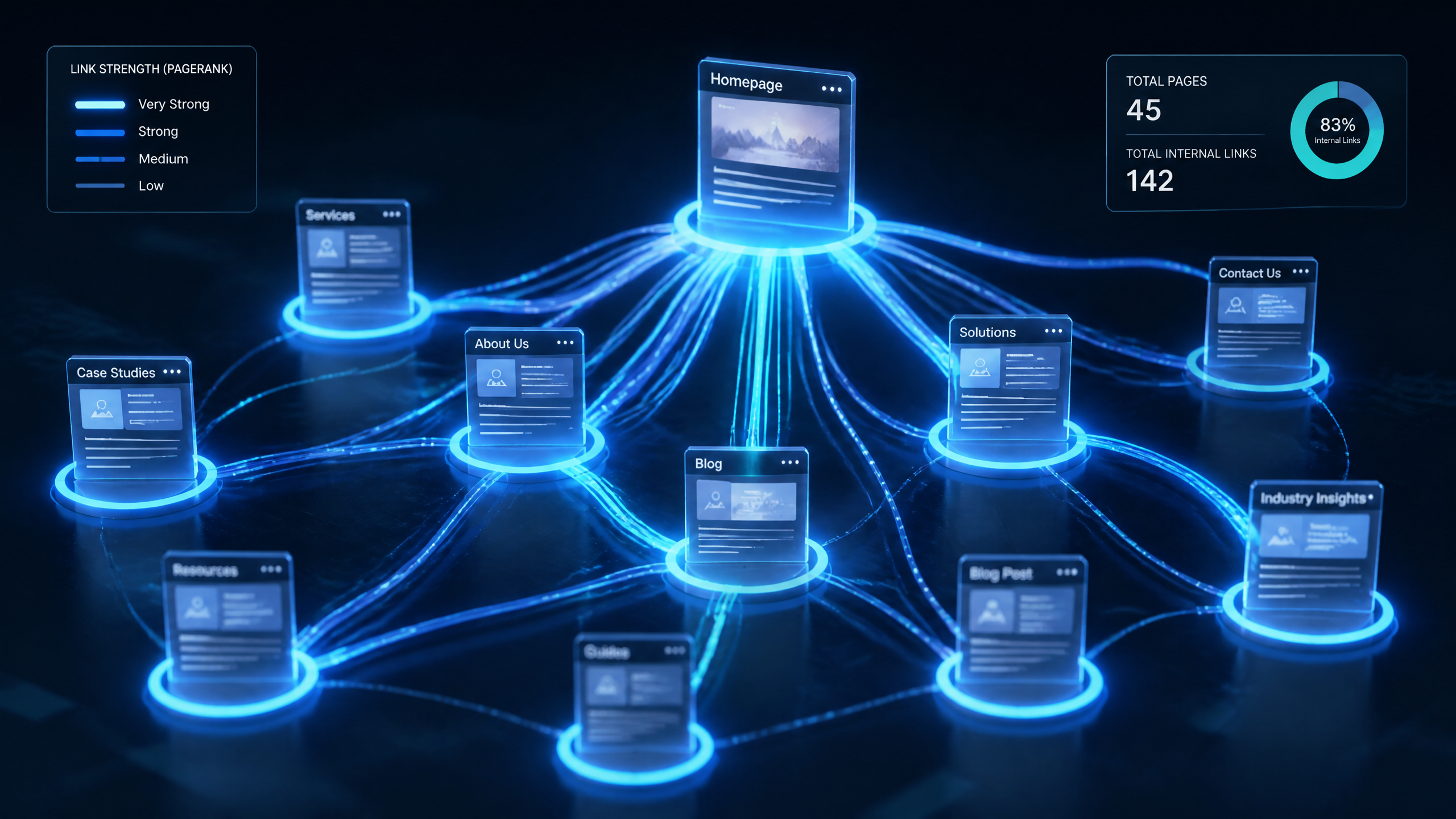
You know what? Many people overlook internal links, but they’re crucial for distributing page authority throughout a site. In my eight years of auditing websites, from messy ecommerce setups to bloated SaaS platforms, I have seen sites rank higher simply by optimizing their internal linking structure—it is often an easiest, high-leverage win you can pull off.
Yet, most tutorials on internal linking make it sound way more complicated than it really is. They bury you in abstract graphs and mathematical formulas, when you really just need to think about how actual users and search crawlers navigate your content. Let's strip away the fluff and look at how internal links function under the hood, how they power modern search engine optimization (SEO), and how you can implement a framework that drives real organic growth.
TL;DR Summary
If you only have two minutes, here is the core takeaway: Internal links are the nervous system of your website. They allow search engine crawlers to discover and index your content, distribute critical PageRank (or "link juice") from high-performing pages to newer posts, and signal topical authority to search engines. By strategically linking related pages, you reduce click depth, eliminate orphaned pages, and keep users engaged longer—which search engines view as a major positive signal.
Key Takeaways
• Discovery and Indexing: Search engines cannot index what they cannot find. Internal links are the primary pathway crawlers use to navigate your site.
• PageRank Distribution: High-backlink "power pages" can share their earned authority with deeper, newer pages via strategic links.
• Topical Authority: Grouping related content into structured silos or clusters signals deep subject expertise to search engines.
• User Engagement: Contextual links guide the user journey, increasing time-on-site and reducing bounce rates.
Table of Contents
What Are Internal Links?
Why Are Internal Links Important for SEO?
PageRank Distribution and Equity Flow
Internal Links, Topical Authority, and AI Search
Internal Linking Strategy by Website Type
The Advanced Internal Linking Framework & Audit Checklist
Frequently Asked Questions
Sources and References
What Are Internal Links?
Defining the Core Mechanism
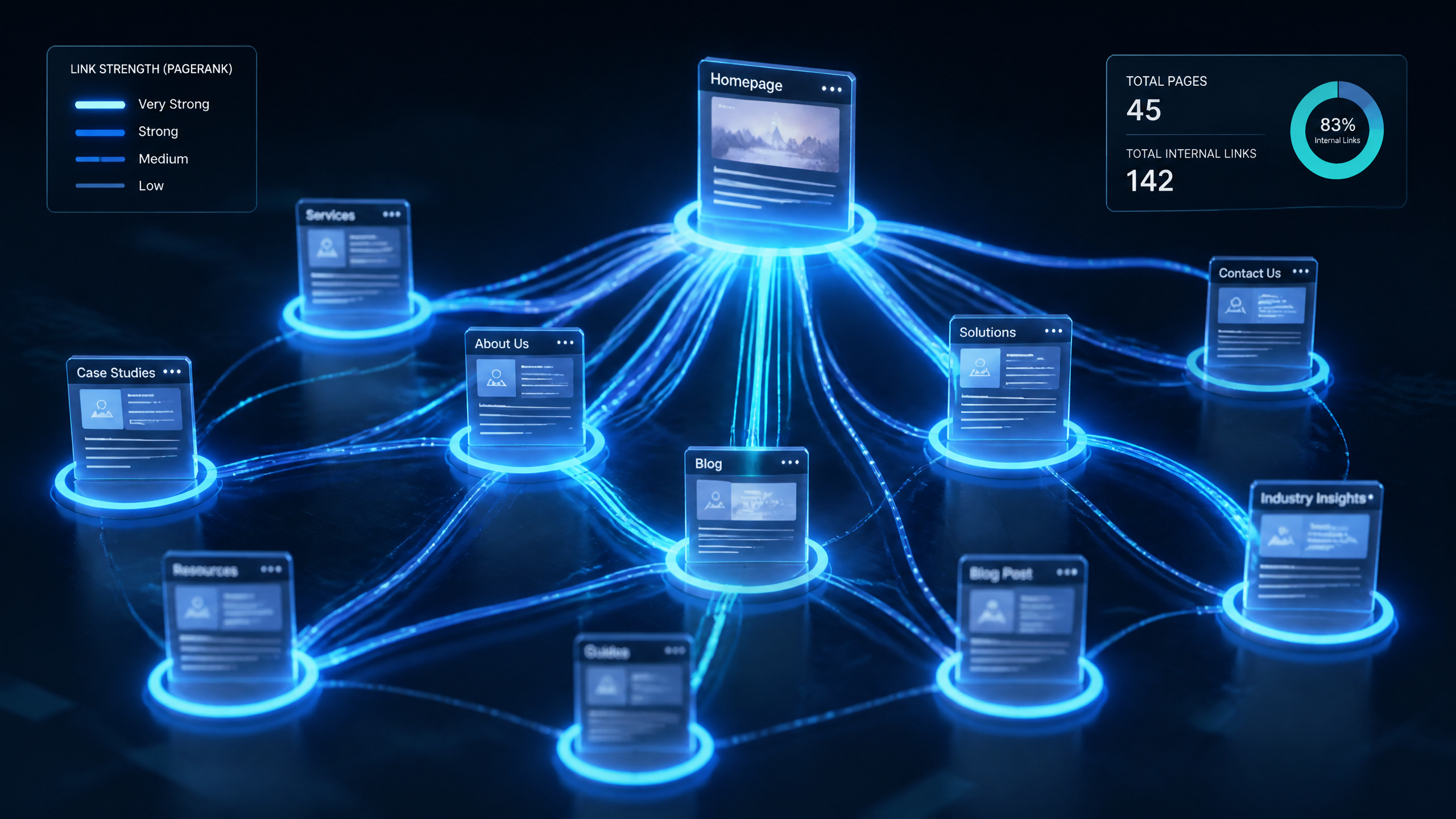
An internal link is simply a hyperlink that connects one page on a website to another page on the same domain. While an external link points to a page on a completely different website, an internal link keeps both the source and the target within your own digital ecosystem.
According to the AIOSEO guide on internal linking, these hyperlinks act as the fundamental mechanism for site navigation and crawler discovery. Without them, your website is just a collection of isolated, disconnected documents.
From a technical perspective, an internal link is typically written in HTML like this:Anchor Text
In this setup, the HTML tag contains two critical components:
The Target URL: The destination page on your domain.
The Anchor Text: The clickable, visible text that describes what the destination page is about.
The Direct Role in Site Architecture
Think of your site architecture as the blueprint of a house. Internal links are the hallways and doorways that connect the rooms. If you build a beautiful room but do not put a door on it, nobody can get in.
In the SEO world, these "doors" establish a clear information hierarchy. A study by Sure Oak's SEO research team found that internal links help search engine crawlers discover and organize pages, establishing a hierarchy that enhances crawlability. They signal to search engines which pages are your foundational "pillars" and which are supporting, highly specific sub-pages.
Why Are Internal Links Important for SEO?
Discovery, Crawling, and Indexing
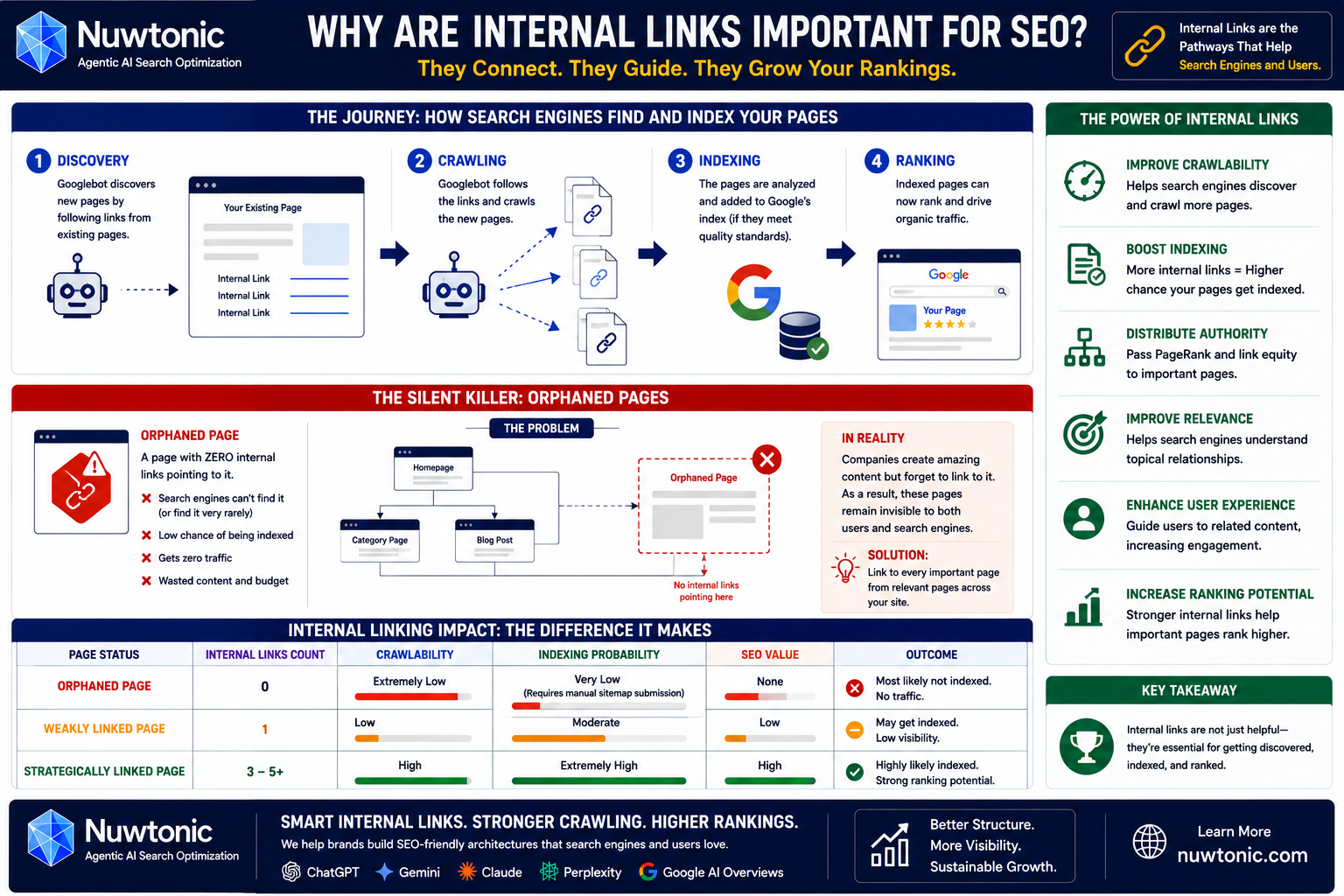
Let's talk about how search engines actually work. Before a page can rank, it must be indexed. Before it can be indexed, it must be crawled. And before it can be crawled, it must be discovered.
Here's the thing: Google's crawler (Googlebot) does not just magically know when you publish a new page. It discovers new content primarily by following links from existing pages. A 2024 report by Siteimprove's search specialists states that Google discovers new pages by crawling links, making internal links essential for indexing new content.
If you publish a new blog post and do not link to it from anywhere else on your site, Googlebot may never find it, even if you submit it in your XML sitemap. Sitemaps are great, but links are the natural pathways that search engines trust.
The Silent Killer: Orphaned Pages
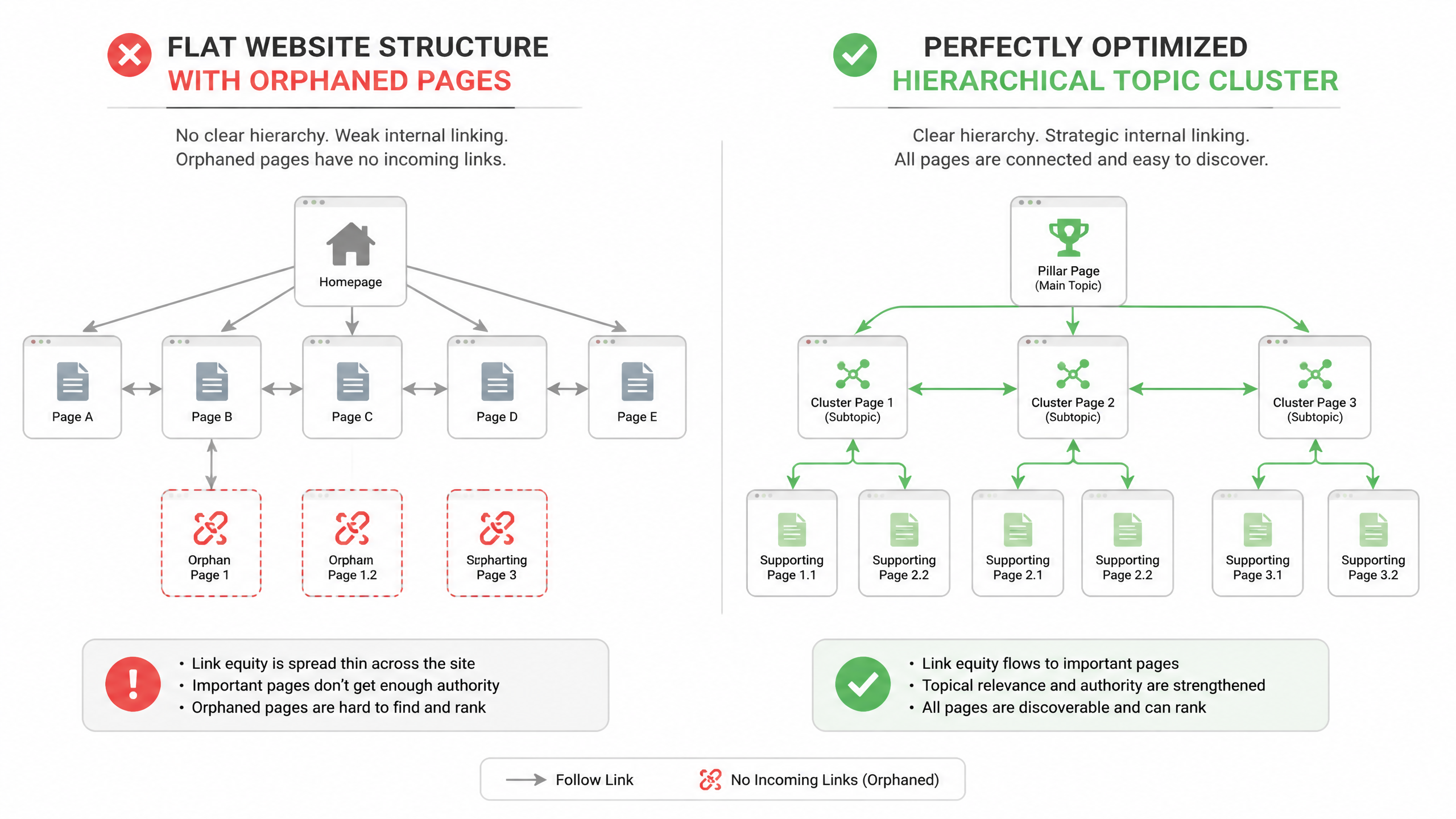
An orphaned page is a page on your website that has exactly zero internal links pointing to it.
I have seen sites with brilliant, high-quality content get absolutely zero traffic simply because their pages were orphaned. A common pattern I observe in audits looks like this: a company spends thousands of dollars writing comprehensive landing pages, publishes them, but leaves them completely unlinked from the main navigation, category pages, or blog posts.
Because crawlers cannot find them naturally, these pages remain unindexed and invisible. To prevent this, every single page you care about must have at least one—and ideally several—relevant, contextual internal links pointing to it. In my experience, identifying and fixing orphaned pages is one of the fastest ways to see a sudden spike in crawled and indexed URLs.
Page Status | Internal Links Count | Crawlability | Indexing Probability | SEO Value |
|---|---|---|---|---|
Orphaned Page | 0 | Extremely Low | Very Low (Requires manual sitemap submission) | None |
Weakly Linked Page | 1 | Low | Moderate | Low |
Strategically Linked Page | 3 - 5+ | High | Extremely High | High (Receives distributed PageRank) |
PageRank Distribution and Equity Flow
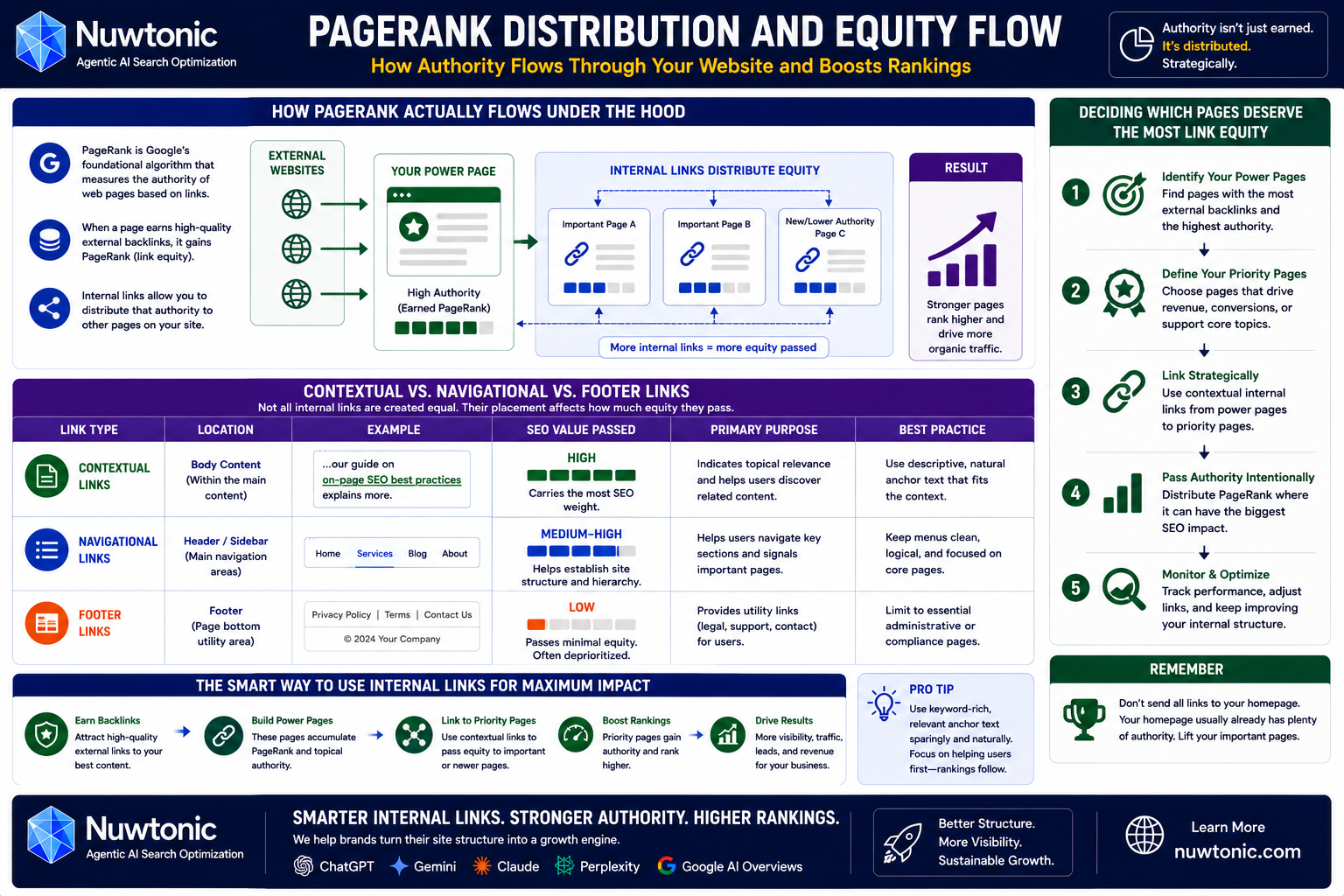
How PageRank Actually Flows Under the Hood
PageRank is the original algorithm Google used to rank web pages based on their link profiles. While Google's ranking algorithm has evolved to include thousands of signals, PageRank remains a foundational pillar of how search engines evaluate authority.
Think of PageRank as a pool of "link equity" (often colloquially called "link juice"). When a page earns high-quality external backlinks from other websites, its page authority increases.
But that authority does not have to stay trapped on that one page. By using internal links, you can strategically distribute that earned authority to other pages on your site. As explained in Semrush's comprehensive internal linking guide, the distribution of link equity via internal links can boost the visibility of less prominent pages.
Contextual vs. Navigational vs. Footer Links
Not all internal links are created equal. Search engines do not treat a link in your footer the same way they treat a link embedded directly within your body copy.
To understand how to distribute authority effectively, you must understand the different types of internal links:
• Contextual Links: These are links placed naturally within the main body content of a page. They carry the most SEO weight because they indicate a direct, topical relationship between the source and target pages.
• Navigational Links: These are the links in your main header menu or sidebar. They help users find major category pages and signal to Google which pages form the core structure of your site.
• Footer Links: These are utility links at the bottom of the page (e.g., Privacy Policy, Contact Us). They pass very little link equity because they are expected utility links and are often ignored by users.
Link Type | Location | SEO Value Passed | Primary Purpose | Best Practice |
|---|---|---|---|---|
Contextual | Body Content | High | Topical relevance & UX | Use descriptive, natural anchor text |
Navigational | Header / Sidebar | Medium-High | Site structure & navigation | Keep clean and uncluttered |
Footer | Page Bottom | Low | Utility & Compliance | Limit to essential administrative pages |
Deciding Which Pages Deserve the Most Link Equity
So, how do you decide where to point your internal links?
Many site owners make the mistake of pointing all their internal links to their homepage. But your homepage usually has plenty of authority. Instead, you should identify your "power pages"—the pages on your site that have earned the most external backlinks—and use them to link to your high-priority commercial pages or newly published content.
If you want to understand how this fits into your broader optimization strategy, learning how to do on-page SEO is an excellent starting point for aligning your content structure with Google's expectations.
Internal Links, Topical Authority, and AI Search
Building Topic Clusters and Content Silos
In modern SEO, search engines do not just look at individual keywords; they look at topical depth. To rank for competitive terms, you need to prove you have comprehensive expertise on the subject—a concept known as topical authority.
This is where topic clusters come into play. A topic cluster consists of a single, comprehensive "pillar page" (covering a broad topic) and multiple "cluster pages" (covering specific sub-topics). You connect these pages using a reciprocal internal linking structure:
The pillar page links to every cluster page.
Every cluster page links back to the pillar page.
Related cluster pages link to each other where relevant.
This tight linking structure creates a content silo. It tells search engine crawlers, "We have covered every single angle of this topic." If you want to dive deeper into how to group your keywords to build these structures, understanding keyword clustering and its importance will make your internal linking strategy significantly more effective.
Internal Links and Entity SEO
Search engines have evolved from matching strings of text to understanding "entities"—real-world concepts, people, places, and things.
When you link two pages together, you are not just passing PageRank; you are defining the semantic relationship between two entities. For example, if you have a page about "Search Engine Optimization" and you link to a page about "Anchor Text," you are telling Google's algorithm that "Anchor Text" is a sub-concept or attribute of "Search Engine Optimization." This semantic mapping helps search engines build a clearer knowledge graph of your website's content.
Adapting to AI Search and Knowledge Graph Architecture
With the rise of search engines powered by artificial intelligence, internal linking has become even more critical. According to seoClarity's analysis of AI search trends, AI search engines rely heavily on internal links to understand how topics and entities relate across a site.
AI engines do not just pull random pages; they synthesize answers based on structured relationships. If your site's internal links clearly map out your knowledge graph, AI search models can easily parse your content, making it far more likely that your pages will be cited as authoritative sources in AI-generated overviews.
Internal Linking Strategy by Website Type
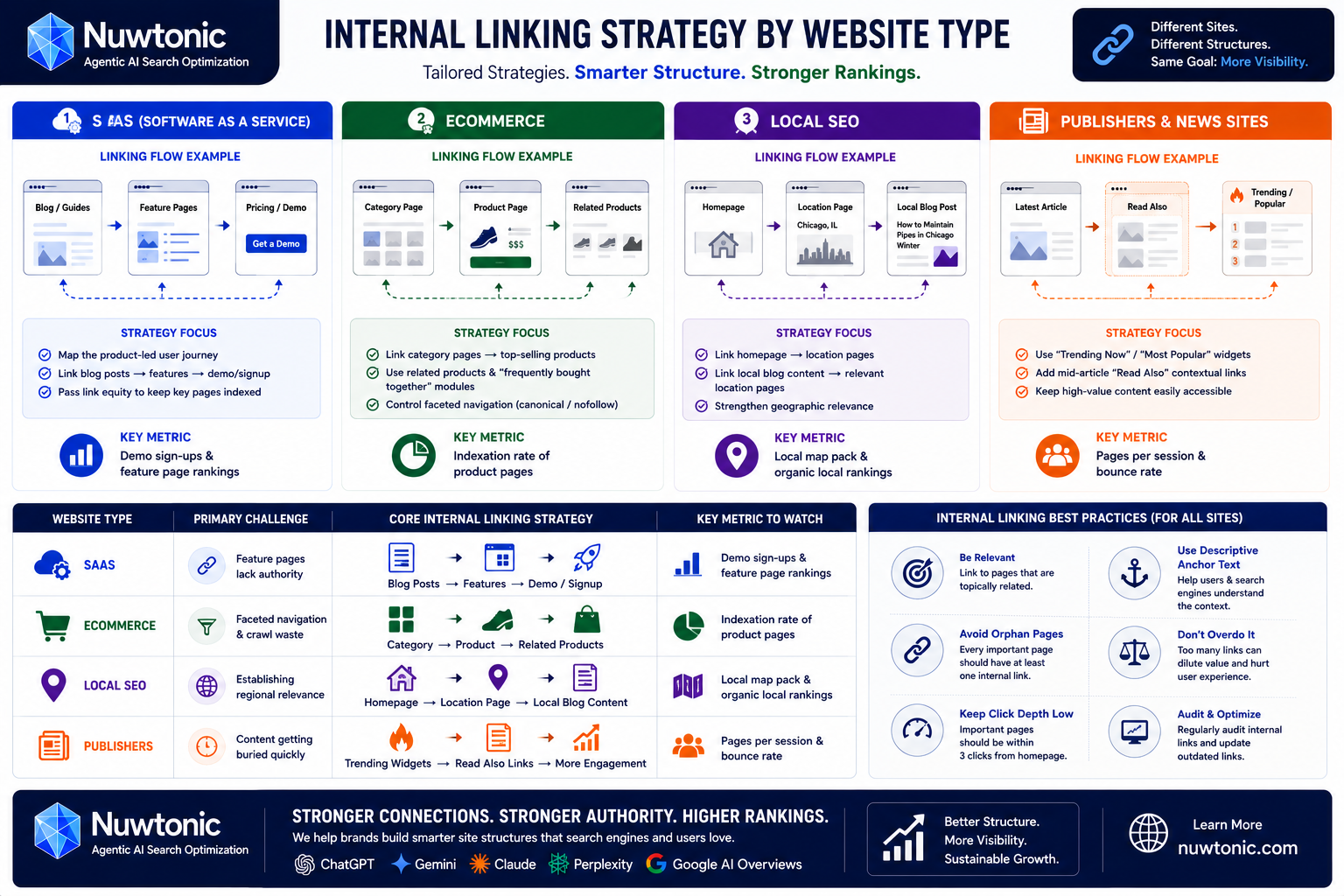
Different business models require completely different approaches to site architecture. What works for a local plumber will fail miserably for an enterprise ecommerce store. Let's look at how to tailor your approach.
SaaS (Software as a Service)
For SaaS websites, the internal linking strategy should focus on mapping the product-led user journey. Your blog posts should naturally link to your feature pages, which in turn should link to your sign-up or demo pages.
SaaS sites often struggle with keeping their feature pages indexed because they lack external backlinks. By linking to these commercial pages from high-traffic, educational blog posts, you pass the necessary link equity to help them rank.
Ecommerce
Ecommerce sites are notoriously difficult to manage because of faceted navigation (filters for size, color, brand, etc.) which can create millions of duplicate URLs.
Your strategy here must be strict:
• Link from category pages to top-selling product pages.
• Use "Related Products" or "Frequently Bought Together" modules to build automated, contextual internal links between products.
• Ensure your faceted navigation uses canonical tags or rel="nofollow" attributes so search engine crawlers do not waste your crawl budget on useless, filtered variations of product pages.
Local SEO
For local businesses, internal linking is all about establishing geographic relevance.
If you are a service business with multiple locations, you should have dedicated location landing pages. Your homepage should link to these location pages, and your local blog content (e.g., "How to Maintain Your Pipes in Chicago Winter") should link directly to the corresponding location page ("Chicago Plumbing Services"). This signals local relevance to both users and Google's local search algorithm.
Publishers and News Sites
Publishers deal with high-volume, fast-paced content creation. The main challenge here is preventing older, evergreen articles from getting buried deep within the archives.
Publishers should utilize:
• "Trending Now" or "Most Popular" Widgets: To keep high-value pages easily accessible (low click depth).
• Contextual "Read Also" Boxes: Inserted mid-article to guide readers to related stories, which dramatically increases user engagement and pageviews.
Website Type | Primary Challenge | Core Internal Linking Strategy | Key Metric to Watch |
|---|---|---|---|
SaaS | Feature pages lack authority | Link from educational blog posts to product/feature pages | Demo sign-ups & feature page rankings |
Ecommerce | Faceted navigation & crawl waste | Category-to-product linking; automated related-product links | Indexation rate of product pages |
Local SEO | Establishing regional relevance | Link local blog content to specific location landing pages | Local map pack & organic local rankings |
Publishers | Content getting buried quickly | "Trending" widgets and mid-article "Read Also" contextual links | Pages per session & bounce rate |
The Advanced Internal Linking Framework & Audit Checklist
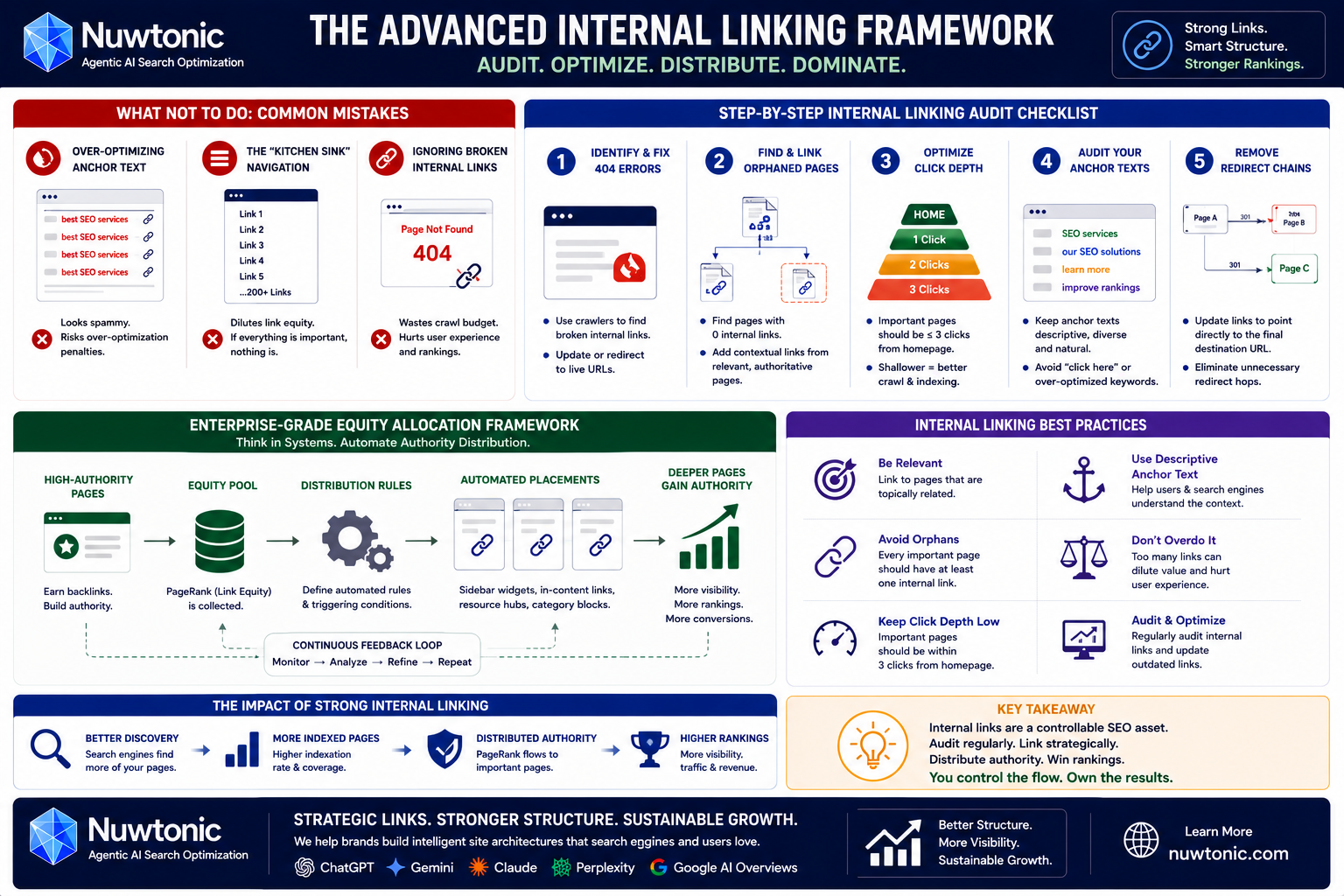
What NOT to Do: Common Mistakes I Constantly See
Before I show you how to build a perfect internal linking framework, let me share a few blunders I see SEO teams make daily:
Over-Optimizing Anchor Text: Using the exact same keyword in every single internal link. If you link to your SEO services page 500 times using the exact anchor text "best SEO services," you risk triggering over-optimization filters. Keep it natural. Vary your anchor text.
The "Kitchen Sink" Navigation: Putting 200 links in your main dropdown menu. This dilutes the link equity of every single link in that menu. If everything is important, nothing is.
Ignoring Broken Internal Links: Linking to 404 pages. This is a terrible user experience and wastes search engine crawl budget.
Step-by-Step Internal Linking Audit Checklist
To keep your site's architecture healthy, you should perform an internal linking audit at least once a quarter. Here is the checklist I use for my clients:
Identify and Fix 404 Errors: Use a crawler like Screaming Frog or Siteimprove to find any internal links pointing to broken pages and update them to live URLs.
Find and Link Orphaned Pages: Locate pages with zero internal links and add contextual links to them from relevant, high-authority pages.
Optimize Click Depth: Ensure that your most important commercial and content pages are no more than three clicks away from the homepage. A shallower crawl depth makes it much easier for search engine crawlers to prioritize your content.
Audit Your Anchor Texts: Ensure your anchor texts are descriptive, diverse, and natural. Avoid generic phrases like "click here" or "read more."
Remove Redirect Chains: If an internal link points to a page that redirects (301) to another page, update the link to point directly to the final destination URL.
Enterprise-Grade Equity Allocation Framework
If you are managing a site with tens of thousands of pages, manual linking is impossible. Enterprise SEO teams think about internal linking as a system of mathematical equity allocation.
They use automated rules to ensure PageRank flows efficiently. For example, they might set up a system where any blog post that reaches a certain threshold of external backlinks automatically gets featured in a "Featured Insights" sidebar across the entire site. This programmatically passes authority to deeper pages without requiring manual editor intervention.
By treating your internal links as a strategic asset rather than an afterthought, you align your site with the core Google ranking factors that drive long-term search visibility. It is one of the few aspects of SEO where you have 100% control—so make sure you use it wisely.
Frequently Asked Questions
How do internal links help Google understand my website structure?
Internal links establish a clear relationship between your pages. By linking sub-topics to a main pillar page, you create a visual and structural hierarchy (a content silo) that shows Google which pages are your core authority hubs and which are supporting articles.
What is "link equity" and how do internal links distribute it?
Link equity, often called "PageRank," is the ranking power a page accumulates from backlinks. Internal links act as conduits, allowing you to pass this accumulated authority from your strongest pages to your newer or lower-ranking pages, boosting their visibility.
Why are "orphaned pages" bad for SEO?
Orphaned pages have zero internal links pointing to them. Because search engine crawlers discover new content primarily by following links, they cannot easily find orphaned pages, leading to poor indexation and zero search visibility.
How many internal links should I put on a single page?
There is no exact magic number, but a good rule of thumb is 3 to 5 contextual internal links per 1,000 words of content. Avoid stuffing pages with too many links, as this dilutes the value of each link and hurts the user experience.
Does internal linking help with AI search results?
Yes. Modern AI search engines rely on structured relationships and entities to answer user queries. A clean internal linking structure helps AI models understand how different concepts on your site connect, increasing your chances of being cited in AI search overviews.
Should I use the same keyword in every internal link anchor text?
No. Using exact-match keywords for every single internal link can look manipulative and trigger search engine over-optimization filters. Instead, vary your anchor text naturally, using a mix of exact keywords, partial matches, and descriptive phrases.