Creating an SEO-friendly XML sitemap is less about listing every page on your website and more about giving search engines a clean, reliable map of the URLs that deserve to be crawled and indexed. I recommend treating it as a controlled indexability file: every included URL should be useful, canonical, accessible, and eligible to appear in search results.
TL;DR
• An XML sitemap helps search engines discover important URLs, but it does not guarantee rankings or indexation.
• Include only canonical, indexable URLs that return a successful HTTP status and are not blocked from crawling.
• Keep lastmod accurate, split large sites into logical sitemap files, and validate the XML before submission.
• Submit the sitemap in Google Search Console and reference it in robots.txt so search engines have more than one discovery path.
What an XML Sitemap Does for SEO
XML sitemap definition
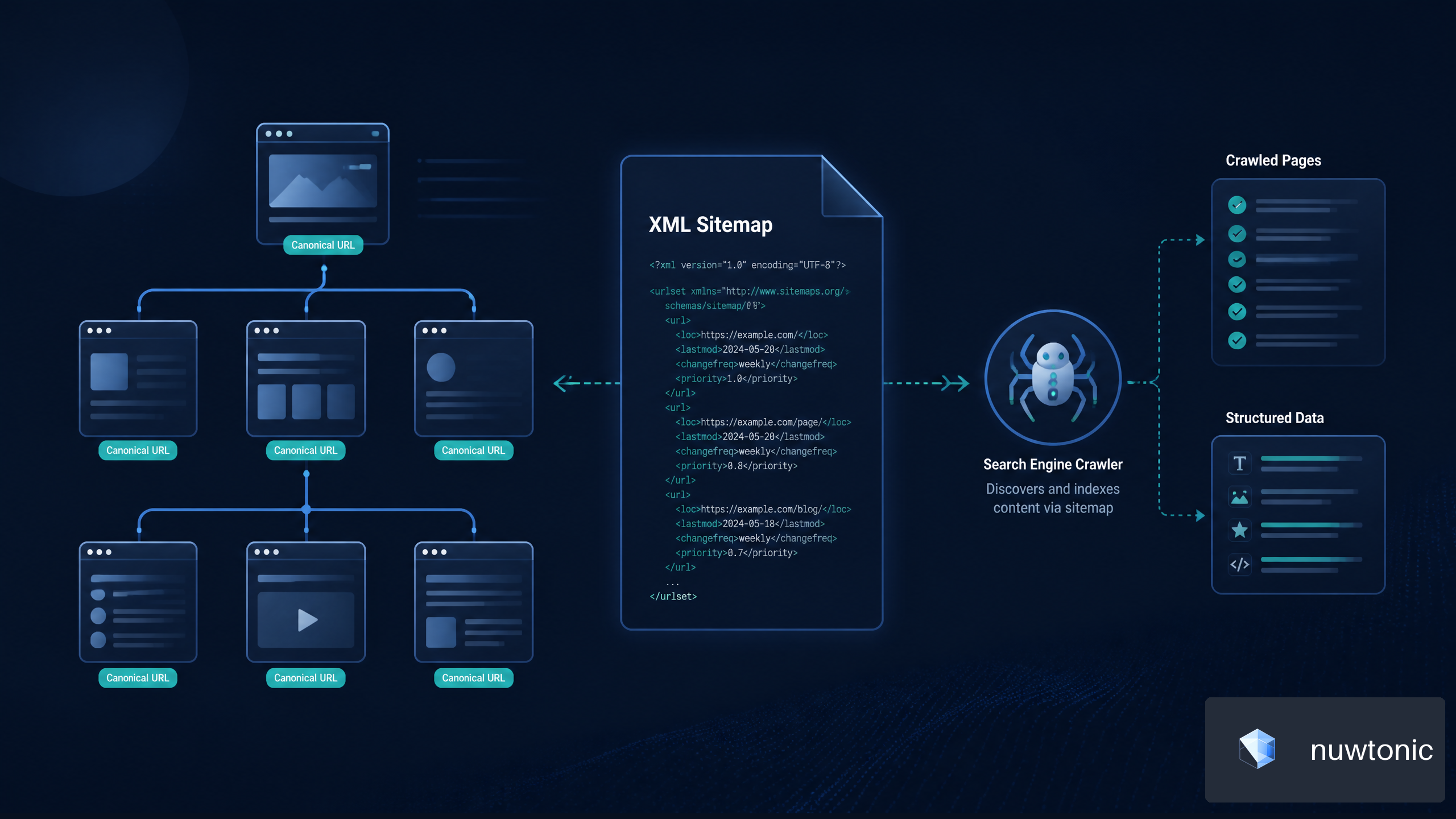
An XML sitemap is a machine-readable file that lists URLs you want search engines to discover. It usually lives at a URL such as https://example.com/sitemap.xml and follows the sitemap protocol.
It is not a replacement for strong internal linking, logical navigation, or indexable page content. Think of it as a structured inventory for crawlers, while internal links show how pages relate to one another. For a broader view of how page relationships affect discoverability, review the Importance of Internal Links for SEO.
When a sitemap is especially useful
Most websites benefit from an XML sitemap, but it becomes more valuable when search engines may have trouble finding pages through links alone.
• Large websites with thousands of product, category, article, or documentation pages
• New websites with limited external and internal link signals
• Ecommerce stores with products that are not consistently linked from category navigation
• JavaScript-heavy websites where crawlable links may be incomplete or delayed
• Websites with archived, multilingual, or media-rich content
A sitemap can improve URL discovery efficiency, especially when it is focused on pages that matter. It should not become a dumping ground for every URL your CMS can generate.
What an XML sitemap cannot do
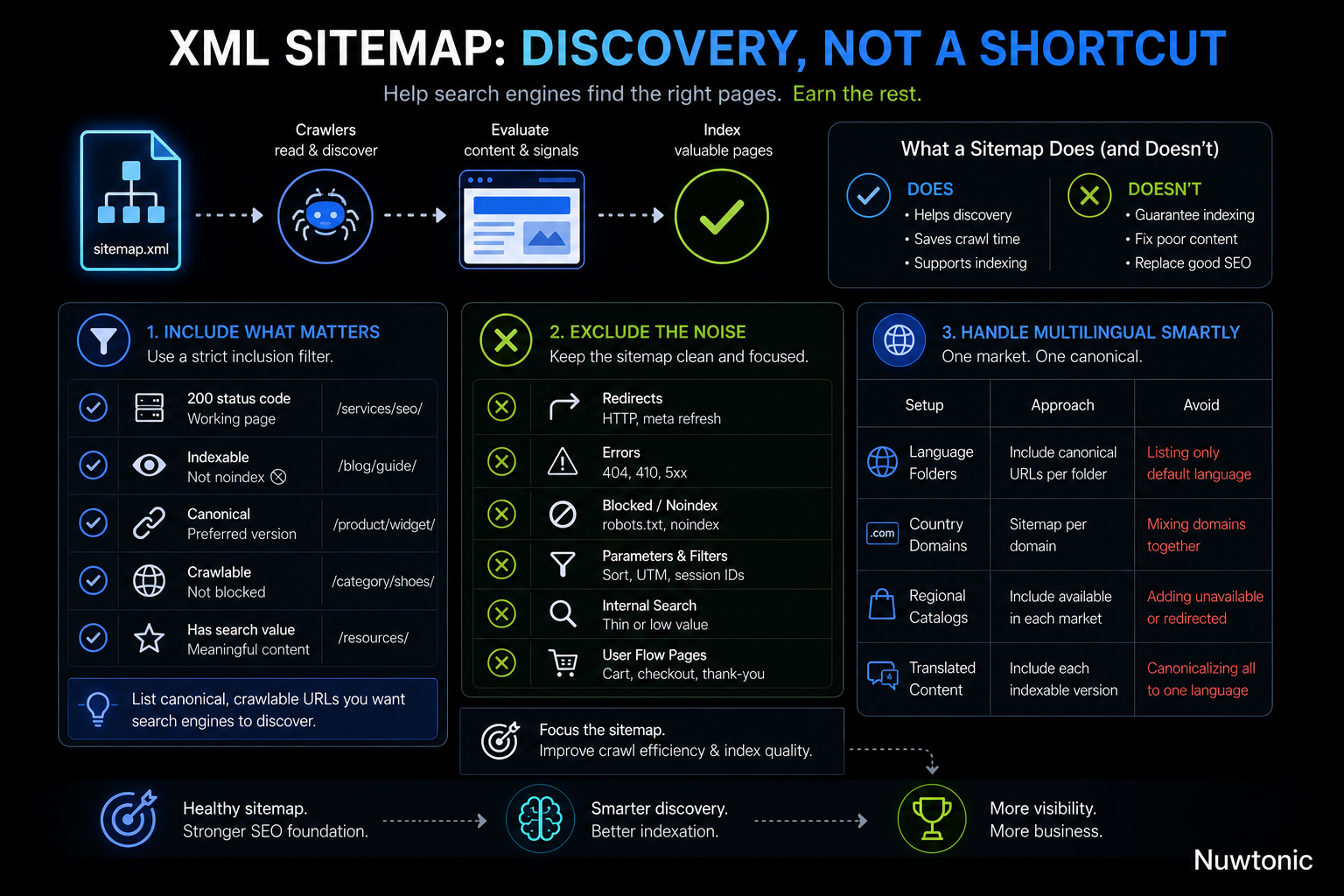
A sitemap is a crawl and discovery hint, not an indexing instruction. A URL can appear in a valid sitemap and still remain unindexed if the page is low quality, duplicated, blocked, unavailable, or not considered useful for search results.
A sitemap should support a healthy indexation strategy, not compensate for a broken one.
For example, placing 20,000 filtered category URLs into a sitemap will not make them valuable. If most pages show nearly identical product grids, search engines may still consolidate, ignore, or avoid indexing them.
Choose the Right URLs Before Generating the File
Use a sitemap inclusion filter
The most practical way to create an SEO-friendly sitemap is to define clear inclusion rules before generation. Google advises site owners to list canonical, crawlable URLs they want search engines to discover, rather than every URL available on a website. See Google Search Central’s sitemap guidance for canonical crawlable URLs for this core rule.
I recommend using the following filter for every candidate URL.
Inclusion requirement | Why it matters | Example |
|---|---|---|
Returns a 200 status code | Crawlers should reach a working page |
|
Is indexable | Non-indexable pages do not need sitemap discovery | A page without |
Is canonical | Avoids signaling duplicate URL versions | The preferred product URL |
Is crawlable | Search engines need access to fetch the page | Not blocked by |
Has search value | Keeps the sitemap focused on meaningful content | Core category or article page |
URLs to exclude from an XML sitemap
A raw CMS export often includes URLs that should never be submitted. Removing these URLs makes sitemap diagnostics more meaningful and reduces mixed signals.
• Redirects, including HTTP and meta refresh redirects
• 404, 410, 500, and other error URLs
• URLs blocked by robots.txt
• Pages using a noindex directive
• Duplicate URL variants with parameters, tracking tags, session IDs, or sorting rules
• Internal search results and thin filtered pages
• Paginated URLs when a stronger canonical version represents the primary page
• Staging, preview, account, cart, checkout, and thank-you pages
Ecommerce sites need extra care here. A store may generate URLs such as /shoes?color=black&size=9, /shoes?sort=price, and /shoes?utm_source=email. Unless those pages are deliberately indexable and canonicalized as unique landing pages, they usually create sitemap noise rather than search value.
Canonical URLs should usually be the only URLs listed
If multiple URLs resolve to substantially similar content, list only the preferred canonical version. For instance, if https://example.com/product/widget/ is canonical and https://example.com/product/widget?ref=homepage is a duplicate variation, only the canonical product URL belongs in the sitemap.
This rule has a useful side effect: your sitemap becomes a QA layer for canonicalization. If a sitemap crawl finds many URLs with canonical tags pointing elsewhere, the file is likely exposing duplicates.
Align multilingual URLs with canonical and hreflang rules
Multilingual and multi-regional sites need a deliberate approach. Each language or regional page can appear in a sitemap if it is independently indexable and canonical to itself.
Site setup | Sitemap approach | Avoid |
|---|---|---|
Separate language folders | Include canonical URLs from each folder | Listing only the default language |
Country-specific domains | Maintain sitemap files per domain | Mixing domains without a clear structure |
Regional product catalogs | Include pages available in each market | Adding unavailable or redirected products |
Translated articles | Include each indexable translation | Canonicalizing every translation to English |
In practice, organizing sitemap files by language can make crawl errors easier to isolate. If an entire Spanish sitemap starts returning errors, the problem is easier to identify than if every locale is mixed into one file.
Create the XML Sitemap File
Choose the right generation method
There are three common ways to create a sitemap. The best option depends on your CMS, publishing frequency, technical resources, and URL volume.
Method | Best for | Strength | Watch for |
|---|---|---|---|
CMS or SEO plugin | Small and medium sites | Automatic updates | Poor default filters or duplicate URLs |
Custom generator | Large or complex sites | Full control over rules | Requires development maintenance |
Manual XML file | Very small static sites | Simple and transparent | Easy to forget updates |
For a small brochure website with 30 stable pages, a manually maintained file can be sufficient. For a store with changing inventory, a custom generator or reliable CMS integration is usually safer because products can be added, removed, and updated automatically.
Use valid XML and absolute URLs
A standard sitemap uses XML with a <urlset> container and one <url> entry per page. Each URL should be absolute, including the protocol and domain.
<?xml version="1.0" encoding="UTF-8"?>
<urlset xmlns="http://www.sitemaps.org/schemas/sitemap/0.9">
  <url>
    <loc>https://example.com/services/technical-seo/</loc>
    <lastmod>2026-08-20</lastmod>
  </url>
  <url>
    <loc>https://example.com/blog/xml-sitemap-guide/</loc>
    <lastmod>2026-08-18</lastmod>
  </url>
</urlset>
XML sitemaps use the standard protocol defined by sitemaps.org, including the required XML namespace. This overview of the XML sitemap protocol structure is useful for understanding the required format.
Use `lastmod` carefully
The lastmod value should represent the last meaningful content change to the page, not the date when your sitemap generator ran.
A meaningful update may include:
• Publishing a new article
• Rewriting substantial product information
• Updating pricing, availability, specifications, or legal details
• Adding a major new section to a service page
A non-meaningful update may include:
• Changing a CSS file
• Rebuilding the sitemap without changing page content
• Updating analytics scripts
• Modifying a timestamp in the CMS without editorial changes
If every URL gets today’s date every time the sitemap is regenerated, search engines receive a freshness signal that may not reflect reality. Accurate lastmod values are more credible and more useful for sites that publish frequently.
Do not rely on `changefreq` and `priority`
The optional changefreq and priority fields are often misunderstood. They can be omitted for most modern sitemap implementations.
changefreq does not force crawlers to revisit a page every day, week, or month. priority does not raise rankings or guarantee that one page will be crawled before another. Your strongest sitemap signals are still clean loc entries, accurate lastmod dates, and a technically healthy site.
Handle Large Sites With Sitemap Indexes
Know the sitemap limits
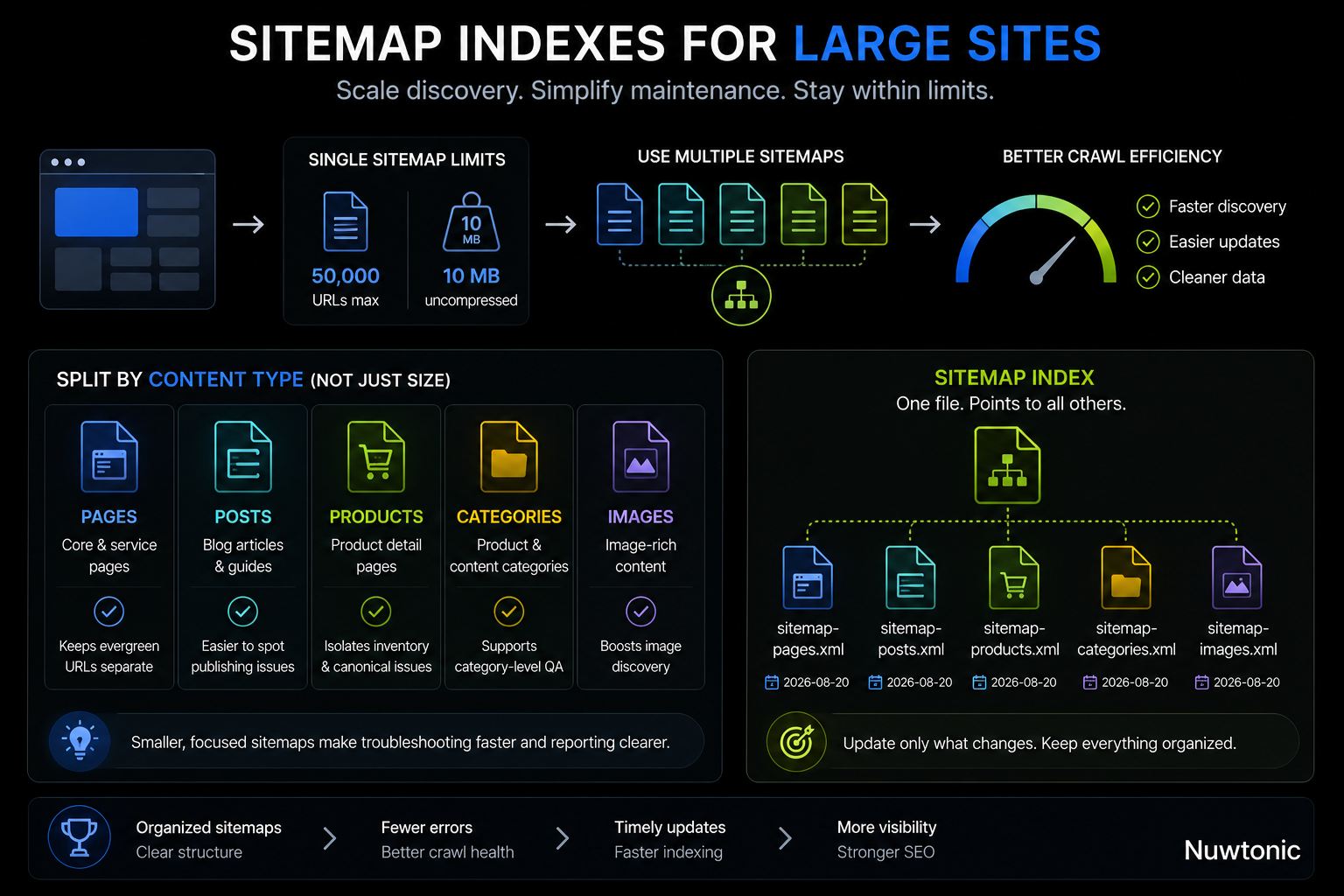
A single sitemap file can contain up to 50,000 URLs and must remain under 10 MB when uncompressed. Google documents these XML sitemap URL count and file-size limits.
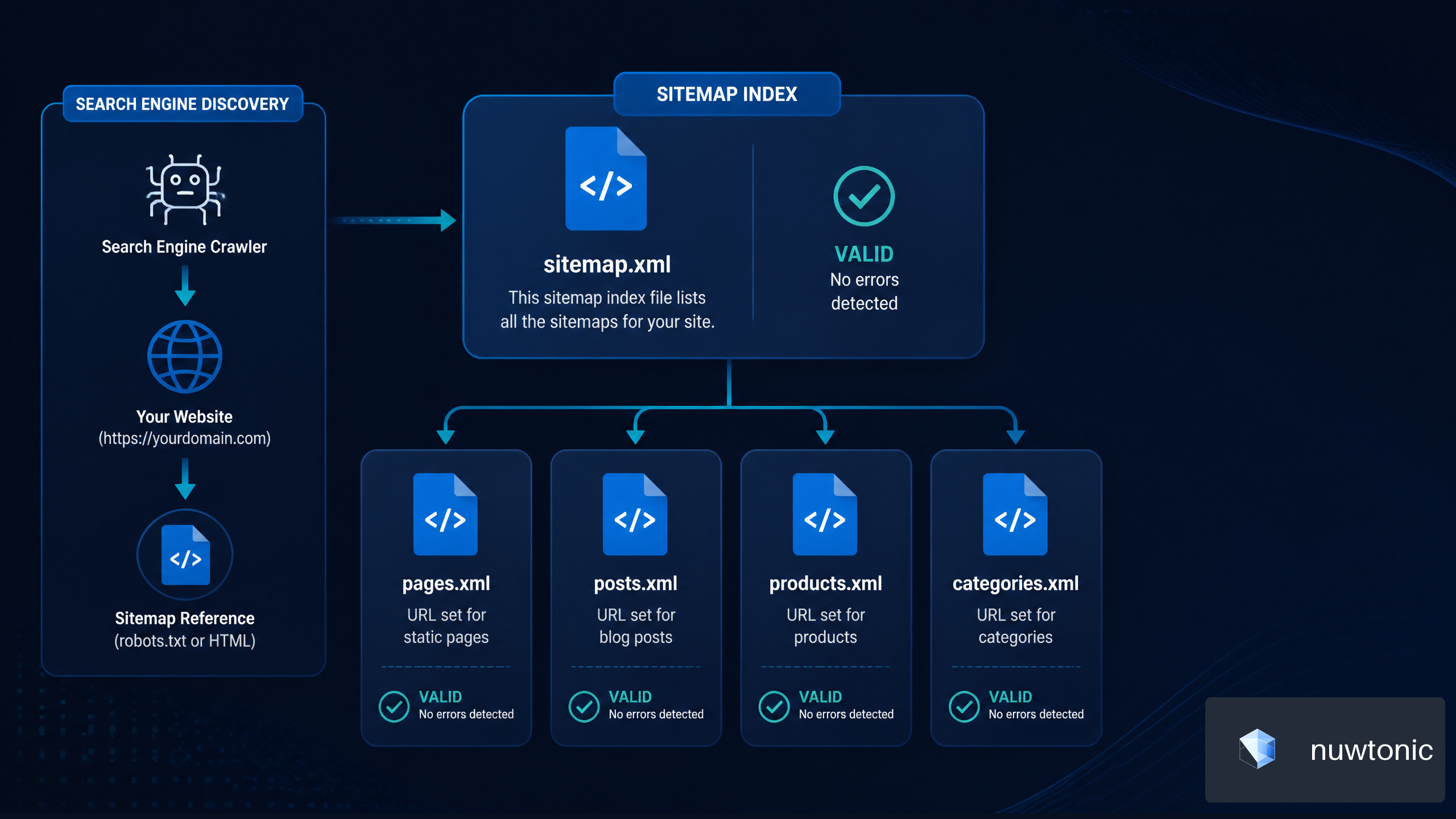
The same practical constraints apply to sitemap index files. If your website exceeds the limit, use multiple sitemap files and connect them with a sitemap index.
Split files for maintenance, not only size
Splitting sitemaps by content type or site section is useful even before you reach the maximum URL count.
Sitemap file | Suitable content | Operational benefit |
|---|---|---|
| Core pages and service pages | Separates evergreen URLs |
| Blog articles and guides | Makes publishing issues easier to spot |
| Product detail pages | Helps isolate inventory and canonical errors |
| Product and content categories | Supports category-level QA |
| Image-heavy content | Useful when image discovery needs extra support |
This structure helps when troubleshooting. If Search Console reports errors only in the product sitemap, you can inspect product feed logic instead of reviewing every URL across the site.
Create a sitemap index
A sitemap index points crawlers to multiple individual sitemap files.
<?xml version="1.0" encoding="UTF-8"?>
<sitemapindex xmlns="http://www.sitemaps.org/schemas/sitemap/0.9">
  <sitemap>
    <loc>https://example.com/sitemap-pages.xml</loc>
    <lastmod>2026-08-20</lastmod>
  </sitemap>
  <sitemap>
    <loc>https://example.com/sitemap-posts.xml</loc>
    <lastmod>2026-08-20</lastmod>
  </sitemap>
</sitemapindex>
Use a sitemap index when your site has more than one sitemap file, when content types update on different schedules, or when separate teams manage different parts of the website.
Validate, Publish, and Submit Your Sitemap
Validate before publishing
Validation should happen before sitemap submission, not after errors appear in Search Console. A valid file must be well-formed XML, use the correct namespace, contain properly encoded URLs, and resolve at a public URL.
A basic validation workflow looks like this:
Generate the sitemap from approved URL data.
Check that the XML file loads without browser or parser errors.
Confirm every sitemap URL uses HTTPS, the preferred hostname, and a canonical format.
Crawl a sample or full export to identify redirects, errors, blocked URLs, and
noindexpages.Confirm
lastmoddates match meaningful page updates.Publish the file and test the live sitemap URL.
For ongoing SEO maintenance, a sitemap review fits naturally into a wider Technical SEO Checklist, alongside redirects, canonical tags, crawl directives, and indexation checks.
Submit in Google Search Console and reference robots.txt
Use both discovery methods. They are complementary.
Open Google Search Console and select the correct property.
Go to Sitemaps.
Enter the sitemap URL or sitemap index URL.
Submit it and review the processing status.
Add a sitemap declaration to your
robots.txtfile.
Sitemap: https://example.com/sitemap.xml
Search Console gives you reporting and error visibility, while the robots.txt declaration helps crawlers locate the sitemap independently. Neither method replaces the other.
Update on a meaningful schedule
Your sitemap should update whenever indexable URLs are added, removed, redirected, or substantially changed. The right cadence depends on publishing activity.
Website type | Recommended update approach | Example |
|---|---|---|
Static business website | Update after major page changes | New service page or location page |
Active blog | Update automatically on publication | New article added weekly |
Ecommerce store | Update continuously or daily | Inventory and product catalog changes |
News publisher | Update rapidly after publication | Time-sensitive article publishing |
For frequently changing websites, automate sitemap regeneration as part of the publishing or deployment workflow. This reduces the risk of publishing a page without adding it to the sitemap, or retaining URLs that have already been removed.
Common XML Sitemap Errors and How to Fix Them
Redirects, blocked pages, and non-canonical URLs
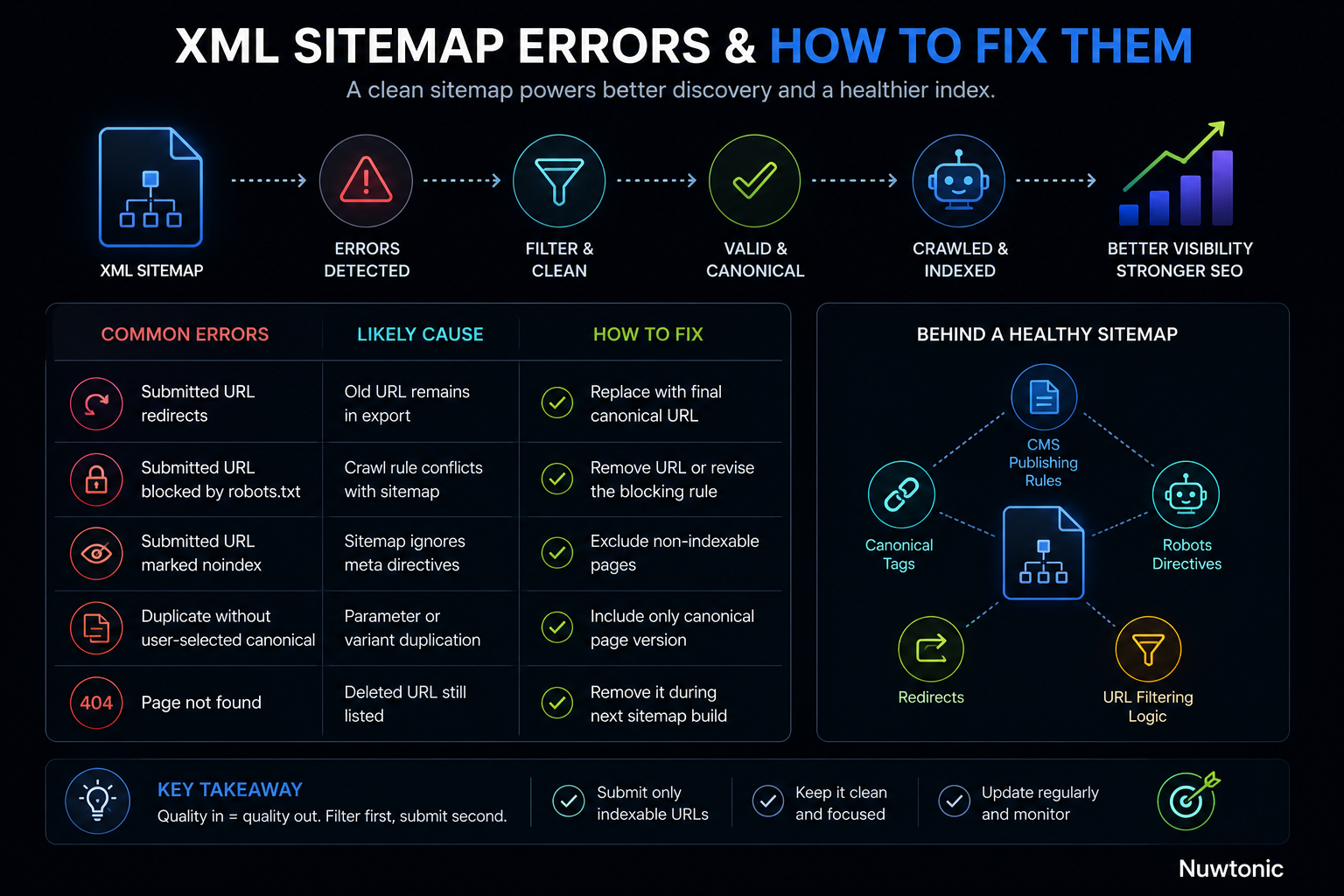
These errors usually indicate that the sitemap generator is drawing from raw URL data instead of an indexability filter.
Error | Likely cause | Fix |
|---|---|---|
Submitted URL redirects | Old URL remains in export | Replace with final canonical URL |
Submitted URL blocked by robots.txt | Crawl rule conflicts with sitemap | Remove URL or revise the blocking rule |
Submitted URL marked | Sitemap ignores meta directives | Exclude non-indexable pages |
Duplicate without user-selected canonical | Parameter or variant duplication | Include only canonical page version |
Page not found | Deleted URL still listed | Remove it during the next sitemap build |
A clean sitemap is often the output of several systems working together: CMS publishing rules, canonical tags, robots directives, redirects, and URL filtering logic.
CMS plugins that generate poor sitemap output
Plugins are convenient, but they should not be trusted blindly. Review their defaults after installation and after major theme, ecommerce, or CMS updates.
Check whether the plugin includes:
• Author archive pages with little unique value
• Attachment pages or media URLs that should not rank
• Product filter combinations
• Tag archives with thin or duplicated content
• URLs marked noindex
• Redirected pages left behind after URL changes
The right plugin is one that supports exclusion rules, canonical handling, automatic updates, and segmented sitemap files where needed. For content-level quality checks that help determine whether a page deserves indexation, use an On-Page SEO Checklist.
Image, video, and news sitemap extensions
Use specialized sitemap extensions only when the content type justifies them.
Extension | When to consider it | When not to use it |
|---|---|---|
Image sitemap | Image-heavy product, portfolio, recipe, or editorial pages | Ordinary pages with incidental images |
Video sitemap | Pages built around original video content | Embedded videos that are not the page focus |
News sitemap | Eligible publishers producing timely news content | Standard evergreen blog content |
These extensions add maintenance requirements. If the underlying metadata is incomplete or inaccurate, a simpler standard XML sitemap may be the better operational choice.
FAQ
What is the difference between a sitemap and a sitemap index?
A sitemap lists individual URLs. A sitemap index lists multiple sitemap files. Use one sitemap for smaller sites and a sitemap index when you need to separate URLs by section, language, content type, or volume.
How many URLs can an XML sitemap contain?
One sitemap file can include up to 50,000 URLs and remain under 10 MB uncompressed. If you exceed either limit, split the URLs into multiple sitemap files and reference them from a sitemap index.
Should every canonical URL be in the sitemap?
Not necessarily. Include canonical URLs that you want search engines to discover and potentially index. A canonical URL can still be excluded if it is thin, private, utility-focused, or intentionally outside your organic search strategy.
How often should I update an XML sitemap?
Update it when indexable URLs are created, removed, redirected, or meaningfully changed. A static site may only need occasional updates, while a large ecommerce or publishing site may need automated updates multiple times per day.
Sources/References
• developers.google.com — https://developers.google.com/search/docs/crawling-indexing/sitemaps/build-sitemap
• developers.google.com — https://developers.google.com/search/blog/2014/10/best-practices-for-xml-sitemaps-rssatom
• thestacc.com — https://thestacc.com/blog/create-xml-sitemap/