

TL;DR Summary & Key Takeaways
Many people overthink technical SEO; often, the simplest fixes yield the best results. This guide provides a comprehensive, field-tested technical SEO checklist designed to eliminate crawl errors, optimize indexation, and maximize your site's search visibility in 2026.
Key Takeaways
• Prioritize Crawlability First: If search engine bots cannot access your pages, your content might as well not exist.
• Strict Core Web Vitals Compliance: Maintain a Largest Contentful Paint (LCP) score of ≤ 2.5 seconds to meet Google's strict ranking benchmarks.
• Eliminate Redirect Chains: Up to 70% of indexing issues stem from broken internal links or messy redirect loops.
• Ensure Mobile-First Optimization: Ignoring mobile optimization is a mistake — if your site isn’t mobile-friendly, you’re already behind.
• Validate Schema Markup: Use structured data JSON-LD and test it rigorously to capture highly visible rich results.

Table of Contents
- Crawlability and Indexing: The Foundation of Search Visibility
- Speed, Core Web Vitals, and Performance Metrics
- Site Architecture, URL Normalization, and Security
- Advanced Technical Configurations: Schema and Internationalization
- Technical SEO Troubleshooting & Common FAQs
- Conclusion and Action Plan
Crawlability and Indexing: The Foundation of Search Visibility
Demystifying robots.txt and the Crawl Budget Myth
Look, too many practitioners treat crawl budget like some mystical currency that only enterprise sites need to worry about. The reality is much simpler. Your robots.txt file is the gatekeeper of your site's crawl efficiency. If you write conflicting directives, you waste precious bot resources on pages that do not matter.
Before writing a single line of code, let's look at what NOT to do. Do not block your entire site's assets (like CSS and JS files) in your robots.txt, as search engines need these to render your pages correctly. Also, ensure you do not block modern AI crawlers (such as Google's AI Overviews bot) unless you explicitly want to withhold your content from LLM-driven search experiences.
To manage your robots.txt effectively, adhere to these technical constraints:
• Keep the file size under 500 KB to prevent parser truncation.
• Explicitly declare the location of your XML sitemap at the bottom of the file.
• Use precise disallow directives for non-public directories (e.g., /wp-admin/ or /checkout/).
Sitemaps, Index Bloat, and Orphan Pages
Your XML sitemap should be a clean, curated map of your site's highest-value, indexable URLs. According to AIOSEO's technical SEO guide, XML sitemaps must exclude duplicate, redirected, or noindex pages to prevent crawl waste.
If you have thousands of low-value, thin, or duplicate pages indexed, you are suffering from index bloat. This dilutes your site's overall authority.
Another common structural failure is the existence of orphan pages — pages with absolutely zero internal links pointing to them. They remain invisible to crawlers unless they are listed in your sitemap. I recommend using crawler tools like Screaming Frog to run regular orphan page detection audits by cross-referencing your crawl data with your XML sitemaps and Google Search Console (GSC) API data.
Canonicalization vs. 301 Redirects: Making the Right Call
One situation I keep seeing is webmasters using canonical tags when they should be using 301 redirects, and vice versa. Let's make this simple. A 301 redirect is a permanent physical redirect that forces both the user and the bot to a new destination. A canonical tag is a hint to search engines, telling them which version of a near-duplicate page is the preferred "master" version.
Here is a quick decision matrix to help you choose the right method:
| Scenario | Recommended Solution | Why It Works | When It Fails |
|---|---|---|---|
| Permanent site migration or page consolidation | 301 Redirect | Transfers link equity directly and updates the index quickly. | If implemented in long, winding redirect chains. |
URL parameters for tracking (e.g., ?utm_source=) |
Canonical Tag | Consolidates ranking signals without altering the user experience. | If the content on both pages is fundamentally different. |
| Near-duplicate product variations (e.g., different colors) | Canonical Tag | Keeps all product variants accessible to users while avoiding duplicate indexation. | If Google chooses to ignore the hint due to poor implementation. |
Honestly, some people spend days arguing about this. Just remember: if the duplicate page serves no unique purpose for a human visitor, redirect it. If it must exist for user experience, canonicalize it.
Speed, Core Web Vitals, and Performance Metrics
Deciphering the Core Web Vitals Thresholds
Core Web Vitals consist of Largest Contentful Paint (LCP), First Input Delay (FID), and Cumulative Layout Shift (CLS). In 2026, these are non-negotiable performance standards. According to Google, a good Largest Contentful Paint (LCP) score is ≤ 2.5 seconds, while > 4.0 seconds is considered poor.
To prioritize your optimization efforts, PageSpeed Insights should be run on the top 10 worst-performing pages first. This targeted approach allows you to fix systemic template issues that affect thousands of pages simultaneously.
| Core Web Vitals Metric | Good (Pass) | Needs Improvement | Poor (Fail) |
|---|---|---|---|
| Largest Contentful Paint (LCP) | ≤ 2.5 seconds | 2.6 – 4.0 seconds | > 4.0 seconds |
| First Input Delay (FID) | < 100 milliseconds | 100 – 300 milliseconds | > 300 milliseconds |
| Cumulative Layout Shift (CLS) | < 0.1 | 0.1 – 0.25 | > 0.25 |
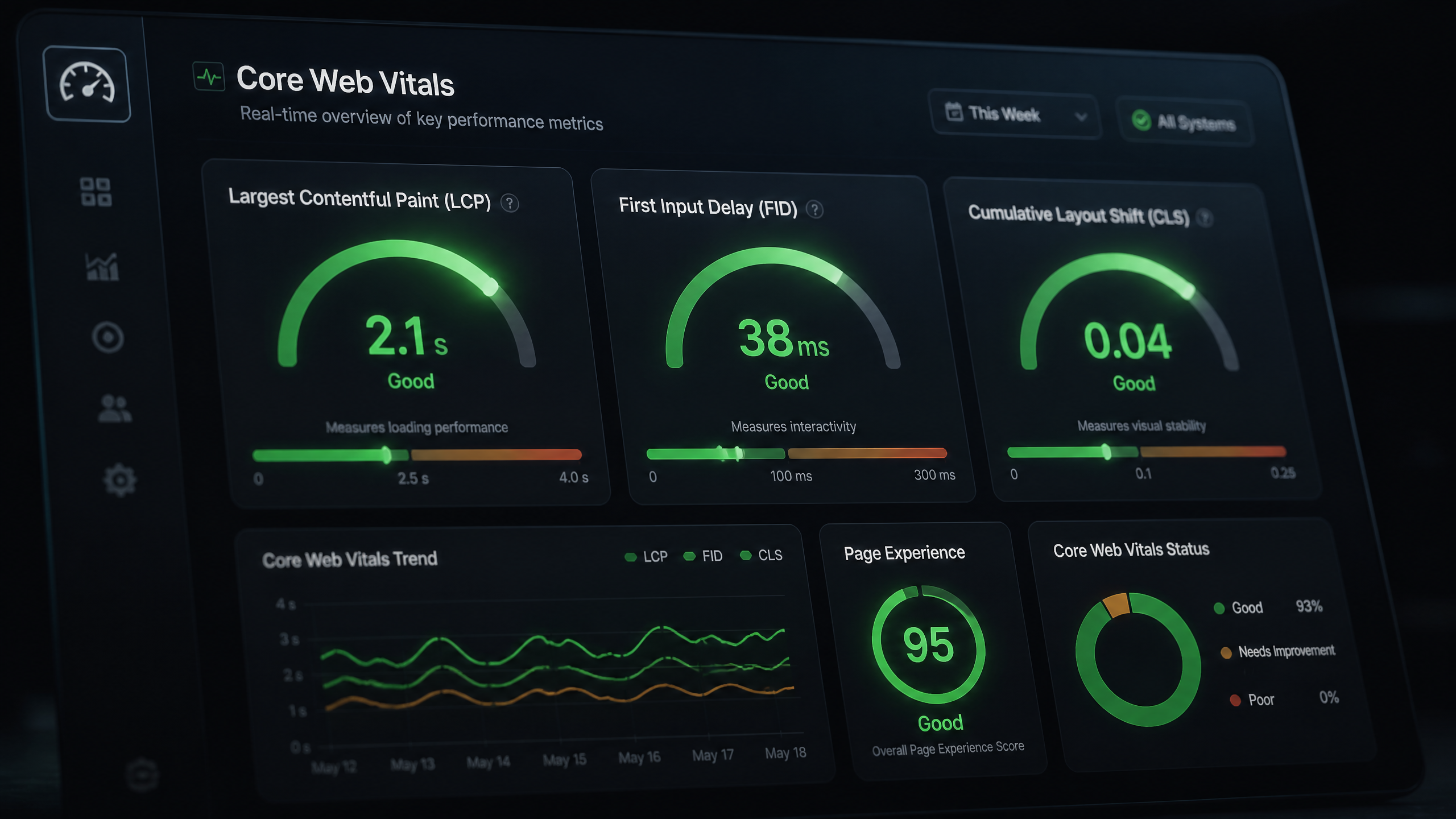
Image Optimization and Next-Gen WebP Delivery
I've seen sites struggle with site speed when a few adjustments to their images could have made a huge difference. According to BigDrop Inc's enterprise SEO analysis, image compression should use next-gen formats like WebP to reduce load times.
To optimize your media assets:
- Convert all legacy PNG and JPEG files to WebP or AVIF formats.
- Implement explicit
widthandheightdimensions on all image tags to prevent Cumulative Layout Shift (CLS). - Set a robust browser cache policy (e.g.,
Cache-Control: max-age=31536000) so repeat visitors do not have to download the same assets twice.
Tackling Render-Blocking Resources and DNS Resolution
According to CognitiveSEO's guide on technical optimization, render-blocking JavaScript and CSS should be minimized to improve server response time.
When a browser requests your page, it shouldn't have to wait for massive, non-critical scripts to load before displaying the above-the-fold content. Defer non-critical JavaScript, inline critical CSS, and benchmark your DNS configuration to ensure fast resolution and prevent crawl delays.
Consider this real-world scenario from a developer forum: a site's LCP was lagging at 4.2 seconds. By deferring non-critical JS and optimizing CSS delivery, they successfully reduced LCP to 2.1 seconds. This simple performance tune-up directly correlated with an 18% rise in organic traffic over the following two months.
Site Architecture, URL Normalization, and Security
Designing an Intuitive 3-Click Architecture
Your site's internal structure dictates how link equity flows and how easily search bots can index your content. According to BigDrop Inc, key content must be accessible in ≤ 3 clicks from the homepage for optimal site architecture.
If you bury your money pages deep within five or six levels of subdirectories, they will rarely get crawled, and they certainly won't rank. Keep your taxonomy flat, logical, and clean.
URL Normalization and Duplicate Content Management
URL normalization is the process of resolving multiple URL variations to a single, authoritative canonical version. A 2025 SEO Success guide states that duplicate content caused by www vs non-www or HTTP vs HTTPS must resolve to one canonical URL.
Look, if your site can be accessed via both example.com and www.example.com, or with and without trailing slashes, search engines will treat these as completely separate pages. This leads to severe duplicate content issues and splits your link equity in half.
Ensure your server configures permanent 301 redirects to enforce a single URL structure:
• Enforce HTTPS across all pages.
• Choose either the www or non-www version and redirect the other.
• Consistently append or remove trailing slashes across the entire site.
HTTPS and Mandatory SSL Compliance
A 2026 guide by OWDT states that HTTPS must be implemented on all pages with valid SSL certificates for security compliance. Google Search Console identifies indexing issues via the Pages report and flags security problems in its Security section. Do not let expired SSL certificates or mixed content errors (loading HTTP assets on an HTTPS page) trigger security warnings that scare away both users and search bots.
Advanced Technical Configurations: Schema and Internationalization
Structured Data Validation and Rich Results Eligibility
Schema markup acts as a direct translator for search engine bots, helping them understand the exact context of your content. A 2026 checklist by NoGood mandates that schema markup must cover articles, products, FAQs, local business info, events, and reviews.
However, simply adding the code isn't enough. Google’s Rich Results Test defines valid structured data as one that matches visible page content and contains no schema errors.
Before deploying any JSON-LD schema, run it through the validator. If you mark up a product price or review rating that isn't actually visible to a human user on the page, you risk a manual action for spammy structured data.
Managing International SEO with Reciprocal Hreflang Tags
If your website targets multiple languages or regions, hreflang is your best friend—and your potential worst nightmare if misconfigured. A technical SEO checklist requires hreflang tags to be reciprocal and self-referencing on all localized pages.
This means if page A (English) points to page B (Spanish) via an hreflang tag, page B must point back to page A. If this bidirectional link is broken, Google will ignore the tags entirely.
To illustrate, a multi-regional e-commerce client once had non-reciprocal hreflang tags across their product catalog, causing their UK pages to rank in US search results. After executing a recursive script to ensure every localized page contained a self-referencing and reciprocal tag, their localized search traffic increased by 27% in three months.
Log File Analysis: Uncovering Bot Behavior
Log file analysis is a technical SEO best practice to detect crawl spikes and server errors not visible in GSC. While Google Search Console provides aggregate data, your server log files show you the raw, unfiltered truth of exactly when and how Googlebot interacts with your site.
By analyzing your logs, you can:
• Identify high-frequency crawl paths.
• Spot 404 and 500-level errors in real-time.
• Discover which low-value parameters are wasting your crawl budget.
• Track how often search bots visit newly updated content.
Technical SEO Troubleshooting & Common FAQs
Frequently Asked Questions
How do I check if my site is crawlable?
The easiest way is to use the "Inspect URL" tool inside Google Search Console. Alternatively, you can run a site crawl using Screaming Frog or check your server log files to see if Googlebot is successfully requesting and receiving 200 OK status codes.
What is the ideal Core Web Vitals score for ranking?
To pass Google's thresholds, you should aim for an LCP of ≤ 2.5s, an FID of < 100ms (or INP < 200ms), and a CLS of < 0.1 on at least 75% of your page loads.
When should I use a 301 redirect vs. a canonical tag?
Use a 301 redirect when you want to permanently send users and bots to a new URL (e.g., after deleting or merging a page). Use a canonical tag when multiple URL variations need to exist for user utility, but you only want one version indexed.
How do I fix orphan pages in my site?
First, identify them using a crawler that cross-references GSC and sitemap data. Once found, either add relevant internal links from high-authority pages to integrate them into your site architecture, or redirect/delete them if they serve no value.
Is robots.txt blocking important pages for AI crawlers?
Check your robots.txt for user-agent directives targeting bots like GPTBot, Google-Extended, or ClaudeBot. If you want your content to appear in AI-generated search summaries, ensure these bots are not blocked.
How often should I update my XML sitemap?
Your sitemap should update dynamically in real-time or daily whenever new indexable pages are published or old ones are removed. Most modern CMS plugins handle this automatically.
Conclusion and Action Plan
Your Next Steps
Technical SEO doesn't have to be an overwhelming chore. By following this structured technical SEO checklist, you systematically eliminate the friction points that prevent search engines from ranking your site.
Start by auditing your foundational crawlability and indexation settings. Once your robots.txt, sitemaps, and canonicals are clean, shift your focus to performance—optimizing your Core Web Vitals, compressing images to next-gen WebP, and securing your entire site with HTTPS.
Sources and References
• The HOTH's technical checklist study (70% of indexing issues stem from broken internal links/redirects)
• Wordtracker's foundational checklist (Pagination and structural optimization standards)
• BigDrop Inc's enterprise SEO analysis (Next-gen image formatting and 3-click architecture principles)
• CognitiveSEO's guide on technical optimization (Render-blocking resources and server response optimization)


