

If you have spent more than five minutes searching for "technical seo types," you have probably run into a wall of confusing terminology. Let me clear the air immediately: technical SEO itself is actually one of the main types of SEO—sitting alongside on-page, off-page, and local SEO. It is not a category that splits into separate, competing "types." Instead, when we talk about technical SEO types, we are really talking about the core technical components, factor groups, and infrastructure layers that keep your website visible to search engines.
Think of your website as a high-performance sports car. Your content is the sleek exterior and the comfortable interior. Your off-page SEO is the reputation of the brand. But technical SEO? That is the engine, the transmission, and the electrical system. If the engine is seized, it does not matter how beautiful the leather seats are—the car is not going anywhere.
Many tutorials make technical SEO seem like some dark art reserved for developers who speak fluent binary. It isn't. Breaking it down into manageable steps usually reveals simpler solutions. Let's strip away the fluff and look at the actual structural pillars you need to master.

Demystifying the "Technical SEO Types" Misconception
Technical SEO vs. On-Page and Off-Page SEO
To understand why technical SEO is a distinct discipline, we have to look at how it differs from the other facets of search engine optimization. Technical SEO focuses entirely on the backend and infrastructure of your website—how search engines access, crawl, interpret, and index your pages. On-page SEO deals with the visible content and keyword optimization, while off-page SEO handles external signals like backlinks.
Here is a quick breakdown to help you visualize where the boundaries lie:
SEO Type | Primary Focus | Key Elements | Impact on Search Engines |
|---|---|---|---|
Technical SEO | Backend & Infrastructure | Crawlability, indexability, site speed, security, schema markup, redirects | Determines if search engines can find, render, and index your content |
On-Page SEO | Content & HTML | Keywords, headings, meta tags, image alt text, internal linking | Helps search engines understand the relevance and value of your pages |
Off-Page SEO | Authority & Reputation | Backlinks, brand mentions, social signals, digital PR | Signals trust, popularity, and authority to search engines |
The Core Pillars: Components, Not "Types"
When practitioners refer to "technical SEO types," they are pointing to the specialized disciplines within technical optimization. You cannot simply focus on one and ignore the others. If a page takes eight seconds to load, even the best content may not rank because search engines cannot serve it effectively to users.
To build a search-compliant website, you must address several specialized technical groups:
• Discovery and Access: Ensuring search bots can find your pages.
• Indexation Control: Directing search engines on which pages to display and which to ignore.
• Site Architecture: Designing a clean, logical URL and folder hierarchy.
• Performance & Experience: Optimizing page speed and mobile rendering.
• Semantic Clarity: Using structured data to explain your content to search engines and AI models.
Pillar 1: Discovery and Access (Crawlability & Indexability)
Crawlability: Opening the Door for Search Bots
Look, if search engines cannot crawl your website, nothing else matters. Crawlability is the absolute baseline of technical SEO. It refers to a search engine's ability to access and navigate the pages on your site without hitting dead ends or roadblocks. Bots like Googlebot discover your pages by following links—both internal links and external backlinks.
If your internal linking structure is a chaotic mess, or if you have critical crawl errors, search bots will abandon your site before finding your high-value pages. In my experience, crawl budget—the number of pages a search engine bot decides to crawl on your site during a given timeframe—is easily wasted on low-value, duplicate, or broken URLs. What you shouldn't do is leave your crawl path to chance.
Indexability: Earning a Place in the Search Index
Once a search bot crawls your page, the next step is indexability. This is the process of getting those crawled pages stored in the search engine's database so they can actually appear in search results. Crawling does not guarantee indexing.
To control indexability, we use specific directives like the noindex tag. This tag tells search engines, "You can look at this page, but do not show it to searchers." This is incredibly useful for utility pages like thank-you pages, internal search results, or admin portals.
Robots.txt and XML Sitemaps: The Traffic Control System
Your robots.txt file and XML sitemaps act as the traffic control system for search bots.
Robots.txt: This simple text file lives at the root of your domain and tells search engines which folders or pages they are allowed to crawl—or forbidden from crawling. A single misplaced character here can de-index your entire site. I once saw a SaaS brand drop out of the index entirely because a developer left a
Disallow: /directive active after a staging migration.XML Sitemaps: This is a structured XML file that explicitly lists the important pages of your site, serving as an invitation for crawlers to visit them. Once generated, you submit this file directly through Google Search Console or Bing Webmaster Tools to streamline discovery.
Pillar 2: Site Architecture and URL Hygiene
Designing an SEO-Friendly Site Structure
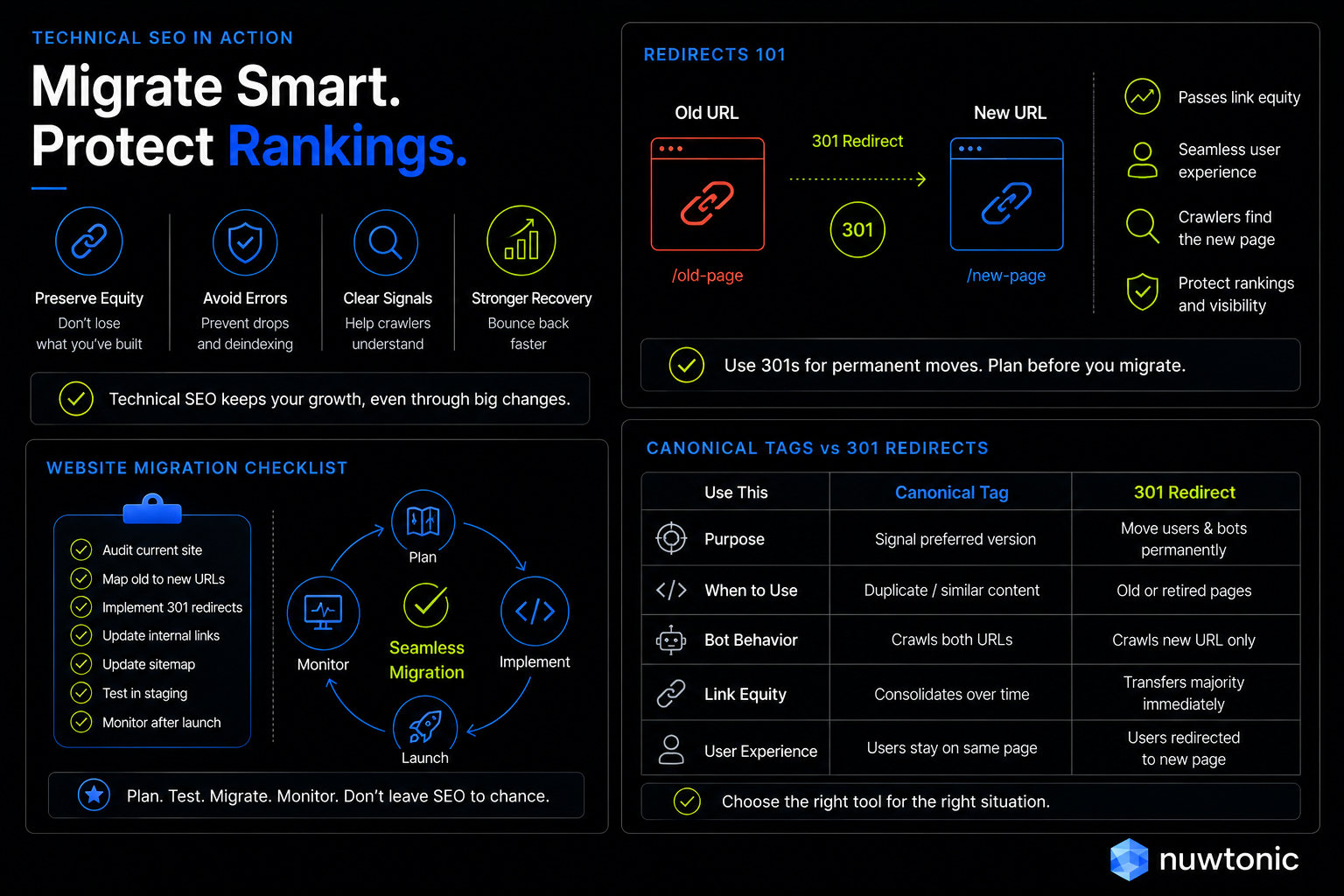
Your site architecture is the logical hierarchy of your website. A flat architectural structure—where any page can be reached within three clicks or fewer from the homepage—makes it incredibly easy for search engines to distribute link equity and crawl your content efficiently.
Your URL structure should mirror this logical hierarchy. Clean, descriptive URLs are far superior to dynamic, parameterized ones. For example, /blog/technical-seo-types is infinitely better than /index.php?id=9823&cat=seo. Clean URLs help both users and search engines instantly understand what a page is about before they even click.
Canonicalization and Redirect Management
Duplicate content is a silent killer for large websites, especially e-commerce platforms with thousands of product variations. If you have multiple URLs displaying identical or highly similar content, search engines won't know which version to rank, diluting your organic performance.
This is where canonical tags and redirects come in:
• Canonical Tags (rel="canonical"): This HTML element tells search engines which version of a page is the master copy. It consolidates ranking signals to the preferred URL without redirecting the user.
• 301 Redirects: These are permanent HTTP redirects that automatically send users and search bots from an old, outdated URL to a new, active one—while preserving the vast majority of the original ranking signals.
Let's compare when to use each approach:
Scenario | Correct Method | Why? |
|---|---|---|
You have tracking parameters on a URL (e.g., | Canonical Tag | Keeps the user on the parameterized page but indexes the clean URL. |
You permanently moved an old blog post to a new URL | 301 Redirect | Sends users and bots to the active page, preventing a 404 error. |
You have a temporary landing page for a seasonal promo | 302 Redirect | Temporary redirect that tells search engines to keep the original URL indexed. |
You have utility pages with zero search value (e.g., checkout) | Noindex Tag | Prevents thin, non-valuable pages from cluttering the search index. |
Pillar 3: Performance, Mobile, and Security Standards
Core Web Vitals and Site Speed
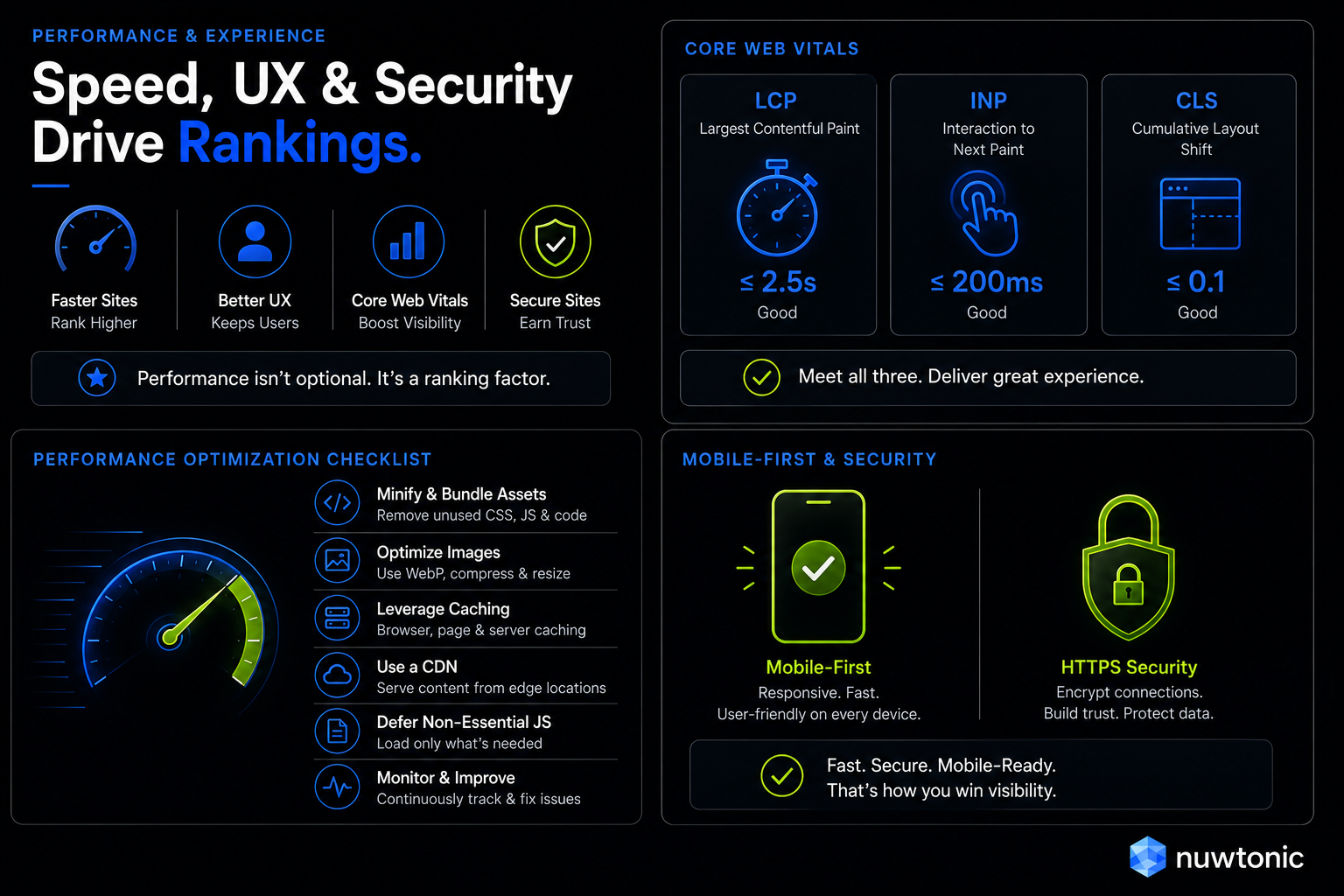
Most businesses overlook the importance of site speed—fixing it can lead to immediate improvements in user engagement and rankings. Google has made it clear that page speed and user experience are direct ranking factors, quantified through a set of metrics called Core Web Vitals.
These metrics measure three specific aspects of user experience:
• Largest Contentful Paint (LCP): Measures loading performance. The main content of your page should load within 2.5 seconds of the page starting to load.
• Interaction to Next Paint (INP): Measures page responsiveness to user inputs (like clicks or key presses). A good score is 200 milliseconds or less.
• Cumulative Layout Shift (CLS): Measures visual stability. Pages should maintain a CLS score of 0.1 or less to prevent unexpected layout shifts.
To hit these thresholds, technical SEO specialists often focus on minifying HTML, CSS, and JavaScript—which removes unnecessary characters and whitespace to reduce file sizes—compressing images, and leveraging browser caching.
Mobile-First Indexing and Responsive Design
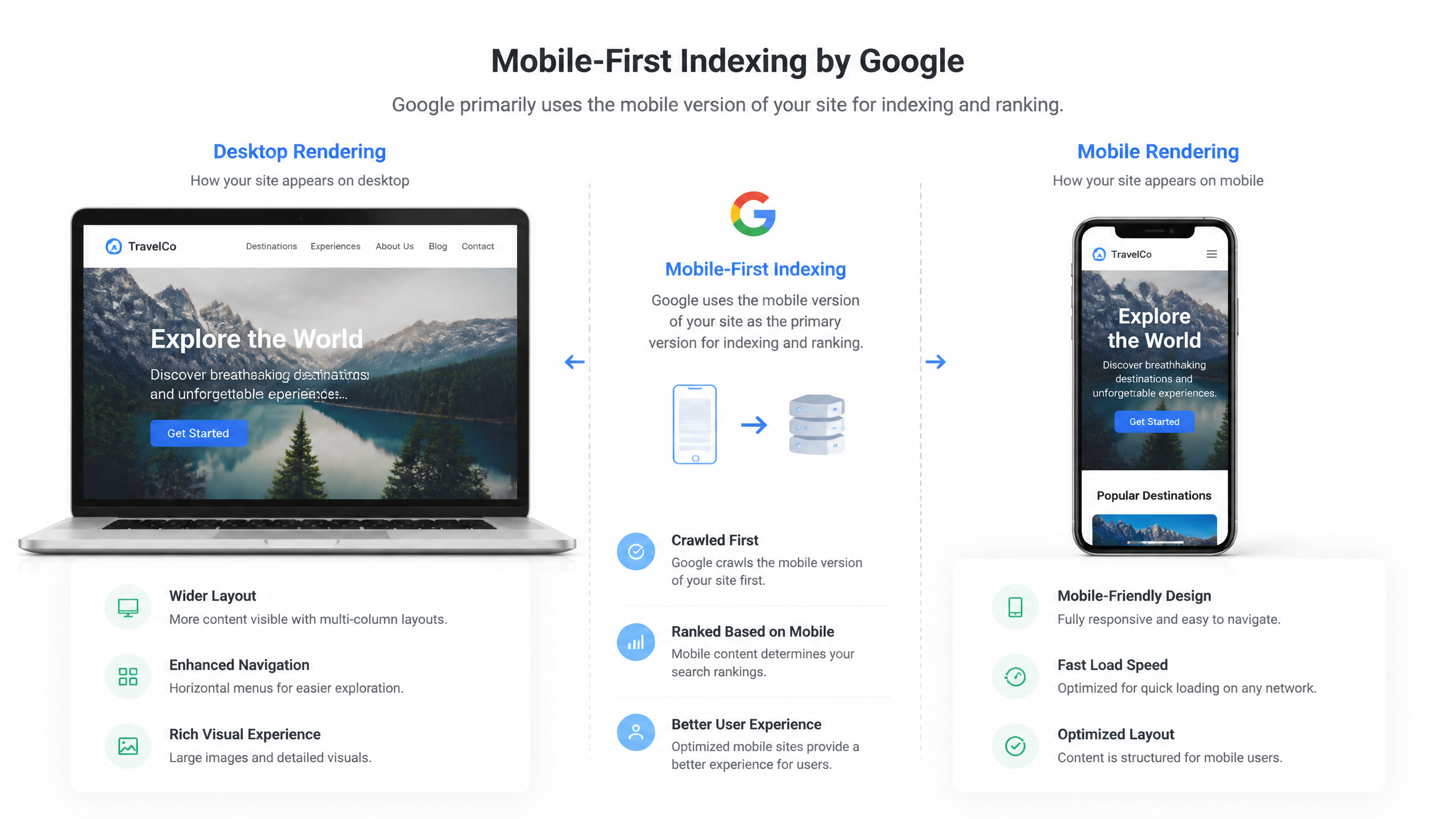
We live in a mobile-first world. Google now uses mobile-first indexing for all websites, meaning the mobile version of your site is the baseline for how Google determines your rankings. If your site has a responsive design that adapts seamlessly to any screen size, you are in good shape. If your mobile site has less content, broken menus, or slow load times compared to your desktop site, your overall rankings will suffer.
HTTPS and Modern Site Security
Security is a non-negotiable ranking signal. Running your site on HTTPS—secured by an SSL certificate—is a baseline requirement for modern search. It encrypts the connection between the user's browser and your server. Insecure HTTP sites are flagged as "not secure" by modern browsers, destroying user trust and negatively impacting your crawl behavior and search visibility.
Pillar 4: Advanced Optimization (Structured Data & Rendering)
Schema Markup and AI Search Eligibility
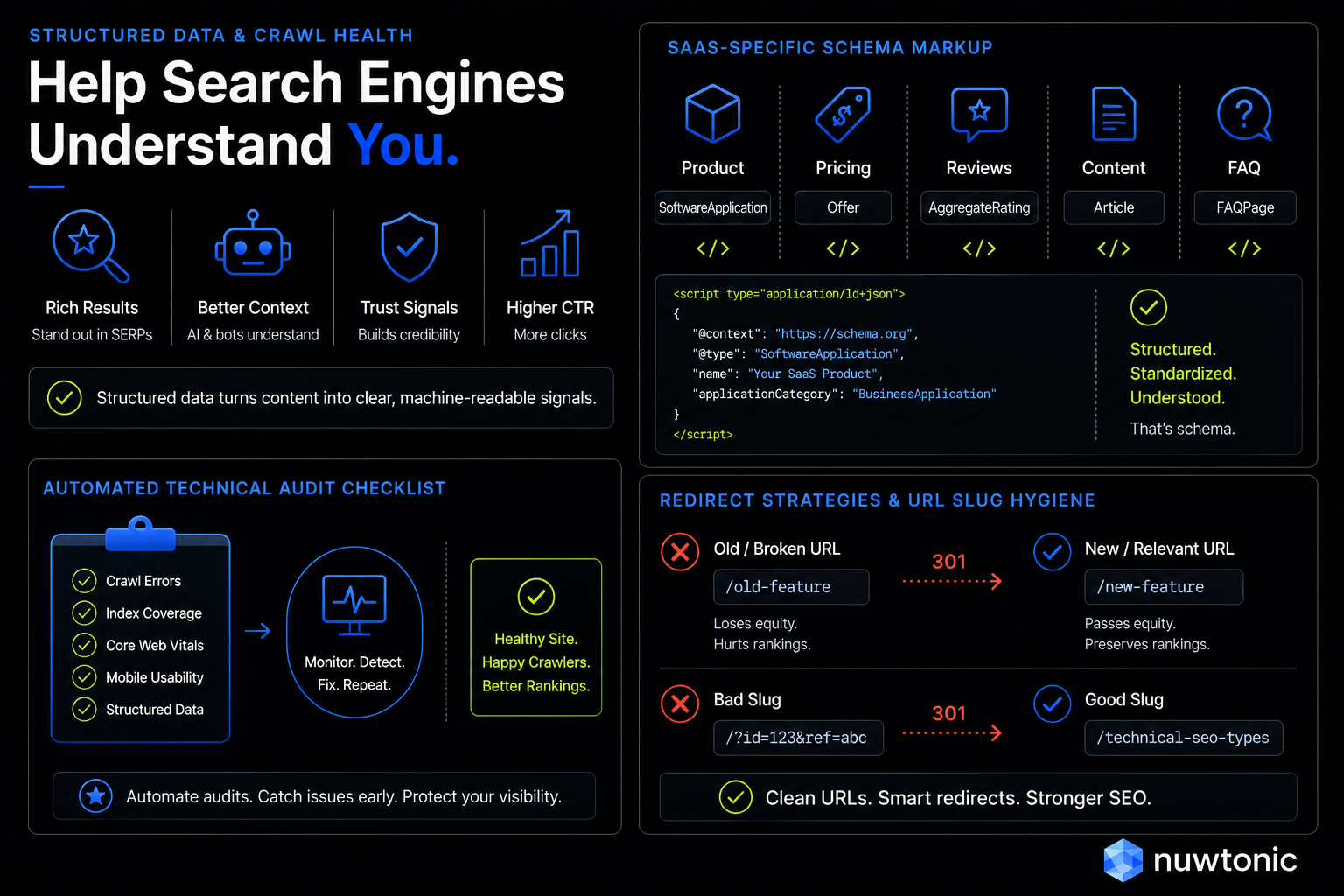
Structured data, implemented via Schema.org vocabulary, is a standardized code format that you add to your pages to help search engines understand your content. Think of it as translating your human-readable text into a structured database format that search bots—and modern AI search engines—can easily parse.
Using schema markup allows you to qualify for rich results, such as star ratings, product prices, event dates, and FAQ dropdowns directly in the search results. Furthermore, as search engines evolve to provide AI-generated answers, having structured, unambiguous data makes your site highly eligible to be cited as an authoritative source.
JavaScript Rendering and Crawl Budget
If your website relies heavily on modern JavaScript frameworks (like React, Angular, or Vue), you need to be extremely careful with how your content is rendered.
What you shouldn't do is rely entirely on client-side rendering without a fallback. When a search bot crawls a JavaScript-heavy site, it may not render the JavaScript immediately because rendering requires significant computational power. Googlebot will often defer rendering JavaScript until resources are available. If your links and content are hidden behind unrendered JavaScript, Google won't see them during the initial crawl, which can severely delay indexing. Implementing server-side rendering (SSR) or pre-rendering ensures that search engines receive fully rendered HTML right out of the gate.
Executing a Technical SEO Audit: A Prioritized Framework
Phase 1: Critical Crawl and Index Fixes
When conducting a technical SEO audit, always prioritize issues that completely block search engines from accessing your content. There is no point in optimizing your image sizes if search engines cannot index the page to begin with.
Check GSC for Crawl Errors: Look for 404 errors, server errors (5xx), and pages blocked by robots.txt.
Review Indexation Status: Use the "Page Indexing" report in Google Search Console to see which pages are excluded and why.
Audit Redirect Chains: Ensure your redirects go directly from Point A to Point B. Avoid redirect chains—where URL A redirects to B, which redirects to C—as they waste crawl budget and slow down your site.
Phase 2: Performance and User Experience Polish
Once you have secured your crawlability and indexability, shift your focus to user experience and structured data.
Test Core Web Vitals: Use PageSpeed Insights to identify specific scripts or images that are delaying your LCP or INP.
Verify Mobile Usability: Ensure there are no elements overflowing the screen or text that is too small to read on mobile devices.
Validate Schema Markup: Use Google's Rich Results Test tool to ensure your structured data is error-free and eligible for rich snippets.
Technical SEO Frequently Asked Questions
What is the difference between crawlability and indexability?
Crawlability refers to whether a search engine bot can discover and access a page on your website. Indexability refers to whether that page is allowed to be analyzed, stored, and displayed in the search engine's index for searchers to find. A page must be crawlable before it can be indexed, but being crawled does not guarantee it will be indexed.
How do I choose between a canonical tag, a 301 redirect, and a noindex tag?
Use a 301 redirect when you want to permanently send users and search engines to a new URL and deprecate the old one. Use a canonical tag when you have multiple active URLs with similar content (like product filters) and want to consolidate their ranking power into one main URL. Use a noindex tag when you want a page to remain active for users (like a landing page or user dashboard) but do not want it appearing in public search results.
What are the target thresholds for Core Web Vitals?
To pass Google's Core Web Vitals assessment, you should target an LCP (Largest Contentful Paint) of 2.5 seconds or less, an INP (Interaction to Next Paint) of 200 milliseconds or less, and a CLS (Cumulative Layout Shift) of 0.1 or less for at least 75% of your page visits.
Summary and Key Takeaways
TL;DR Summary
Technical SEO is not a single task; it is the foundational infrastructure that allows search engines to discover, crawl, render, and index your content. By breaking it down into manageable pillars—crawlability, indexability, site architecture, performance, and structured data—you can systematically remove the roadblocks that prevent your high-quality content from ranking. Focus on the critical crawl and index issues first, then optimize your performance metrics to secure a competitive edge in search results.
Sources and References
• Google Search Central documentation on crawling, indexing, and search guidelines.
• Schema.org community standards for structured data markup.
• W3C web performance and accessibility standards.


