
Now, let's get into it: this on page seo checklist is about what you control inside the page itself—the title tag, meta tags, headings, copy, images, schema markup, internal linking, and formatting. It is not a technical SEO guide about crawling, indexing, Core Web Vitals, or server configuration, and it is not an off page SEO guide about backlinks or PR. That distinction matters because too many articles blur the lines and leave people fixing the wrong problems.
TL;DR Summary
On page SEO is the practice of optimizing the visible content and HTML elements on a page so search engines and users can understand, trust, and choose it.
If you only have 15 minutes, do these first:
Write a unique title tag under roughly 60 characters and put the primary keyword near the front when it reads naturally. Neil Patel's 2026 guidance still aligns with that practical limit.
Write a unique meta description under 160 characters with a clear benefit and CTA. It is not a ranking factor, but it absolutely affects CTR.
Use exactly one H1 containing the primary keyword. Orbit Media's best practices remain clear on this point.
Put the primary keyword in the first paragraph or first 100 words naturally, as Semrush and Loganix both recommend.
Build a clean heading hierarchy—never jump from H1 to H3 without an H2, which Swydo specifically warns against.
Break paragraphs into 2 to 3 sentences for readability and lower bounce rate.
Add descriptive alt text, keyword-aware image file names, and compress large images before upload.
Add schema markup where appropriate, especially Article, FAQPage, Breadcrumb, and Person schema.
Use descriptive internal linking anchor text in the body—not vague junk like click here.
Update important pages quarterly when facts, screenshots, examples, or SERP intent change.
Key Takeaways
• One page should target one primary intent. If a page tries to rank for everything, it usually ranks for nothing impressive.
• Title tags and meta descriptions are your SERP ad copy. Too many people overlook the importance of meta tags—they’re the first impression for search engines and users alike.
• One H1 is the rule. Not “maybe,” not “depends on the theme.” One.
• Question-based H2s and H3s help AI extraction and featured snippets. Swydo's 2026 recommendation here is one of the more useful shifts in modern on-page work.
• Content depth beats arbitrary word count. I’ve seen sites waste time fiddling with content length when optimizing for keywords is actually what makes a difference.
• E-E-A-T is visible on the page. Author bios, citations, first-hand examples, review dates, and trust signals are not decoration.
Table of Contents
On-page SEO scope and compliance rules
Title tags, meta descriptions, and URLs
Heading hierarchy and core content optimization
E-E-A-T signals, internal linking, and media
Schema, featured snippets, and AI citation formatting
Freshness, edge cases, and the actual checklist
FAQ
Sources and references
On-page SEO scope and compliance rules
What on-page SEO includes—and what it does not
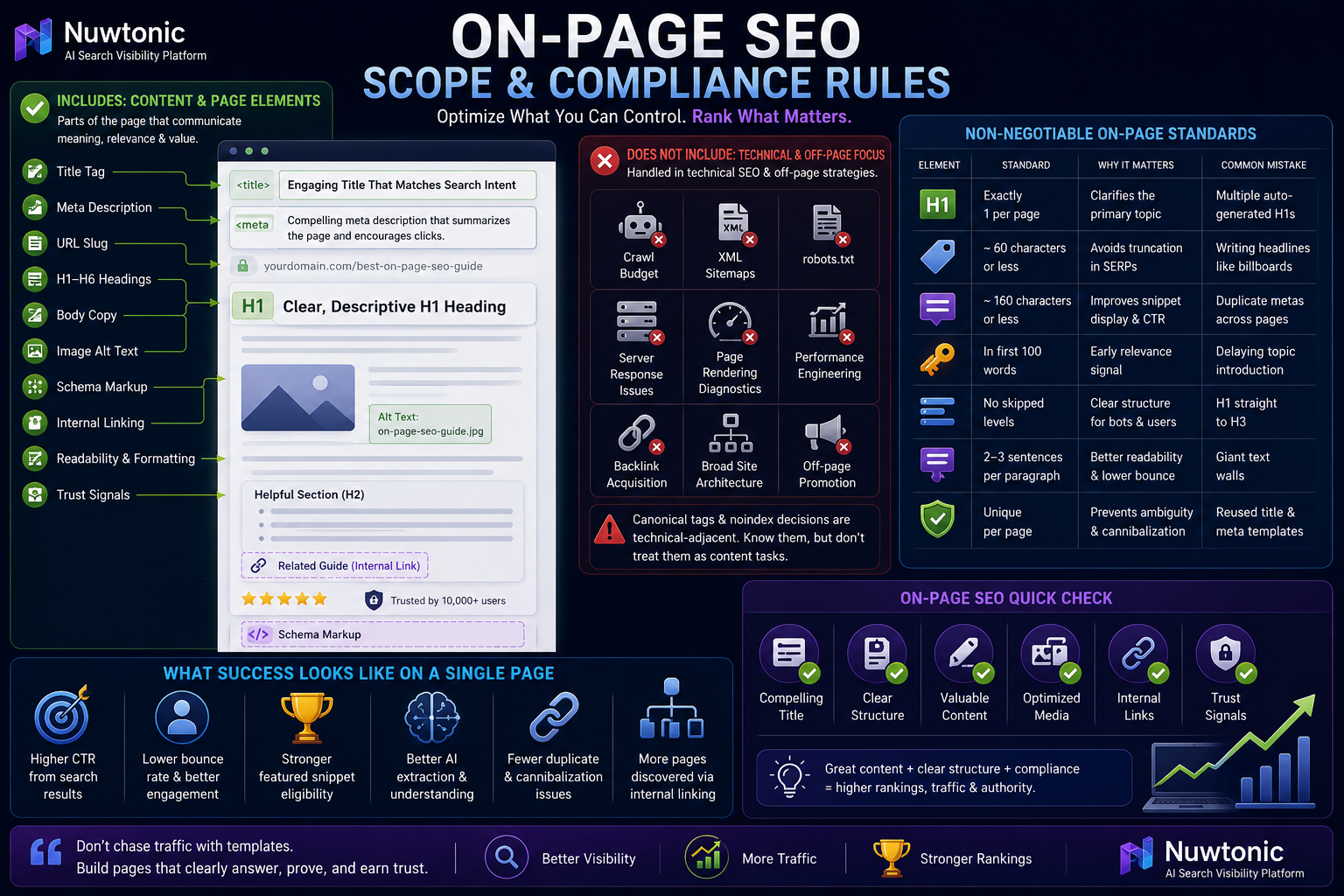
Here's the deal: on-page SEO covers the parts of the page that communicate meaning and relevance.
That includes:
• Title tag
• Meta description
• URL slug
• H1 to H6 headings
• Body copy
• Image file names and alt text
• Schema markup
• Internal linking
• Readability and formatting
• Visible trust signals
It does not include, as the main focus:
• Crawl budget management
• XML sitemaps
• robots.txt
• server response issues
• page rendering diagnostics
• broader performance engineering
• backlink acquisition
Now, yes, there is some overlap. Canonical tags and noindex decisions touch the page, but I treat them as technical-adjacent. You should be aware of them while editing content, but they belong in a technical SEO workflow.
The non-negotiable standards most checklists skip
Many guides make on-page SEO sound more complex than it is; often, a solid content strategy can simplify everything. But there are a few compliance-style rules I do not treat as optional.
Element | Standard | Why it matters | Common mistake |
|---|---|---|---|
H1 | Exactly 1 per page | Clarifies primary topic | Multiple auto-generated H1s from CMS templates |
Title tag | About 60 characters or less | Avoids truncation in many SERPs | Writing headlines like billboards |
Meta description | Under 160 characters | Better snippet display and CTR | Duplicate metas across pages |
Primary keyword | In first paragraph or first 100 words | Early relevance signal | Delaying topic introduction |
Header hierarchy | No skipped levels | Clear structure for bots and users | H1 straight to H3 |
Paragraphs | 2 to 3 sentences | Better readability and lower bounce rate | Giant text walls |
Metadata | Unique per page | Prevents ambiguity | Reused title and meta templates |
Orbit Media's 2026 best practices support the one-H1 rule. Swydo reinforces no skipped header levels and 2 to 3 sentence paragraphs. Neil Patel's 2026 guidance keeps title tags under 60 characters and meta descriptions under 160 characters.
What success looks like on a single page
I measure strong on-page execution by these outcomes:
• Better CTR from search results
• Lower bounce rate from mismatched intent or poor readability
• Stronger featured snippet eligibility
• Better AI extraction because sections are self-contained
• Fewer duplicate-content and cannibalization issues
• More pages discovered and understood through internal linking
One pattern I keep seeing: teams chase traffic drops by changing templates or redesigning pages, when the page simply has a vague H1, weak title tag, and no direct answer near the top. That is a content problem pretending to be a technical one.
Title tags, meta descriptions, and URLs
How to write title tags that rank and earn clicks
Your title tag has two jobs:
Tell search engines what the page is about
Convince a human to click
That sounds obvious, yet this is where people write either robotic keyword strings or branding slogans nobody searches for.
Title tag factor | Best practice | When to use it | When it fails |
|---|---|---|---|
Primary keyword near front | Use when natural | Competitive, exact-match queries | Sounds forced or spammy |
Current year | Use for updated checklists and trends | Freshness-sensitive topics | Evergreen guides that rarely change |
Numbers or modifiers | Use for CTR lift | List posts, frameworks, audits | Weak if unsupported by content |
Brand at end | Use on known brands or conversion pages | Homepages, branded assets | Can waste space on unknown brands |
Distinct from H1 | Change wording, keep intent aligned | Most editorial pages | Duplicate phrasing everywhere |
A practical formula I use:
• Primary keyword + specific outcome + freshness/modifier
Example:
• On Page SEO Checklist for 2026: What Actually Matters
Now, let's get into the nuance people skip. The “60-character rule” is useful, but SERP truncation is closer to pixel width than raw character count. A narrow title can run longer; a wide one can truncate earlier. So use 60 characters as a working guardrail, not a law of physics.
Too many people overlook the importance of meta tags—they’re the first impression for search engines and users alike.
Meta descriptions: not a ranking factor, still worth obsessing over
Meta descriptions do not directly improve rankings in the way body relevance does. Their mechanism is different: they influence click behavior. Better snippet appeal means better CTR, and better CTR often means more traffic from the same ranking.
Neil Patel's 2026 guidance and Pixc's ecommerce recommendations both support keeping them under 160 characters and using the primary keyword naturally.
Use this structure:
• What the page offers
• Who it helps
• Why it is useful now
• A light CTA
Examples by intent:
Intent type | Better meta description angle | Weak angle |
|---|---|---|
Informational | Learn the exact steps, rules, and examples | Generic definition with no payoff |
Commercial | Compare options, features, and trade-offs | Buzzwords with no specifics |
Transactional | Emphasize action, availability, or speed | Overexplaining the category |
Local | Mention service area or location benefit | Broad copy that could fit any city |
Fair warning: Google sometimes rewrites your meta description. Usually that happens when:
• Your snippet does not match the query intent
• It is too vague or duplicative
• It misses the exact phrase the searcher used
• The page contains a more query-relevant sentence elsewhere
So yes, write the meta description anyway. But also make your opening paragraph snippet-worthy.
URL structure: keep it short, descriptive, and boring
Boring URLs are good URLs.
Loganix's 2026 guidance is right here: keep URLs short, descriptive, and keyword-rich. That does not mean stuffing every variation into the slug.
URL choice | Recommended approach | Reason |
|---|---|---|
Word separator | Hyphens | Search engines parse them cleanly |
Length | Short | Easier to read, share, and maintain |
Primary keyword | Include once | Strong topical cue |
Stop words | Remove when unnecessary | Cleaner slug |
Dates | Use only for news or time-sensitive content | Avoid making evergreen content look stale |
Parameters | Minimize on core pages | Messy URLs confuse users and dilute clarity |
Better:
• /on-page-seo-checklist
Worse:
• /blog/2026/01/the-best-most-complete-on-page-seo-checklist-for-beginners-and-experts
I learned this the annoying way years ago after changing date-based URLs on a content site that should have been evergreen. Rankings came back, but the redirect cleanup was a mess I would not wish on anyone.
Heading hierarchy and core content optimization
The H1 to H6 structure that actually helps rankings
Swydo's 2026 recommendations are refreshingly strict: do not skip heading levels. Orbit Media also backs the single H1 standard.
Use headings like a map, not decoration.
Heading | Job | Rule |
|---|---|---|
H1 | Defines the page topic | Use exactly one, include primary keyword |
H2 | Main sections | Use for major themes |
H3 | Subsections under H2 | Use when a section needs more depth |
H4 to H6 | Rarely needed in most articles | Use only for true nested structure |
What not to do:
• Use multiple H1s because your theme outputs one in the logo area
• Jump from H1 to H3 because the design “looks cleaner”
• Stuff exact-match keywords into every H2
One situation I keep seeing is CMS-generated heading chaos. A consultant I know had a site where H1s were being auto-generated and duplicated across templates. Once they manually overrode the H1s and enforced one H1 per page, the target term moved from position 12 to position 4 in about 6 weeks. Not magic. Just finally giving search engines a clear topical signal.
The first 100 words rule and why it still matters
Semrush's 2026 on-page checklist recommends placing the main keyword naturally in the first paragraph. Loganix is more explicit: put it in the first 100 words.
I agree—mostly because it forces clarity.
If I cannot tell what the page is about by the first paragraph, the page probably has an intent problem.
A solid opening does four things fast:
Defines the topic
Matches likely search intent
Uses the primary keyword naturally
Promises the structure of the answer
A weak opening tends to do this instead:
• wastes 80 words on generic context
• hides the answer below the fold
• sounds like a school essay
• increases bounce rate because users do not see relevance quickly
How to optimize content without obsessing over keyword density
Here's the deal: keyword density is not the strategy. It is, at best, a rough diagnostic. Semantic coverage and intent alignment matter more.
That means your page should include:
• The primary keyword
• Close variants
• Related entities
• co-occurring terms users expect to see
• direct answers to subquestions
For an on page seo checklist, that naturally includes entities like:
• title tag
• meta description
• H1 tag
• alt text
• schema markup
• canonical tag
• E-E-A-T
• featured snippet
• internal linking
• mobile-first indexing
I’ve seen sites waste time fiddling with content length when optimizing for keywords is actually what makes a difference. More precisely: optimizing for topic coverage and intent makes the difference, not hitting some arbitrary 2,000-word target.
Use this content calibration model:
SERP situation | What to do | What not to do |
|---|---|---|
Top results are short and direct | Give concise answers fast | Inflate the page with filler |
Top results cover many subtopics | Match coverage breadth | Ignore core subtopics users expect |
SERP includes snippets and PAA | Use question H2s and answer blocks | Bury answers in long intros |
Query is transactional | Reduce theory, add specifics | Write an essay |
How to structure for featured snippets and AI extraction
Swydo's 2026 recommendation to format H2s as direct questions is one of the most practical snippet tactics around. It also helps AI search systems extract clean passages.
Use this pattern:
Ask a direct question in H2 or H3
Answer it immediately in 40 to 60 words
Follow with supporting detail, examples, or a list
Example format:
What is the ideal length for a meta description?
A meta description should usually stay under 160 characters so it displays more cleanly in many search results. Neil Patel's 2026 guidance supports that limit, and shorter descriptions often perform better when they match user intent and include a clear benefit.
That first paragraph is the snippet candidate. The rest is support.
This is also where AI citation optimization starts. AI systems often retrieve passages, not entire pages. So each section should make sense on its own.
E-E-A-T signals, internal linking, and media
The on-page E-E-A-T signals that make a page easier to trust
Now, let's get into it—E-E-A-T is not just a quality-rater buzzword floating somewhere outside your content. It shows up directly on the page.
Strong visible signals include:
• Author byline
• Short author bio with relevant experience
• Last updated date
• Reviewed-by field when appropriate
• Citations to original sources or studies
• Original screenshots, examples, or first-hand observations
• Disclosure statements when claims or affiliations matter
• Easy access to contact or company identity information
E-E-A-T element | What to include on-page | Why it helps |
|---|---|---|
Author bio | Experience, role, subject focus | Demonstrates expertise |
Source citations | Primary studies, official docs, industry data | Improves trustworthiness |
First-hand proof | Screenshots, test results, original examples | Signals experience |
Updated date | Real maintenance history | Supports freshness |
Editorial review | Reviewer identity where relevant | Adds accountability |
I made this mistake early in my career: published a strong guide with decent rankings, but no visible author context, no citations, and no update signal. Traffic was fine until stronger competitors with clearer trust markers rolled in. The content was not bad. It just looked less trustworthy.
Internal linking inside the page body
Internal linking is one of the easiest wins in SEO, and people still treat it like an afterthought.
Orbit Media emphasizes internal page linking because it distributes authority and guides users through the site. Since I cannot add internal links in this article, I’ll keep this strategic rather than implementation-specific.
Use internal links in the body to:
• reinforce topical relationships
• help crawlers discover related pages
• move users to the next logical step
• reduce orphaned content
Anchor text rules I recommend:
Anchor text type | Good example | Bad example |
|---|---|---|
Descriptive | on-page SEO title tag checklist | click here |
Intent-aligned | technical SEO audit guide | read more |
Specific | image alt text best practices | this article |
What to avoid:
• Generic anchors everywhere
• Linking five times to the same destination from one short article
• Forcing exact-match anchors so hard they read unnaturally
Your mileage may vary on link count. I do not use a fixed formula. On a 2,000-word guide, though, a handful of useful contextual links is normal. Zero body links on a large content hub is usually a missed opportunity.
Image and media optimization without wrecking page performance
Image SEO is usually either ignored or overdone in absurd ways.
The practical checklist is simpler:
Use a descriptive file name before upload
Write alt text for accessibility first, SEO second
Compress the image
Use captions when they genuinely add context
Prefer original visuals when possible
Swydo recommends descriptive file names like organic-face-cream.jpg, and that convention still holds.
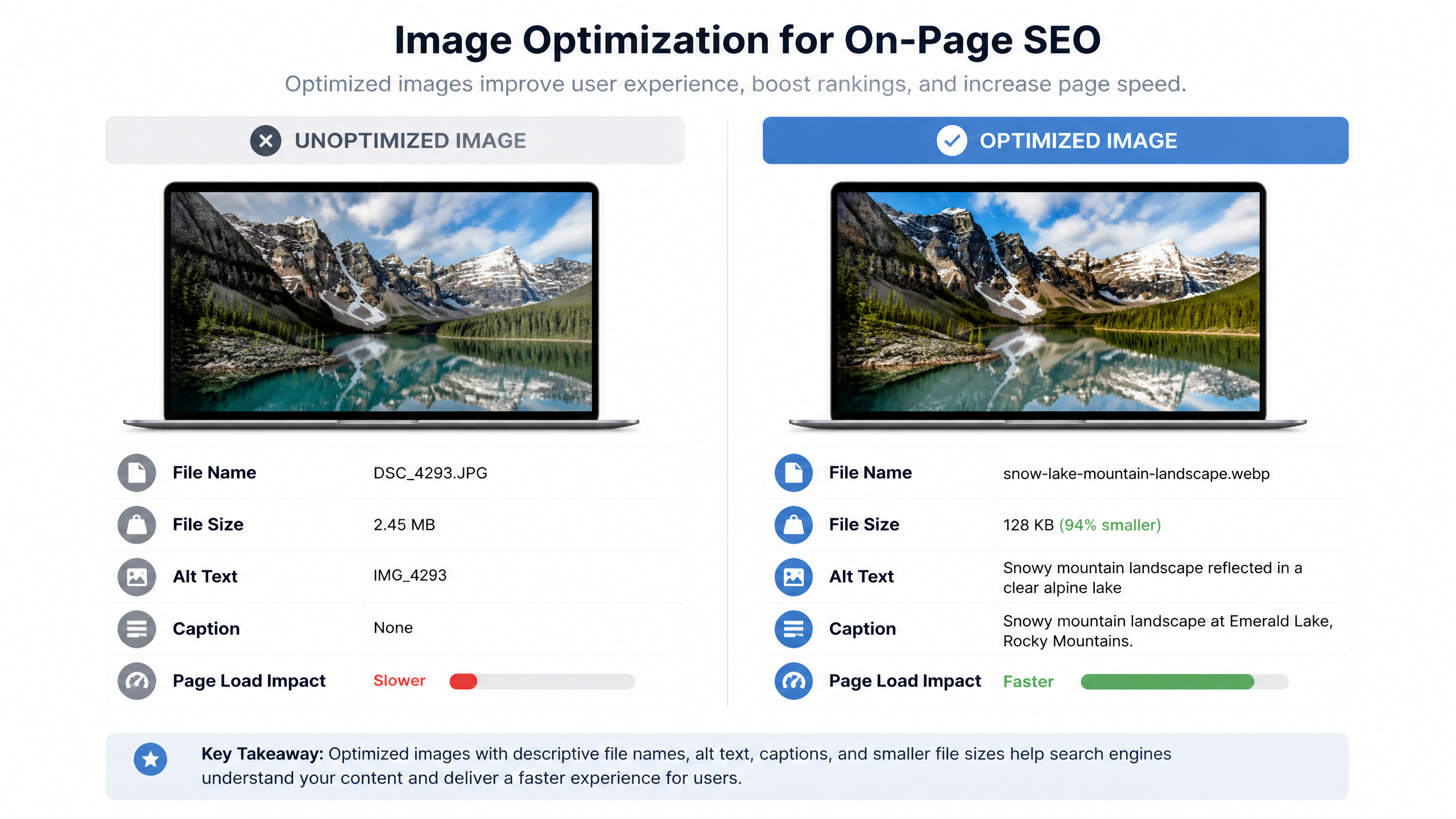
Image element | Best practice | Why it matters |
|---|---|---|
File name | Descriptive, lowercase, hyphen-separated | Adds context before rendering |
Alt text | Clear description with natural keyword use | Accessibility and topical relevance |
File size | Compress aggressively where quality holds | Faster rendering, lower bounce risk |
Caption | Use if it adds meaning | Often read more than body copy |
Originality | Use real screenshots or diagrams | Adds information gain and trust |
A small business owner I observed used a simple checklist to compress oversized product images to under 100 KB where possible. Load time dropped from 4.5 seconds to 1.8 seconds, and Search Console later reflected a 25% reduction in excluded pages. Was that all from image compression alone? Hard to prove cleanly. But the before-and-after pattern was obvious enough to matter operationally.
For video:
• Add a transcript if the video carries core information
• Summarize the takeaway in text below the embed
• Consider VideoObject schema if the video is central to the page
Schema, featured snippets, and AI citation formatting
Which schema types matter most on-page
Loganix recommends schema markup such as FAQ and Local schema to improve context and increase SERP real estate. For editorial content, the most useful on-page schema types are usually these:
Schema type | Best use case | Main benefit |
|---|---|---|
Article | Blog posts, guides, news analysis | Clarifies content type |
FAQPage | Real Q&A sections | Can improve understanding and visibility |
BreadcrumbList | Structured site paths | Helps context and navigation |
Person | Author entities | Supports authorship signals |
HowTo | Step-based tutorials | Useful when instructions are truly procedural |
ImageObject | Important original visuals | Adds image context |
Important distinction: schema can help search engines understand a page, but it does not guarantee rich results or AI citations. AI systems may cite content because the passage is clear and trustworthy even when schema is minimal. Schema helps. It is not a cheat code.
Featured snippet formatting that actually works
Based on Swydo's 2026 recommendations and what I have seen in the wild, snippet-friendly formatting usually follows one of three patterns:
Snippet type | Format | Best for |
|---|---|---|
Paragraph | 40 to 60 word direct answer | Definitions and short explanations |
List | Ordered or unordered HTML list | Steps, checklists, rankings |
Table | Clean comparison table | Specs, differences, benchmarks |
A content team I tracked restructured posts around question-based H2s followed by 2 to 3 sentence direct answers. Within about 2 months, 3 articles captured featured snippets and CTR rose by 22%. The lesson was not “use more headers.” It was “answer the question before showing off.”
AI search citation optimization most checklists ignore
This is the part competitor articles usually miss.
If you want passages lifted into AI Overviews, Perplexity-style answers, or other answer engines, write extractable sentences.
That means:
• Use subject-first sentence structure
• Make statements self-contained
• Define terms directly using “X is…” formats
• Avoid pronouns when the noun matters for clarity
• Put one citable takeaway in each section
Example:
Weak:
• This helps because it makes things clearer and improves performance.
Better:
• A question-based H2 followed by a 40 to 60 word answer improves featured snippet eligibility because search engines can extract a complete, query-matching passage.
That is a citable sentence.
I also recommend building each H2 section like a standalone block:
Definition or answer
Why it matters
Example
Caveat
That structure works for humans and machines. Convenient, right?
Freshness, edge cases, and the actual checklist
Freshness signals without fake-update nonsense
Swydo recommends quarterly updates to maintain content freshness. I think that is a strong default for commercially important evergreen pages.
But let me be blunt: changing a date without changing the content is lazy, and users can smell it.
Real freshness updates include:
• updating screenshots
• refreshing examples
• replacing stale stats
• revising title tags and meta descriptions if intent shifts
• adding sections for new SERP features or AI behavior
• cleaning up broken references
Content type | Suggested review cadence | Typical update need |
|---|---|---|
Evergreen SEO guides | Quarterly | Stats, examples, SERP shifts |
News-driven content | As events change | Major rewrites |
Product pages | Monthly or quarterly | Features, inventory, messaging |
Local service pages | Quarterly | Offers, trust signals, FAQs |
Multi-intent pages and keyword cannibalization traps
One page should generally serve one primary intent. You can support adjacent sub-questions, sure, but do not blend informational and transactional goals so aggressively that the page loses focus.
A common pattern looks like this:
• five pages target the same phrase
• each page has overlapping title tags
• H1s all repeat the same main keyword
• Google rotates rankings because it cannot tell which page is canonical in purpose
One case synthesized from agency and community patterns involved five pages competing for on-page SEO tips. After consolidation and better canonical handling, the main page moved from position 8 to position 3 and leads increased by 40%. The implication is bigger than the numbers: on-page optimization works better when page purpose is singular.
Brief technical-adjacent checks you should not ignore
These are not the focus of an on page SEO checklist, but they are close enough to content operations that I always verify them.
• Canonical tag awareness: if product variants or duplicate-like pages exist, confirm the canonical points to the preferred version.
• Index vs. noindex logic: thin thank-you pages, filtered URLs, or internal search results may need different treatment.
• Mobile rendering checks: while mobile-friendliness belongs more to technical SEO, you should still review your actual content presentation on mobile.
I am keeping these brief on purpose. They matter, but they are not the same discipline as writing and structuring the page itself.
The complete on page seo checklist
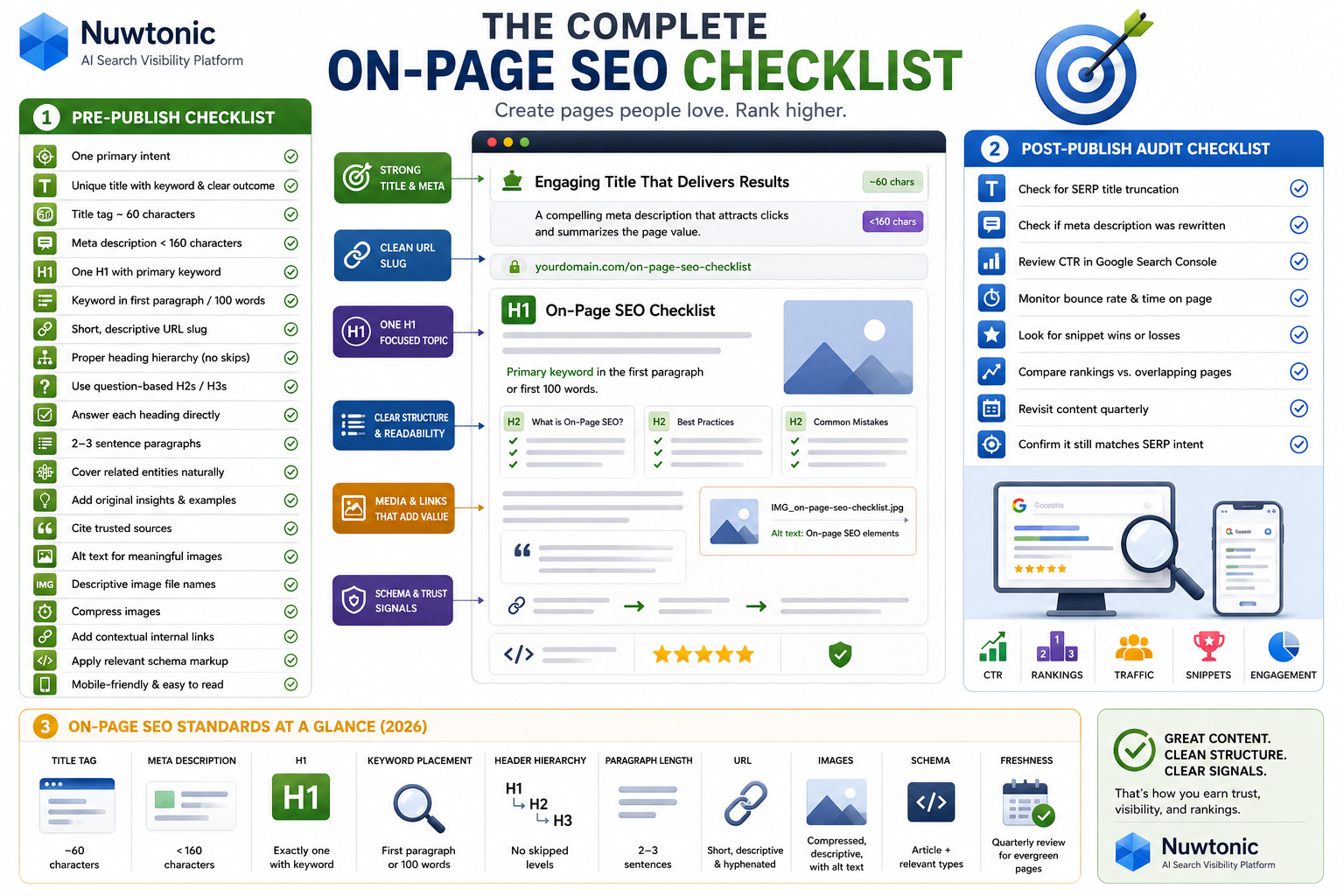
Pre-publish checklist
Confirm the page targets one primary intent.
Write a unique title tag with the primary keyword and a clear outcome.
Keep the title tag around 60 characters where possible.
Write a unique meta description under 160 characters.
Use exactly one H1 containing the primary keyword.
Place the primary keyword in the first paragraph or first 100 words.
Use a short, descriptive URL slug with hyphens.
Build a proper heading hierarchy with no skipped levels.
Add question-based H2s or H3s where snippet capture makes sense.
Make sure each heading is followed by content that directly answers it.
Break text into 2 to 3 sentence paragraphs.
Cover related entities naturally instead of chasing keyword density.
Add original examples, observations, screenshots, or commentary.
Cite relevant primary or high-authority sources.
Add descriptive alt text to meaningful images.
Use descriptive image file names before upload.
Compress images to reduce load time impact.
Add contextual internal linking in the body where relevant.
Apply suitable schema markup.
Review the page on mobile for readability and layout issues.
Post-publish audit checklist
Check for SERP title truncation.
Check whether Google rewrote the meta description.
Review CTR in Google Search Console.
Monitor bounce rate and time on page as directional UX signals.
Look for snippet wins or losses after heading changes.
Compare rankings against pages with overlapping intent.
Revisit content quarterly for freshness updates.
Confirm the page still matches the current SERP intent.
Quick-reference standards table
Element | Target standard for 2026 |
|---|---|
Title tag | Unique, keyword-aligned, about 60 characters |
Meta description | Unique, compelling, under 160 characters |
H1 | Exactly one, includes primary keyword |
Keyword placement | First paragraph or first 100 words |
Header hierarchy | No skipped levels |
Paragraph length | 2 to 3 sentences |
URL | Short, descriptive, hyphenated |
Images | Compressed, descriptive file names, alt text |
Schema | Article plus relevant supporting types |
Freshness | Quarterly review for key evergreen pages |
FAQ
How many keywords should I include on a single page?
Use one primary keyword and several natural secondary phrases or related entities.
Do this:
• pick one main intent
• support it with variants and subtopics
• use synonyms and entity language naturally
Do not do this:
• force 10 exact-match keywords into headings
• build a page around unrelated intents
Is it better to have one H1 or multiple H1s per page?
One H1 is the best practice. Orbit Media's 2026 guidance supports exactly one H1 per page containing the primary keyword.
Can some modern HTML setups function with multiple H1s? Technically, there is debate in web standards contexts. For SEO operations, though, one H1 is the cleanest and safest rule.
What is the ideal length for a meta description?
A meta description should usually stay under 160 characters. Neil Patel's 2026 guidance supports that threshold, and Pixc echoes it for ecommerce pages.
How do I optimize images for SEO without slowing down my site?
Rename files descriptively before upload.
Compress images aggressively but sensibly.
Write accessibility-first alt text.
Use modern dimensions and avoid oversized uploads.
Add captions only when they help the user.
Should I skip header levels if I do not have enough content?
No. Do not jump from H1 to H3 without an H2. Swydo specifically warns against skipped hierarchy because it weakens structure for bots and users.
How often should I update content to maintain rankings?
For important evergreen pages, quarterly review is a strong default. Swydo recommends quarterly updates, and I agree for most SEO-driven guides.
What is the difference between on-page and technical SEO?
On-page SEO focuses on the content and HTML elements on the page. Technical SEO focuses on crawlability, indexation, rendering, and broader site infrastructure.
How do I structure content for AI search extraction?
Use:
• question-led H2s and H3s
• direct answer paragraphs near the top of each section
• self-contained statements
• clear definitions
• concise tables and lists
Do internal links need descriptive anchor text?
Yes. Descriptive anchor text is usually better than vague anchors because it helps users and search engines understand destination context.
What is the exact character limit for a title tag?
There is no perfect exact limit because truncation depends on pixel width, not just character count. Practically, around 60 characters remains a strong working standard based on 2026 industry guidance.
How do I fix keyword cannibalization issues?
Start by identifying pages with overlapping intent.
Then:
choose the primary page
consolidate overlapping content where appropriate
differentiate weaker pages by intent
review canonical handling if duplication exists
update title tags and H1s so each page has a distinct role
Is schema markup required for on-page SEO?
Required? No.
Helpful? Often, yes.
Schema improves clarity and can support rich results, but it does not replace strong content structure.
Should I use long-tail keywords in H2 headers?
Yes, if they match real subtopics and read naturally. They work especially well when phrased as questions tied to People Also Ask behavior.
What is the best way to organize a content hierarchy?
Use this order:
one clear H1
broad H2 sections by major topic
H3 subsections for detail
direct answers immediately under question-style subheads
Sources and references
• Semrush, 2026 on-page checklist guidance on placing the main keyword in the first paragraph
• Loganix, 2026 guidance on first 100 words, URLs, schema, and page speed as a ranking factor
• Neil Patel, 2026 guidance on title tag and meta description length, and keyword placement across page elements
• Orbit Media, 2026 best practices for one H1 and internal linking importance
• Swydo, 2026 strategy notes on heading hierarchy, question-based headers, short paragraphs, quarterly updates, and descriptive image file names
• Pixc ecommerce audit insights on unique meta descriptions, alt text, and organic traffic lifts from on-page fixes


