
You're looking at a Search Console export and seeing the same query touch two or three URLs that all feel close enough to rank, but none of them is owning the click. That's the classic cannibalization mess, and it usually shows up after a site has grown by accretion, one useful page at a time, until the query-to-URL map stops being clean. Fixing it starts by reading the symptom correctly, then choosing the right survivor page instead of reflexively merging everything and hoping Google sorts it out.
Table of Contents
- What Keyword Cannibalization Looks Like in Search Console
- Auditing Your Site for Cannibalization in a Single Afternoon
- Building a Priority Matrix So You Fix the Right Conflicts First
- Choosing the Right Fix for Each Conflict
- Internal Links, Sitemaps, and the Cleanup That Makes the Fix Stick
- Monitoring Recovery and Catching Rebounds
- Common Mistakes That Undo a Cannibalization Fix
What Keyword Cannibalization Looks Like in Search Console
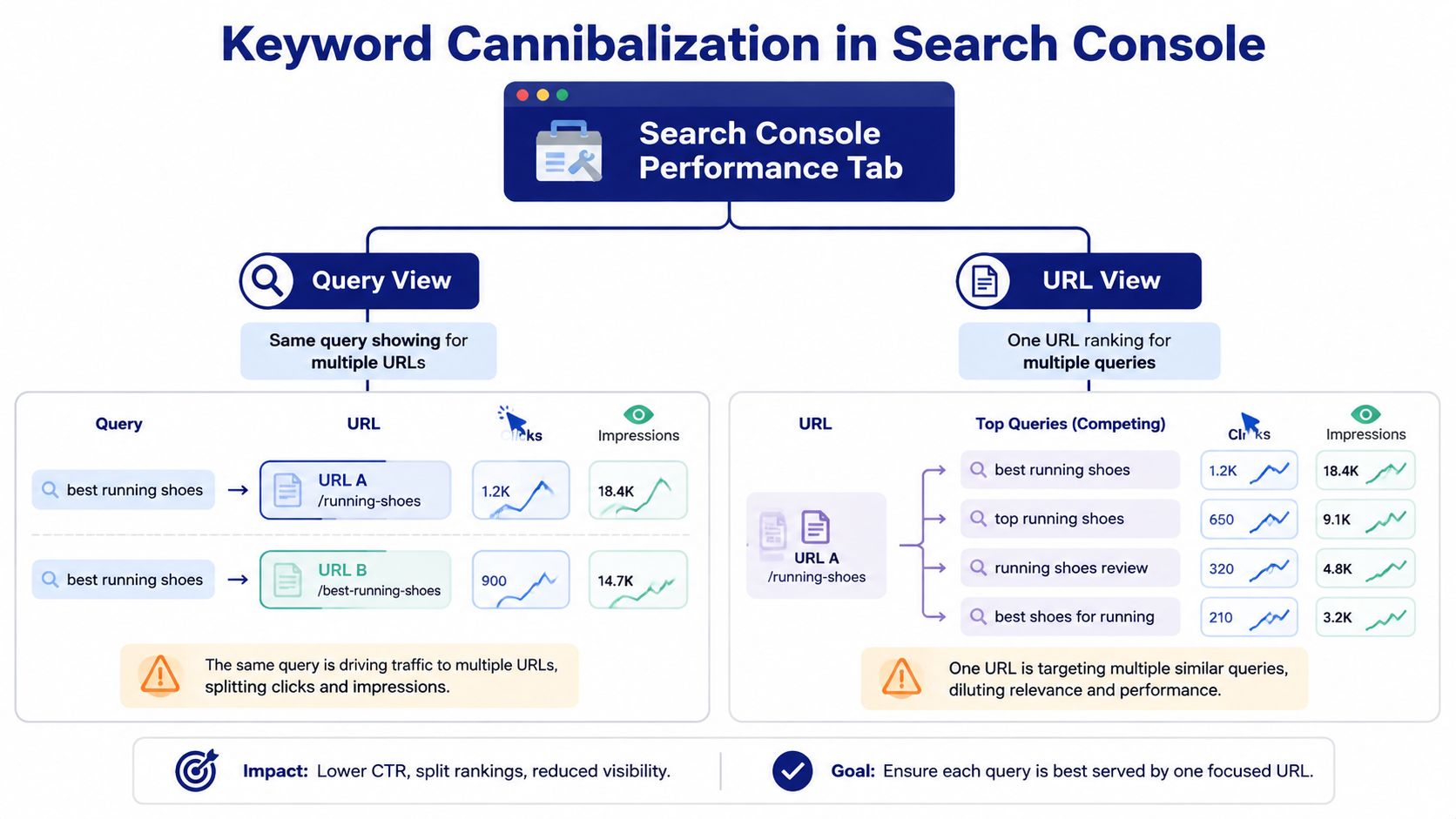
The first time I catch it on a client site, the problem usually is not obvious in the page templates or the crawl report. A query with solid impressions keeps sending clicks to the wrong URL, or two pages trade positions every few days in Search Console with no stable winner. The result is plain enough, multiple URLs split clicks, impressions, and ranking signals for the same intent, so the site never concentrates authority on one page.
The query-to-URL conflict visible in data
Open Google Search Console, go to Performance, then filter to a query that matters. If 2+ URLs are getting clicks for the same query, you are looking at a live conflict, not a theory problem. That pattern can be normal when different pages serve different sub-intents, but cannibalization usually comes with duplicate or near-duplicate pages, similar titles, and no clear primary URL. For a detailed walkthrough on extracting this data, see our guide on how to find keyword cannibalization in GSC.
Practical rule: if the query is the same and the intent is the same, but the URLs keep swapping in and out of the clicks, the site is splitting relevance instead of concentrating it.
The traffic loss is easy to miss because the drop happens inside the query report, not as a dramatic sitewide collapse. A 2026 marketing statistics roundup reports that 25% of websites have keyword cannibalization, and that it can reduce traffic by 15–20%. That makes this a common operational problem, not a rare edge case. The same roundup also notes the standard fix, identify competing URLs in Search Console, choose one primary page, then merge the weaker page or apply a 301 redirect so the competition stops. The 2026 roundup on keyword cannibalization supports treating this as routine cleanup rather than an emergency response.
Healthy overlap looks different
Shared visibility is not always a problem. A blog post, a category page, and a service page can all appear for related terms if each one satisfies a different intent. Cannibalization is the case where the pages are too similar in purpose, too close in wording, or too close in metadata, so search has to choose between pages that should have been consolidated earlier.
Older sites tend to accumulate more overlap than newer ones. A large-scale keyword cannibalization summary shows websites aged 0–1 years average 2.19% duplicate-keyword overlap, while 5–10-year-old sites average 10.73% and sites older than 10 years average 13.95% overlap. That is why a fix usually starts with a sitewide query map, not a single page edit. If you run a mature site, assume the issue is spread across templates, sections, and legacy URLs until the query data proves otherwise. Neil Patel's keyword cannibalization statistics roundup is useful because it shows how the problem builds over time.
One pattern I see often is a site that wants to rank the same phrase with a blog post, a service page, and a documentation page. The pages may all deserve visibility, but they cannot all be the primary answer for the same query. That is also why teams that need to improve API docs visibility should check whether docs pages are competing with product pages before they start rewriting copy.
Auditing Your Site for Cannibalization in a Single Afternoon
Start with Search Console, not a crawl. A crawl can tell you which pages look similar, but it can't tell you which query is being split, and that's the signal that matters. The cleanest audit begins with performance data, because cannibalization is a query-to-URL problem before it's a content problem.
Pull the query export first
Export Search Console performance data for your top queries, then filter for queries where 2 or more URLs receive clicks. That alone gives you a first-pass conflict list. From there, sort by clicks and impressions so the pages with the most search demand rise to the top, because low-volume overlaps often don't justify heavy-handed remediation.
Next, run a site crawl and compare title tags and H1s on the flagged URLs. A published playbook recommends flagging pages with 70%+ title similarity before you decide on a remedy, since that pattern usually means overlapping intent rather than healthy topical breadth. In practice, that threshold catches a lot of pages that look “different enough” to content teams but are too similar for search engines to treat as distinct answers. DigitalThriveAI's fix workflow is a solid reference for that workflow.
Separate overlap from genuine topic coverage
One mistake that slows audits is treating every shared query as a problem. A query can map to multiple URLs when the site has a clean content hierarchy, but the pages each answer a different sub-question. What you're looking for is the same search intent repeated across multiple URLs, not just a keyword repeated in a broader topic cluster.
Field note: if the titles, H1s, and search intent all point in the same direction, you probably have one page too many.
A second pair of eyes helps here. Teams working on structured documentation sites or API docs often run into near-duplicate article coverage, so a resource like improve API docs visibility can be useful when you're trying to decide whether separate pages really deserve separate query ownership. I like using that kind of example because it forces the team to distinguish between distinct intent and duplicate coverage.
Turn the audit into a conflict sheet
By the end of the afternoon, the sheet should show the query, the competing URLs, title similarity, H1 similarity, and a note on whether the overlap looks like merge, redirect, canonical, or rewrite territory. For older sites, expect the list to be longer than the team assumes. The audit isn't done when you've found the overlap, it's done when you can rank the conflicts by likely traffic recovery and implementation complexity.
Building a Priority Matrix So You Fix the Right Conflicts First
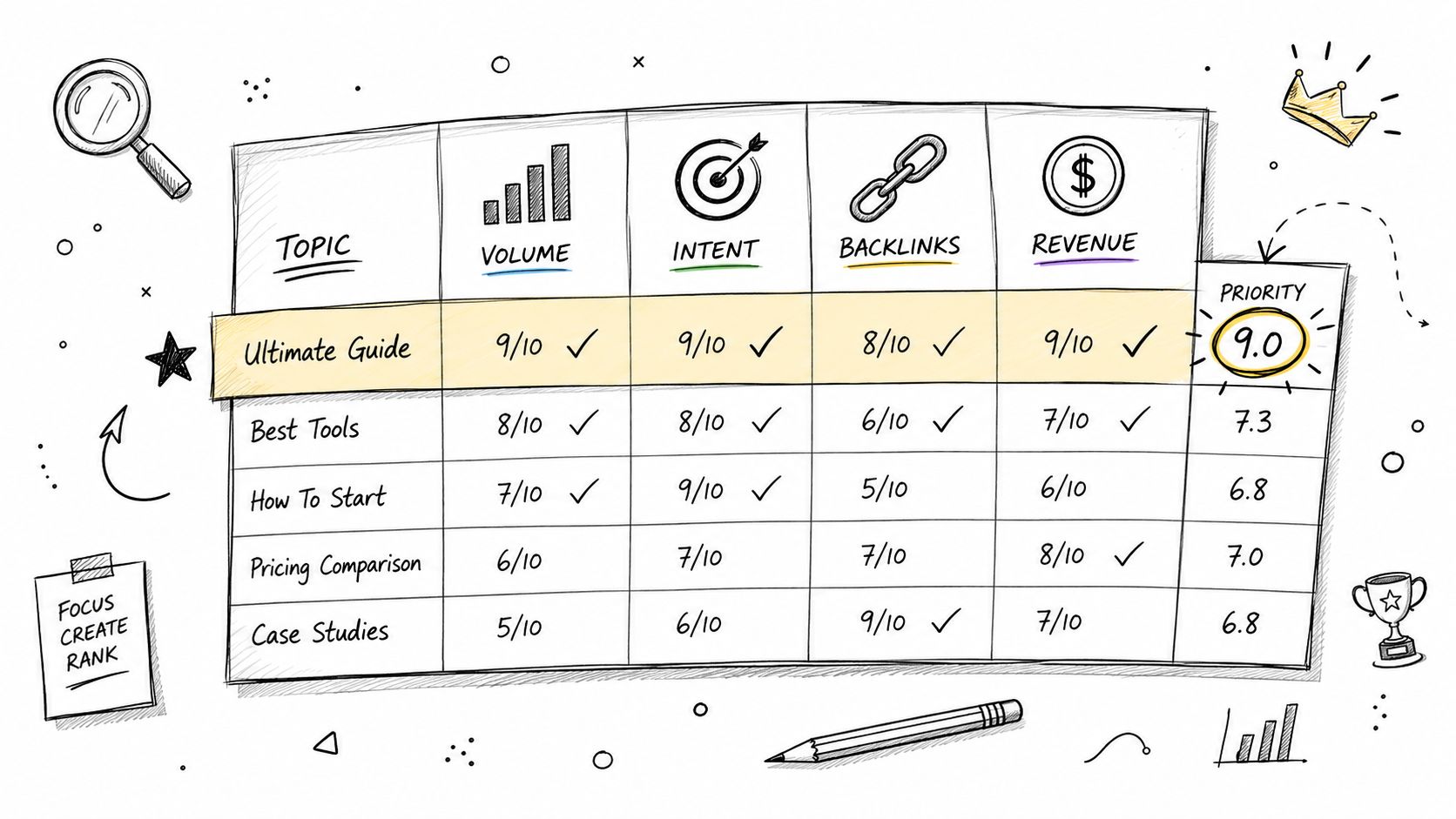
A raw conflict list is useful, but it doesn't tell you what to touch first. The traffic-weighted approach works better because not every overlap deserves the same amount of time, and not every apparent problem is worth a deployment. A good priority matrix forces the team to score each conflict on volume, intent fit, backlink strength, and revenue exposure, then rank the case before anyone starts editing URLs.
Use three buckets, not endless debate
I've found it works best to sort cases into P1, P2, and P3.
- P1 means the query gets meaningful demand, the URLs are clearly competing, and the current state is suppressing the page you want to rank.
- P2 means the overlap is real, but the traffic or business value is lower, so the fix can wait until the higher-value work ships.
- P3 means the pages overlap a little, but the traffic impact is small enough that you're better off leaving it alone until a broader content refresh happens.
The ranking logic should be blunt. If a page has stronger backlinks, stronger engagement, or higher commercial relevance, it should usually win the conflict. SmartSites recommends choosing the page that best matches search intent and has the stronger off-page signals as the survivor, then merging the weaker page into it with a 301 redirect so the surviving URL keeps the accumulated link equity. SmartSites' cannibalization guide aligns with the way most senior SEOs make this call.
Don't overwork the near-duplicates
The matrix should also help you skip false urgency. If two pages share a few phrases but the ranking URLs are stable and the click curve isn't volatile, that may be healthy topical coverage, not a conflict. The right response is to leave the pair alone or tighten internal links, not to over-merge pages that are already serving distinct queries cleanly.
Decision rule: if the likely winner is obvious from intent and link equity, don't waste time scoring it like a research project. Move it into the fix queue.
A useful way to keep the matrix honest is to mark the cases where the winner is already obvious. That prevents teams from spending half a sprint “analyzing” cases that should just be merged or redirected. The point of the matrix is to reduce noise, not create a second layer of bureaucracy.
The same logic applies in broader content planning. A founder-level content strategy needs to decide whether to consolidate, differentiate, or retire pages before the publish queue grows. That's why Orchory's founder's guide to content SEO is relevant here, not as theory, but as a reminder that page ownership should be designed upstream, not cleaned up downstream.
Choosing the Right Fix for Each Conflict
The worst mistake here is defaulting to one remedy for every case. A 301 redirect is right when a page should disappear, but it's wrong when both pages need to stay live for business reasons. The job is matching the fix to the conflict, not worshipping consolidation for its own sake.
Four remedies, four different triggers
| Remedy | Best When | Risk If Misapplied |
|---|---|---|
| Merge | Several weak pages cover the same intent and one stronger survivor can absorb the useful sections | You flatten useful sub-intents and create a bloated page that's harder to rank |
| 301 Redirect | One page is the clear loser and no longer needs to exist as a separate asset | You remove a page that still has a legitimate purpose, or create redirect chains if cleanup is sloppy |
| Canonical Tag | Both pages must remain live, but search engines should treat one as primary | You send mixed signals if the canonical target isn't the preferred, indexable page |
| Rewrite / Differentiate | The pages can survive if each one serves a distinct sub-intent | You keep both pages too similar and the conflict comes back |
Use the survivor test before you touch the URL
Moz recommends consolidating or redirecting cannibalized pages into a single authoritative page, then adding a canonical tag on the secondary page that points to the preferred URL. That's the right move when the content is materially duplicated and one page clearly deserves to be the primary answer. The canonical pattern is simple, but it only works when the target page is indexable and represents the main version.
Use this markup on the secondary page when both URLs must remain accessible:
<link rel="canonical" href="https://www.example.com/best-page">
For implementation details, Moz's keyword cannibalization guidance is the cleanest citation in the set. If the pages are near duplicates but both have a business reason to stay, canonicalization gives search engines a strong hint without removing the alternate page from users.
Match the fix to the exact conflict
If the weaker page has little unique value, merge it into the winner, then redirect it. If the page must stay live because it serves a different audience, rewrite it so the intent is separate. If both pages must exist for operational reasons, canonicalize the secondary page and keep the architecture tidy. If the page is duplicate, thin, and unnecessary, the 301 is usually the cleanest path, which is why this HTTP status overview is worth keeping handy during implementation.
Internal Links, Sitemaps, and the Cleanup That Makes the Fix Stick
A redirect without cleanup is only half a fix. Old internal links keep sending authority toward the retired URL, and your XML sitemap can keep confusing crawlers long after the page has been merged. The recovery starts when the site itself stops contradicting the decision you just made.
Clean the internal link graph first
Search Engine Land advises defining a primary keyword for each page and using that term, or a close variation, as anchor text when linking to it from other pages. That matters because anchor text helps reinforce which URL should own the topic, and it becomes especially important after consolidation. The same guidance also recommends spreading internal links fairly evenly across important pages so one URL isn't unintentionally reinforced over the others. Search Engine Land's cannibalization guide is still one of the clearest references for this cleanup.
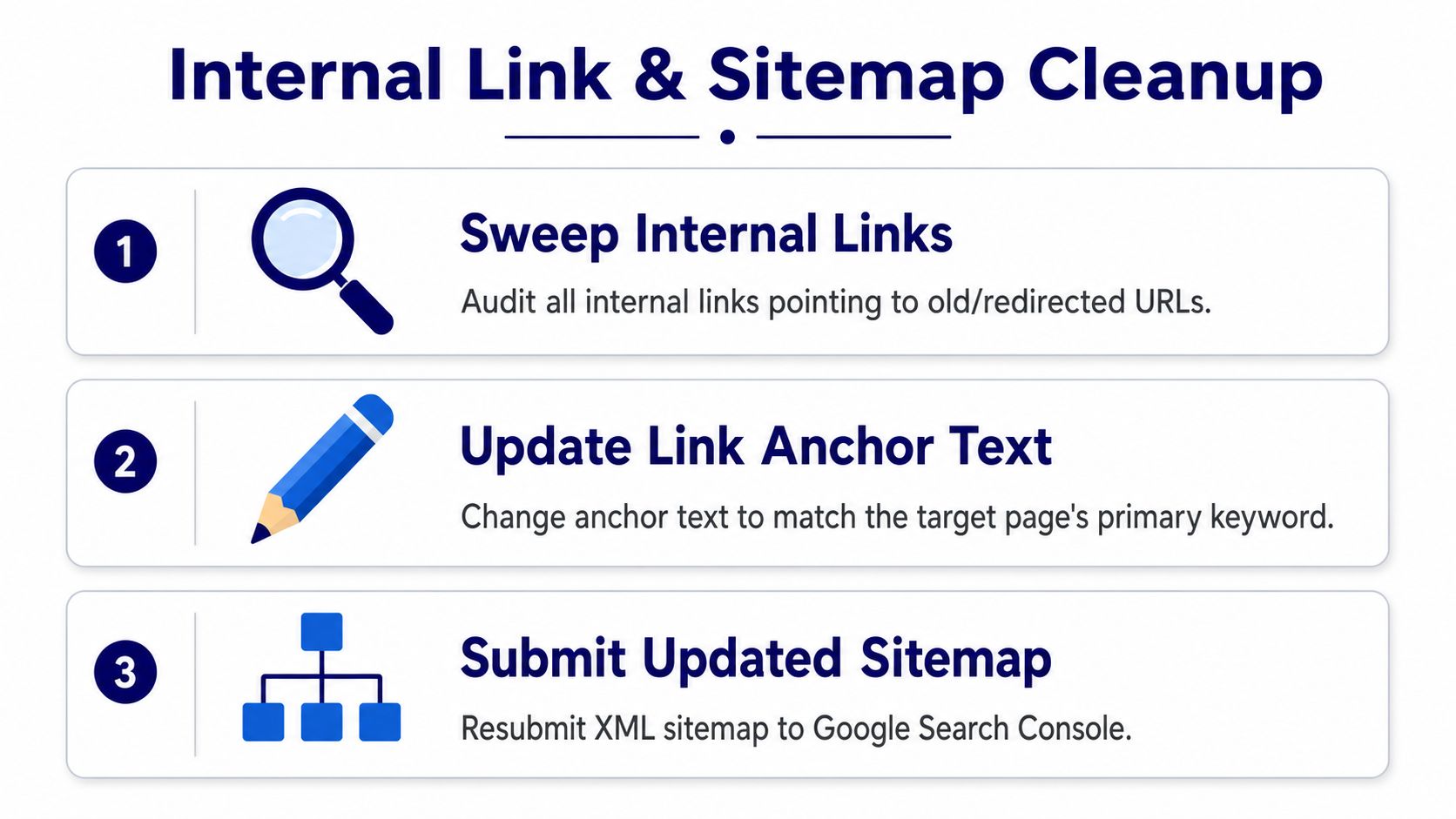
The sequence should be simple. Update links that still point to retired URLs, change the anchor text so it matches the target page's primary keyword, and remove any obvious over-linking that keeps favoring the old structure. If you leave internal links untouched, you're telling search engines to keep trusting the page you just demoted.
Remove redirected URLs from the sitemap
Once the internal links are fixed, remove redirected URLs from the XML sitemap. Multiple SEO guides recommend that step because a sitemap should only reinforce indexable, preferred URLs, not ghost pages that now forward elsewhere. The goal is consistency, not just technical correctness. Search engines crawl cleaner when the sitemap, redirects, and internal links all tell the same story.
The order matters. Ship the content change or merge, activate the redirect or canonical, sweep the internal links, then resubmit the updated sitemap. That keeps the redirected page from hanging around as a signal source while the new structure settles.
Operational note: if the surviving page still isn't receiving internal links after the cleanup, the fix hasn't really been finished.
This is also where a formal audit process helps. Teams that maintain ongoing internal-link reviews, like the workflow in Nuwtonic's internal linking audit, usually catch stale links faster because they're looking at the link graph as a system, not as a one-off edit.
Monitoring Recovery and Catching Rebounds
A cannibalization fix isn't done when the redirect goes live. It's done when Search Console shows one URL taking over the query and the others stop appearing as competing destinations. The recovery usually shows up in stages, and if you don't watch the right metrics, you'll miss a rebound or mistake a temporary wobble for failure.
Use a 30, 60, 90 day review loop
At 30 days, check whether the preferred URL is beginning to absorb the query's impressions consistently. At 60 days, verify that the secondary URLs are fading from the query-to-URL map and that the surviving page is holding the click demand. At 90 days, make sure the new structure is stable enough that the conflict doesn't reappear from a fresh internal link, a new content publish, or an old page that got repurposed without coordination.
The signals that matter are straightforward. Look for impressions convergence on the survivor URL, a click-through rate lift, and the disappearance of secondary URLs for the target query. If those three things don't line up, the site may still be sending mixed signals, or the chosen winner may not have been the right one.
Keep the audit recurring
Nuwtonic's SiteWise Cannibalization Tracker uses a 365-day Google Search Console sync to catch new conflicts as the site grows, which is exactly the kind of ongoing monitoring needed after the first cleanup. It's a sensible fit for teams that don't want cannibalization to become a quarterly surprise again. I'd treat that sort of tracker as a standing watchlist, not a replacement for judgment, because the decision to fix still has to come from intent and URL-level review.
Useful habit: keep a short dashboard with the query, survivor URL, old competing URLs, and the last date you confirmed the fix.
The biggest gain from this monitoring loop is not just the recovery. It's the confidence that future content updates won't reopen the conflict you just closed.
Common Mistakes That Undo a Cannibalization Fix
Most broken fixes fail for boring reasons, not strategic ones. Someone leaves a redirect chain in place, an old internal link survives a template update, or the team ignores a small conflict that later becomes a bigger one when the site expands. Those are process failures, and they're preventable.
Redirect chains leak the benefit
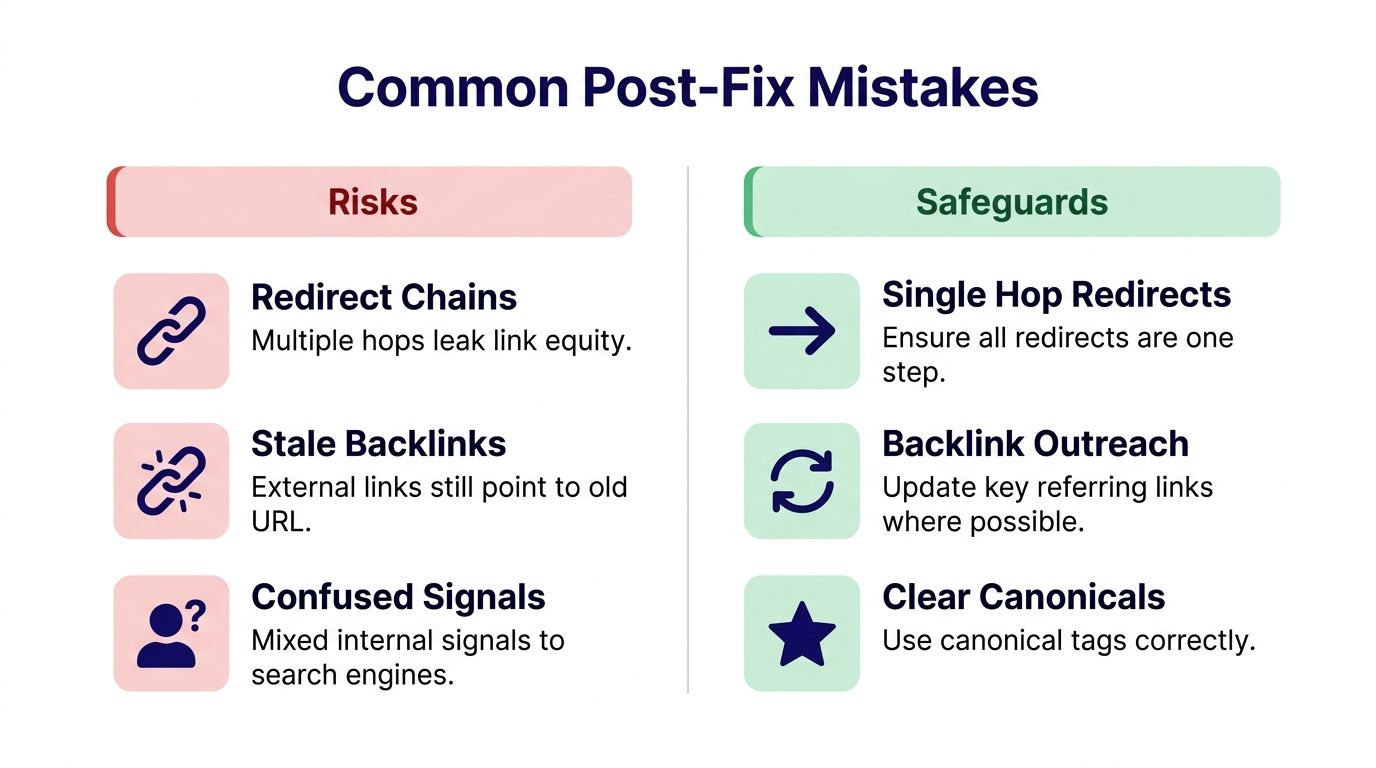
If you redirect Page A to Page B and Page B to Page C, you've created a chain that can slow re-evaluation and dilute the signal you're trying to consolidate. Multiple SEO guides warn against this because the cleanest fix is a single-hop redirect from the retired URL to the preferred URL. Clean architecture matters here more than cleverness.
The same goes for stale backlinks. If a few important external references still point to the retired page, you can't assume the whole problem is solved just because your internal links were cleaned. Outreach to key referring pages is worth doing when the links matter enough to justify the effort.
Don't ignore the small conflicts
Weak cannibalization is easy to dismiss because it doesn't look dramatic. That's a mistake, especially on older sites where overlapping pages tend to accumulate in the background. If a low-traffic URL keeps competing for a query that matters strategically, it can still muddy the intent signals and keep the preferred page from settling into place.
The other common failure is choosing the wrong survivor. Backlinks matter, but so do engagement and commercial fit. If the page with the better link profile has worse intent alignment, the more defensive move is to reassess the choice rather than forcing the wrong URL to win because it looks stronger on paper.
Use a pre-publish checklist before you call it finished
- Check redirects: Make sure every retired URL goes straight to the chosen survivor with no extra hops.
- Verify internal links: Confirm that navigation, related-content modules, and body links all point to the preferred URL.
- Review canonicals: Make sure secondary pages, if they stay live, point cleanly to the main version.
- Re-test the query: Confirm the same search term now maps to one dominant URL in Search Console.
- Watch for relaunch drift: New content can reopen the conflict if editors publish near-duplicates without a keyword map.
That checklist catches the kind of drift that erodes recovery after everyone thinks the fix is finished. It's the difference between a temporary cleanup and a stable URL structure.
Nuwtonic helps teams find query-to-URL conflicts in Google Search Console, track cannibalization across a site, and route the cleanup work into a reviewable workflow instead of a one-time spreadsheet exercise. If you're ready to turn overlapping URLs into a clear page hierarchy, visit Nuwtonic and see how the platform handles cannibalization monitoring, technical audits, and content fixes in one workspace.


