
Key Takeaways
• Core Profile Fields Are Non-Negotiable: Meta's search algorithm prioritizes complete pages with accurate names, usernames, and categories.
• Intent Dictates Discovery: Facebook search is transactional and social, whereas Google indexes your page based on structured entity signals.
• Engagement Trumps Followers: Your organic reach is powered by your engagement rate, not a vanity follower count.
• Local Consistency Wins: Aligning your Name, Address, and Phone (NAP) details across platforms is crucial for local SEO discoverability.

Table of Contents
The Reality of SEO for Facebook Pages
Optimizing Your Core Page Identity
Crafting High-Performance Copy and Metadata
Driving Discoverability Through Engagement and Activity
Common Pitfalls and How to Avoid Them
Frequently Asked Questions (FAQ)
Sources and Industry References
TL;DR Summary
Optimizing your Facebook Page for search requires a dual-focus approach: catering to Facebook's internal search algorithm while aligning with Google's external indexing requirements. By completing your profile fields, naming your page strategically, securing a custom username, and maintaining an active content calendar, you can dramatically improve your organic reach and local discoverability. This guide breaks down the exact steps to turn your Facebook Page into a search-ranking asset.
The Reality of SEO for Facebook Pages
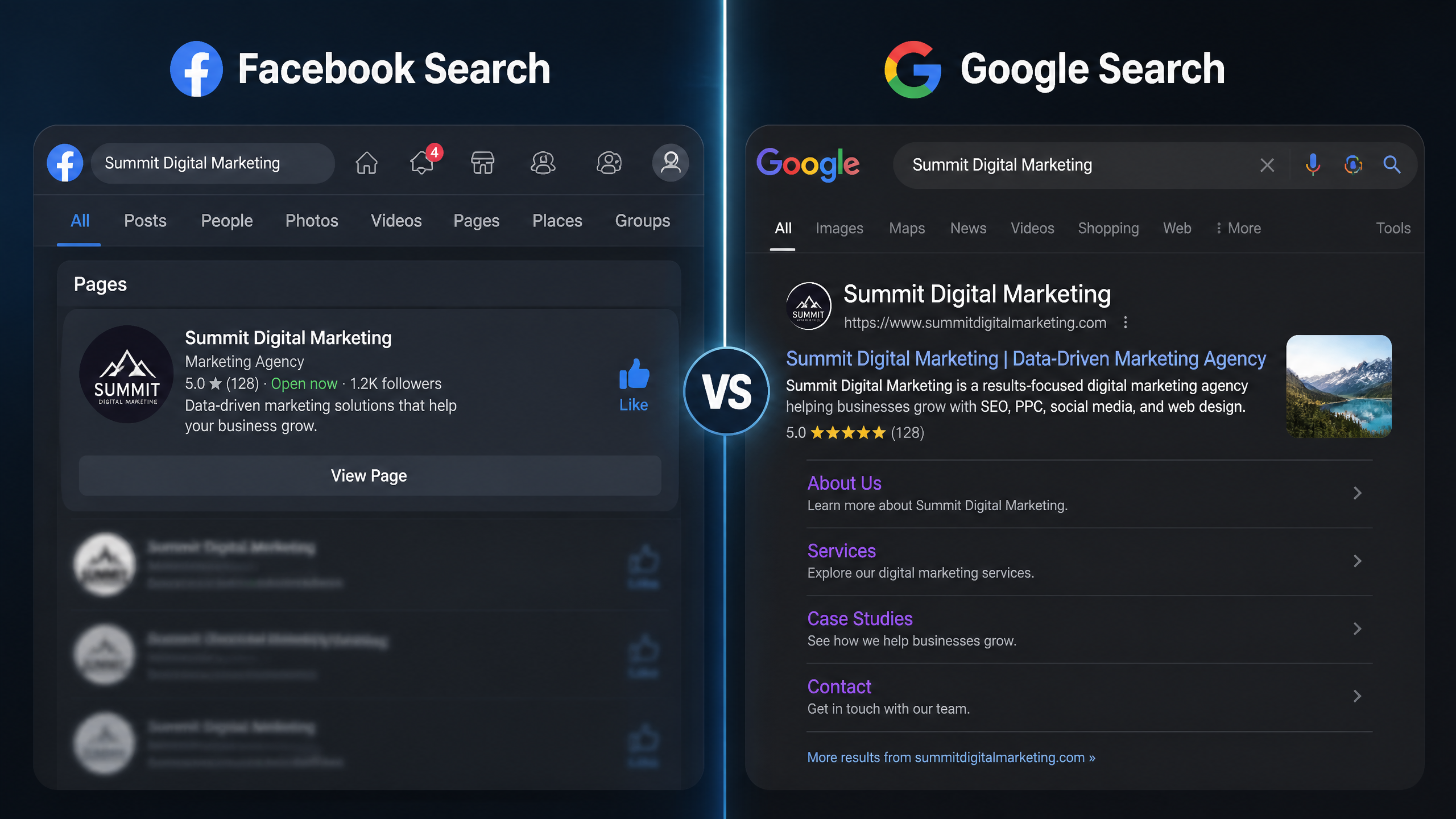
Internal Facebook Search vs. External Google SEO
Let's face it, most marketers treat their Facebook Page like a dusty digital filing cabinet — posting occasionally and hoping for the best. But here is the critical distinction we must make right out of the gate: optimizing for Facebook's internal search is not the same as optimizing for Google.
Facebook's in-platform search engine is highly social, behavioral, and personalized. It prioritizes user intent, location, and direct brand connections. Google, on the other hand, indexes Facebook Pages as structured entity profiles. When a user searches Google for your brand or local services, Google relies on clear title tags and entity signals to rank your Facebook Page.
Feature or Signal | Facebook Internal Search | Google External Search |
|---|---|---|
Primary Search Intent | Brand navigation, local services, community engagement | Informational, brand verification, reviews |
Core Ranking Factor | Page name, category, user engagement, physical proximity | Entity consistency, metadata, crawlable text, authority |
Keyword Treatment | Built on natural semantic relevance and user activity | Relies on title tags, meta descriptions, and inbound links |
Algorithm Logic | Personalized, engagement-heavy, highly localized | Structured data, crawlable entity graphs, and NAP consistency |
Why Profile Completeness is Your Secret Weapon
According to Meta's Facebook Page settings guidance, a Page’s name, username, category, and About information are core profile fields that help define how the Page is presented and found. When you leave these blank, you are essentially hiding from both search systems.
In my seven years as a social media optimization specialist, the easiest win I have ever seen is simply completing every single profile field. It is the social equivalent of understanding on-page SEO for a traditional website. If search engines do not have structured data to crawl, they cannot categorize your business accurately.
The False Promise of Keyword Stuffing
Honestly, if I see one more page named "Best Cheap NYC Plumber - Plumbers NYC - Local Plumbing Services," I might lose my mind. It looks incredibly spammy, and guess what? It does not work.
According to Meta’s platform documentation, Pages are searched and surfaced based on relevance and user intent, so descriptive page copy matters more than repeated keywords alone. Stuffing keywords into your page name or bio actively degrades user trust and lowers your engagement rate.
Google Search Central also emphasizes that search engines rely on clear, descriptive title and entity signals, meaning a precise business name is far easier for search systems to interpret than a string of disconnected search terms.
Optimizing Your Core Page Identity
Naming Your Page for Search Relevance
Your Page name is the strongest relevance signal you can send. According to Meta, a Page is intended for businesses, brands, organizations, and public figures, so your optimization should start with accurate entity representation rather than keyword manipulation.
Before we look at the solution, let's look at what NOT to do:
• Do not use generic keywords as your entire page name (e.g., "Affordable Shoes").
• Do not use excessive capitalization, symbols, or unnecessary punctuation.
• Do not misrepresent your actual brand identity to capture temporary search trends.
The Solution: Combine your actual brand name with a single, high-value descriptive term if necessary (e.g., "Apex Marketing - SEO Agency"). This satisfies both user recognition and algorithmic search parameters.
Securing Your Vanity URL (Username)
Your username (the handle following the "@" symbol) dictates your custom Facebook URL. According to Meta’s Page username guidance, a username creates a unique Page identifier that can be used in the Page URL and in mentions, which directly supports brand consistency.
If your business is named "Greenwood Bakery," your username should ideally be @GreenwoodBakery. If you are running an online store, this is a prime opportunity to align your social handles with your website's primary target terms. It is highly similar to how you would execute keyword research for eCommerce to find the exact terms that map to your brand's core identity. Keep it clean, keep it memorable, and keep it consistent.
Choosing the Right Page Category
According to Meta’s Page category system, choosing the most accurate category helps classify the Page for discovery and user understanding. Facebook allows you to select up to three categories, but the first one you choose is the most critical because it appears directly under your Page name.
Do not make the mistake of choosing a broad, generic category if a specific one exists. If you run a vegan bakery, select "Vegan Restaurant" or "Bakery" rather than just "Food & Beverage." This structured classification helps Facebook's recommendation engine group your page with relevant local peers and suggest it to interested users.
Crafting High-Performance Copy and Metadata

Maximizing the About Section and Bio
Your About section is your page's meta description. While Facebook does not use standard HTML meta tags in the traditional web sense, search engines like Google rely heavily on this section to generate the snippet that appears in external search results.
Write a descriptive, compelling summary of your business. Keep your keyword density natural — around 1% to 2% — to avoid looking like a robot wrote it. Clearly state what you do, who you serve, and why you are the authority in your niche.
Local SEO Optimization for Brick-and-Mortar Pages
For local businesses, your physical address, phone number, and operating hours are critical. According to Meta’s Page info guidance, location, hours, contact details, and website fields improve how a Page is displayed to people searching for a business.
Furthermore, according to Google’s local SEO guidance, maintaining accurate business information on prominent profiles can help local customers find and verify a business, which makes Facebook Page consistency important for US businesses.
Ensure your Name, Address, and Phone (NAP) data on Facebook matches your Google Business Profile and website exactly. Any discrepancy can confuse search engine crawlers and hurt your local search rankings.
Integrating Keywords into Your Content Calendar
Many people overlook the importance of a solid content calendar — it’s the backbone of a successful Facebook strategy. You cannot simply post random updates and expect to build search visibility.
When mapping out your content calendar, weave your primary and secondary keywords naturally into your post captions, video descriptions, and image alt text. This builds a consistent topical authority graph over time, signaling to both Facebook and Google what your page is about.
Driving Discoverability Through Engagement and Activity
The Correlation Between Engagement Rate and Visibility
Too many marketers get hung up on follower counts; engagement rate is a much better indicator of success. According to Meta’s recommendations, Page updates, posts, and engagement contribute to how useful a Page appears to users, which can indirectly support discoverability through activity and interaction.
If your page has 10,000 followers but zero likes, comments, or shares, Facebook's algorithm assumes your content is irrelevant. I have run multiple A/B testing campaigns on Facebook ads and organic posts, and the data always points to the same truth: high engagement rates trigger a positive feedback loop that drives organic reach.
Social Proof, Reviews, and Entity Consistency
Reviews and recommendations are massive trust signals. According to Google Search Central, structured, unambiguous business information is easier for search systems to process, which supports the case for clear page naming and detailed About content on Facebook.
When users leave positive reviews, they often naturally use keywords associated with your business (e.g., "best chocolate chip cookies in Boston"). These user-generated keywords act as highly authentic search signals for both Facebook and Google. Encouraging your customers to leave reviews on your Page directly feeds this optimization loop.
Measuring Success with Facebook Insights
I've noticed that brands often underestimate the power of Facebook Insights; it’s like having a cheat sheet for your audience. If you are not regularly reviewing your analytics, you are flying blind.
Use Facebook Insights to track:
• Which posts drive the highest engagement rate.
• When your audience is most active online.
• How users are finding your page (organic search vs. direct recommendations).
• The demographic breakdown of your most active followers.
Use this data to iteratively refine your content calendar, adjust your post timing, and optimize your keyword targeting.
Common Pitfalls and How to Avoid Them
What NOT to Do with Your Facebook Page
Before we look at policy compliance, let's look at the absolute worst offenders when it comes to Facebook optimization:
• Ignoring Broken Links: Linking to a dead website or an old, expired domain is a quick way to kill your trust. Just as the impact of broken links on SEO can devastate a website's rankings, having broken links on your Facebook profile signals to both Meta and Google that your business might be inactive or neglected.
• Ghosting Your Audience: Posting once every three months tells the algorithm your page is abandoned.
• Misaligned Branding: Using different business names, logos, or contact details across your website, Facebook, and Instagram.
Handling Platform Policy and Algorithm Shifts
Facebook's ranking systems are governed by platform rules and algorithmic updates. According to Meta's Page transparency information, users can inspect details about a Page's history and management, so consistent branding and governance can affect trust.
In my experience, staying compliant with Meta's community standards and maintaining transparency is the only way to safeguard your organic visibility long-term.
The ACCC digital platforms report notes that platform algorithms are highly dynamic and can shift distribution patterns overnight. To mitigate this risk, focus on building genuine community engagement rather than trying to game the system with short-term hacks.
Frequently Asked Questions (FAQ)
How does Facebook search decide which Pages to show?
Facebook search relies on a combination of relevance, user intent, and engagement. The algorithm analyzes your Page name, category, username, and the completeness of your profile. It also factors in behavioral signals, such as whether a user has interacted with your Page before, their physical proximity to your business, and your Page's overall engagement rate.
Can a Facebook Page rank in Google search?
Yes. Google indexes Facebook Pages as high-authority brand entities. To help your Page rank in Google, ensure your Page name matches your actual brand name, fill out your About section with descriptive, keyword-rich copy, and maintain consistent Name, Address, and Phone (NAP) details across the web.
Does page completeness matter for discoverability?
Absolutely. According to Meta, a Page’s profile completeness improves the user experience by giving people enough information to decide whether to follow, contact, or visit the business. Complete profiles send stronger entity signals to both Facebook and Google, making them much more likely to appear in search results.
Sources and Industry References
Official Meta Documentation
• Meta Page Settings & Username Guidance
• Meta Page Category System & Discovery Recommendations
• Meta Page Info & Transparency Guidelines
Google Search Central and Academic Research
• Google Search Central Business Entity Documentation
• Google Local SEO Guidance & NAP Consistency
• ACCC Commissioned Report on Digital Platforms


