
TL;DR Summary
Can AI analyze your Google Search Console (GSC) data? Absolutely. Today, you can analyze your search performance using Google's native AI-powered configuration tool, external LLMs like ChatGPT and Claude, or specialized agentic SEO platforms like Nuwtonic. While native AI helps you build reports and external tools assist with data crunching, Nuwtonic goes a step further by automatically running 32+ advanced analyses on your GSC data to find immediate content gaps and ranking opportunities.
Key Takeaways
• Native GSC AI: Google's built-in experimental feature allows you to use natural language prompts to set up filters, compare dates, and isolate key metrics inside your Performance report.
• External LLMs: You can export your GSC data into CSV or Google Sheets to have ChatGPT or Claude classify search intent, find "striking distance" keywords, and detect performance anomalies.
• The Nuwtonic Advantage: Instead of manual exports and tedious prompt engineering, Nuwtonic connects directly to your GSC via OAuth to automate 32+ agentic analyses, instantly mapping out cannibalization, zero-CTR queries, and topical authority maps.
• Limitations: Google does not natively track traffic coming from AI engines (like SGE or ChatGPT) inside GSC, requiring alternative tracking methods or custom regex workarounds.
Table of Contents
The Evolution of Google Search Console Analysis
How Native AI Configurations Work Inside GSC
The Power of External AI Tools and Intent Classification
Nuwtonic: The Agentic Solution for Automated GSC Action
Comparing GSC Analysis Methods
Frequently Asked Questions
Sources and References
The Evolution of Google Search Console Analysis
The Old Way: Drowning in CSVs and Spreadsheets
You know what’s funny? Most people overlook the wealth of data in GSC — it’s not just about clicks and impressions, but so much more. In my seven years of analyzing search performance, I’ve watched countless digital marketers spend hours exporting massive CSV files, only to get completely bogged down in pivot tables. Too many folks get bogged down in technical jargon; the key to using GSC effectively is understanding your site's story.
Historically, identifying a sudden ranking drop or finding a keyword with high impressions but low click-through rates (CTR) required tedious manual filtering. You had to manually compare date ranges, build complex regex filters, and cross-reference multiple tabs just to figure out which page was losing steam. It was slow, frustrating, and often led to analysis paralysis.
Enter Native AI: Google's Experimental Configuration Tool
Everything changed when Google introduced its experimental AI-powered configuration feature inside the Search Console Performance report. Originally rolled out globally in late 2025 and expanded in January 2026, this native integration allows users to describe their analysis goals in plain English instead of manually configuring filters.
Instead of clicking through endless dropdown menus, you can simply type a prompt, and Google's native system automatically configures the metrics, date ranges, and comparisons for you. It is a massive step forward for accessibility, turning complex reporting tasks into simple conversations.
The Rise of External AI and Agentic Interpreters
But what if you want to go beyond simple report setup? That is where external AI tools and agentic platforms enter the picture. While Google's native AI is excellent for configuring views, it doesn't actually interpret the data or tell you why your rankings changed.
To bridge this gap, SEO professionals began exporting GSC data to feed into large language models (LLMs) like ChatGPT and Claude. More recently, agentic AI platforms have emerged that connect directly to your GSC data via secure API connections. These tools don't just organize your reports—they analyze patterns, detect anomalies, and generate prioritized content recommendations in plain language.
How Native AI Configurations Work Inside GSC
Natural Language Prompting for Report Filters
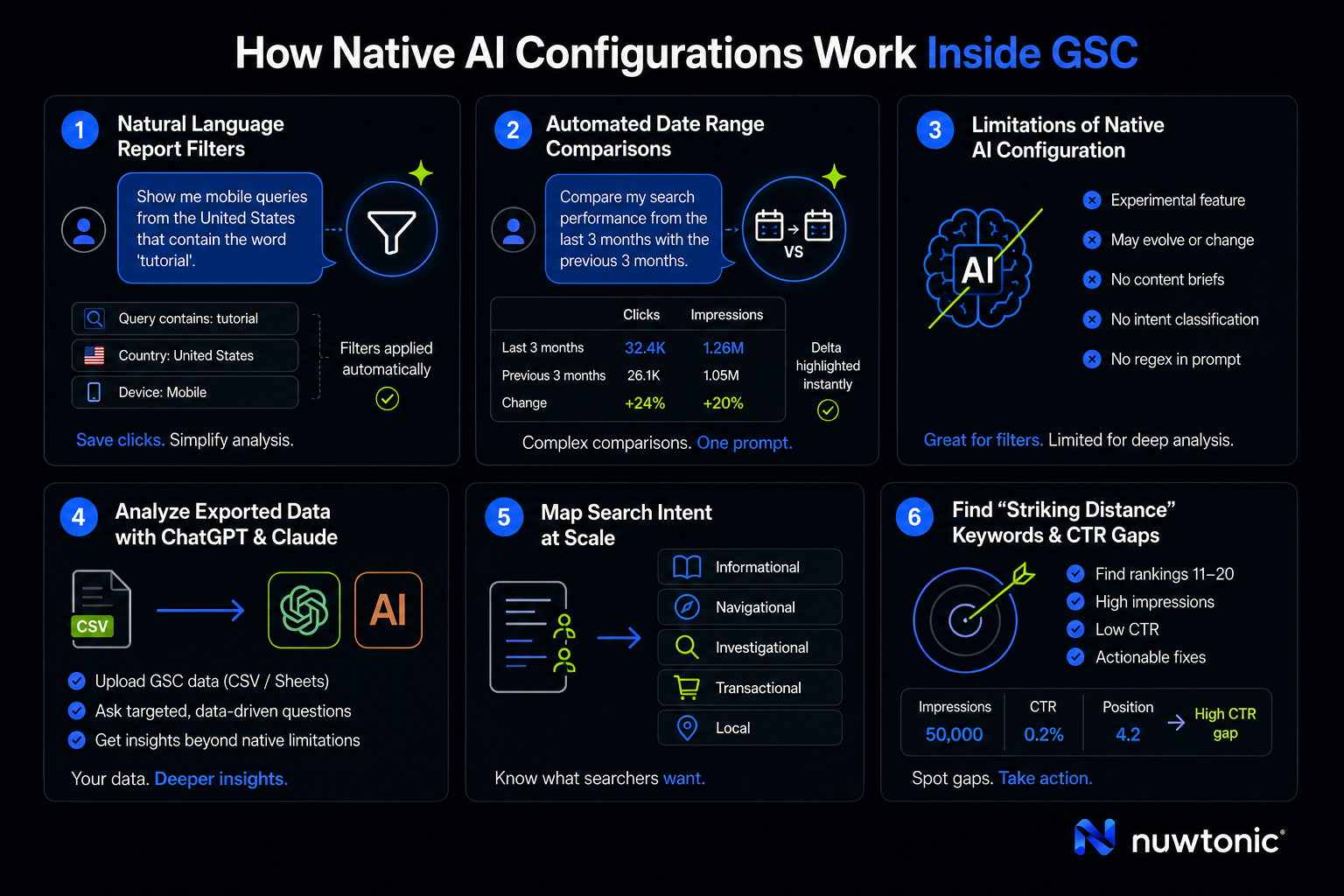
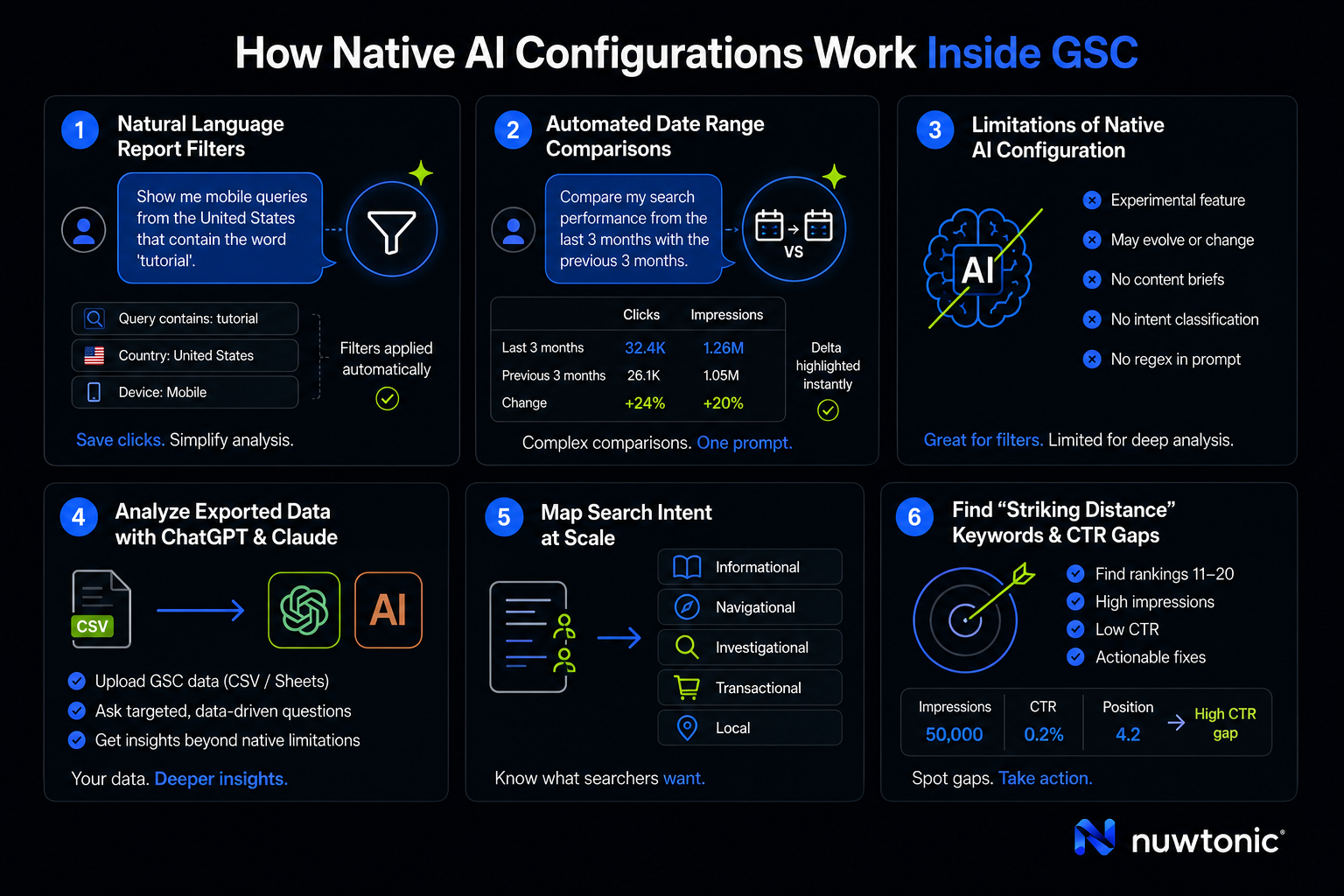
Google's native AI-powered configuration simplifies how you interact with the four core GSC metrics: Clicks, Impressions, CTR, and Average Position. By typing natural language prompts directly into the Performance report, the system auto-applies filters based on query, page, country, or device.
For example, instead of manually adding a query filter and setting it to "contains," you can type:
"Show me mobile queries from the United States that contain the word 'tutorial'."
Within seconds, GSC applies the exact filter configuration, saving you multiple clicks and reducing the learning curve for team members who aren't technical SEO experts.
Automated Date Range and Period Comparisons
Comparing performance across different timeframes is one of the most critical tasks in search performance analysis. Google's native AI excels at automating these complex date comparisons.
Here’s a thought: Ever wondered why your impressions aren’t converting? Often, it's because of seasonal shifts or sudden algorithm updates. To diagnose this, you can ask the native GSC AI:
"Compare my search performance from the last 3 months with the previous 3 months."
The tool instantly configures the comparison view, highlighting the delta in clicks and impressions across your top-performing pages. What used to take several manual steps is now handled in a single conversational prompt.
Limitations of Google's Built-In AI Configuration
While this native feature is incredibly helpful, it is important to understand its boundaries. First and foremost, the feature is strictly experimental. Google explicitly states that it may evolve or change, meaning you shouldn't build your entire reporting infrastructure around it just yet.
Furthermore, the built-in AI cannot perform deeper analytical tasks. It will not write a content brief for you, it cannot classify search intent, and it does not support regex-based AI prompts directly inside the conversational bar. If you want to run complex regex—such as isolating long-tail, AI-style queries—you still have to apply those filters manually before letting the AI analyze the remaining dataset.
The Power of External AI Tools and Intent Classification
Analyzing Exported Data with ChatGPT and Claude
Because Google's native AI has strict functional boundaries, many SEOs rely on external LLMs for deep-dive analysis. The workflow typically involves exporting your GSC performance data as a CSV or Google Sheets file, then uploading that file directly to an AI chat interface.
Once the data is uploaded, you can ask specific, targeted questions. I’ve seen clients waste time on fixing things that GSC isn’t even flagging as issues — sometimes you just need to trust the data and let an LLM run a cold, hard mathematical analysis on your actual numbers. For instance, you can prompt ChatGPT to identify your top ten "striking distance" keywords (queries ranking in positions 11-20 that need a minor boost to reach page one).
Mapping Search Intent at Scale
One of the most powerful use cases for external AI is intent classification. GSC gives you raw search queries, but it doesn't tell you what the searcher actually wants. By exporting your query data and prompting an AI model like Claude, you can categorize thousands of keywords into distinct intent buckets at scale.
Typically, the AI will classify queries into the following categories:
Informational: Searchers looking for answers, guides, or explanations.
Navigational: Users trying to find a specific website or brand page.
Investigational: Searchers comparing different products, services, or solutions.
Transactional: Users with a clear intent to purchase or sign up.
Local: Searchers looking for physical locations or services nearby.
Having this classification mapped directly to your GSC performance data allows you to see exactly which content formats are driving your organic traffic and where your conversion funnel might be leaking.
Finding "Striking Distance" Keywords and CTR Gaps
An external AI can quickly cross-reference impressions and CTR to find massive optimization opportunities. If a page has 50,000 impressions but a CTR of only 0.2% while ranking in position 4, you have a serious CTR gap.
An LLM can analyze this pattern and suggest immediate actions, such as rewriting the meta title to be more click-worthy, or adding structured schema markup to win rich snippets. It takes the guesswork out of prioritization, pointing you directly to the lowest-hanging fruit on your website.
Nuwtonic: The Agentic Solution for Automated GSC Action
Connecting GSC via OAuth for Instant Workspace Setup
Let's be honest: exporting CSVs, formatting Google Sheets, and copying-and-pasting complex prompts into ChatGPT every single week gets exhausting. It is a disjointed workflow that eats up valuable hours. This is exactly where Nuwtonic steps in to streamline the entire process.
Instead of forcing you to act as a data courier between tools, Nuwtonic connects securely to your Google Search Console via a standard OAuth flow. In about 30 seconds, Nuwtonic builds a dynamic workspace around your actual, live search performance data. There are no manual exports, no formatting errors, and no security risks from uploading sensitive business files to public AI chats.
Run 32+ Agentic Analyses Automatically
Once connected, Nuwtonic doesn't just sit there waiting for you to ask a question. The platform's performance dashboard immediately runs 32+ agentic analyses automatically on your GSC data.
Instead of you having to dig for insights, Nuwtonic automatically surfaces:
• Zero-CTR Queries: Keywords where your site is getting massive impressions but absolutely zero clicks, signaling a major title or search intent mismatch.
• Mobile vs. Desktop Ranking Gaps: Pinpointing technical rendering or speed issues that are hurting your mobile performance while desktop remains stable.
• Cannibalization Issues: Identifying instances where multiple pages on your site are competing for the exact same search query, diluting your organic authority.
• Top Movers and Shakers: Highlighting which pages have experienced the most significant traffic gains or losses over recent indexing cycles.
Transforming GSC Data into a High-Authority Topical Map
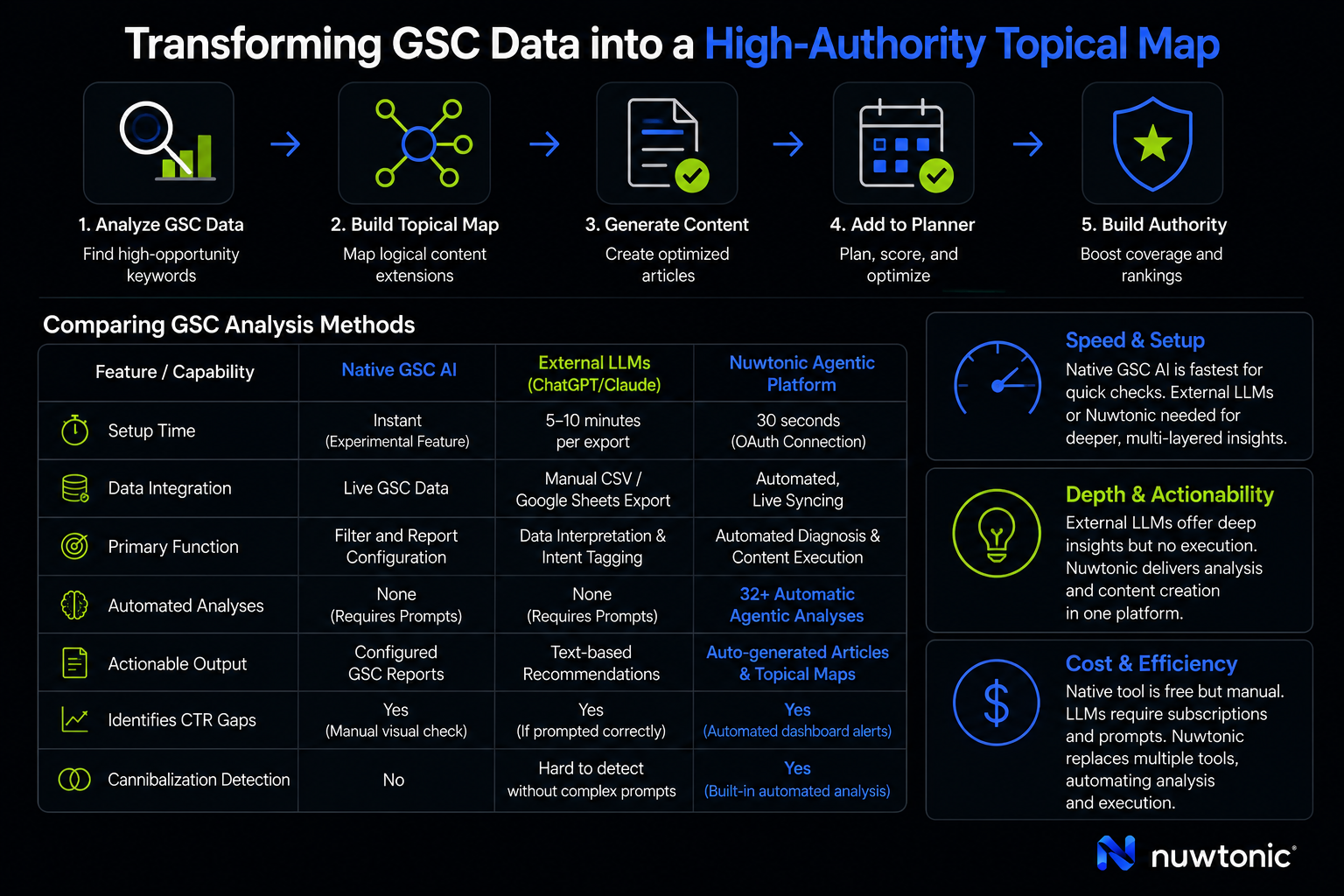
Identifying a problem is only half the battle; the real value lies in fixing it. Nuwtonic bridges this gap by using your actual GSC data and existing topical authority to build a comprehensive topical map.
Instead of guessing what to write next, Nuwtonic looks at the keywords Google already trusts your site for and maps out logical content extensions. You can select a high-opportunity keyword directly from your GSC analysis, generate a highly optimized article, and drop it straight into your content planner—complete with contextual images, an E-E-A-T score, and real-time optimization suggestions. It turns raw GSC data into a repeatable content engine.
Comparing GSC Analysis Methods
To help you decide which approach fits your workflow, let's look at how these three primary methods stack up against each other across speed, setup, and actionable depth.
Feature / Capability | Native GSC AI | External LLMs (ChatGPT/Claude) | Nuwtonic Agentic Platform |
|---|---|---|---|
Setup Time | Instant (Experimental Feature) | 5-10 minutes per export | 30 seconds (OAuth Connection) |
Data Integration | Live GSC Data | Manual CSV/Google Sheets Export | Automated, Live Syncing |
Primary Function | Filter and Report Configuration | Data Interpretation & Intent Tagging | Automated Diagnosis & Content Execution |
Automated Analyses | None (Requires Prompts) | None (Requires Prompts) | 32+ Automatic Agentic Analyses |
Actionable Output | Configured GSC Reports | Text-based Recommendations | Auto-generated Articles & Topical Maps |
Identifies CTR Gaps | Yes (Manual visual check) | Yes (If prompted correctly) | Yes (Automated dashboard alerts) |
Cannibalization Detection | No | Hard to detect without complex prompts | Yes (Built-in automated analysis) |
Speed and Setup Requirements
If you just need a quick, isolated look at a specific date range or a single query modifier, Google's native AI-powered configuration is your fastest option. It requires zero setup and is built right into your existing dashboard. However, if you want deep, multi-layered insights, manual exports to external LLMs or a direct connection to Nuwtonic is necessary.
Depth of Insights and Actionability
External LLMs offer incredible depth when it comes to linguistic analysis, such as categorizing search intent or analyzing the semantic differences between your page titles and competing SERP results. However, they lack the ability to take action. Nuwtonic is the only solution that combines automated analysis with execution—allowing you to identify a GSC performance gap and instantly generate the content needed to fix it within the same platform.
Cost and Resource Efficiency
While Google's native tool is entirely free, it requires manual oversight. External LLMs often require paid subscriptions for advanced data analysis features, and they demand continuous prompt engineering. Nuwtonic acts as a comprehensive, cost-effective replacement for multiple disjointed SEO tools, automating both the analysis of SEO issues and the execution of fixes while keeping you in control of the approval process.
Frequently Asked Questions
Can I ask GSC questions in plain English?
Yes, you can. With Google's native AI-powered configuration feature inside the Performance report, you can type natural language questions to automatically configure metrics, apply filters, and set up date comparisons without having to click through manual dropdown menus.
Does GSC track traffic from AI engines like SGE?
No, it does not. Currently, Google Search Console does not provide a separate "AI Mode" filter to track organic traffic originating specifically from AI-generated search experiences like Google's AI Overviews or Search Generative Experience (SGE). This traffic is blended into standard search performance metrics.
What are the privacy risks of connecting GSC to AI?
When using external AI tools, uploading raw CSV exports can expose sensitive business data to public LLM training models unless you opt out of data sharing. Platforms like Nuwtonic use secure OAuth protocols, ensuring that your search console data is analyzed securely within a private workspace and never shared with public models.
Can AI find my "striking distance" keywords?
Yes. By analyzing your GSC query data, AI can instantly filter for keywords that have high impressions and an average ranking position between 11 and 20. These are queries sitting on page two of search results that require minor optimization to move to page one.
How accurate is AI at classifying search intent?
External AI models like Claude and ChatGPT are highly accurate (often exceeding 85-90% alignment with human analysts) at classifying search intent into informational, transactional, navigational, or investigative categories, provided you give them clear definitions and context in your prompt.
Sources and References
• Google Developers Blog: Official documentation regarding the experimental status and capabilities of the AI-powered configuration feature inside Search Console's Performance report.
• Google Search Console Launch Announcement (December 2025): Details on the global introduction of native natural language prompting and automated report configurations.
• Nuwtonic Platform Specifications: Documentation on the 32+ agentic analyses, GSC OAuth integration, and automated topical authority mapping features.


