
When auditing a new client's website, one of the first technical flaws we look for is link rot. If you are wondering why broken links hurt SEO, the answer lies in a compounding chain reaction: they sever the flow of link equity, frustrate your users, and force search engine crawlers into dead ends.
In 2026, Google's algorithms are more sensitive to user experience (UX) and resource allocation than ever before. While a handful of 404 errors will not trigger a manual penalty, leaving them unaddressed sends a clear signal to search engines that your site is unmaintained.
In this guide, we will break down the exact mechanics of how broken links degrade your search visibility, backed by Google's own documentation and our experience managing enterprise SEO campaigns at Nuwtonic.
TL;DR & Key Takeaways
• Broken links do not cause direct Google penalties, but they indirectly harm rankings by degrading user experience and increasing bounce rates.
• Crawl attempts on 404 pages consume valuable server resources, slowing down the discovery of your indexable content.
• Internal broken links prevent PageRank (link equity) from flowing through your site, isolating important pages.
• Soft 404s are often more dangerous than hard 404s because they confuse search engines by returning a "200 OK" status for missing content.
• Fixing link rot requires a systematic approach: audit, prioritize by traffic impact, and resolve via 301 redirects or permanent removals.
Table of Contents
- The Mechanics: Why Broken Links Hurt SEO Directly and Indirectly
- The User Experience Factor: How 404s Sabotage Rankings
- Diagnosing the Damage: Hard 404s vs. Soft 404s
- Strategic Triage: How to Prioritize and Fix Broken Links
- Frequently Asked Questions (FAQ)
- Sources and References
The Mechanics: Why Broken Links Hurt SEO Directly and Indirectly
To understand the true impact of broken links, we must look under the hood at how search engines process your website. The damage is rarely instantaneous; instead, it acts as a slow leak in your site's structural integrity.
Wasted Crawl Budget and Server Resources
Crawl budget refers to the maximum number of pages a search engine like Googlebot will crawl on your site within a specific timeframe. Google's documentation states that pages returning 4xx status codes (like a 404 Not Found) do not technically "waste" crawl budget in the traditional sense, but the crawl attempt still consumes your server resources.
When Googlebot hits a broken link, it halts discovery on that path. If you run a large content site or SaaS platform with thousands of pages, hundreds of broken links can cause severe indexing delays. The crawler spends time requesting dead pages instead of finding your newly published, high-value content.
Disrupted Link Equity and PageRank Flow
Links are the nervous system of SEO. They pass PageRank and anchor text signals to Google, establishing topical authority and hierarchy. When an internal link points to a 404 page, that flow of link equity stops dead.
Consider a scenario where your homepage links to a pillar service page, but a typo in the URL breaks the link. The service page loses the powerful ranking signals passed from the homepage. If you are struggling with Fixing Indexed Pages That Don't Rank, a disrupted internal linking structure is often the hidden culprit.
The Truth About Google Penalties
Let us clarify a persistent myth: there is no direct Google penalty for having broken links. You will not receive a manual action in Google Search Console simply because a few outbound links rotted over time.
However, Google's Search Quality Guidelines divide link error impacts by intensity levels. A site riddled with broken links falls into the "lowest" quality rating because it fails to achieve its purpose for the user. The penalty is algorithmic and indirect—your pages slowly lose visibility as Google determines they offer a subpar experience.
The User Experience Factor: How 404s Sabotage Rankings
Search engines ultimately want to serve links that satisfy the user's query. When broken links disrupt that satisfaction, your rankings suffer.
Spiking Bounce Rates
Bounce rate serves as a critical behavioral signal. When a user clicks a promising link in your article only to hit a "Page Not Found" error, their immediate reaction is frustration. They hit the back button and return to the search results—a behavior known as pogo-sticking.
This rapid abandonment tells Google's algorithm that your page did not satisfy the user's intent. Over time, high bounce rates correlated with navigation frustrations will drag down your primary page's ranking, even if the content itself is excellent.
Trust, Conversions, and Brand Damage
Beyond technical SEO, broken links destroy commercial trust. A study cited in recent SEO analyses shows that 89% of consumers will shop with competitors after a poor user experience involving issues like broken links.
Imagine an e-commerce athleisure store where a popular blog post links to a discontinued product without a proper redirect. The user is ready to buy, clicks the link, hits a 404, and immediately leaves to buy from a competitor. You lose the sale, and the product category page loses its SERP position due to poor behavioral metrics.
Accessibility and Compliance Constraints
In the US, website accessibility is increasingly tied to ADA compliance. Screen readers and assistive technologies rely on clean, functional HTML. Broken links create dead ends for visually impaired users navigating via keyboard or voice commands. While accessibility is not a direct ranking factor, the resulting UX degradation compounds the negative behavioral signals sent to search engines.
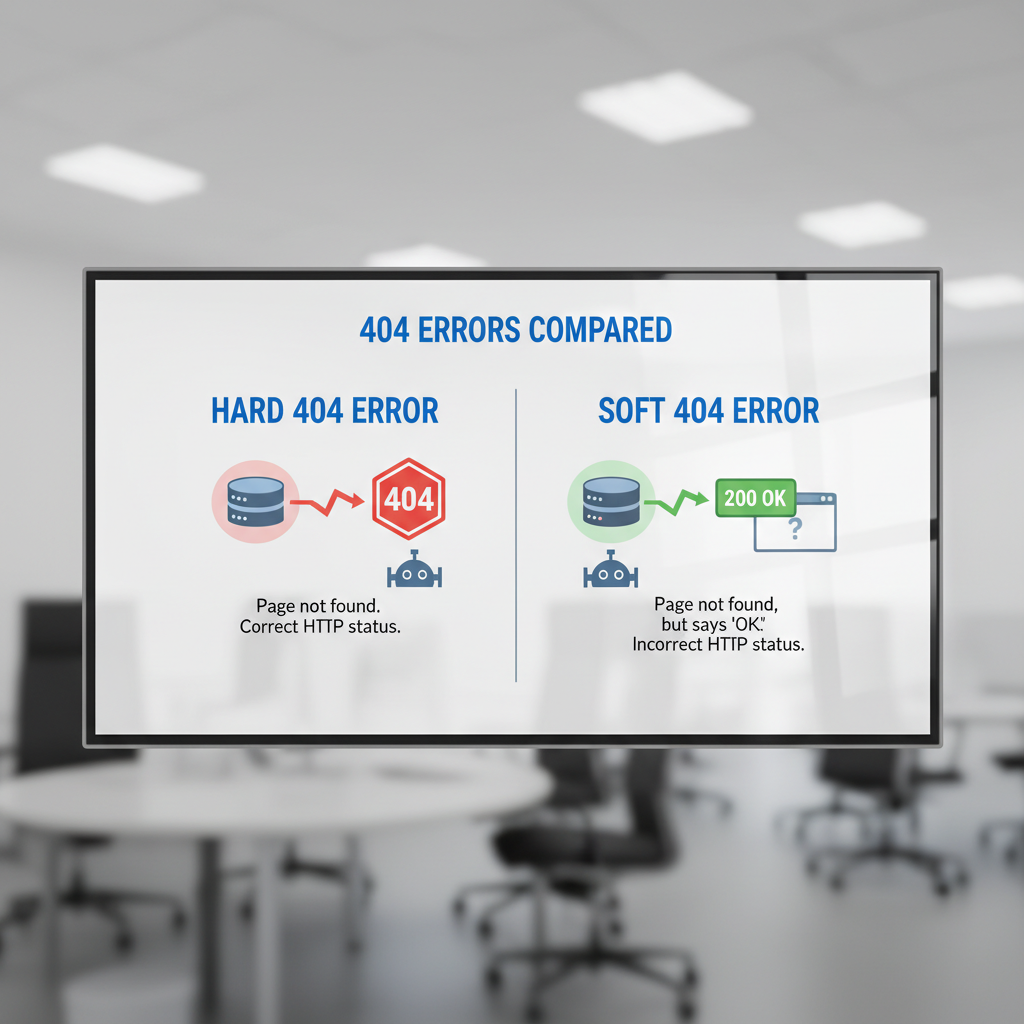
Diagnosing the Damage: Hard 404s vs. Soft 404s
Not all broken links are created equal. To fix the problem, we must first accurately diagnose the HTTP response codes your server is sending to Googlebot.
Identifying Hard 404 Errors
A "Hard 404" is the standard "Not Found" error. The server correctly tells the browser and the search engine that the requested URL does not exist. Googlebot processes this cleanly by eventually dropping the URL from the index. While this is the correct technical response for a deleted page, any links pointing to this 404 URL are wasting link equity and frustrating users.
The Sneaky Threat of Soft 404s
Soft 404s are significantly more dangerous. A soft 404 occurs when a page displays a "not found" message to the user, but the server returns a "200 OK" status code to the search engine.
This is a sneaky SEO trap. Because the server claims the page is valid, Googlebot wastes time crawling and attempting to index a useless page. Soft 404s often happen when sites discontinue subdomains and lazily redirect everything to the homepage, blocking PageRank flow and harming topical relevance.
Crawlable Link Standards
To proactively avoid indexing issues, you must adhere to technical standards. According to Google's crawlable link standards, links are only considered crawlable if they use standard <a> HTML elements with an href attribute. Script-based links or onclick events without an href are effectively invisible to Googlebot, acting like broken links from a discovery standpoint.
| Error Type | HTTP Status Code | Impact on Googlebot | User Experience Impact |
|---|---|---|---|
| Hard 404 | 404 Not Found | Drops from index eventually; crawl stops. | High frustration; clear dead end. |
| Soft 404 | 200 OK | Wastes crawl budget; confuses index. | High frustration; misleading. |
| Server Error | 500 / 503 | Halts crawl entirely; signals instability. | Total blockage; loss of trust. |
Strategic Triage: How to Prioritize and Fix Broken Links
Fixing broken links on a five-page local business site takes ten minutes. Fixing them on a 50,000-page enterprise site requires strategic triage. Here is our methodology for addressing link rot at scale.
Detecting Errors at Scale
First, you need comprehensive data. Google Search Console's "Pages" report is your starting point for identifying URLs returning 404s. However, GSC only shows pages Google has already tried to crawl.
To find broken links proactively, you need a dedicated crawler. Using a Broken Link Checker Tool allows you to scan your entire architecture, identifying exactly which pages contain the broken outbound or internal links. Integrating this into your routine On-Page SEO Audit Tools workflow ensures you catch errors before Googlebot does.
Redirects vs. Removals: Making the Right Choice
Once you have your list of broken links, you must decide how to handle the target URLs. Do not blindly redirect everything to your homepage.
| Fix Method | When to Use It | SEO Impact |
|---|---|---|
| 301 Redirect | The broken page has a direct, relevant replacement. | Preserves up to 90%+ of link equity. |
| 410 Gone | The page is permanently deleted with no relevant replacement. | Tells Google to drop it from the index immediately. |
| Update Link | The internal link points to a typo or old URL. | Restores perfect link equity flow. |
| Remove Link | The external site you linked to is dead. | Cleans up UX and outbound link profile. |
Handling External Backlink Decay
External broken links (other sites linking to your 404 pages) are a massive loss of potential authority. According to Moz's analysis on broken link impacts, reclaiming these lost backlinks is one of the highest-ROI SEO tasks you can perform.
If a high-authority site links to a broken page on your domain, implement a 301 redirect from that broken URL to the most relevant live page. If the incoming link is from a toxic, spammy domain that recently broke, you might choose to let it 404, or use the Disavow tool sparingly after attempting webmaster outreach.
Frequently Asked Questions (FAQ)
Do broken links cause direct Google penalties?
• No. Google has confirmed there is no manual penalty specifically for broken links.
• However, they cause algorithmic demotions due to poor user experience, wasted crawl resources, and disrupted PageRank flow.
How many broken links are too many for SEO?
• There is no exact numerical threshold publicly provided by Google.
• As a general rule in our audits, if more than 1% to 2% of your total internal links are broken, you are likely experiencing measurable indexing delays and link equity loss. Keyword Everywhere's guide on link rot suggests maintaining near-zero broken internal links for optimal performance.
Does fixing broken links improve rankings quickly?
• It depends on the scale of the issue.
• If you fix a broken internal link pointing to a critical service page, you may see ranking improvements within a few weeks as Googlebot recrawls the site and restores the PageRank flow.
• Fixing external outbound broken links primarily improves UX, which is a slower, long-term ranking factor.
Sources and References
• Google Search Central Documentation: Crawlable Link Standards.
• Google Search Quality Evaluator Guidelines.
• UX and Consumer Behavior Studies on Site Abandonment.
• Google Search Console Help: Managing 404 and Soft 404 Errors.