TL;DR Summary
If you are wondering exactly what is on page seo, here is the short answer: it is the practice of optimizing individual web pages so they rank higher and earn more relevant traffic in search engines. This means tweaking the content, HTML tags (like title tags and meta descriptions), and page structure to satisfy both user intent and search engine algorithms. It is fully within your control, unlike off-page SEO.

Table of Contents
Introduction
Key Takeaways
What Exactly Is On-Page SEO?
The Core Elements of On-Page SEO
Content Optimization: Beyond the Buzzwords
The Technical-ish Side of On-Page SEO
Common On-Page SEO Mistakes I See Constantly
How to Audit Your Pages (A Repeatable Process)
FAQ Section
Sources and References
Key Takeaways
• User Intent is King: Matching what the user is actually looking for is more important than repetitive keyword placement.
• Structure Matters: Proper use of H1, H2, and H3 headings helps both users and search crawlers digest your content.
• Control the Snippet: While Google sometimes rewrites them, well-crafted title tags and meta descriptions are vital for improving your click-through rate (CTR).
• Internal Links Build Context: Strategic linking between your own pages distributes authority and helps search engines understand topical relationships.
What Exactly Is On-Page SEO?
You know what's funny? I still get asked on a weekly basis to define the boundary between different types of SEO. When people ask "what is on page seo," they are usually trying to figure out what they actually have the power to change today.
On-page SEO refers to the optimization of everything that exists on a specific web page. This includes the written content, the HTML source code (like meta tags), the images, and the overall structure. According to Google Search Central, on-page SEO begins with creating content that is helpful, reliable, and primarily written for people rather than search engines.
It is crucial to understand how this fits into the broader picture. If you are confused about the boundaries, understanding the difference between on-page SEO vs technical SEO is usually the best place to start.
Comparing the Three Pillars of SEO
To make this concrete, let's look at how on-page compares to the other two main pillars of search optimization:
SEO Pillar | What It Covers | Who Controls It | Primary Goal |
|---|---|---|---|
On-Page SEO | Content, keywords, headings, title tags, image alt text | You (100%) | Relevance and user experience |
Off-Page SEO | Backlinks, brand mentions, social signals | Third-parties (Mostly) | Authority and trust |
Technical SEO | Site speed, crawlability, indexing, server responses | You / Your Developer | Accessibility for search engine bots |
The Core Elements of On-Page SEO
Many guides make on-page SEO sound more complicated than it is; often, small tweaks lead to big results. Let's break down the actual levers you can pull to improve a page's performance.
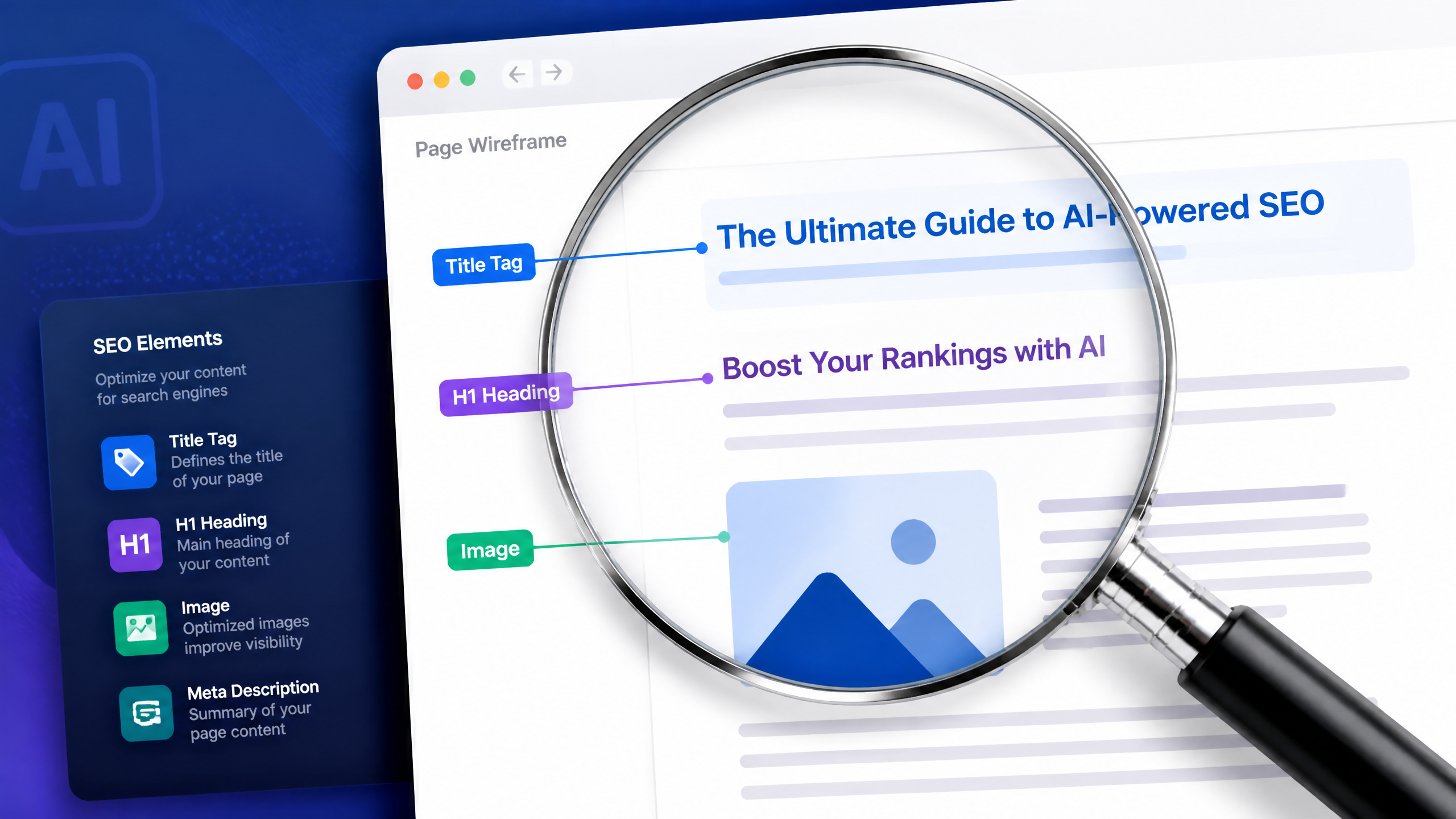
Title Tags and Meta Descriptions
A lot of people overlook the basics — proper meta tags can make a significant difference in CTR. The title tag is the clickable headline you see in search engine results pages (SERPs). Official documentation confirms that title links are a major way Google understands a page's topic.
However, fair warning: Google may rewrite your title links and snippets if they feel your HTML doesn't accurately reflect the page content.
One situation I keep seeing in SEO communities is the classic "high rank, low click" scenario. A practitioner gets a page to rank well, but nobody clicks. They rewrite the title tag and meta description to be more compelling—focusing on the user's problem rather than just stuffing keywords. The outcome? Their rankings barely change, but their CTR skyrockets. Better snippets often affect clicks more than raw rankings.
Headings and Page Structure
Headings (H1, H2, H3) are not just for making text bigger. They create a semantic hierarchy.
• H1 Heading: You should only have one H1 per page. It signals the main topic.
• H2 Headings: These break down the main topic into key subtopics.
• H3 Headings: These provide deeper detail under specific H2s.
Proper structure allows users to scan the page easily. If a user lands on a wall of text, their immediate reaction is usually to hit the back button—increasing your bounce rate.
Internal Linking
Internal linking is how you connect your content ecosystem. When you link from a high-traffic page to a newer, related page, you pass along authority. Furthermore, internal links help Google discover pages and understand how a site's content is related.
Content Optimization: Beyond the Buzzwords
Look, here's the deal: I've seen too many sites get hung up on keyword density when user experience should be the priority.
Search Intent over Keyword Density
Search intent is the underlying goal behind a user's query. If someone searches "what is on page seo," their intent is informational. They want a guide, a definition, or a tutorial. If they search "buy SEO software," their intent is transactional.
If your page does not match the intent of the keyword, it will not rank—period. Google's algorithms are exceptionally good at figuring out if a page actually solved the user's problem.
Quality, Depth, and Freshness
Thin content—pages with barely 300 words that state the obvious—rarely performs well today. You need depth. Depth doesn't mean writing 5,000 words of fluff; it means answering the primary question and proactively answering the follow-up questions the user is likely to have.

The Role of E-E-A-T
Experience, Expertise, Authoritativeness, and Trustworthiness (E-E-A-T) are critical frameworks for content quality. Search engines want to know that the person writing the content actually knows what they are talking about. If you are struggling to prove your authority within your content, running your pages through an EEAT checklist for SEO can highlight missing trust signals like author bios, original data, and clear sourcing.
The Technical-ish Side of On-Page SEO
Some elements blur the line between on-page and technical SEO, but because they live on the specific page, they fall under our domain here.
Image Optimization and Alt Text
I still remember the time I forgot to optimize an image—a massive 5MB hero banner—and it slowed down an entire site right before a major product launch. The page experience tanked, and so did our initial rankings.
Image optimization involves two main things:
Compression: Keeping file sizes small so the page loads instantly.
Alt Text: Writing descriptive text for screen readers and search crawlers. Descriptive alt text helps search engines understand image content and vastly improves accessibility.
URL Structure
Your URLs should be clean, readable, and descriptive.
• Good URL: website.com/blog/what-is-on-page-seo
• Bad URL: website.com/blog/p=12345&category=seo
Schema Markup (Structured Data)
Schema markup is code you add to your page that helps search engines provide more informative results (like star ratings, recipe times, or event dates). While it doesn't guarantee a ranking boost, it helps search engines interpret page content more precisely, which can lead to rich snippets.
Common On-Page SEO Mistakes I See Constantly
Before we talk about how to fix things, let's list what NOT to do.
The Mistake | Why It Fails | The Pragmatic Fix |
|---|---|---|
Keyword Stuffing | Makes content unreadable and signals spam to search engines. | Write naturally. Use synonyms and related entities instead of repeating the exact phrase. |
Missing H1 Tags | Confuses search engines about the primary topic of the page. | Ensure every page has exactly one clear, descriptive H1 heading. |
Ignoring Search Intent | High bounce rates because the content doesn't answer the user's actual question. | Google the target keyword first. Look at the top 3 results and match their format and depth. |
Vague Anchor Text | Using "click here" tells search engines nothing about the destination page. | Use descriptive anchor text like "read our on-page SEO guide." |
How to Audit Your Pages (A Repeatable Process)
You need a systematic approach to ensure your pages are optimized. Here is the exact workflow I use when evaluating a new piece of content:
Identify the Primary Keyword and Intent: Confirm exactly what query this page is meant to answer.
Review the Title Tag and Meta Description: Ensure the primary keyword is present and the copy is compelling enough to earn a click.
Check the Heading Hierarchy: Verify there is only one H1, and that H2s and H3s logically outline the topic.
Evaluate Content Depth: Compare the page against the top 3 ranking competitors. Are we missing crucial subtopics?
Analyze Internal Links: Ensure the page links out to 2-3 relevant internal pages, and that older pages link to this new page.
Inspect Images: Check that all images are compressed and have descriptive alt text.
Measure Page Speed: Ensure the page loads quickly on both desktop and mobile devices.
If you are managing a large site, doing this manually for every page is impossible. Leveraging on-page SEO audit tools can automate the discovery of missing tags, broken links, and heavy images.
FAQ Section
How is on-page SEO different from technical SEO?
On-page SEO focuses on the content and HTML elements of a specific page (like text, headings, and images) to improve relevance. Technical SEO focuses on the backend infrastructure of the entire website (like server response times, XML sitemaps, and crawlability) to ensure search engines can access the site efficiently.
How many keywords should a page target?
Focus on one primary keyword per page. However, by writing comprehensive, natural content, a single well-optimized page will typically rank for dozens or even hundreds of related secondary keywords and long-tail variations.
Do images actually help on-page SEO?
Yes. Optimized images improve user experience by breaking up text and keeping users engaged. Furthermore, properly compressed images improve page speed, and descriptive alt text helps your content appear in Google Image Search.
How long should SEO content be?
There is no universal word count rule. The content should be exactly as long as it needs to be to fully satisfy the user's search intent. A definition might only need 500 words, while a comprehensive guide might require 3,000 words.
Sources and References
• Google Search Central: Creating helpful, reliable, people-first content.
• Google Search Central: Control your title links in search results.
• Google Search Central: Google Images SEO best practices.
• Google Search Central: Make your links crawlable.