Honestly, if I had a dollar for every time a client asked me whether they should buy a Screaming Frog license or an Ahrefs subscription, I would probably be sipping drinks on a beach instead of analyzing log files.
You know what’s funny about this? People treat this comparison like they are choosing between a hammer and a Swiss Army knife. Yes, they both help you build search visibility, but they are engineered for entirely different scenarios.
In my seven years of managing technical SEO audits and optimizing site performance for e-commerce and SaaS brands, I have learned that using these tools is not an either-or proposition. It is about knowing which tool to deploy for the specific problem in front of you.

Key Takeaways
• Screaming Frog is a local desktop crawler designed for deep technical audits, custom extraction, and onsite optimization.
• Ahrefs is a cloud-based SEO suite built for backlink analysis, keyword research, and competitive intelligence.
• Screaming Frog requires local hardware resources (RAM), whereas Ahrefs operates entirely in the cloud.
• For crawl budget management and finding complex rendering issues, Screaming Frog is unmatched.
• For tracking rankings and identifying content gaps, Ahrefs is the superior choice.
Table of Contents
• The Core Philosophies: Desktop Crawler vs. Cloud-Based Suite
• Technical SEO Auditing: Deep Dive into Site Architecture
• Off-Page SEO, Backlinks, and Competitive Intelligence
• Pricing, Usability, and Resource Consumption
• The Verdict: How to Choose Your Tooling
• Frequently Asked Questions
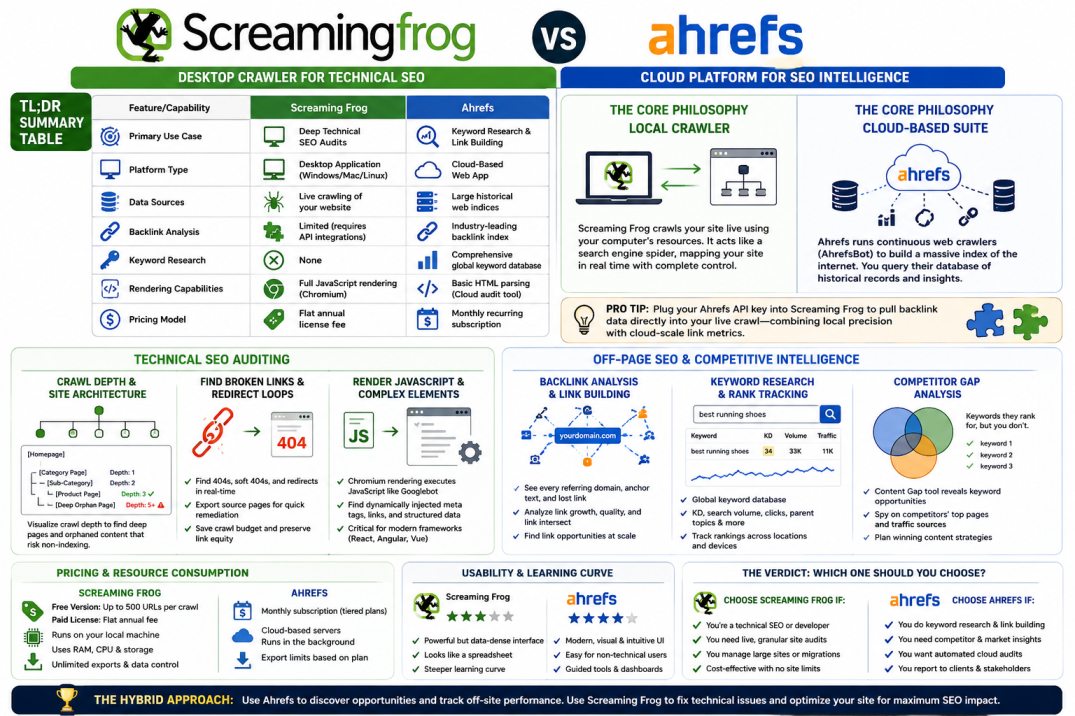
TL;DR Summary Table
Feature/Capability | Screaming Frog | Ahrefs |
|---|---|---|
Primary Use Case | Deep Technical SEO Audits | Keyword Research & Link Building |
Platform Type | Desktop Application (Windows/Mac/Linux) | Cloud-Based Web App |
Data Sources | Live crawling of your website | Large historical web indices |
Backlink Analysis | Limited (requires API integrations) | Industry-leading backlink index |
Keyword Research | None | Comprehensive global keyword database |
Rendering Capabilities | Full JavaScript rendering (Chromium) | Basic HTML parsing (Cloud audit tool) |
Pricing Model | Flat annual license fee | Monthly recurring subscription |
The Core Philosophies: Desktop Crawler vs. Cloud-Based Suite
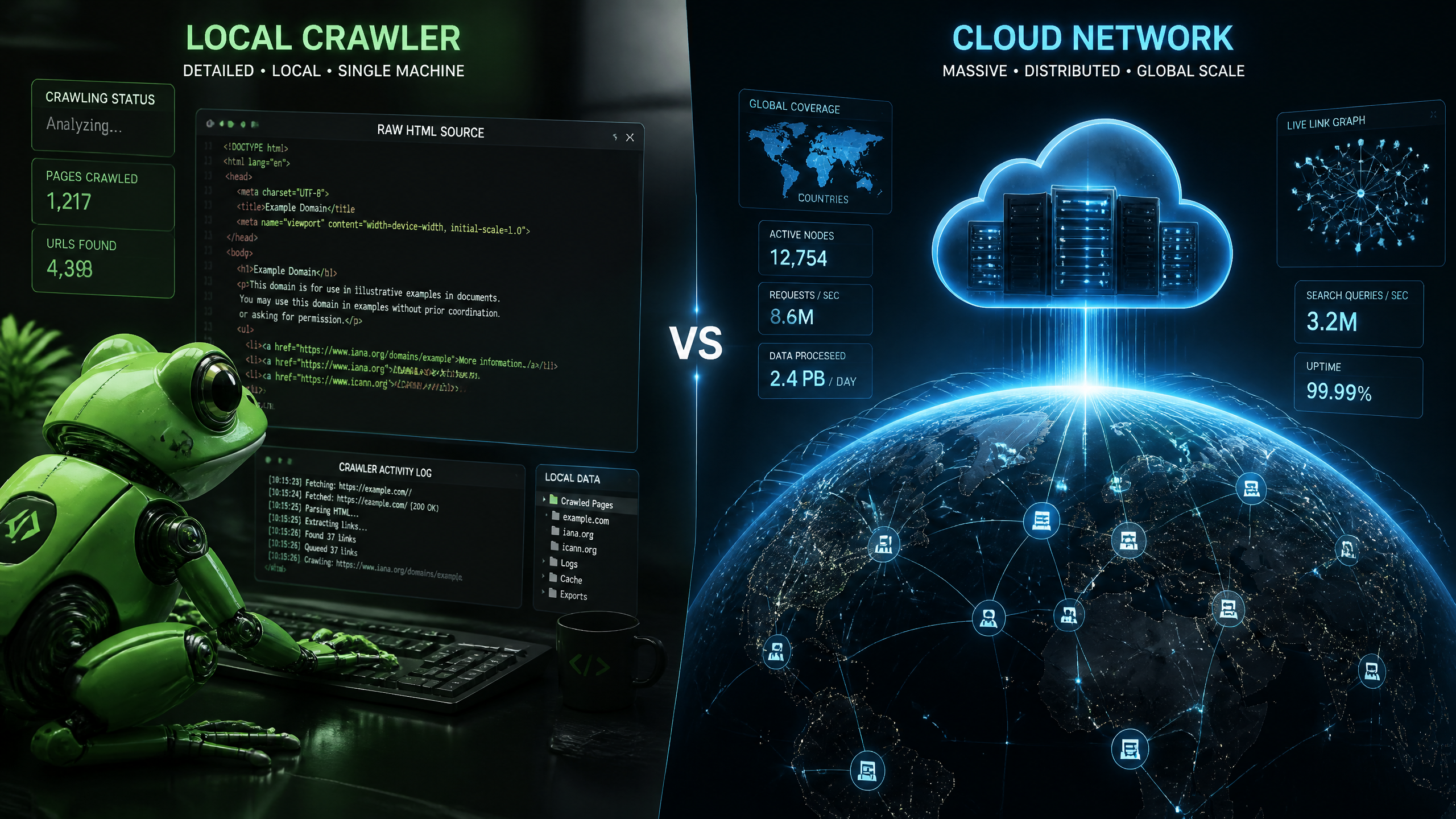
To understand why these platforms differ so wildly, we have to look at how they retrieve information. Screaming Frog is a local desktop crawler. When you input a URL, it uses your computer's internet connection and RAM to request pages, parse HTML, and follow links. It acts exactly like a search engine spider, mapping out your site in real time.
Ahrefs, on the other hand, is a massive database. They run their own continuous web crawlers (AhrefsBot) to build a colossal index of the internet. When you search for a domain in Ahrefs, you are not crawling that site live; you are querying Ahrefs' saved records of what that site looked like the last time their bot visited it.
Screaming Frog: The Local Powerhouse
Screaming Frog is a powerhouse for on-site audits, but Ahrefs shines when it comes to backlink analysis. Because Screaming Frog runs locally, you have complete control over the crawl configurations. You can rewrite URLs on the fly, search for specific code snippets using regex, and test how your site behaves under different user-agent instructions.
Ahrefs: The Cloud-Based Giant
Ahrefs is your window into the rest of the web. It does not just look at your site; it looks at your competitors, your industry, and the entire link graph of the internet. If you want to see what keywords your competitors are ranking for or where they get their links, Screaming Frog cannot help you. You need a cloud-scale index for that.
Why Architecture Matters for Your Workflow
Your workflow will dictate which architecture you need. If you are preparing for a migration, you need the live, granular precision of Screaming Frog. If you are planning a content strategy, you need the historical, macro-level insights of Ahrefs.
Pro Tip: If you want the best of both worlds, you can plug your Ahrefs API key directly into Screaming Frog. This allows you to pull Ahrefs' backlink data directly into your live crawl, marrying local technical precision with cloud-scale link metrics.
Technical SEO Auditing: Deep Dive into Site Architecture
When we talk about technical SEO, we are talking about ensuring search engine bots can find, render, and index your content without hitting roadblocks. Let's see how our two contenders handle this challenge.
Crawl Depth and Crawl Budget Management
Many people overlook the importance of crawl budget management—using Screaming Frog effectively can save you a ton of headaches. By visualizing your crawl depth in Screaming Frog, you can see exactly how many clicks it takes to reach your most important pages.
If your key commercial pages are buried five or six levels deep, search spiders might rarely visit them. Screaming Frog makes these structural issues obvious through its interactive directory tree graphs.
[Homepage]
└── [Category Page] (Crawl Depth: 1)
└── [Sub-Category] (Crawl Depth: 2)
└── [Product Page] (Crawl Depth: 3 - Optimal)
└── [Deep Orphan Page] (Crawl Depth: 5+ - Risk of non-indexing)
Finding Broken Links and Redirect Loops
Identifying broken links is critical for maintaining link equity and a clean user experience. While Ahrefs can find broken links during its scheduled Site Audits, Screaming Frog finds them in real-time as you crawl.
If you want to understand the impact of broken links on SEO, you must realize that broken internal links waste your crawl budget and frustrate users. Screaming Frog allows you to export a bulk list of every single source page containing a 404 error, making remediation straightforward.
Rendering JavaScript and Complex On-Page SEO Elements
Modern websites rely heavily on JavaScript frameworks like React, Angular, or Vue. If your SEO tool cannot execute JavaScript, it will miss critical elements like dynamically injected meta tags, internal linking structures, and structured data.
Screaming Frog uses an integrated Chromium engine to render JavaScript exactly like Googlebot does. While Ahrefs has a cloud-based rendering toggle in its audit tool, it is metered and can quickly consume your monthly data credits.
I learned this the hard way back in 2021 when I was auditing a massive 500,000-page e-commerce site. I tried to run a full JavaScript rendering crawl on my standard work laptop using Screaming Frog. Within twenty minutes, my computer sounded like a jet engine taking off, and the application crashed because I ran out of memory. That taught me two things: first, always allocate more RAM in Screaming Frog's system settings, and second, know when to limit your crawl limits to protect your hardware.
Pro Tip: When crawling massive sites in Screaming Frog, switch the storage mode from "RAM Storage" to "Database Storage" under System Settings. This saves the crawl data to your hard drive instead of your memory, preventing software crashes.
Off-Page SEO and Competitive Intelligence
Technical health is only half of the equation. Once your site is crawlable, you need authority to rank. This is where the balance of power shifts dramatically.

Backlink Profile Analysis and Link Building
Screaming Frog cannot build a backlink profile for you because it only crawls the URLs you tell it to crawl. It does not know who is linking to you from the outside world unless you feed it an external list.
Ahrefs is the undisputed king here. Its crawler has mapped trillions of connections across the web. With Ahrefs, you can plug in any domain and instantly see every referring domain, anchor text, and lost link. If you are performing a link-building campaign, Ahrefs is your primary research engine.
Keyword Research and Rank Tracking
To rank, you need to know what people are searching for. Understanding the difference between SEO and keyword research is crucial here. While SEO covers the technical and structural health of your site, keyword research identifies the search intent and opportunities you need to target.
Ahrefs provides deep metrics like keyword difficulty, search volume, and parent topics. Screaming Frog has zero keyword research capabilities; it can only analyze the keywords you have already placed within your on-page SEO elements like title tags and headers.
Competitor Gap Analysis
You can get lost in the data with Ahrefs; sometimes, a simple overview is all you need to identify the next steps. For example, using the Content Gap tool in Ahrefs allows you to compare your site against three competitors to find keywords they rank for, but you do not. This kind of competitive intelligence is completely outside of Screaming Frog's scope.
If you want a broader perspective on how these platforms fit into the market, you can read our detailed comparison of SEO tools like Ahrefs to see how it matches up against Semrush and Moz.
Pro Tip: Use Ahrefs to identify your competitor's top-performing pages, then crawl those specific URLs with Screaming Frog to extract their exact heading structures, schema markup, and internal link distributions.
Pricing, Usability, and Resource Consumption
Choosing between these tools often comes down to budget constraints and your team's technical comfort level.
The Cost of Local vs. Cloud Software
Screaming Frog offers a very generous free version (capped at 500 URLs per crawl with limited configuration options). Their paid license is a flat annual fee, which makes it incredibly cost-effective for freelancers and in-house teams.
Ahrefs operates on a monthly subscription model with tiered pricing. Because they must maintain massive server farms, their pricing is significantly higher and features strict usage limits (credits) on lower-tier plans.
Learning Curve and User Interface
Screaming Frog's user interface looks like a spreadsheet program from 2010. It is functional, dense, and can be highly intimidating for beginners. There are dozens of tabs, filters, and export options.
Ahrefs features a sleek, modern, web-based user interface with visual charts, color-coded health scores, and guided tooltips. It is much easier for a non-technical stakeholder to understand.
Resource Consumption Comparison
Screaming Frog: Uses your local hardware resources. If you have a slow computer with less than 8GB of RAM, large crawls will freeze your system.
Ahrefs: Runs entirely on cloud servers. You can close your laptop, go to sleep, and your site audit will continue running in the background.
Data Portability: Screaming Frog allows unlimited local exports of your data. Ahrefs limits exports based on your monthly account plan limits.
Pro Tip: If you are on a tight budget, use Screaming Frog's free version for small technical fixes and rely on free search console data for your basic keyword monitoring before investing in premium cloud suites.
The Verdict: How to Choose the Right Tool
So, which one should you choose? It depends on your role, your budget, and what problems you are trying to solve.
When to Choose Screaming Frog
• You are a technical SEO specialist or web developer.
• You manage massive sites and need to audit raw HTML, JavaScript, and custom code integrations.
• You need to perform bulk redirects, find broken links, or audit metadata across thousands of pages.
• You want a highly cost-effective tool with no arbitrary limits on the number of sites you can crawl.
When to Choose Ahrefs
• You are a content marketer, link builder, or digital PR strategist.
• You need to monitor keyword rankings, analyze competitor strategies, and discover content opportunities.
• You require a tool that can run automated site health checks in the cloud without slowing down your computer.
• You need to report clean, visual data directly to clients or executive stakeholders.
The Hybrid Approach for Maximum ROI
In an ideal world, you do not choose. You use both. You use Ahrefs to discover what keywords to target and to track your competitor's link-building campaigns. Then, you use Screaming Frog to ensure your site's architecture is flawless so that those links and keywords actually convert into high search rankings.
By leveraging tools like Nuwtonic alongside these platforms, you can automate the process of identifying these technical gaps and executing content updates seamlessly, saving hours of manual spreadsheet work.
Frequently Asked Questions
Can Screaming Frog replace Ahrefs for keyword research?
No. Screaming Frog does not maintain an external database of search queries, search volumes, or keyword difficulty metrics. It can only analyze keywords that are already present on crawled web pages. For keyword discovery, you must use a database-driven tool like Ahrefs.
Is Screaming Frog completely free?
Screaming Frog offers a free version that is capped at 500 URLs per crawl. It does not allow you to save crawls, customize crawl configurations, render JavaScript, or integrate with APIs. The paid version removes all limits and unlocks the full suite of technical features.
Which tool is better for a beginner?
Ahrefs is generally easier for beginners because of its intuitive web interface, visual charts, and educational resources. Screaming Frog has a steeper learning curve and requires a basic understanding of web technologies like HTML, CSS, status codes, and server responses to be used effectively.
Does Screaming Frog analyze backlinks?
Not natively. Screaming Frog can only find outbound links on the pages it crawls. However, you can connect Screaming Frog to the Ahrefs API (or other backlink tools) to import backlink metrics directly into your crawl files.
Can I run Screaming Frog in the cloud?
Yes. While it is a desktop application, advanced users can install Screaming Frog on a cloud instance (like Google Cloud Platform or Amazon Web Services) to run large crawls without consuming local computer resources.
Sources and References
• Screaming Frog SEO Spider User Guide and Documentation
• Ahrefs Product Help Center and Crawler Index Specifications