
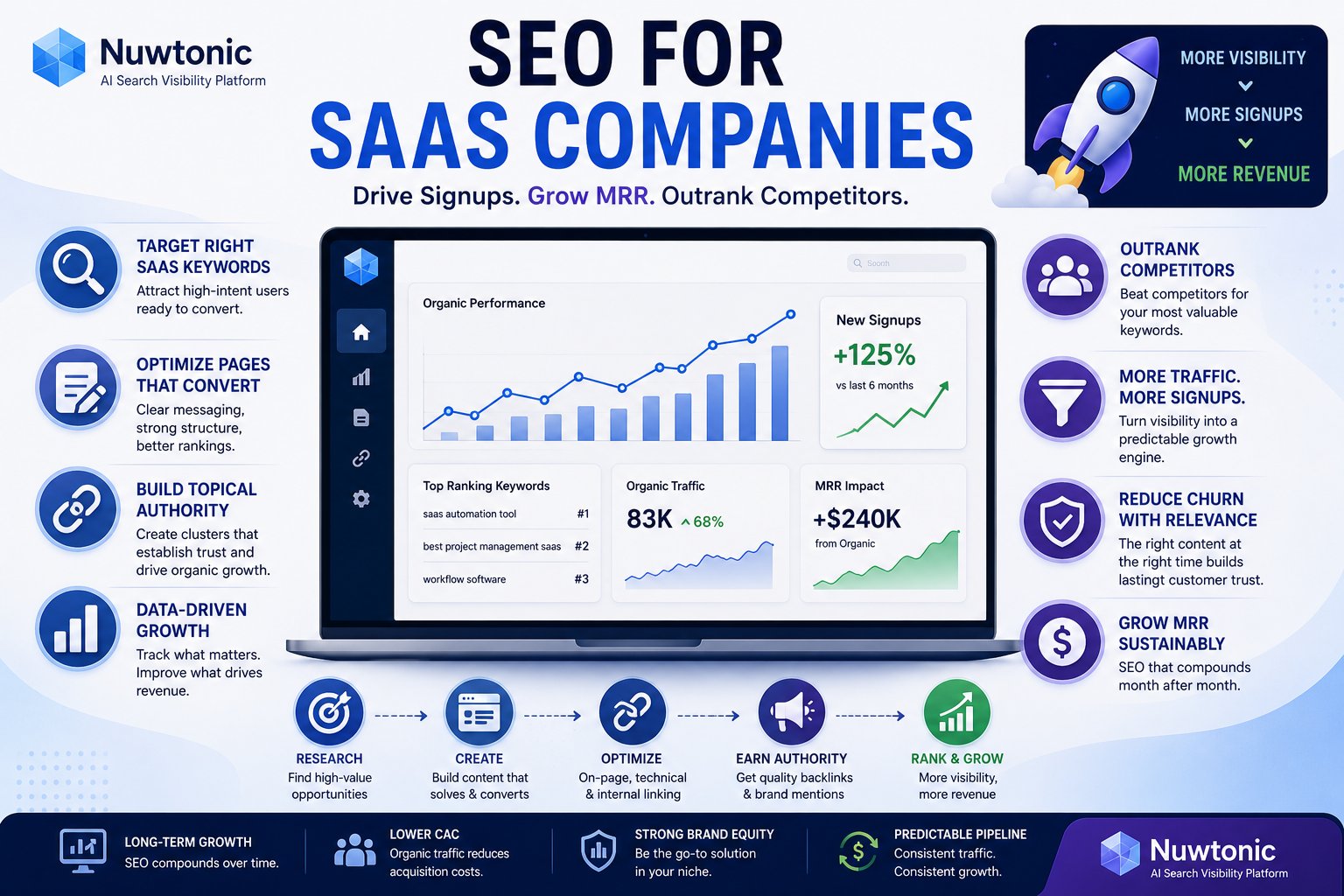
Most advice on SEO for SaaS companies is stuck in an older operating model. It tells teams to track keywords, publish more blog posts, run quarterly audits, and wait. That model breaks when product pages are rendered poorly, when AI answer engines become part of discovery, and when nobody can connect traffic to demo requests or pipeline.
The bigger problem isn't strategy scarcity. It's execution scarcity. SaaS companies often recognize they need better content, cleaner architecture, and stronger intent targeting. What they don't have is a reliable way to find the highest-impact issue, fix it fast, and prove the fix changed revenue outcomes.
That gap matters because SEO is too valuable to treat as a reporting exercise. SaaS SEO delivers 702% ROI with a breakeven period of 7 months, and organic search generates 44.6% of all revenue in B2B verticals according to this SaaS SEO statistics roundup. If a channel can carry that much acquisition weight, the standard of execution has to rise.
A lot of teams also separate content and SEO in ways that slow both down. That's one reason practical resources like RepurposeYourContent's B2B SaaS playbook are useful. They help frame content as a growth system, not a publishing calendar. But in 2026, that still isn't enough unless the system can ship fixes, support AI visibility, and tie output back to revenue.
Table of Contents
- Why Most SaaS SEO Playbooks Are Obsolete
- Mapping Buyer Intent to Product and Content Pages
- The Hands-On SaaS Technical SEO Checklist
- Building Topical Authority with Content Clusters
- Unlocking Growth with Docs and Knowledge Bases
- Optimizing for AI Answers with Generative Engine Optimization
- Measuring Growth and Recovering Lost Traffic
- The Accelerated Execution Workflow for SaaS SEO
Why Most SaaS SEO Playbooks Are Obsolete
Traditional SaaS SEO playbooks assume the main job is prioritization. It isn't. The main job is implementation quality under real constraints. You already know your site needs better pages, sharper intent mapping, and technical cleanup. The failure point is that those fixes stay trapped in audits, spreadsheets, and sprint backlogs.
The old playbook also overweights ranking reports and underweights system behavior. A JavaScript-heavy product site can look polished and still be partially invisible. A blog can produce traffic and still fail to influence pipeline. A brand can be well known and still miss AI citations because the pages aren't structured for extraction.
The real bottleneck is execution speed
Most SaaS teams run SEO through disconnected tools. One tool finds technical issues. Another tracks rankings. A writer drafts content somewhere else. Engineering controls implementation. Marketing owns reporting. Nobody owns the full path from signal to fix.
That fragmentation is exactly why so many SEO programs feel busy but underpowered. You get analysis without action.
Practical rule: If a recommendation can't be reviewed, approved, and pushed live without a separate project plan, it will sit longer than it should.
There's also a strategic lag built into old playbooks. They were designed for blue-link search dominance. That's no longer the only battlefield. Buyers now discover vendors through search results, AI overviews, comparison queries, help content, and answer engines. An SEO program that only tracks rankings misses part of the market.
Reporting doesn't create growth
A dashboard can tell you that impressions are up and CTR is down. That's useful, but it doesn't solve anything. Growth comes from the next layer: rewrite the title, add the internal links, fix rendering, patch the thin section, refresh the outdated proof point, reframe the page for intent, and measure what changed.
That shift from reporting to execution is what separates modern SEO for SaaS companies from legacy playbooks. The channel is too profitable to run on static advice and slow handoffs.
Mapping Buyer Intent to Product and Content Pages
Most SaaS sites don't have a traffic problem first. They have a page-purpose problem. Teams publish content around topics they care about, then hope those pages somehow move users toward a trial or demo. Search doesn't reward that confusion. Buyers don't either.
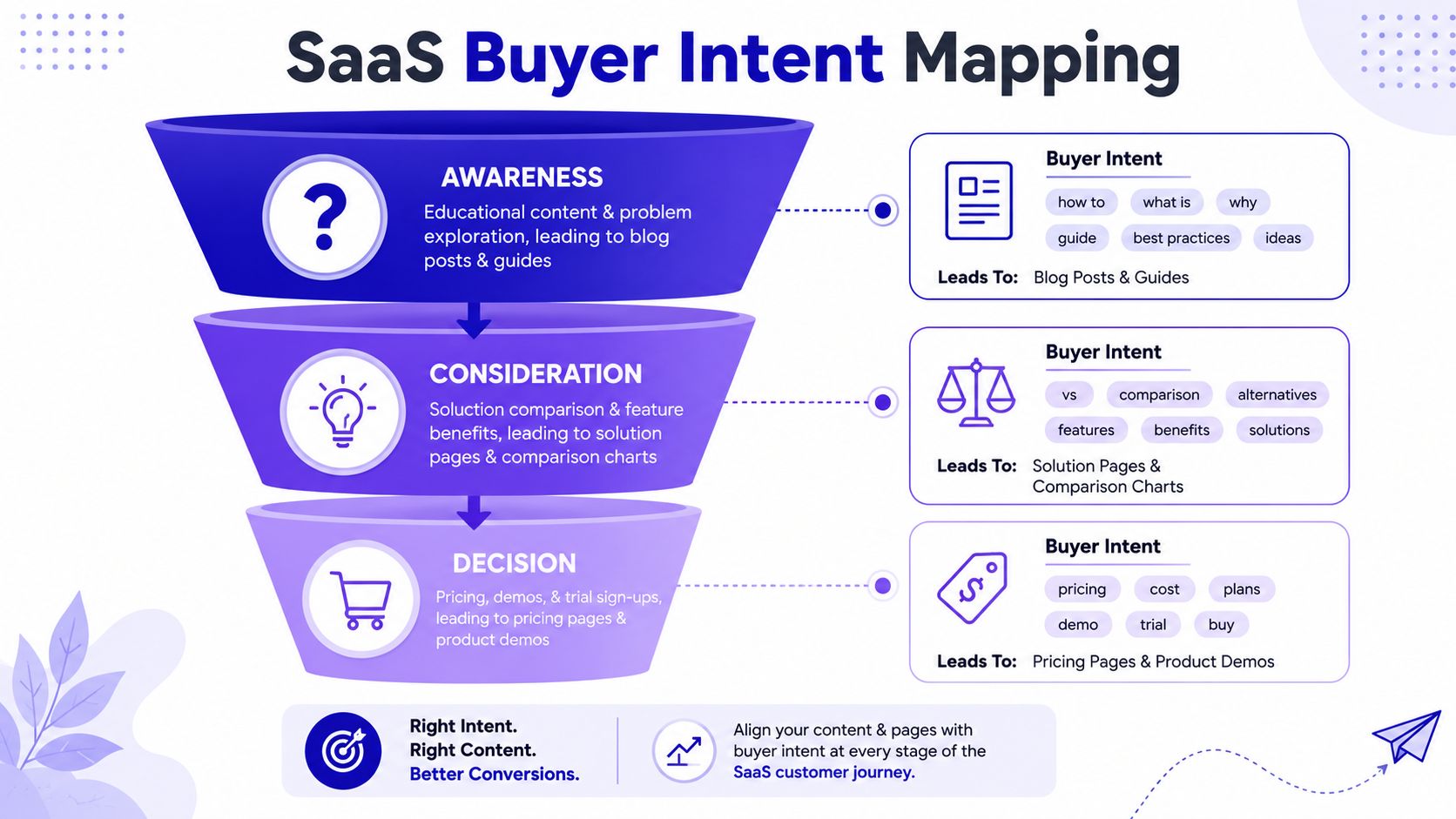
If you want SEO for SaaS companies to generate pipeline, every target query needs a matching destination page with a clear job. Transactional searches should land on commercial pages. Problem-aware queries should land on educational pages. Comparison intent should land on decision-stage assets. When those get mixed, rankings may still happen, but conversion quality degrades.
Start with page purpose, not keyword lists
A common mistake is building a keyword sheet before defining the page inventory. Reverse that. List the pages you already have or need:
- Product pages for core capabilities
- Solution pages for role, industry, or use case
- Pricing pages for decision-stage visitors
- Comparison pages for competitive evaluation
- Educational resources for problem discovery
- Docs and help articles for solution-specific questions
Then map intent. SaaS companies should prioritize transactional terms like "[solution] pricing" and "best [category] software" because they drive demo requests and signups, while informational terms mainly capture top-of-funnel traffic, as explained in Kalungi's discussion of SaaS SEO importance.
The practical difference is simple. If someone searches a pricing query and lands on a blog post, you force them to search further. If someone searches a broad educational question and lands on a hard-sell product page, you create bounce risk.
A practical intent-to-page map
Use a simple operating model like this:
| Intent type | Query pattern | Best page type | Main conversion action |
|---|---|---|---|
| Informational | problem, how-to, guide | Blog post or resource | Newsletter, demo assist, deeper page visit |
| Commercial investigation | best software, alternatives, comparison | Comparison page or solution page | Demo request, product evaluation |
| Transactional | pricing, software for X, product category + modifier | Pricing page, feature page, product page | Trial signup, contact sales |
A strong site architecture moves visitors between these assets on purpose. An informational guide should link to the relevant solution page. A comparison page should link to pricing and product proof. A feature page should route to docs for implementation detail and to sales for evaluation.
A page shouldn't just rank for a term. It should finish the job that term implies.
For teams doing this at scale, a buyer-intent workflow helps prevent editorial drift. A tool like Nuwtonic's buyer intent keyword finder can help categorize query sets by likely stage before you assign them to URLs, but the strategic decision still matters most: don't publish a page until you know exactly what buyer state it serves.
One more trade-off matters here. Founders and product marketers often want broad category visibility because it feels bigger. In practice, high-intent pages usually deserve earlier investment. A smaller set of sharp commercial and transactional pages will usually influence revenue more directly than a wide layer of loosely connected awareness posts.
The Hands-On SaaS Technical SEO Checklist
Technical SEO usually gets reduced to generic hygiene. That misses what makes SaaS different. Product sites often rely on JavaScript-heavy frameworks, app-style navigation, fragmented templates, gated content paths, and fast-moving release cycles. The result is a site that looks clean to humans but creates crawl, rendering, and extraction problems for search engines and AI crawlers.
The first fix is often rendering. For JavaScript-heavy SaaS sites, Server-Side Rendering or Dynamic Rendering is critical because browser-side rendering alone can block visibility for core product pages, as noted by Advanced Web Ranking's SaaS SEO guidance.
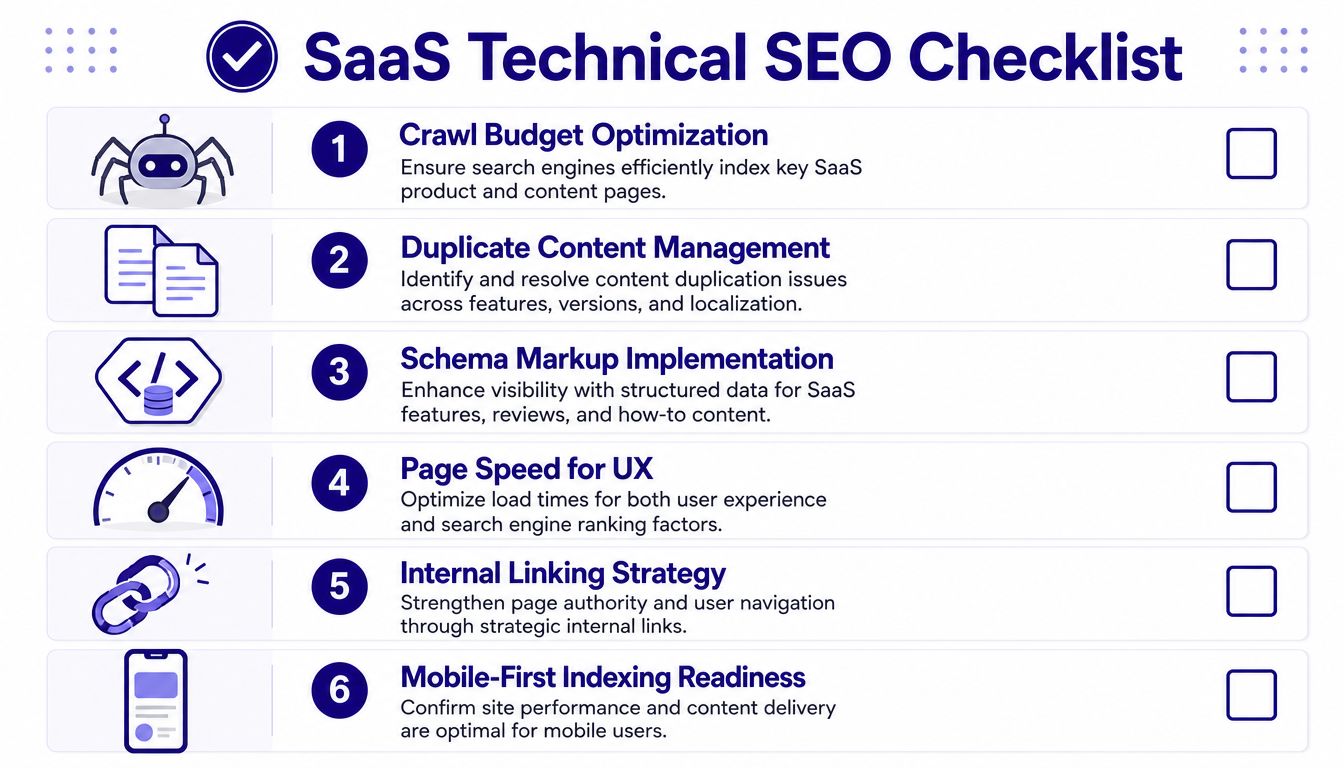
A quick visual checklist helps keep the basics grounded before you move deeper.
What breaks SaaS SEO first
Three failure patterns show up repeatedly.
First, key content is present in the browser but weak in the initial HTML response. That leads to partial indexing, delayed rendering, or incomplete understanding of product pages.
Second, crawl rules are written for older search assumptions. Teams block or fail to explicitly allow AI-oriented agents, then wonder why they don't appear in AI answers.
Third, internal architecture decays over time. Feature pages compete with blog posts. Similar solution pages overlap. Legacy URLs remain indexable. Search engines don't get a clean signal about which page owns which topic.
The execution checklist
Use this as an operating checklist, not a one-time audit artifact.
- Render core commercial pages server-side: Product, feature, pricing, comparison, and solution pages need stable HTML output. If the page is expected to rank and convert, don't rely on client-side rendering alone.
- Review robots directives for AI and search crawlers: If your site blocks modern AI crawlers, you reduce your odds of being cited in answer engines. Check crawl access deliberately instead of inheriting defaults.
- Keep the site fast on revenue pages: The fastest pages should be the ones closest to conversion, especially pricing and product detail pages.
- Use schema where it clarifies page purpose: FAQ and Organization schema are especially useful on SaaS sites because they help machines understand who you are and what the page is answering.
- Audit duplicate and overlapping templates: Similar use-case pages, feature pages, and regional variants often compete with each other unless you consolidate intent.
- Strengthen internal links with descriptive anchors: Internal links should help both crawlers and users understand topical relationships and commercial paths.
The implementation details are getting more specific. According to RZLT's technical SEO guide for SaaS companies in 2026, technical SEO for SaaS in 2026 requires explicit allowance of AI crawlers such as Perplexitybot, ChatGPT-User, and Claudebot in robots.txt. The same source notes that non-compliant SaaS sites can end up with 0% AI citation rates, and that sites with LCP under 2.5 seconds plus mobile-responsive design see 15-20% higher CTR. It also reports that 3-5 contextual internal links per page improve topical authority by 35% and reduce cannibalization by 40%.
Later in the section, use a walkthrough if your team needs a visual explanation.
What to inspect after the fixes ship
Don't stop at deployment. Validate outcomes.
| Area | What to check | Good sign |
|---|---|---|
| Rendering | Cached HTML and indexed text | Core page copy appears cleanly without browser execution dependence |
| Crawl behavior | Logs and crawl diagnostics | Important commercial URLs receive consistent bot access |
| Internal linking | Contextual links from related pages | Clear paths from blog and docs to product and conversion pages |
| Mobile UX | Page experience on key templates | No broken layout or hidden content on mobile |
Technical work only matters when it changes discoverability, extraction, and conversion paths. That's why the best SaaS SEO teams don't treat audits as deliverables. They treat them as queues for fixes.
Building Topical Authority with Content Clusters
Publishing isolated articles doesn't create durable authority. It creates inventory. Search engines can rank one good page, but they trust a site more when multiple pages consistently explain the same topic from different angles, with clear relationships between them.
That's why content clusters still matter. Not as a trendy framework, but as an architectural signal. A pillar page defines the main topic. Supporting pages answer narrower questions, comparison angles, implementation issues, objections, and use cases. Internal links connect those pages in ways that reinforce ownership.
Clusters work when they change site structure
A weak cluster is just a tag archive with better branding. A strong cluster changes how authority flows through the site.
For example, if you sell billing software, your cluster shouldn't be ten random posts about finance operations. It should contain a core page on SaaS billing, then supporting assets around pricing models, invoicing workflows, usage-based billing, implementation issues, and product-specific solution pages. Each page needs a distinct intent and a distinct role.
A lack of discipline often impacts teams. They publish similar articles because each one looks reasonable alone. Over time, those pages overlap. Rankings fragment. Search engines split signals across multiple URLs.
Build fewer pages per topic, but make each one harder to confuse with another.
How to build a cluster that actually compounds
A practical cluster build looks like this:
- Choose one commercial topic with product relevance: Not just a broad theme. Pick something your product solves directly.
- Create the pillar page first: This page should define the topic, set the context, and route users to deeper subtopics.
- Add support pages based on real query variation: Use Search Console patterns, sales objections, implementation questions, and competitor gaps.
- Link with intent, not habit: Link from educational pages into solution pages where appropriate. Link from comparison pages to pricing. Link from docs to feature pages when a technical question reveals product fit.
- Refresh cluster pages together: When you update the pillar, review the support pages too. That keeps the cluster internally consistent.
Here, workflow matters more than theory. In practice, GSC data is often the best signal for cluster expansion because it reveals the query edges where Google already associates your domain with a topic. When a team sees multiple near-adjacent queries rising around one theme, that's usually the right time to build supporting URLs and reinforce the internal graph.
I learned this the hard way on SaaS sites that looked "content rich" in CMS counts but weak in search reality. Hundreds of posts existed. Very few worked together. Once the site architecture reflected topic ownership instead of editorial drift, performance became easier to grow and easier to defend.
Unlocking Growth with Docs and Knowledge Bases
Many SaaS companies bury some of their highest-intent SEO assets in the help center. They treat documentation and knowledge base content as support overhead, then spend the main content budget chasing broader blog topics with weaker conversion paths.
That's backwards. Docs and help content often sit closest to real product usage, implementation friction, and concrete problem-solving queries. Those are exactly the terms serious evaluators and self-serve buyers search.
Why support content becomes acquisition content
A prospect rarely searches in neat funnel language. They search with the problem in front of them. That could be an integration issue, setup question, configuration term, workflow problem, permission model, or reporting limitation. Those searches don't always look commercial, but they often indicate strong solution fit.
Support content also ages differently from blog content. A good explainer for a core workflow can stay useful for a long time if the product remains stable. That gives you a durable acquisition asset with lower editorial drift than trend-driven blog posts.
If you're building a help center from scratch or trying to bring structure to a sprawling one, this guide to scalable customer support knowledge is worth reviewing because it focuses on the operational side of building usable knowledge systems. That's the part many SEO articles skip.
How to make docs rank and convert
Treat docs like product-adjacent landing pages with high informational precision.
- Target problem language: Use the phrases customers type when they're stuck, not just your internal feature names.
- Write headings for extraction: Clear H2s and H3s help both search engines and AI systems identify answerable sections.
- Keep answers close to the top: Don't hide the solution after long product exposition.
- Use screenshots, steps, and examples where they reduce ambiguity: Dense software topics need clarity more than persuasion.
- Link back into commercial pages carefully: A doc article about a capability should point to the feature or solution page when that helps the reader evaluate the product more thoroughly.
A neglected knowledge base creates two losses. Support teams answer the same questions repeatedly, and SEO teams miss intent-rich pages that could attract highly qualified users. A well-structured one does the opposite. It lowers friction for users already in the product and attracts future users who are trying to solve the same problem.
Optimizing for AI Answers with Generative Engine Optimization
Ranking isn't the only visibility layer anymore. Buyers increasingly get vendor discovery, summaries, comparisons, and implementation guidance from AI systems before they click a result. If your pages aren't built for citation and extraction, you're invisible in a channel that now shapes consideration earlier than many teams realize.
Generative Engine Optimization transforms from a buzzword into an execution discipline. A significant shift involves optimizing at the URL level, rather than solely for vague brand presence. That matters because 60-70% of SaaS traffic now originates from long-tail, intent-driven queries, a gap many traditional frameworks ignore, according to Kalungi's SaaS SEO analysis.

URL-level visibility is the real unit of GEO
A lot of teams say they want visibility in AI answers, but they still measure only branded mentions. That's incomplete. The more useful question is: which specific pages can an AI system extract, trust, and cite for a specific query pattern?
That shifts the content brief. A strong GEO page needs a stable topic focus, extractable sections, clear entities, and answers that stand alone without needing surrounding context. A messy but "helpful" page often loses to a cleaner page that machines can parse with less ambiguity.
If an H2 section can't make sense when copied by itself, it's weaker for AI citation than you think.
The technical stack AI crawlers need
For SaaS companies, GEO now has an infrastructure layer. According to Growtika's SaaS SEO guide, teams in 2026 must deploy a three-layer AI visibility infrastructure made up of an XML sitemap, llms.txt, and an LLM Sitemap to improve how AI models discover and cite content. The same source says early adoption of this stack shows a 30-40% increase in snippet adoption rates where LLMs use exact brand phrasing. It also reports that 40-50 word Answer Blocks at the start of each H2 help extraction, and that refreshing content every 3-6 months with updated dateModified schema and new proof points can deliver a 15-20% CTR lift when title tags lead with the primary keyword. The source also notes a 25% improvement in cluster multiplier effects when one ranking page lifts the surrounding topic cluster.
That sounds technical because it is. But the operational takeaway is straightforward. AI visibility depends on machine-readable structure, crawl access, consistent entities, and sections that can be quoted cleanly.
Teams looking for a workflow to operationalize this can review generative engine optimization tools, especially if they need a process for measuring citations and prioritizing page-level fixes instead of guessing from prompt tests.
How to format content for extraction
The pages most likely to show up in AI answers usually share the same traits:
- An inverted-pyramid opening: Lead with the direct answer.
- Short answer blocks near each major heading: Give the model a clean extract before deeper detail.
- Consistent terminology: Don't rename the same concept three times across one page.
- Self-contained sections: Each section should work independently if lifted into an answer.
- Structured supporting elements: FAQs, lists, tables, and schema help machines resolve meaning faster.
GEO isn't a replacement for SEO. It's what modern SEO for SaaS companies looks like when answer engines become part of the search surface.
Measuring Growth and Recovering Lost Traffic
Traffic is a weak success metric if you can't connect it to qualified action. SaaS leadership doesn't care that a post earned impressions unless those visits influenced trials, demos, expansion opportunities, or pipeline quality. That's why measurement has to move past search visibility and into business attribution.
A second problem is decline diagnosis. Many teams notice traffic loss too late, then respond with broad content campaigns instead of precise repairs. That usually wastes time. Traffic drops are often concentrated in a specific template, cluster, query set, or CTR issue.
What executives actually want to see
The board-level view of SEO should answer four questions:
| Question | Useful SEO view |
|---|---|
| Is organic driving pipeline? | Demo requests, trials, or qualified leads influenced by organic landing pages |
| Which pages create commercial value? | Product, pricing, comparison, and solution pages tied to conversion events |
| Where are we losing share? | Query sets, clusters, or templates with declining clicks or CTR |
| What are we fixing next? | Ranked action list tied to expected business impact |
Most existing SaaS SEO advice doesn't handle this well. As MRS Digital's guide to SEO in the SaaS world points out, many resources fail to show how to tie organic traffic directly to metrics like MRR, demo requests, or trial signups, and they also skip practical methods for diagnosing click-decay and unexplained declines.
That gap matters because SEO reporting often stops at "what happened." Revenue teams need "what changed, why, and what fix is live."
How to handle click-decay without guessing
One of the most impactful places to focus is the edge of page one. For SaaS businesses, the highest ROI keyword targets are those ranking on the top of page 2, positions 10–20, because they can often be moved to page 1 with moderate optimization, as noted in Canny's breakdown of SaaS SEO metrics.
A practical recovery process looks like this:
- Pull declining pages from Search Console: Start with pages that matter commercially, not just high-traffic blogs.
- Segment the issue: Is the drop caused by lower rankings, lower CTR, topic overlap, outdated copy, or SERP format changes?
- Check page-two terms first: Terms already close to page one often respond fastest to targeted fixes.
- Patch the page, don't rewrite blindly: Improve title alignment, tighten the opening, add missing subtopics, refresh examples, improve internal links, and reduce ambiguity.
- Watch post-fix query movement: Measure at the query and page level, not only in aggregate organic traffic.
Traffic recovery is usually a patching job before it's a content production job.
The trade-off here is focus. Teams under pressure often chase new keywords because new work feels productive. In many cases, the faster win comes from repairing pages that already have history, relevance, and partial ranking strength. Mature SaaS sites usually have more value trapped in under-optimized existing URLs than they think.
The Accelerated Execution Workflow for SaaS SEO
The bottleneck in SEO for SaaS companies isn't knowing what good looks like. The bottleneck is coordinating the people, tools, and approvals needed to make improvements live before the opportunity passes.
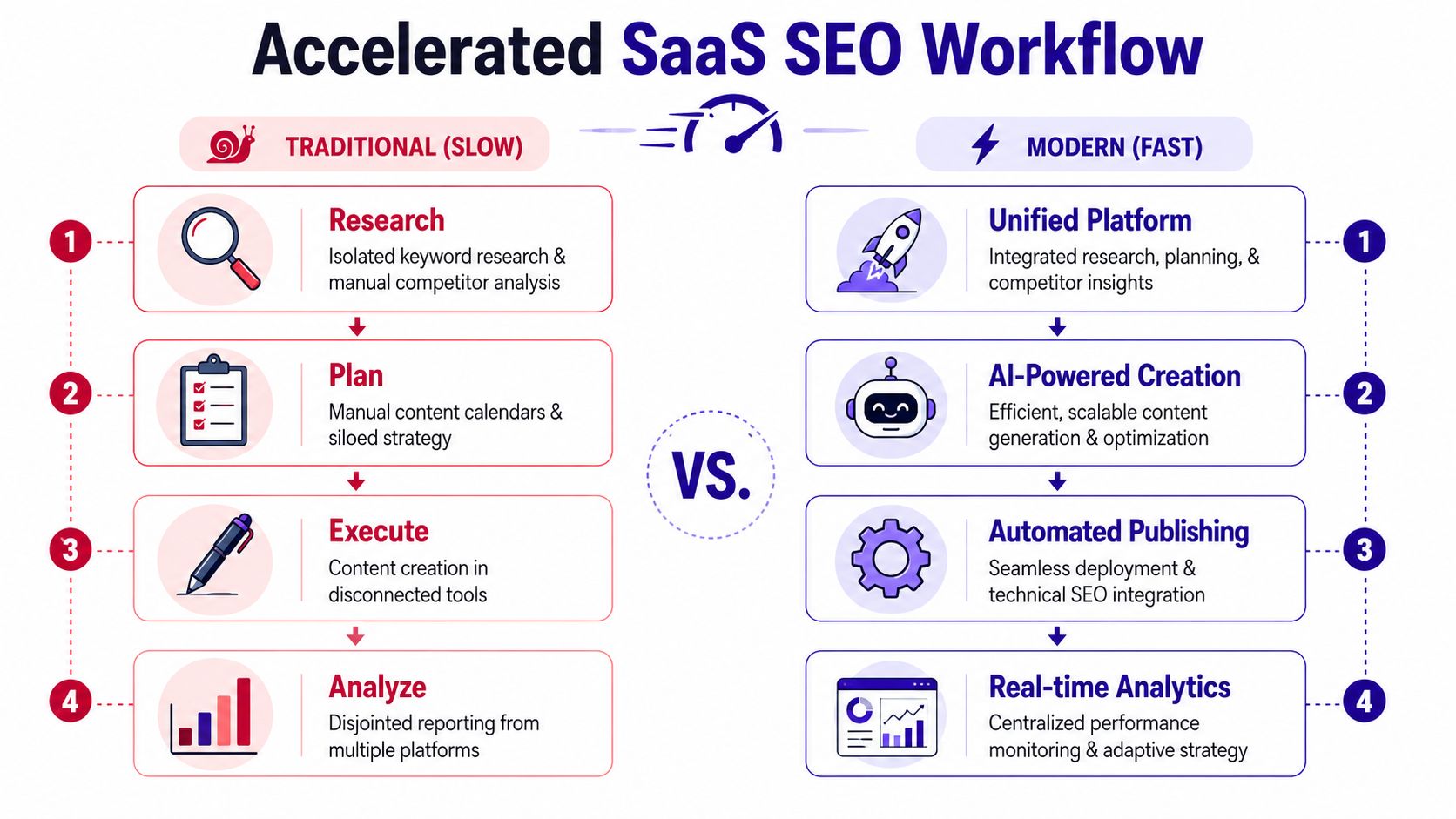
The old workflow is fragmented by design. Research happens in one place. Technical audits live in another. Content planning sits in docs or project boards. Developers implement fixes later if the ticket survives prioritization. Reporting arrives after the window for easy gains has already narrowed.
The old workflow is too slow
Typically, teams operate like this:
- Research lives in silos: Keyword tools, crawl tools, and GSC data tell different partial stories.
- Plans become static documents: Priorities are documented but not connected to implementation.
- Execution depends on handoffs: Writers wait on briefs, editors wait on drafts, developers wait on tickets.
- Analysis arrives after the lag: By the time performance is reviewed, the issue has compounded.
This isn't just inconvenient. It's expensive. Slow workflows let competitors patch content faster, strengthen clusters sooner, and capture query edges while your fixes are still in review.
What a unified execution layer changes
A modern workflow needs one system that can surface the issue, rank its likely impact, generate the fix, route it for review, and push it into the CMS or implementation queue cleanly.
That is where an execution layer becomes more useful than another reporting layer. One option is Nuwtonic's SEO automation platform, which connects GSC-driven issue discovery with technical fixes, content updates, AI visibility checks, and review-before-deploy workflows. The important idea isn't the tool itself. It's the operating model: issues move directly toward implementation instead of dying in reports.
A practical example makes the difference clear. Suppose a feature page is slipping on a cluster of high-intent queries. A unified system should detect the CTR drop, compare the page against adjacent competitors, flag missing structural elements, propose revised copy and schema, and let the team approve the update without starting from zero in five separate tools.
A practical operating rhythm
The most effective SaaS SEO teams run a short-cycle workflow:
| Cadence | Primary action | Output |
|---|---|---|
| Weekly | Review GSC movement and issue prioritization | Patch list for technical and on-page fixes |
| Biweekly | Refresh existing high-value pages | Updated titles, internal links, sections, schema |
| Monthly | Expand clusters based on query patterns and competitive gaps | New supporting URLs with clear role |
| Quarterly | Reassess technical health, AI visibility, and cannibalization | Structural cleanup and roadmap reset |
This workflow also changes team roles. SEO stops acting like an advisory function that hands recommendations to other departments. It becomes a production system with review, control, and measurable output.
That is the key update behind modern SEO for SaaS companies. Strategy still matters. But the compounding gains now come from an execution stack that can move from signal to deployed fix without losing momentum.
Nuwtonic helps SaaS teams run that execution model in one workspace. It connects Search Console data to prioritized SEO and GEO actions, surfaces technical and content issues, supports reviewable fixes, and tracks AI visibility at the URL level so teams can move faster without giving up control. If your current stack produces reports faster than it produces improvements, explore Nuwtonic.


