
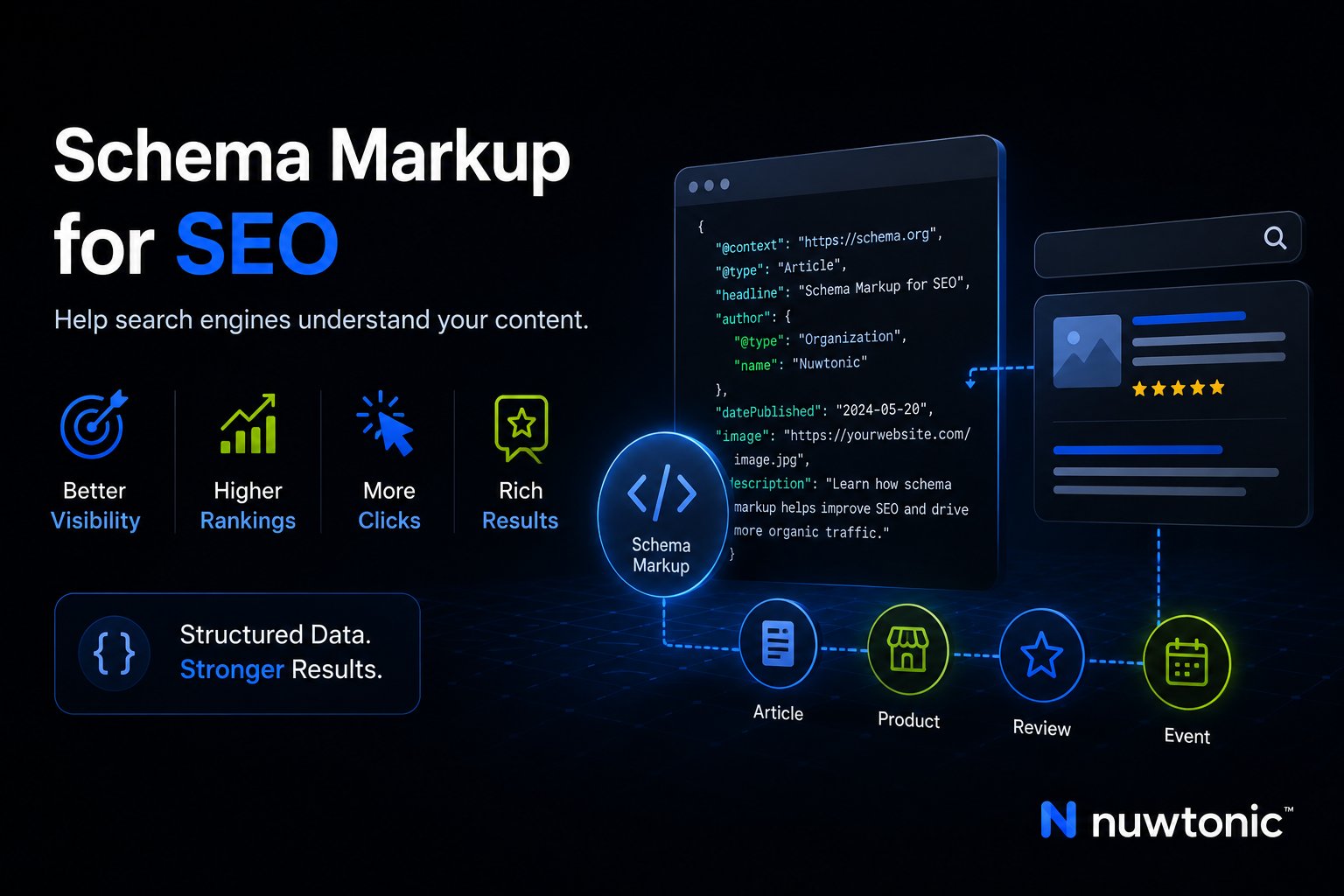
You can ship schema markup on a live site in an afternoon and still have it turn into a maintenance problem by the next content update. I've seen teams validate a launch build, publish it, and never look at it again while product pages, FAQs, locations, and brand details drifted out of sync across the CMS, search results, and AI answers.
That's why schema markup for SEO works best as an operating system, not a one-time enhancement. The sites that get value from it treat markup as a versioned layer tied to page templates, content changes, and review cycles, then measure it through rich-result eligibility, Search Console data, and entity visibility in AI search.
Table of Contents
- The Real Cost of Schema You Deploy and Forget
- What Schema Markup Actually Is and How Search Engines Read It
- High-Impact Schema Types and Copy-Ready JSON-LD Examples
- Choosing the Right Implementation Path for Your Stack
- The Two-Layer Validation Stack and Pre-Deploy Checklist
- Measuring Impact in Search Console and Tracking AI Inclusion
- Pitfalls, Maintenance, and a Review-Before-Deploy Workflow
The Real Cost of Schema You Deploy and Forget
A common agency scene looks like this. A redesign goes out, the developer adds JSON-LD to the templates, the SEO lead checks it in a validator, and everyone moves on because the page “has schema now.” Three months later, the live product grid shows old availability, a location page still lists a phone number that changed last quarter, and a FAQ block mentions a policy the support team removed.
The damage usually isn't dramatic at first. The page may still rank, but the markup no longer matches what users see, so the search engine has less reason to trust the structured data. If the page was eligible for a rich result, that eligibility can disappear, and the visual treatment that used to help the result stand out vanishes with it.
That's also where AI search gets messy. Entity-rich markup helps machine readers understand what the page is about, but stale fields can send the wrong signal to systems that summarize or cite content. If a brand page still describes old services, or a product schema still points to a retired model, the structured data becomes a liability instead of a clarity layer.
Practical rule: treat schema the way you treat price feeds or inventory syncs. If the content changes, the markup needs a review.
Google's own guidance frames structured data as something to measure over time with Search Console, not as a direct ranking lever, and it recommends comparing several months of data before and after implementation to judge impact. That makes schema a workflow problem, not a checkbox. The teams that win with it usually follow four moves: choose the right type, implement it safely, validate it thoroughly, and maintain it on a schedule.
What Schema Markup Actually Is and How Search Engines Read It
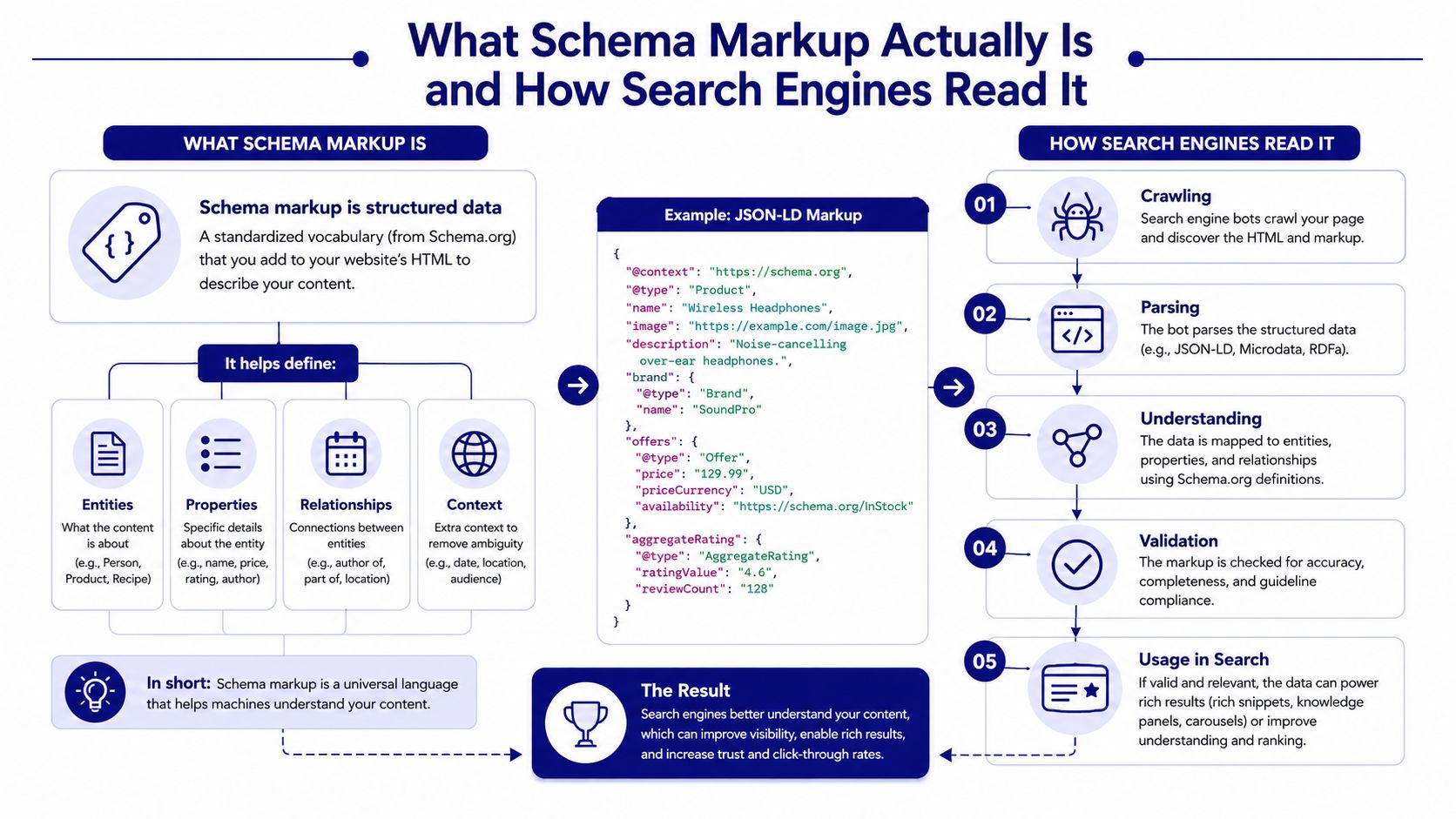
Think of schema markup like a product label on a shipping box. The box might already contain a laptop, but the label tells the carrier what it is, where it goes, and how to treat it. Search engines use schema the same way, as a shared vocabulary that describes entities, relationships, and page purpose.
What Schema Means in Practice
The common language here is the Schema.org vocabulary, which major search engines launched in 2011 to standardize how websites describe things like articles, products, events, and local businesses. That matters because one shared vocabulary reduces translation errors between SEO teams, CMS templates, and crawlers. The modern implementation choice is usually JSON-LD, which is now the recommended or preferred format across Google, Moz, Ahrefs, Webflow, and Umbraco, and it can be placed in the page head or body so long as crawlers can read it reliably. Read more in semantic search optimization.
The useful distinction is between schema validity and rich-result eligibility. A block of JSON-LD can be perfectly valid Schema.org markup and still not qualify for Google's enhanced search appearance. That's why structured data work has two audiences, the parser that checks syntax and the search engine that decides whether to display a special result.
If you want to inspect a raw structured data file before it goes live, debug JSON schema files can help surface structure issues before they become production noise. That kind of inspection is especially useful on large sites where schema is assembled from templates, CMS fields, and API data.
How Search Engines Consume JSON-LD
JSON-LD works well because it's detached from the visible HTML layout. Search engines can parse the <script type="application/ld+json"> block without having to infer meaning from DOM positions or styling. For server-rendered sites, that usually means putting the block directly into the rendered HTML, not injecting it only after client-side load.
Search engines don't need pretty markup. They need consistent, visible, machine-readable facts.
That consistency is the reason JSON-LD scales across multi-page sites and templated CMS workflows. It's easier to audit, easier to diff, and easier to update when page content changes. The main discipline is keeping the data aligned with what users see, because hidden or stale markup undermines the whole point.
High-Impact Schema Types and Copy-Ready JSON-LD Examples
The schema types that move the needle are usually the ones that map cleanly to page intent, not the ones that look impressive in a schema generator. For brand identity, editorial content, commerce, FAQs, and navigation, the markup needs to be specific, visible, and tied to a clear search outcome. As noted earlier, generic markup wastes opportunity when a more precise subtype exists.
| Schema Type | @type | Primary Benefit | Minimum Fields |
|---|---|---|---|
| Organization | Organization | Brand entity clarity | name, url, logo |
| Article | Article | Editorial understanding and article eligibility | headline, author, datePublished |
| Product | Product | Commerce detail and product visibility | name, offers |
| FAQPage | FAQPage | Question-and-answer eligibility | mainEntity |
| BreadcrumbList | BreadcrumbList | Navigation context | itemListElement |
| LocalBusiness | LocalBusiness, Restaurant | Local entity and location clarity | name, address |
Organization and Article
Use Organization on the home page and brand pages when the page represents the company itself. Keep it aligned with the About page, contact details, and logo that users can see.
{
  "@context": "https://schema.org",
  "@type": "Organization",
  "name": "Example Brand",
  "url": "https://www.example.com",
  "logo": "https://www.example.com/logo.png"
}
Use Article for editorial pages, blog posts, guides, and news content. Keep the headline in sync with the visible H1, and only use dates that appear on the page.
{
  "@context": "https://schema.org",
  "@type": "Article",
  "headline": "Example Article Title",
  "author": {
    "@type": "Person",
    "name": "Author Name"
  },
  "datePublished": "2025-01-01"
}
Product, FAQPage, BreadcrumbList, and LocalBusiness
For commerce pages, Product is the workhorse. It supports product understanding for pages where users can make a purchase or evaluate a purchase decision, so it belongs on product detail pages rather than generic category pages.
{
  "@context": "https://schema.org",
  "@type": "Product",
  "name": "Example Product",
  "offers": {
    "@type": "Offer",
    "price": "49.99",
    "priceCurrency": "USD",
    "availability": "https://schema.org/InStock"
  }
}
Use FAQPage only when the questions and answers are visible on the page. That's a common place where teams overreach, especially when they want search features but don't publish the answers on-page.
{
  "@context": "https://schema.org",
  "@type": "FAQPage",
  "mainEntity": [
    {
      "@type": "Question",
      "name": "Example question?",
      "acceptedAnswer": {
        "@type": "Answer",
        "text": "Example answer."
      }
    }
  ]
}
BreadcrumbList helps search engines understand page hierarchy and navigation context.
{
  "@context": "https://schema.org",
  "@type": "BreadcrumbList",
  "itemListElement": [
    {
      "@type": "ListItem",
      "position": 1,
      "name": "Home",
      "item": "https://www.example.com"
    }
  ]
}
For locations, use LocalBusiness only when the page is very broad. If the business is a restaurant, the more specific Restaurant subtype is the better fit. Industry guidance recommends the most specific applicable subtype, because broad or inaccurate types reduce usefulness and eligibility.
Specificity beats volume. One accurate subtype usually does more than three vague ones.
Use Nuwtonic schema tools when you need a quick way to generate or inspect markup across templates without hand-editing every page.
Choosing the Right Implementation Path for Your Stack
The implementation path should match your site's change rate, not your preference for one tool over another. I've seen small WordPress sites do fine with a managed plugin, and I've seen enterprise catalogs break because schema was hardcoded in a place nobody knew how to update. The right choice usually comes down to how often content changes and who owns the stack.
Match the method to the site
Managed CMS plugins fit smaller WordPress deployments where one team owns publishing and the page templates are stable. They're fast to turn on, but they can become opaque when you need a field-level exception or a rollback.
Theme-level templates work well for headless or custom CMS setups. They keep schema close to the page model, which makes updates more predictable, but they require more discipline in template governance.
In-template hardcoded blocks are a clean fit for static marketing pages. They're simple, easy to review, and hard to overcomplicate, though they're brittle if the content starts changing often.
API-driven generation is the best fit when schema needs to mirror product catalogs, store locators, or large CMS datasets. That path scales, but only if the source fields are clean and someone owns the mapping rules.
If the page changes often, the markup should be generated from the same source of truth.
A simple decision rule
Use a plugin when the site is small and the team is non-technical. Use templates when the content model is structured and the CMS is predictable. Use API generation when the content surface is large, dynamic, or duplicated across multiple properties and regions. If a marketer can't explain how to update the markup when the page changes, the implementation path is already too fragile.
The Two-Layer Validation Stack and Pre-Deploy Checklist
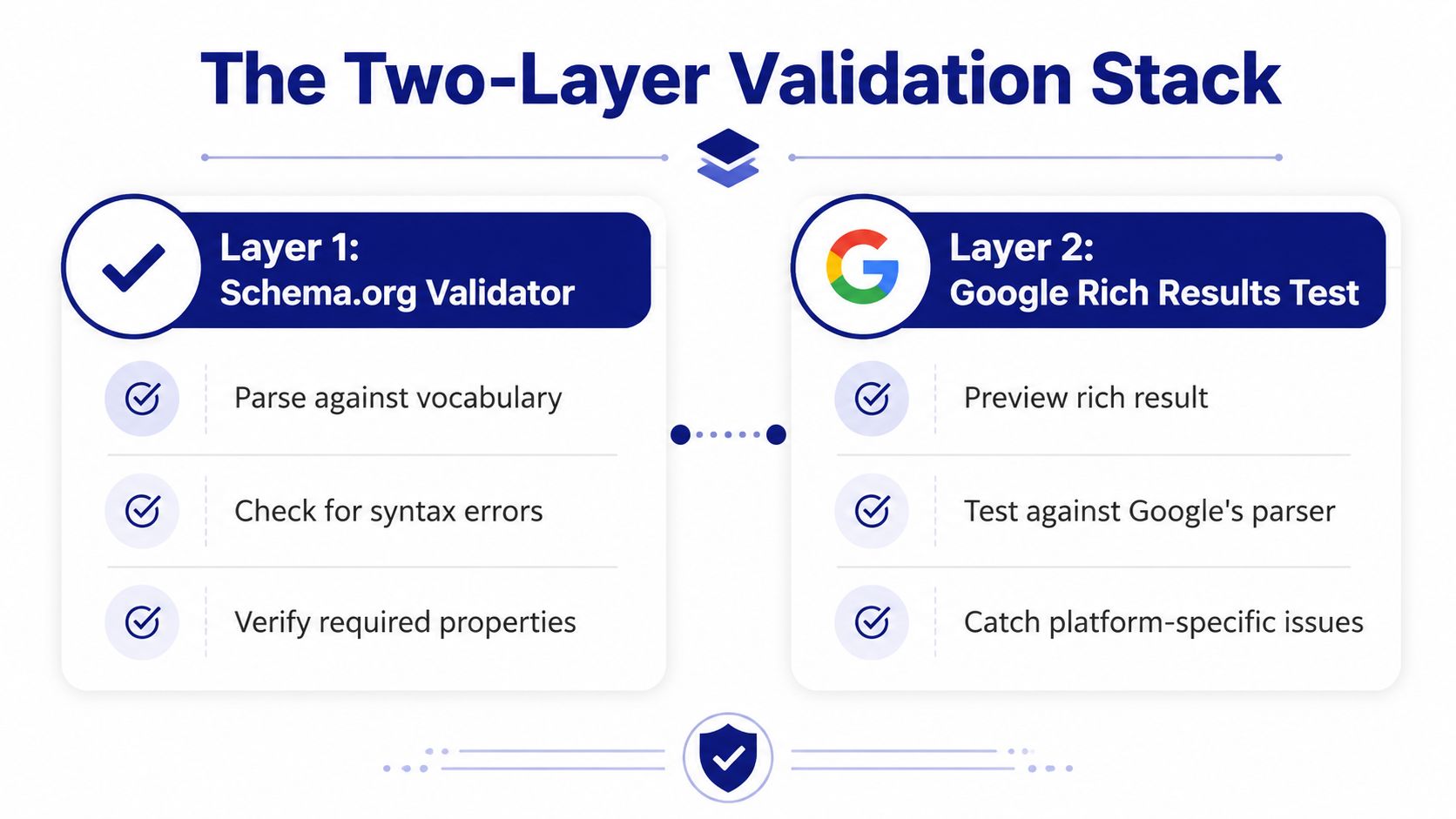
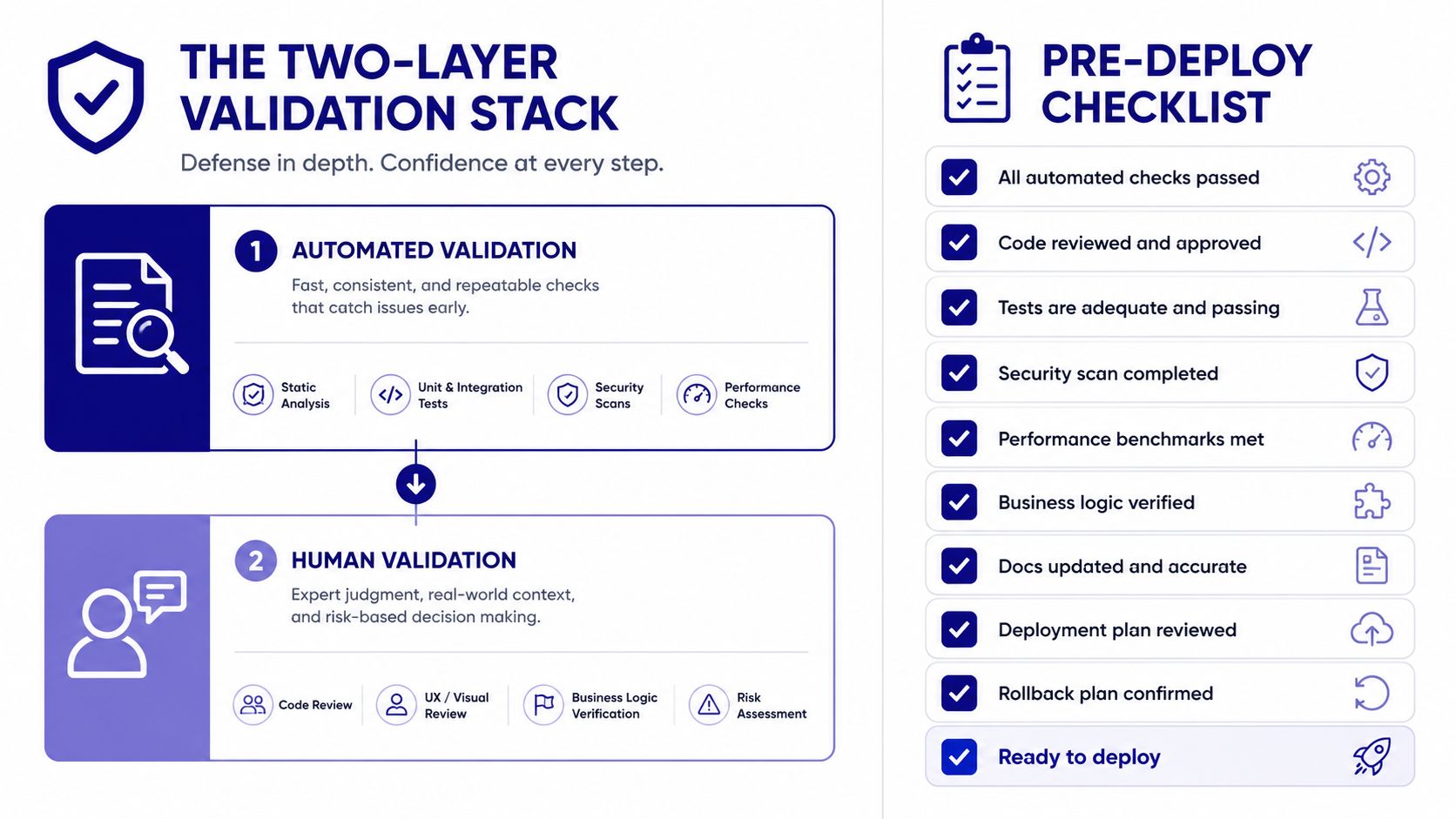
Validation breaks down into two separate checks. The first answers whether the code is valid structured data, and the second answers whether Google will do anything useful with it. Passing one without the other is a common reason teams think schema “didn't work.”
Run both validators before launch
The Schema.org Validator confirms the markup matches the vocabulary. Google's Rich Results Test confirms eligibility for Google-specific rich results. A page can pass the first test and still fail the second, which is why both need to run before deployment, not after traffic drops.
That distinction matters in production. Structured data errors can remove rich-result eligibility, and in some cases they can lead to manual action risk when the markup misrepresents what users see. The safest setup is the one that makes schema easy to audit before it reaches the live page.
Pre-deploy checklist that catches real failures
- Most specific subtype used: Choose the narrowest valid type, such as Restaurant instead of LocalBusiness, when the page clearly fits it.
- Visible content only: Mark up only information users can see on the page.
- No hidden-tab markup: Don't wrap tab-only, accordion-only, or CSS-hidden content in schema.
- Server-rendered JSON-LD: Ship the script in the rendered HTML, not as a client-only injection.
- Property alignment: Make sure the text in the markup matches the page copy, prices, names, and locations.
Use Nuwtonic's schema markup checker when you want a quick preflight on generated blocks before pushing them into a CMS release.
What happens after deployment
After release, review the page in Google Search Console and watch the relevant enhancements report over time. That's where you catch schema that validates technically but doesn't produce the result type you expected. It also gives you a practical place to spot missing fields, template regressions, and accidental field drift after content edits.
Measuring Impact in Search Console and Tracking AI Inclusion
Schema work is easy to overstate if you look only at rankings. Google's own guidance pushes you toward a different measurement model, compare several months of Search Console data before and after adding structured data, then watch impressions, clicks, and rich-result eligibility rather than assuming a direct ranking effect. That's the right frame because schema usually changes how a result appears, not just where it ranks.

Read the Search Console signal correctly
In Search Console, the Enhancements area is where schema work becomes visible. You're looking for the status of each rich-result type, error counts, and whether the template is producing the expected eligibility pattern across similar pages. If a template change affects one group of pages and not another, that usually points to a field mapping problem rather than a sitewide schema failure.
The practical habit is to compare like for like. Don't compare a seasonal page to a perennial one, or a product detail page to a category page, because the content intent is different. Compare the same page class before and after the change, then check whether clicks and impressions moved in the same period that rich-result eligibility improved.
Track AI inclusion as an entity visibility problem
AI search doesn't have a single universal reporting layer yet, so the most useful approach is manual prompt testing across systems like ChatGPT, Gemini, Perplexity, Claude, and Google AI Overviews. Ask the same target query set, check whether your brand appears, and note whether the answer cites your page, paraphrases it, or ignores it altogether.
Entity-rich markup helps because it removes ambiguity. If an AI system can map your brand, article, product, or location to a clear structured entity, the page is easier to classify and easier to cite. The evidence is still evolving, so I treat AI inclusion as a visibility signal, not a guarantee.
Nuwtonic's AI Search Agent fits into that workflow as one option for tracking brand presence, prompt coverage, and URL-level citations across answer engines. Used well, that turns a messy manual process into a repeatable visibility audit instead of a one-off experiment.
Track the question, the answer engine, and the citation, not just the brand mention.
Pitfalls, Maintenance, and a Review-Before-Deploy Workflow
Most schema failures aren't syntax errors. They're content mismatches. A page ships with markup that still reflects the old offer, the old FAQ, the old location, or a brand description that no longer matches the About page, and the markup ceases to be trustworthy.
The failure modes that trip teams up
Hidden content is the first one to eliminate. Google's guidance says content in tabs, accordions, or CSS display:none shouldn't be marked up, and doing so can violate guidelines and trigger manual actions. That's not a soft recommendation, it's a hard implementation rule.
Outdated values are the second issue. Product price, availability, business hours, and FAQ answers drift quickly when editors update pages without touching the schema block. On bigger sites, the problem often comes from template inheritance, where one field changes in the CMS but the generated JSON-LD still points at the old value.
The third failure is inconsistency. Organization schema that says one thing while the About page says another, or FAQ schema that marks up questions no longer visible on the page, creates a trust gap that's easy for a reviewer to spot and hard for a crawler to justify.
Build a review-before-deploy loop
A safe workflow is straightforward. First, generate or edit schema in the source system, not in a one-off page patch. Second, run both validators. Third, compare the markup against the live page content. Fourth, approve the release before it touches production.
For agencies, that review gate matters because schema changes can roll out across hundreds of URLs at once. A small mapping error on a template can scale into a sitewide issue fast, so schema should be previewed and approved like any other content change.
Keep a maintenance cadence
Set a recurring audit cadence tied to page ownership, not just to technical SEO reviews. Product teams should review catalog-driven schema when inventory logic changes, content teams should review Article and FAQ blocks when page copy changes, and local teams should review location fields when business details shift. The maintenance habit is what keeps schema useful after launch.
If you want help turning schema into a managed workflow instead of a fragile markup task, visit Nuwtonic to see how its reviewable SEO and GEO tooling can support schema checks, AI visibility tracking, and CMS-safe updates across your site.


