

Your rankings look stable until one folder slips. Then /blog/ starts losing clicks, /docs/ stops getting indexed cleanly, AI answers cite a competitor instead of your own pages, and the whole domain feels weaker than it should. This illustrates the impact of subdirectory SEO. One weak section can drag down internal linking, crawl efficiency, and authority flow across the rest of the site.
Subdirectories are usually the strongest default for content tied to the main business because they consolidate authority and pass link equity directly to the root domain, while subdomains are often treated as separate entities with less benefit to the main site, as outlined in this subdirectory vs subdomain SEO analysis. That matters even more now because AI search systems and classic search both reward clear site structure, strong internal relationships, and machine-readable signals.
These 8 in-depth resources focus on execution. You'll see how to segment performance by folder, tighten canonical rules, build stronger internal linking patterns, split sitemaps properly, apply schema by section, control crawling with headers, and monitor mobile performance where it breaks. If you manage multiple site sections, publish through several CMS workflows, or need tighter integration between technical SEO and AI visibility, start with this guide to SEO and AI visibility for subdirectories.
Table of Contents
- 1. Google Search Console API for Subdirectory Performance Segmentation
- 2. Subdirectory Canonicalization and Self-Referential Canonicals via Schema Markup
- 3. Subdirectory-Level Internal Linking Architecture and Topical Clustering
- 4. Subdirectory Sitemaps and Crawl Optimization for Index Inclusion
- 5. Subdirectory-Specific Schema Markup BreadcrumbList CollectionPage SpecialAnnouncement
- 6. Subdirectory HTTP Headers and Meta Tags for Crawl Control and SERP Optimization
- 7. Subdirectory Mobile Optimization and Core Web Vitals Monitoring
- 8. Subdirectory Core Web Vitals Implementation and Remediation
- Subdirectory SEO, 8-Point Comparison Guide
- Next Steps for Mastering Subdirectory SEO
1. Google Search Console API for Subdirectory Performance Segmentation
Search Console's interface is fine for broad trend checks. It's weak for operational SEO when you need to isolate /blog/, /docs/, /resources/, or /products/ and compare them against each other at scale. The API is where subdirectory SEO becomes manageable.
Pull page, query, clicks, impressions, CTR, and average position into a warehouse, spreadsheet, or dashboard. Then filter by URL prefix. That lets you see whether one folder is losing impressions because of indexing, losing CTR because of weak snippets, or stalling in positions where a stronger on-page pass could move it.
Build the segment first
A practical setup uses one daily API pull with these dimensions:
- Page path filter: Limit exports to one folder such as
/blog/or/docs/. - Query split: Group terms by intent. Informational queries belong mostly in editorial folders. Commercial terms should cluster around product and pricing paths.
- Device split: Separate mobile and desktop. Folder-level mobile decay often shows up before sitewide averages make it obvious.
For teams using Nuwtonic, the cleanest workflow is to route these exports into the GSC Performance Dashboard in Nuwtonic, then prioritize issues by section instead of treating the domain as one undifferentiated asset.
Practical rule: Compare each folder's CTR against your site average. If one subdirectory is meaningfully below the rest, check titles, meta descriptions, schema, and search intent alignment before rewriting content.
What to look for in the data
A common pattern on large sites is that /blog/ ranks for valuable terms but sits just outside the top results, while /products/ gets impressions but weak click-through because rich results are missing. Another pattern is cannibalization inside /resources/, where two guides answer the same query and split demand.
I've found that the best use of the API isn't reporting. It's triage. Sort subdirectories by fastest path to improvement:
- High impressions, weak CTR: Fix snippets and schema first.
- Positions clustered just off page one: Improve internal links and content depth.
- Large query overlap across same folder: Consolidate or differentiate pages.
- Strong clicks but limited impressions: Expand topic coverage inside that folder.
This is also where AI workflows help. When query classes, snippet gaps, and cannibalization signals are already grouped by subdirectory, it's much easier to push tightly scoped fixes into a review queue instead of launching random sitewide edits.
2. Subdirectory Canonicalization and Self-Referential Canonicals via Schema Markup
Canonical mistakes don't usually create dramatic errors overnight. They create quiet losses. Two pages target the same intent, Google alternates which one appears, backlinks split across duplicates, and neither URL becomes the clear authority.
That problem gets worse inside complex folder structures. Teams often create similar content in /blog/, /resources/, /guides/, /help/, and /docs/ because each department publishes independently. Without strict canonical discipline, subdirectory SEO starts fighting itself.
What correct canonicalization looks like
Every indexable page should have a self-referential canonical using an absolute URL. Not relative. Not protocol-relative. Not left to a plugin default after a migration. Absolute URLs reduce ambiguity and are safer when templates, parameters, and syndication logic get messy.
Use folder-level canonical rules for recurring duplicate patterns:
- Product overlap: Canonical discount or sale variants back to the primary product URL if the content is substantially the same.
- Knowledge base overlap: Point old help articles to the current docs version when both cover the same endpoint or setup process.
- Archive duplication: Canonical historical or filtered copies to the main live page when they don't add distinct search value.
Google treats subdomains and subdirectories similarly in its systems, but practitioners repeatedly see subdirectories rank faster because they consolidate backlinks and authority under one hostname, as discussed in this subdomain versus subdirectory overview.
If you can't explain why two nearly identical URLs both deserve to exist in search, one of them usually needs a canonical or a redirect.
Where schema fits
Schema doesn't replace canonicals. It supports consistency. Breadcrumbs, mainEntity, and isPartOf relationships help reinforce the intended page hierarchy, especially when several folders cover adjacent topics. That's useful on enterprise sites where content models blur together.
Quarterly canonical audits are worth the time because migrations and CMS changes tend to reintroduce old errors. Use URL inspection in Search Console to confirm the canonical Google selected. If Google chooses a different page than the one you declared, don't argue with the tag. Investigate why the signals conflict.
For regional or language variations inside subdirectories, keep hreflang in XML sitemaps when scale grows. It's easier to govern there than scattered in page templates.
3. Subdirectory-Level Internal Linking Architecture and Topical Clustering
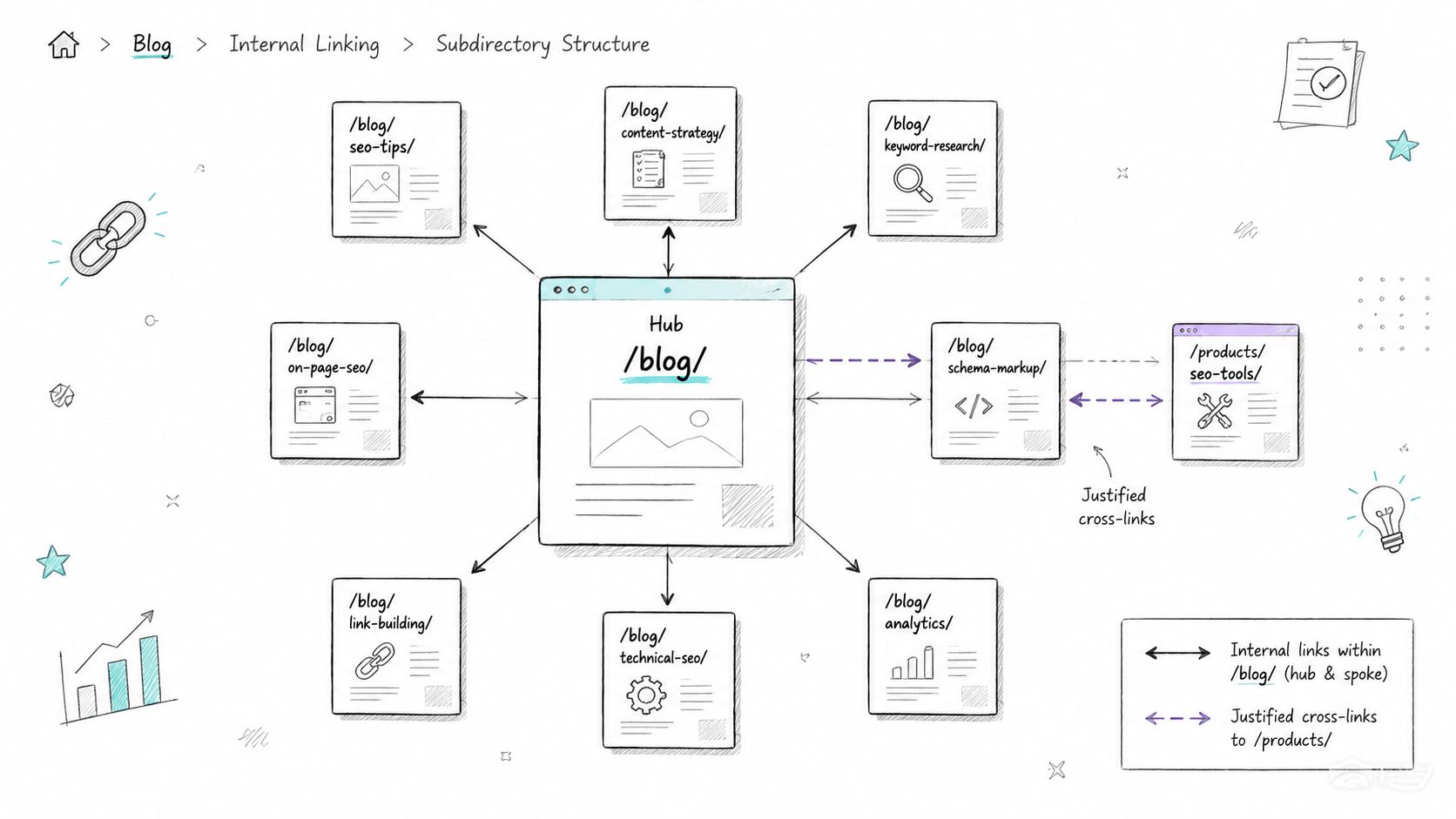
Internal links decide whether a folder feels like a coherent topic hub or a pile of isolated URLs. That's why subdirectory SEO isn't just about URL structure. It's about how pages inside that structure reinforce each other.
A strong subdirectory keeps users and crawlers moving through a topic before sending them elsewhere. A weak one sprays links across the site with no hierarchy, no progression, and no obvious authority page.
Map the cluster before adding links
Start with one folder. Say /resources/seo/. Identify the hub page, the supporting guides, and the transactional pages that deserve selective links out of the cluster. Then review your actual graph, not just navigation menus.
A good internal linking audit checks:
- Hub coverage: Every support article should link back to the main category or pillar page.
- Sibling relevance: Related articles should cross-link when the user intent overlaps naturally.
- Depth control: Important pages shouldn't drift too far from the homepage or from their own folder hubs.
Important pages should stay within three clicks of the homepage, and subdirectory depth should usually be limited to about three to four levels for crawlability and semantic clarity, based on this subdirectory glossary and structure guidance.
If you need a process for mapping link gaps across templates and content groups, this internal linking audit guide from Nuwtonic is a useful operational reference.
What strong subdirectory linking looks like
A B2B SaaS docs section often works best as a hub-and-spoke model. The API overview page links to authentication, endpoints, rate limits, SDK setup, and common errors. Those pages link back to the overview and sideways to closely related docs. That creates a clear ownership signal.
On ecommerce sites, category pages should sit at the center of the cluster, not hide behind faceted dead ends. Product pages can link back to category hubs and to a small number of related products, but avoid turning every SKU into a random link farm.
Field note: Most internal link problems aren't caused by too few links. They're caused by links with no hierarchy.
For enterprises managing thousands of URLs, it helps to scrape and classify the current architecture before changing anything. This guide to scraping URLs for enterprises is useful for building that inventory before redesigning folder-level link paths.
4. Subdirectory Sitemaps and Crawl Optimization for Index Inclusion
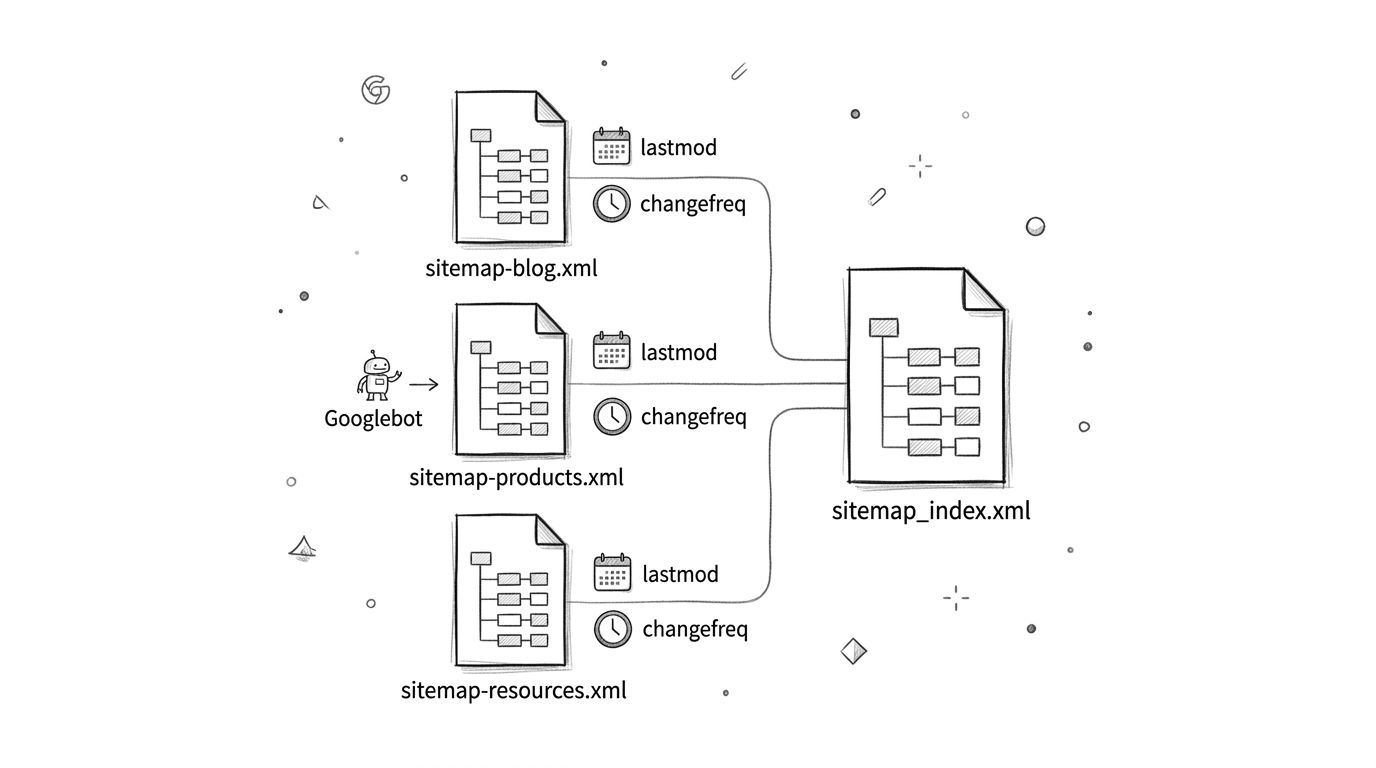
One sitemap for everything looks neat. It usually isn't efficient. When /blog/ updates every day, /docs/ changes in bursts, and /archive/ rarely changes at all, bundling them together gives Google weak freshness signals and makes troubleshooting harder.
Subdirectory SEO works better when sitemap logic follows publishing behavior. Each important folder should have its own sitemap or sitemap set, referenced by a sitemap index file.
Split sitemap logic by content behavior
Use separate sitemap files for sections with different velocity and value. That gives you cleaner diagnostics in Search Console and tighter control over what gets crawled first.
A practical split often looks like this:
- Editorial folders: Frequent
lastmodupdates for articles with substantive changes. - Docs folders: Automated
lastmodtied to substantive edits, not tiny text fixes. - Product folders: Segmented by category or product type when volume gets large.
- Archive or legacy folders: Low-priority inclusion, only if those pages still matter for search.
Each subdomain needs its own robots.txt and separate XML sitemap, which adds overhead and increases configuration risk. Subdirectories are easier to manage under one root structure, as explained in this website architecture and SEO analysis.
Where teams usually break this
They update lastmod for cosmetic changes. They include noindex URLs. They let paginated, filtered, or duplicate variants flood the sitemap. Or they fail to map old subdomain URLs correctly during migrations.
When moving content from a subdomain to a subdirectory, every old URL should 301 redirect to its exact new equivalent, internal links should be updated, and revised XML sitemaps should be submitted in Search Console, as outlined in this subdomain migration workflow.
Clean sitemap files don't compensate for weak internal links, but they do make indexation problems visible much faster.
If you need tooling around validation and monitoring, these website indexing tools can help you verify which folders are entering the index cleanly and which ones are stalling.
5. Subdirectory-Specific Schema Markup BreadcrumbList CollectionPage SpecialAnnouncement
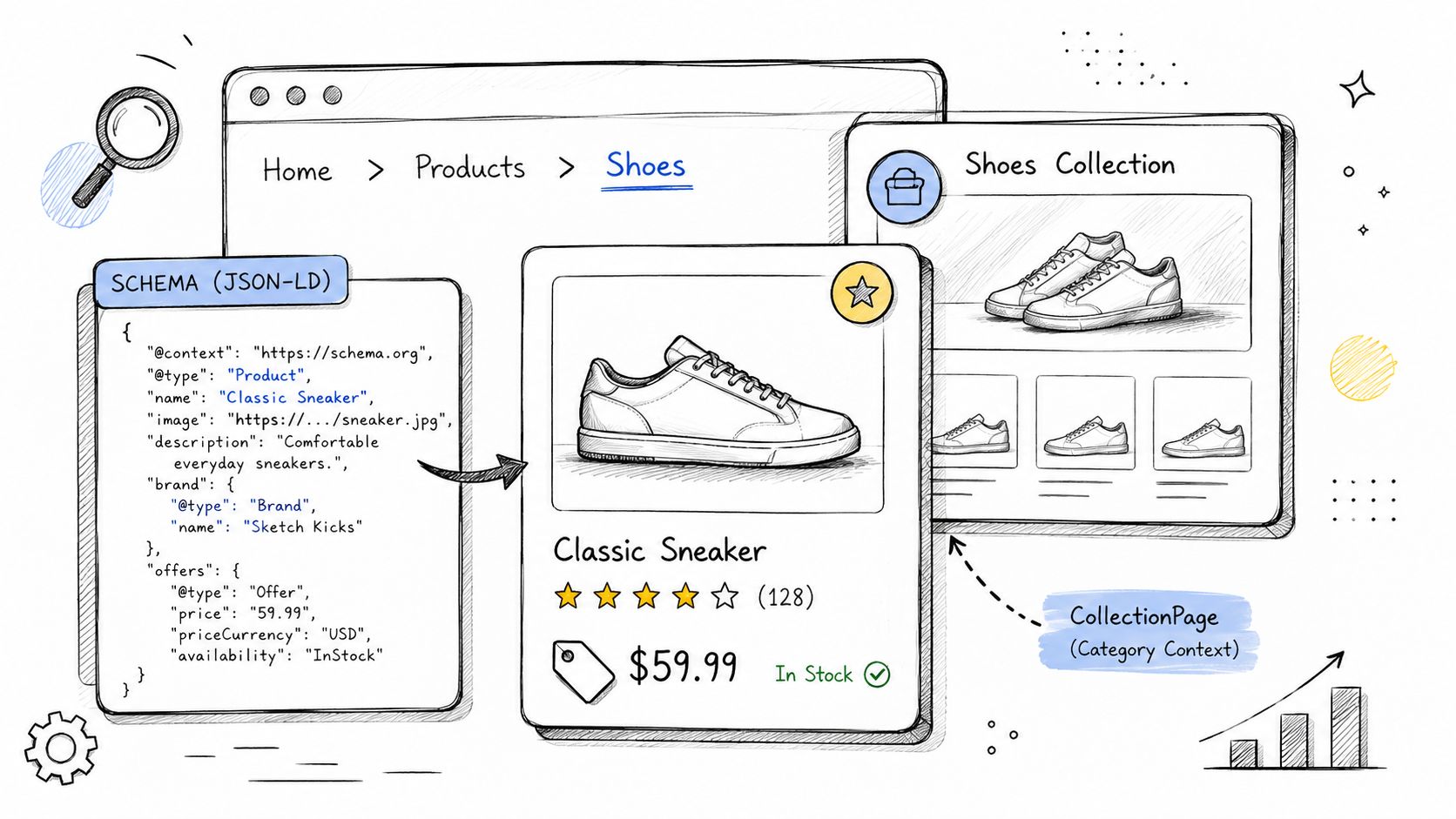
Schema should reflect what a folder is. That sounds obvious, but a lot of sites still apply one generic pattern across every section. Then /products/ gets article-style markup, /blog/ misses author and date signals, and category pages never declare themselves as collections.
That wastes the structural clarity you get from subdirectories in the first place.
Match schema to folder intent
Treat schema by page type and by folder family.
/products/or/shop/: UseProduct, and include offer information where relevant./blog/or/news/: UseBlogPostingorNewsArticlewhen the format fits./category/or collection pages: UseCollectionPage.- Sitewide folder hierarchy: Use
BreadcrumbListto reinforce path relationships. - Announcements or urgent updates: Use
SpecialAnnouncementonly when the content genuinely qualifies.
The schema also needs to match the user intent and the template. A category page with dozens of products is not a single product. A support article with a Q and A section may deserve FAQPage, but not every documentation page does.
For validation and cleanup, the Nuwtonic schema markup checker is useful when you need to verify JSON-LD output across templates without manually checking each page.
Implementation details that prevent waste
Use one clear primary schema entity per page and avoid stacking conflicting variants. Duplicate or mismatched schema often gets ignored. It can also make debugging rich result eligibility harder than it needs to be.
One more structural consideration matters in 2026 search environments. A growing share of AI citations are concentrated among a small group of domains, and every extra hostname dilutes citation opportunity. The projection that 68% of AI citations are consolidated within the top 15 domains comes from this 2026 subdirectory versus subdomain SEO analysis. If you're trying to improve machine readability and citation share, splitting related content across multiple hostnames makes that harder.
Use breadcrumbs consistently. They're one of the simplest ways to tell search systems that /products/shoes/ sits under a commercial collection, while /blog/running-shoe-fit/ is informational support content.
6. Subdirectory HTTP Headers and Meta Tags for Crawl Control and SERP Optimization
Robots directives in robots.txt are too blunt for many folder-level problems. Headers and meta tags give you finer control. That matters when only part of the site needs noindex rules, snippet restrictions, cache changes, or tighter SERP messaging.
At this point, subdirectory SEO gets operational. You're not debating architecture anymore. You're deciding how each folder should be crawled, cached, and presented.
Use headers for folder-level control
X-Robots-Tag is useful when templates or file types make HTML meta tags awkward. It's especially helpful for dynamic or technical folders such as staging environments, internal search results, temporary campaign pages, or downloadable assets.
A practical setup might include:
- Noindex for non-public folders: Keep staging and temporary QA paths out of the index.
- Snippet controls for sensitive content: Limit what search engines can display if snippets expose things you don't want surfaced.
- Cache behavior by content type: Faster-changing offer pages can use shorter cache windows than stable evergreen pages.
If you want a deeper implementation reference for non-HTML directives and deployment patterns, this guide to mastering the X-Robots-Tag covers the mechanics well.
Meta tags should reflect section intent
Your /blog/ descriptions shouldn't sound like your /products/ descriptions. Informational folders need clarity and promise. Commercial folders need specificity. Review folders should communicate comparison or evaluation.
Write meta descriptions in templates where possible, but inject page-level variables intelligently. Product type, brand, feature set, or audience fit often improves relevance more than generic “learn more” copy.
Search snippets are part of site architecture. If every folder speaks the same way, your structure isn't helping users or search engines distinguish intent.
For AI-assisted workflows, this is a good bulk task. Generate candidate descriptions by folder, review them by template, and deploy only where the pattern is stable enough to avoid duplication.
7. Subdirectory Mobile Optimization and Core Web Vitals Monitoring
Sitewide performance averages hide the problem. Mobile issues usually cluster by template, and templates usually map to folders. That's why you need to read Core Web Vitals by subdirectory, not by domain.
A common example is /blog/ loading cleanly while /products/ struggles under heavy images, variant selectors, review widgets, and faceted filters. Or /docs/ performs well on desktop but drags on mobile because code blocks, sticky sidebars, and nested navigation overload the layout.
Read performance by folder not by domain average
Group URLs by subdirectory and page type. Then compare lab and field signals separately for each group. You're looking for patterns, not isolated bad pages.
The most useful setup combines:
- CrUX or other field data: To see what real users experience.
- RUM by template: To catch issues on high-traffic mobile pages.
- Lighthouse testing on representative URLs: To identify the likely causes behind the field issues.
Pages located beyond three clicks from the homepage tend to receive less crawl attention and link equity, which makes folder design and click depth especially important for mobile-heavy sites, according to this website architecture guidance.
The mobile depth problem is real
There's also a nuance many teams miss. Deep subdirectories can create mobile visibility issues when important pages sit under long paths and weak internal link density. A contrarian 2025 perspective argues that some mobile-first brands can see signal fragmentation in deep subdirectory structures and may need a hybrid approach rather than assuming subdirectories always win. That argument is outlined in this mobile cannibalization perspective on subdomains versus subdirectories.
I wouldn't take that as a reason to abandon subdirectories by default. I would take it as a warning not to bury critical mobile pages inside overgrown folder trees. If your mobile users and crawlers reach those pages less efficiently than desktop users do, your architecture is undercutting your content.
8. Subdirectory Core Web Vitals Implementation and Remediation
Monitoring is only useful if it changes templates, components, and deployment rules. The fastest way to improve subdirectory SEO performance is to fix recurring template issues at the folder level instead of chasing individual URLs one by one.
Typically, this means prioritizing the templates that support high-value folders first. Product listing pages, product detail pages, docs templates, article templates, and key landing page layouts usually cover the majority of the impact.
Fix templates not isolated pages
Start with the largest causes of delay and instability:
- Images: Convert oversized assets, implement responsive images, and lazy-load below-the-fold media carefully.
- CSS: Inline critical CSS where it helps and trim unused style bundles from legacy templates.
- JavaScript: Defer non-critical scripts, especially third-party widgets, chat tools, and review embeds.
- Layout stability: Set explicit dimensions for images, embeds, and dynamic UI elements.
Subdirectories usually rank faster because they inherit authority from the main domain, while subdomains behave more like separate projects that need their own SEO momentum, according to this subdirectory authority overview. Once that structural advantage is in place, performance fixes on the main hostname can compound more efficiently across all the linked folders.
Build a remediation workflow that sticks
Don't rely on one-off audits. Tie changes to release management. Every template update should trigger a small performance review for the affected subdirectory. That's especially important after CMS redesigns, frontend framework migrations, or new app integrations.
When migrating a blog or docs section from a subdomain to a subdirectory, the ranking lift often appears between weeks 6 and 12 if redirects are mapped correctly, and Flick reached 9.6 million yearly traffic after moving its blog from blog.flick.com to flick.com/blog, as described in this subdirectory migration case study. That kind of result doesn't come from the URL move alone. It also depends on keeping the new folder technically clean, internally linked, and fast enough to capitalize on the authority consolidation.
Subdirectory SEO, 8-Point Comparison Guide
| Feature | Core capability | Primary benefit / outcome | Key metrics / UX signals | Implementation effort & prerequisites |
|---|---|---|---|---|
| Google Search Console API, Subdirectory Performance Segmentation | Query-level GSC data by URL prefix, 365‑day trends, webhooks, pagination | Detect subdirectory-specific drops (CTR, impressions), prioritize remediation | Impressions, clicks, CTR, position, query distribution, 365‑day trends | Medium, enable GSC API, service account, handle quotas; ~3‑day data delay; integrate with dashboards |
| Subdirectory Canonicalization & Self‑Referential Canonicals | rel=canonical, canonical chains, schema canonicalUrl, 301 redirects, hreflang | Consolidates ranking power, reduces duplicates and crawl waste, improves SERP consistency | Canonical chosen, index status, duplicate URLs, impressions, crawl budget use | Medium–High, audit structure, CMS template/redirect changes; risk of silent deindexing if misconfigured |
| Subdirectory Internal Linking & Topical Clustering | Hub‑and‑spoke links, contextual anchors, breadcrumb schema, depth limits | Builds topical authority, improves crawl efficiency and dwell time | Internal link counts, crawl depth, time on page, ranking lift for clustered topics | Medium, content mapping, editorial linking updates, guideline enforcement |
| Subdirectory Sitemaps & Crawl Optimization | Segmented sitemaps, sitemap_index.xml, accurate lastmod, changefreq, robots rules | Faster indexing, reduced crawl waste, clearer subdirectory indexing status | Indexation rate, time‑to‑index, submitted vs indexed (GSC), lastmod accuracy | Low–Medium, generate segmented sitemaps, update robots.txt, automate lastmod; avoid over‑claiming priority |
| Subdirectory‑Specific Schema Markup | JSON‑LD per type (BreadcrumbList, CollectionPage, Product, BlogPosting, FAQ) | Rich snippets, SERP features, improved AI citation and voice results | Rich result appearances, schema validation errors, CTR lift, AI citation frequency | Medium, implement via CMS templates, validate with tools, avoid schema mismatches |
| HTTP Headers & Meta Tags for Subdirectories | X‑Robots‑Tag, Cache‑Control, meta robots, meta descriptions, viewport | Precise crawl control, fresher SERP snippets, improved CTR, protect staging/test areas | CTR, index/exclude status, cache TTL effectiveness, header validation | Low–Medium, server/CMS header changes, meta updates; careful testing to prevent conflicts |
| Subdirectory Mobile Optimization & Core Web Vitals Monitoring | Per‑subdirectory RUM/CrUX dashboards; segment mobile metrics | Identify UX hotspots and prioritize fixes for conversion/SEO impact | LCP, INP/FID, CLS, mobile load time, percentiles by subdirectory | Medium, instrument RUM, aggregate CrUX data, segment by path and template |
| Subdirectory Core Web Vitals, Remediation | Lab + field testing, performance budgets, automated alerts, remediation playbook | Reduce LCP/INP/CLS to raise rankings, conversions and reduce bounce | Core Web Vitals improvements, conversion rate, bounce, template‑level regressions | High, engineering work (image pipelines, critical CSS, lazy loading), testing, CI/CD integration |
Next Steps for Mastering Subdirectory SEO
Most subdirectory problems aren't caused by one catastrophic mistake. They come from drift. A folder launches on a separate workflow, templates evolve without SEO review, canonicals get inconsistent, internal links weaken, and performance monitoring stays stuck at the domain level. Six months later, the site still looks organized on the surface, but search systems no longer read it as a strong, unified structure.
The fix is to treat each subdirectory like an operational unit. Track it separately. Crawl it separately. Audit its canonicals and schema separately. Measure mobile performance separately. Then connect those observations back to one shared authority model under the main domain.
That approach fits the broader reality of modern search. Subdirectories remain the default choice for most business-critical content because they consolidate authority and simplify technical governance. Google may say its systems process subdomains and subdirectories similarly, but in practice subdirectories usually make execution easier. You have one hostname, one stronger internal linking environment, fewer crawl-management points to maintain, and less fragmentation when you're trying to earn search visibility and AI citations.
A strong next-step sequence looks like this:
- Start with folder segmentation: Pull Search Console data by path and identify weak CTR, declining impressions, or query overlap.
- Fix URL authority signals: Clean up self-referential canonicals, redirects, and duplicate paths before touching content.
- Rebuild internal logic: Tighten hubs, supporting pages, and click depth so important URLs are easy to reach.
- Split sitemaps by behavior: Keep high-change and low-change content in separate files and watch indexation by folder.
- Match schema to intent: Products, articles, collections, docs, and announcements shouldn't share one generic markup pattern.
- Control crawl and snippets carefully: Use headers and meta directives where folder-level handling is required.
- Monitor mobile by template group: Don't trust one sitewide score to represent every subdirectory.
- Turn fixes into workflows: Assign owners, route issues into review queues, and connect monitoring to deployment.
Nuwtonic is particularly useful when the site has grown beyond manual SEO management. It connects Google Search Console data, issue prioritization, schema checks, content workflows, cannibalization tracking, and AI visibility monitoring in one workspace. That makes it easier to move from diagnosis to implementation without juggling separate tools for every task.
If you want subdirectory SEO to hold up as the site scales, stop treating architecture as a one-time setup decision. Treat it as a living system. The teams that win keep refining each folder so authority, crawlability, user paths, and machine-readable signals all point in the same direction.
Nuwtonic helps teams turn subdirectory SEO from scattered audits into an execution system. If you manage multiple folders, clients, or content types, Nuwtonic gives you one place to connect Search Console data, surface ranked issues, monitor AI visibility, run schema and on-page checks, detect cannibalization, and push reviewable fixes through agent-driven workflows.


