

Claude is genuinely good at SEO work — better than most people give it credit for, because most people use it like a keyword-stuffed content generator instead of what it actually is: a research and reasoning partner that can hold an entire brand's context (via Projects), read and reason over spreadsheets and code (via Claude for Excel and Artifacts), and browse the live web on your behalf (via Claude for Chrome).
What Claude can't do is act as your system of record. It has no memory of your site's actual Search Console data unless you feed it in, no live view of whether ChatGPT or Perplexity are citing you, and no way to publish a fix to your CMS on its own. Every strategy below works — and every one of them has the same shape: you are the pipeline connecting Claude's output to your live site.
That's not a criticism of Claude. It's the honest operating model, and it's worth understanding clearly before you build a workflow around it — which is exactly what the cons section at the end of this guide unpacks.
Strategy 1: Claude SEO Keyword Research & Search Intent Clustering
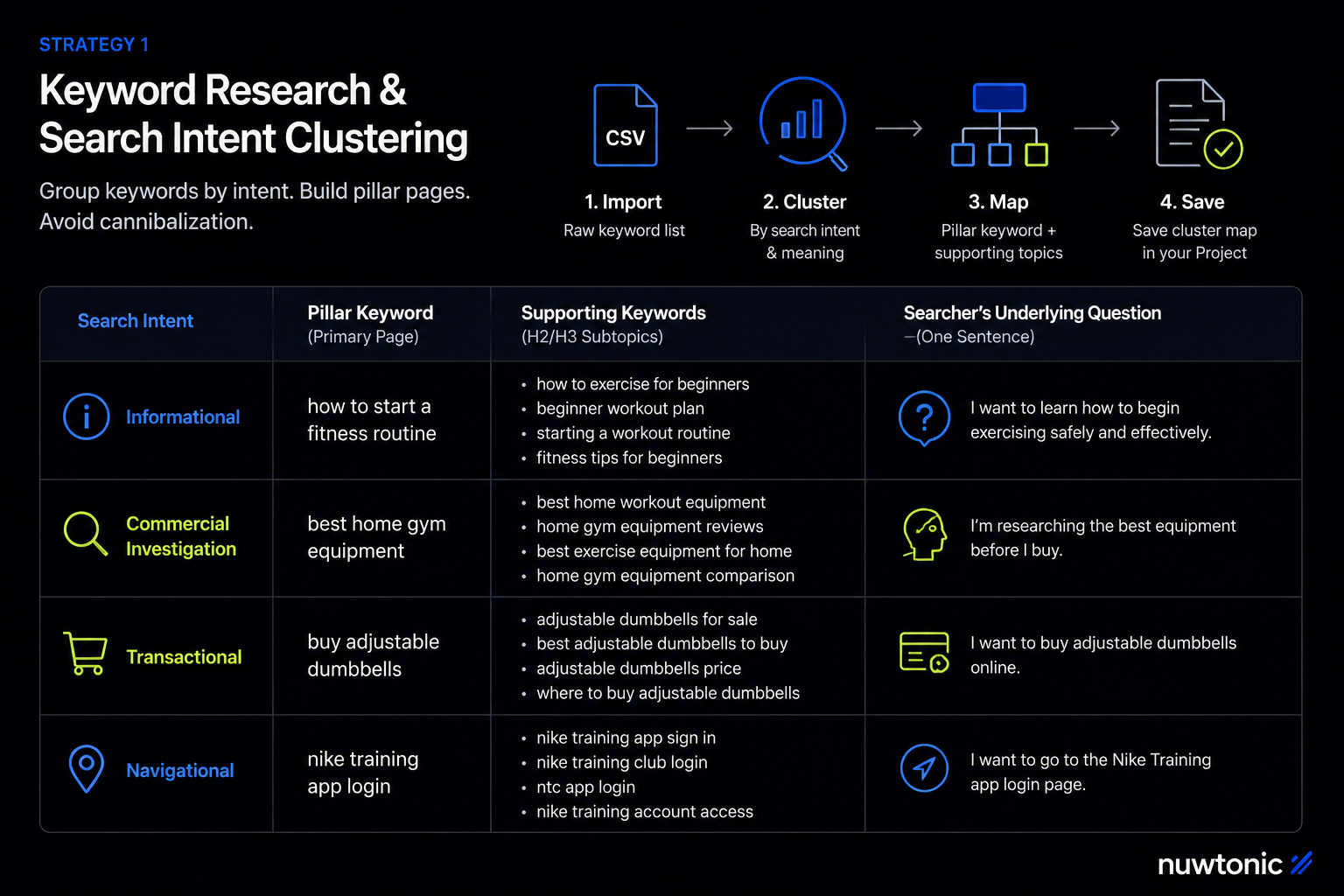
The problem it solves: Raw keyword lists from traditional tools tell you volume and difficulty, but not why someone is searching, or which of your 50 target keywords are really the same underlying intent wearing different words.
Steps:
Export a raw keyword list (from Search Console, Semrush, Ahrefs — anywhere) as a CSV or paste it directly into the chat.
Ask Claude to cluster the list by search intent (informational, commercial, transactional, navigational), not just by topic similarity.
For each cluster, ask Claude to identify the single "pillar" keyword that should own a dedicated page, and which of the rest should become supporting sections or internal-linked subtopics instead of separate pages (this avoids keyword cannibalization before it happens).
Save the finished cluster map as a Project document so future content requests in the same Project automatically respect it.
Example prompt:
Here is a list of [N] keywords for [industry/site]: [paste list].

Cluster these by search intent (informational, commercial investigation,
transactional, navigational), then group semantically similar keywords
under one pillar topic each. For each cluster, tell me:
1. The single keyword that should be the primary target for a dedicated page
2. Which other keywords in the cluster should be H2/H3 subtopics instead of
   separate pages, to avoid cannibalization
3. The likely searcher's underlying question behind the cluster, in one sentence

Output as a table.
Strategy 2: Claude SEO Content Briefs for Writers
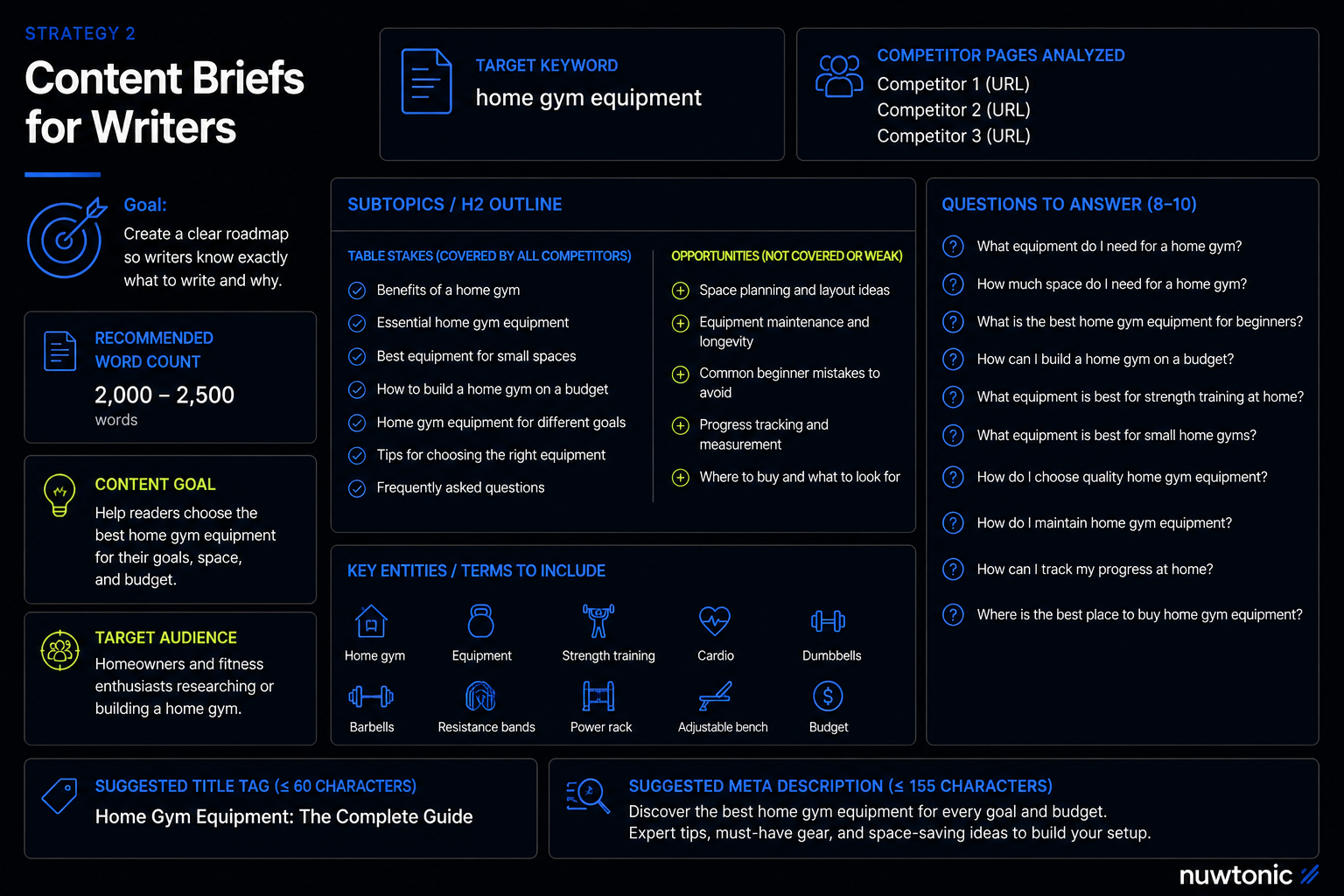
The problem it solves: Writers (in-house or freelance) waste time guessing what "good" looks like for a given keyword. A tight brief removes the guesswork before a single word gets written.
Steps:
Give Claude the target keyword, three to five competitor URLs (paste the text, since Claude can't fetch live URLs from its own knowledge — use Claude for Chrome or a search tool if you want it pulling live pages), and your existing internal style guide if you have one.
Ask for a structured brief: target word count range, required subtopics, questions to answer, entities to mention, and a suggested title/meta description.
Store the site's style guide and past top-performing briefs in a Project so every new brief request is consistent without re-explaining your brand voice each time.
Example prompt:
I'm writing a page targeting the keyword "[keyword]". Here's the text of
the top 3 ranking competitor pages: [paste text].

Build a content brief that includes:
- Recommended word count range
- The subtopics/H2s the top competitors all cover (so I don't miss table
  stakes) and any subtopic none of them cover (so I can differentiate)
- 8-10 real questions a searcher would ask that this page should answer directly
- Key entities/terms that should appear naturally
- A suggested title tag (under 60 characters) and meta description (under 155)
Strategy 3: Claude SEO Long-Form Content Drafting
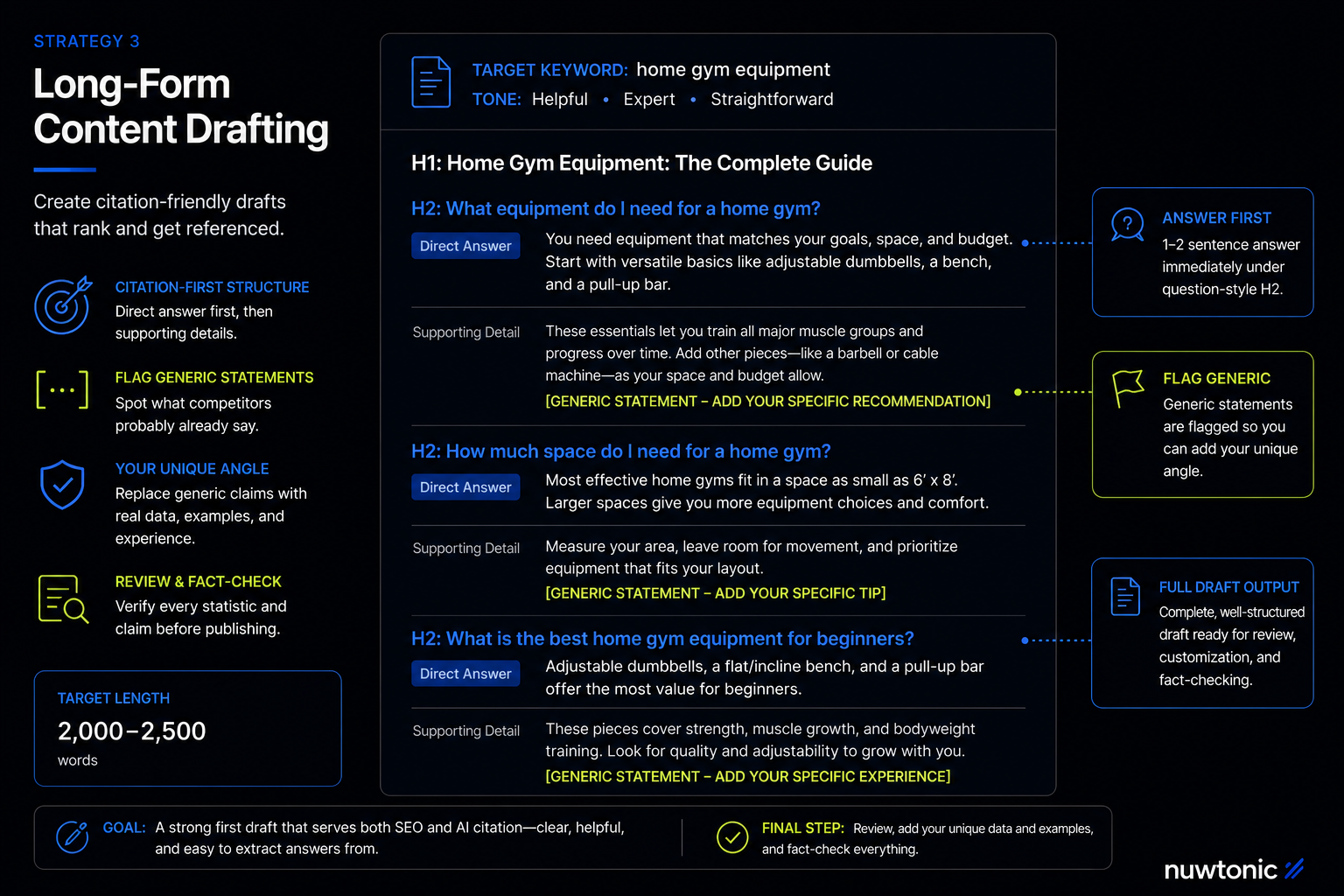
The problem it solves: Getting from a blank page to a strong first draft, especially for pages that need to serve both traditional rankings and AI-answer citations (direct, extractable answers near the top, not buried in paragraph four).
Steps:
Feed Claude the brief from Strategy 2, or build one in the same conversation.
Ask explicitly for citation-friendly structure: a direct one-to-two sentence answer immediately under any H2 that's phrased as a question, followed by supporting detail.
Ask Claude to flag anywhere the draft is stating something generic that every competitor already says — this is where you should swap in a real, specific fact, number, or example only your brand has, since generic restatement is exactly what both Google's ranking systems and AI citation selection deprioritize.
Review and fact-check every statistic or claim before publishing — treat Claude's draft as a strong first pass, not a finished, verified piece.
Example prompt:
Using this brief: [paste brief], write a full draft targeting [keyword].

Requirements:
- Under every H2 phrased as a question, answer it directly in the first
  1-2 sentences before adding supporting detail
- Flag in brackets any sentence that's a generic industry statement rather
  than something specific to [brand/product] — I want to replace those
  with real specifics afterward
- Match a [tone description] voice
- Target length: [X] words
Strategy 4: Claude SEO On-Page SEO Optimization (Titles, Metas, Headers)
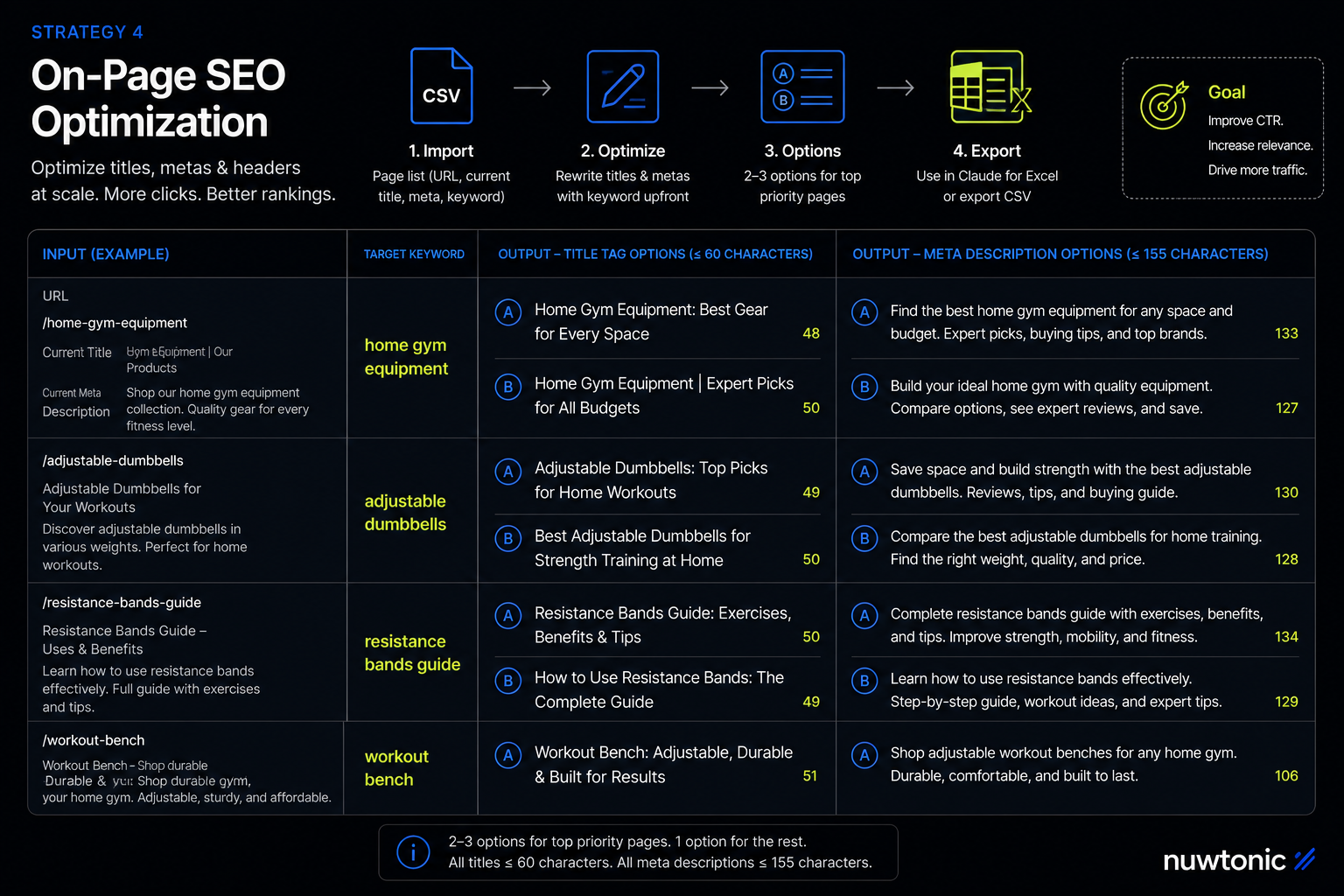
The problem it solves: Bulk-writing dozens of title tags and meta descriptions by hand is tedious and inconsistent.
Steps:
Export your page list (URL, current title, current meta, target keyword) as a CSV or paste as a table.
Ask Claude to rewrite each one within character limits, keeping the target keyword near the front of the title where possible.
Ask for 2-3 alternatives per page rather than one fixed answer, so you can pick the strongest for high-priority pages instead of accepting the first draft everywhere.
Use Claude for Excel if you're working directly inside a spreadsheet of hundreds of URLs — it can read and update the workbook in place rather than you shuttling data between a chat window and a spreadsheet.
Example prompt:
Here's a table of pages: URL, current title, current meta description,
target keyword. [paste table]

For each row, write:
1. A new title tag, under 60 characters, with the target keyword as close
   to the front as natural phrasing allows
2. A new meta description, under 155 characters, that includes a clear
   reason to click (not just a restatement of the title)
Give me 2 options per page for the 10 highest-priority rows, 1 option for the rest.
Strategy 5: Claude SEO Schema Markup Generation
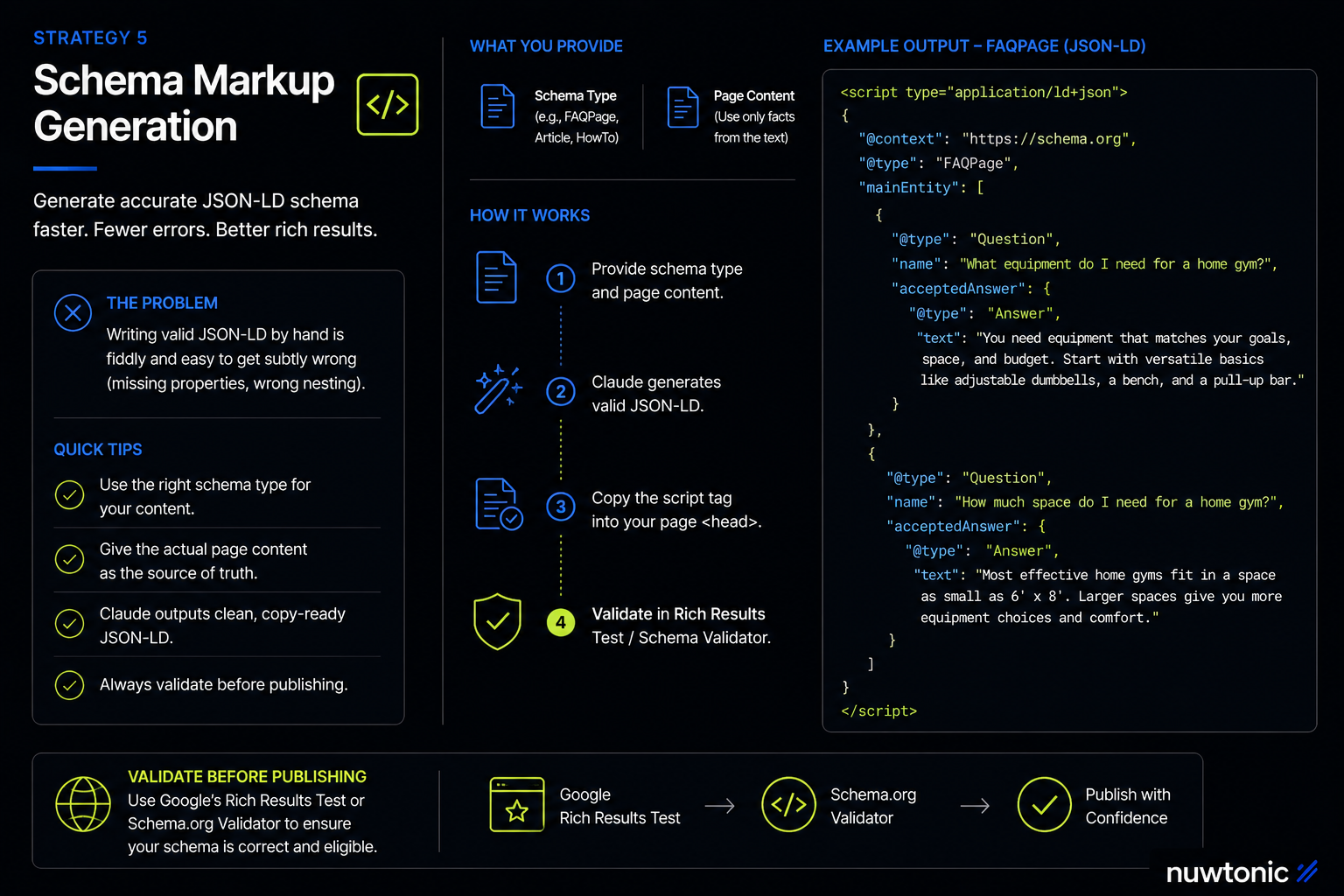
The problem it solves: Writing valid JSON-LD by hand is fiddly and easy to get subtly wrong (missing required properties, wrong nesting).
Steps:
Tell Claude what schema type you need (Article, FAQPage, Product, HowTo, LocalBusiness, etc.) and give it the actual page content to pull facts from — don't let it invent values.
Ask it to output the result as a code artifact so it's easy to copy directly into your CMS's custom HTML/head field.
Validate the output afterward in Google's Rich Results Test or Schema.org's validator before publishing — Claude can produce syntactically valid JSON-LD that's still semantically wrong for your specific page if the source content was ambiguous.
Example prompt:
Generate FAQPage JSON-LD schema for this page content: [paste content].

Use only questions and answers that are actually present in the text
below — don't invent new ones. Output as a single valid JSON-LD script
tag ready to paste into a page <head>.
Strategy 6: Claude SEO Competitor Content Gap Analysis
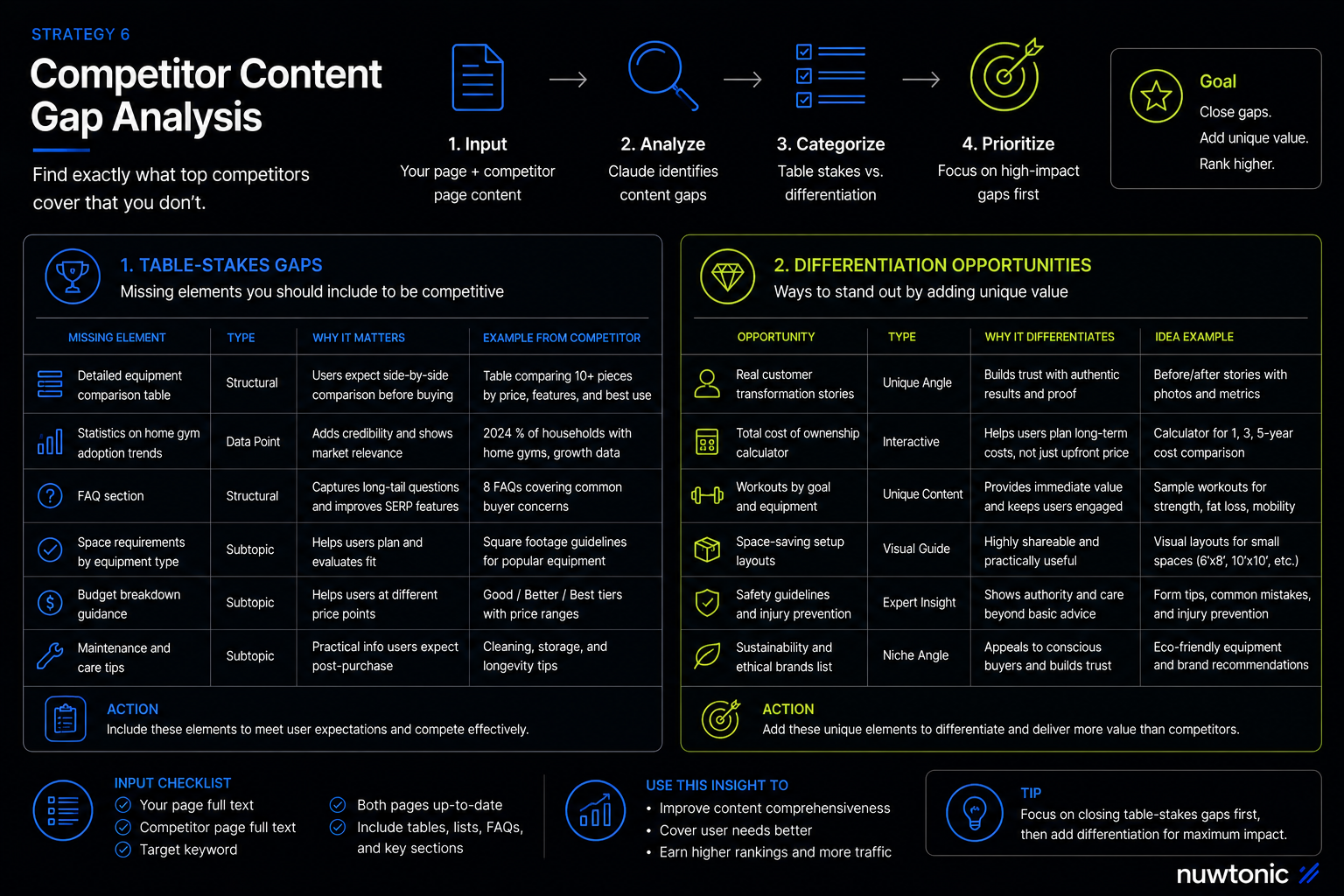
The problem it solves: Knowing exactly what a higher-ranking competitor page covers that yours doesn't — the actual missing subtopics and facts, not a vague "make it more comprehensive" note.
Steps:
Paste your current page's full text and the competitor's full text (or use Claude for Chrome to pull both live if you want it browsing directly).
Ask Claude to list, specifically, what the competitor covers that you don't — subtopics, data points, examples, and structural elements (tables, FAQs, comparison charts).
Ask it to separate that list into "table stakes you're missing" versus "genuine differentiation opportunities" so you're not just copying the competitor's structure wholesale.
Example prompt:
Here is my page: [paste text]
Here is a competitor page ranking above mine for "[keyword]": [paste text]

List specifically what the competitor covers that mine doesn't — subtopics,
data points, examples, structural elements like tables or FAQs. Separate
the list into:
1. Table-stakes gaps I should close to be competitive
2. Genuine differentiation opportunities where I could add something the
   competitor doesn't have at all
Strategy 7: Claude SEO Content Refresh & Decay Diagnosis
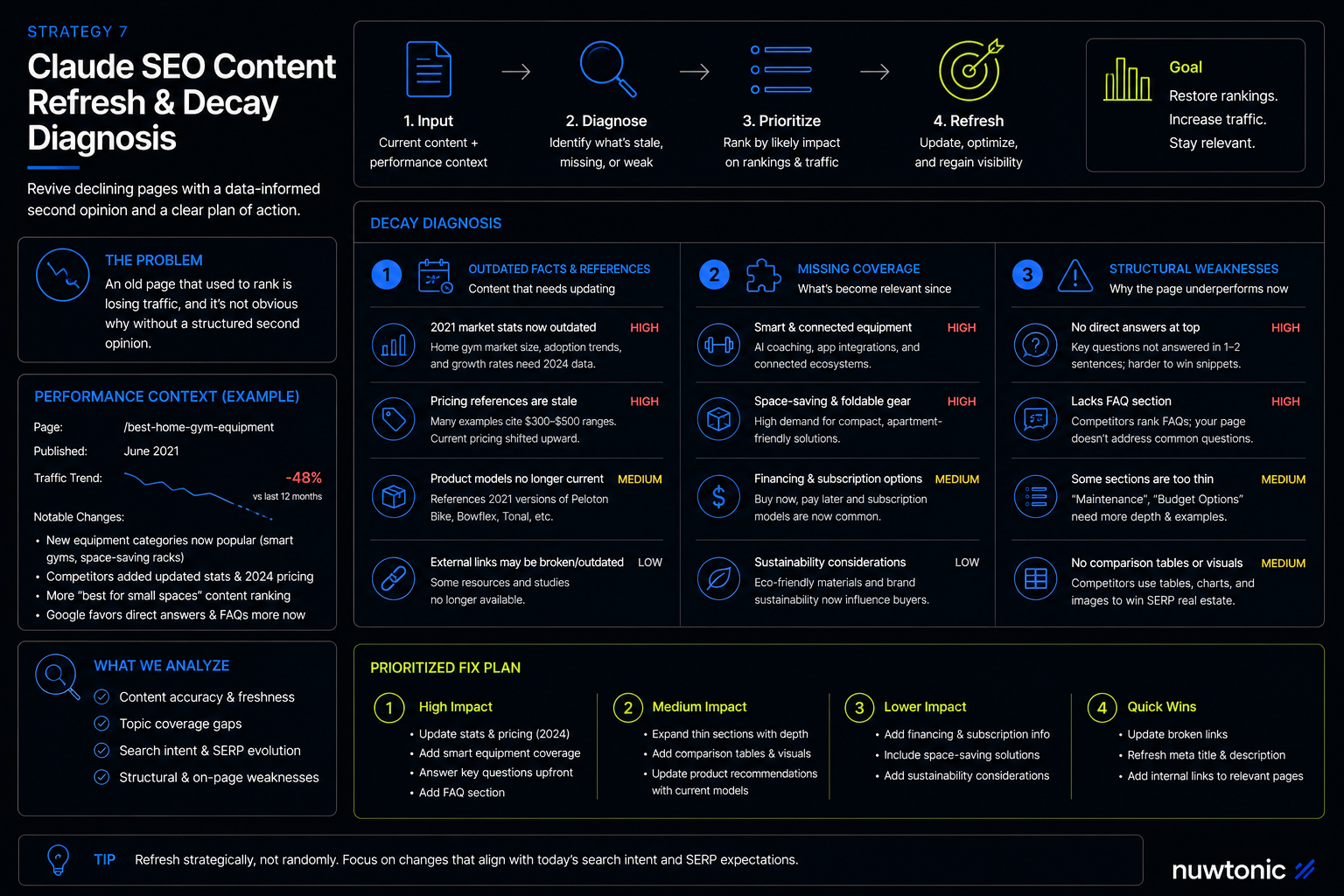
The problem it solves: An old page that used to rank is losing traffic, and it's not obvious why without a structured second opinion.
Steps:
Paste the existing content along with any performance context you have (approximate traffic trend, what you know has changed in the SERP or the topic since publication).
Ask Claude to identify what's stale: outdated statistics, references to old product versions, missing recent developments in the topic, or structural issues (thin sections, no direct answers) that wouldn't have mattered as much when the page first ranked.
Ask for a prioritized list of fixes, not just an unranked pile of "content is a bit dated" notes.
Example prompt:
This page ranked well starting [year] but traffic has dropped since. Here's
the current content: [paste content]. Here's what's changed in the topic
since then: [brief notes].

Identify:
1. Any outdated facts, statistics, or references that need updating
2. Missing coverage of anything that's become relevant to this topic since
   publication
3. Structural weaknesses (thin sections, no direct-answer format, missing FAQs)
Prioritize the list by likely impact, most important first.
Strategy 8: Claude SEO Internal Linking Strategy
The problem it solves: Internal links usually get added ad hoc by whoever's writing that week, instead of deliberately reinforcing your most important pages.
Steps:
Give Claude a list of your site's pages with a one-line description of each (or paste a sitemap export).
Ask it to identify which pages should link to your priority "pillar" pages and suggest natural anchor text — not exact-match keyword stuffing, but phrasing that would occur naturally in context.
Feed this list into a Project so it's available every time you draft new content, ensuring every new page gets appropriate internal links from day one instead of retrofitted later.
Example prompt:
Here is a list of pages on my site with a one-line description of each:
[paste list]. My priority pillar pages are: [list].

For each non-pillar page, suggest 1-3 places it should link to a pillar
page, with natural (non-exact-match) anchor text suggestions that would
read naturally in a sentence.
Strategy 9: Claude as Technical SEO Audit Assistance
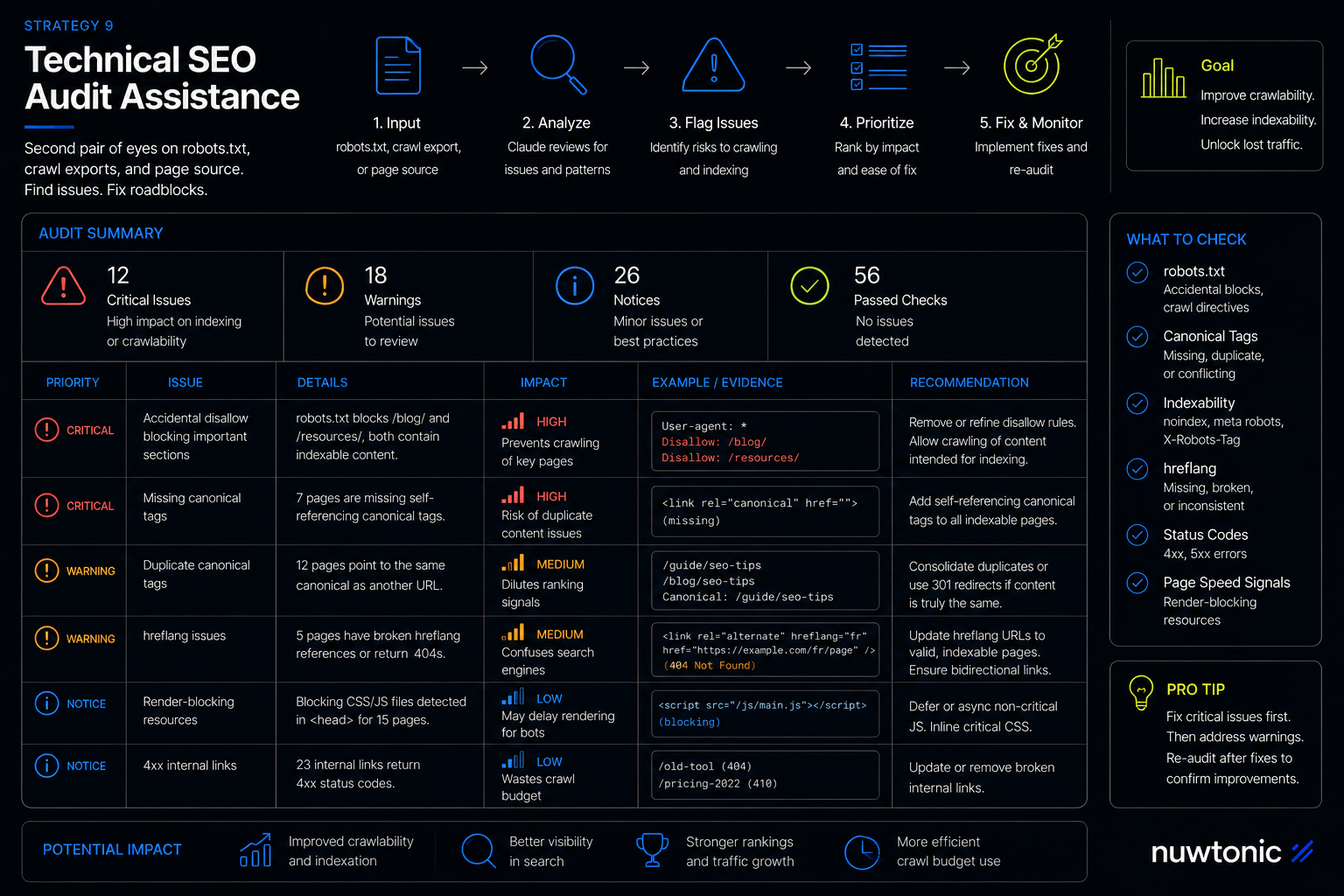
The problem it solves: Reading a raw robots.txt, a crawl export, or a chunk of page source to spot what's blocking indexing or crawling is tedious and easy to miss something in.
Steps:
Paste your robots.txt file, a crawl export (from Screaming Frog or similar), or raw page source/HTML.
Ask Claude to flag specific issues: accidental disallow rules, missing or duplicate canonical tags, broken hreflang, render-blocking scripts that could hide content from bots that don't execute JavaScript.
Treat this as a second pair of eyes on a technical export you already have — Claude can't crawl your live site itself unless you're using it inside a tool that gives it that access.
Example prompt:
Here's my current robots.txt: [paste]. And here's a crawl export showing
status codes, canonical tags, and indexability for my top 50 pages by
traffic: [paste].

Flag anything that looks like an accidental block (disallow rules that
might be unintentional), duplicate or missing canonical tags, and any
other technical issue that could be hurting indexing.
Strategy 10: Claude SEO Repurposing One Piece of Content Into Many
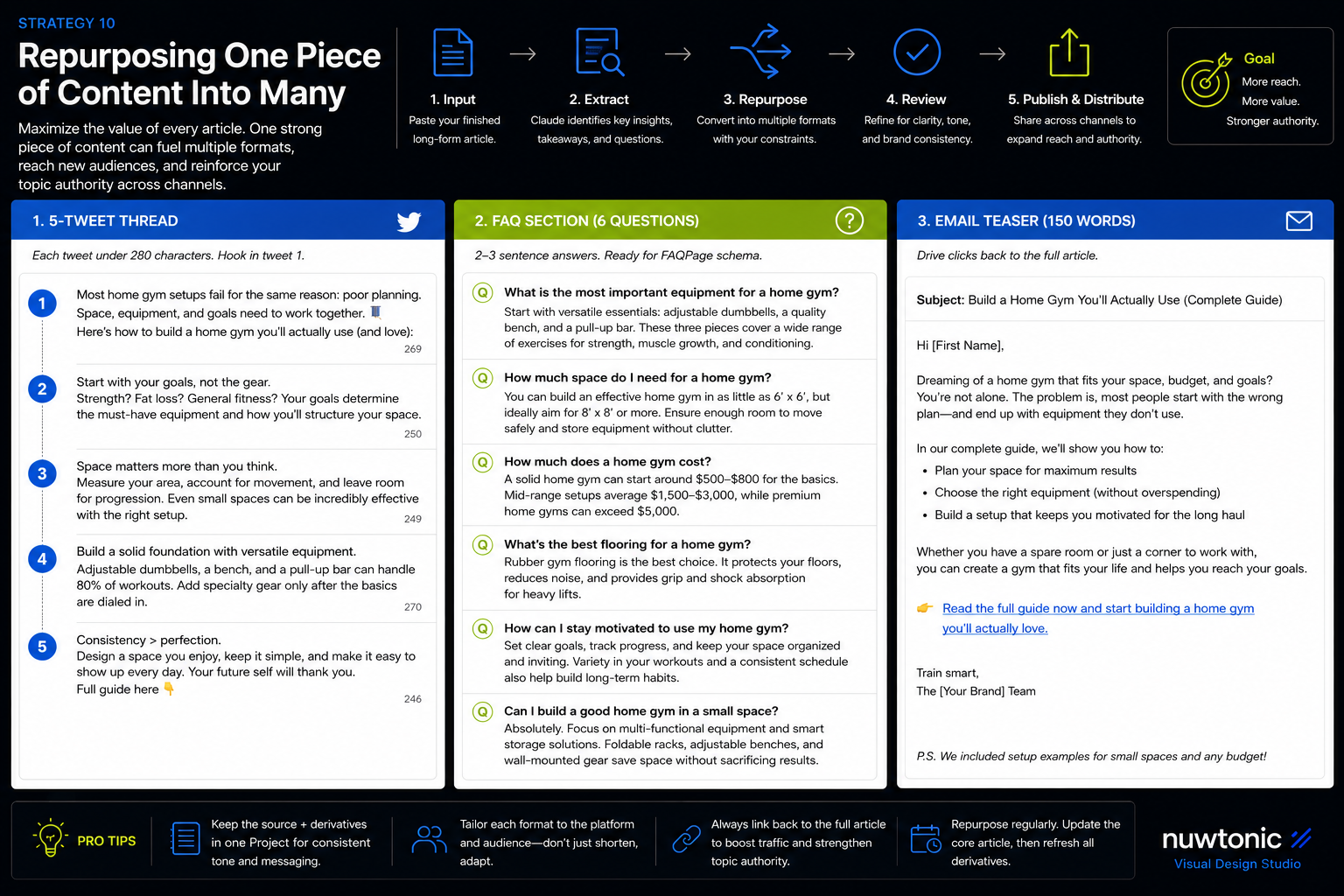
The problem it solves: A strong long-form article often only gets published once, when it could seed five other assets (a social thread, an FAQ page, an email, a shorter explainer) that all reinforce the same topical authority.
Steps:
Paste the finished long-form piece.
Ask Claude to extract it into the specific formats you need — being explicit about each format's constraints (character limits, tone, structure) rather than a vague "repurpose this."
Keep the source article and its extracted formats in the same Project so tone stays consistent across every derivative piece.
Example prompt:
Here's a finished article: [paste]. Repurpose it into:
1. A 5-tweet thread (each tweet under 280 characters, hook in tweet 1)
2. A standalone FAQ section (6 questions, 2-3 sentence answers) suitable
   for adding to the page as FAQPage schema later
3. A 150-word email teaser driving clicks back to the full article
Strategy 11: Claude SEO Scaling the Workflow With Projects, Chrome, and Excel
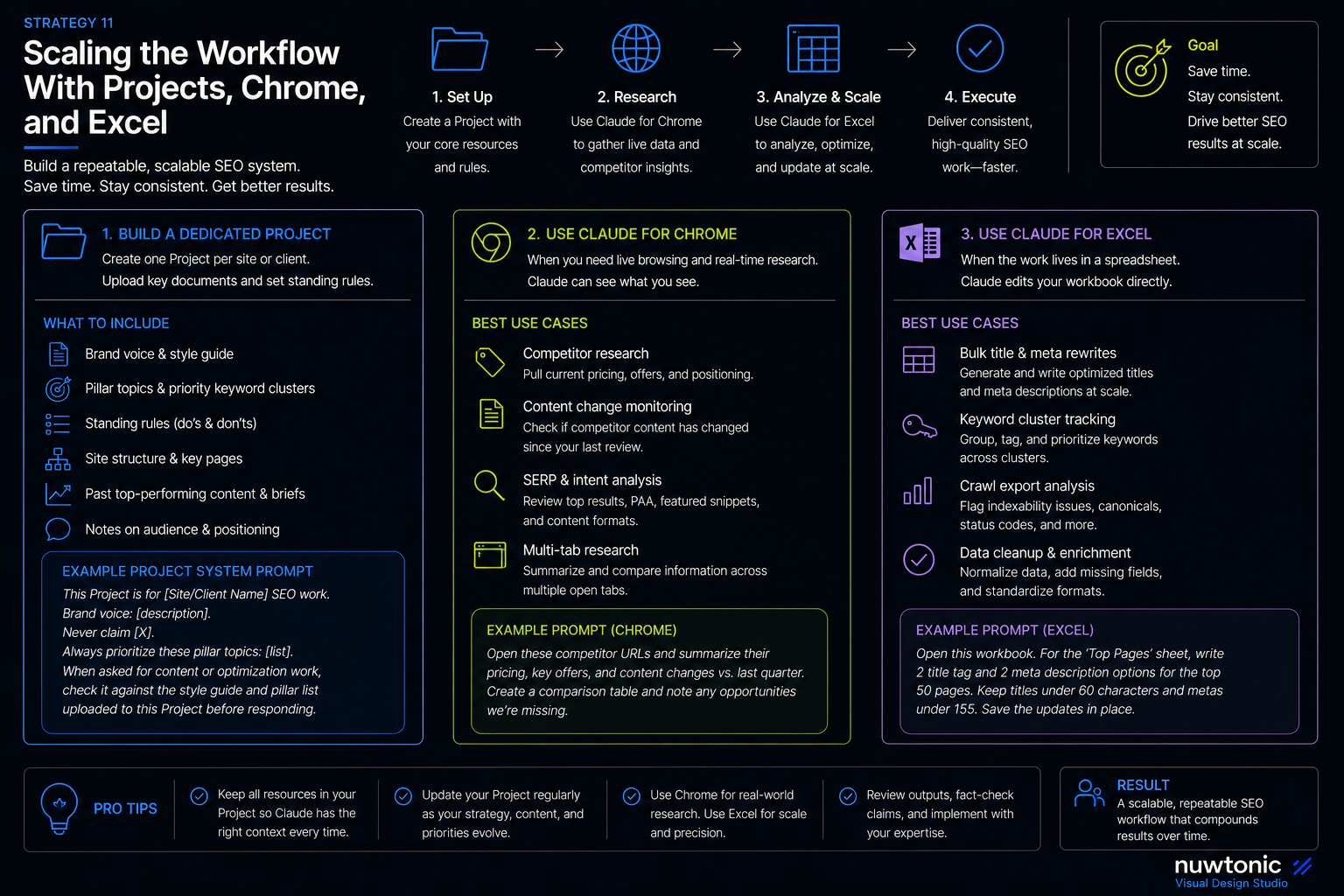
The problem it solves: Everything above works in a single conversation, but SEO work is ongoing — you don't want to re-explain your brand voice, site structure, and past decisions every single time.
Steps:
Build a dedicated Claude Project per site or client, with your style guide, brand voice notes, priority keyword clusters, and any standing rules ("never claim X," "always mention Y") uploaded as reference documents.
Use Claude for Chrome when a task genuinely needs live browsing — pulling current competitor pricing pages, checking whether a competitor's content has changed since you last reviewed it, or gathering research across several open tabs at once.
Use Claude for Excel when the work already lives in a spreadsheet — bulk title/meta rewrites, keyword-cluster tracking, or reconciling a large crawl export — so Claude edits the workbook directly instead of you copying values back and forth.
Example prompt (Project system prompt):
This Project is for [Site/Client Name] SEO work. Brand voice: [description].
Never claim [X]. Always prioritize these pillar topics: [list]. When asked
for content or optimization work, check it against the style guide and
pillar list uploaded to this Project before responding.
The Downsides of Using Claude for SEO
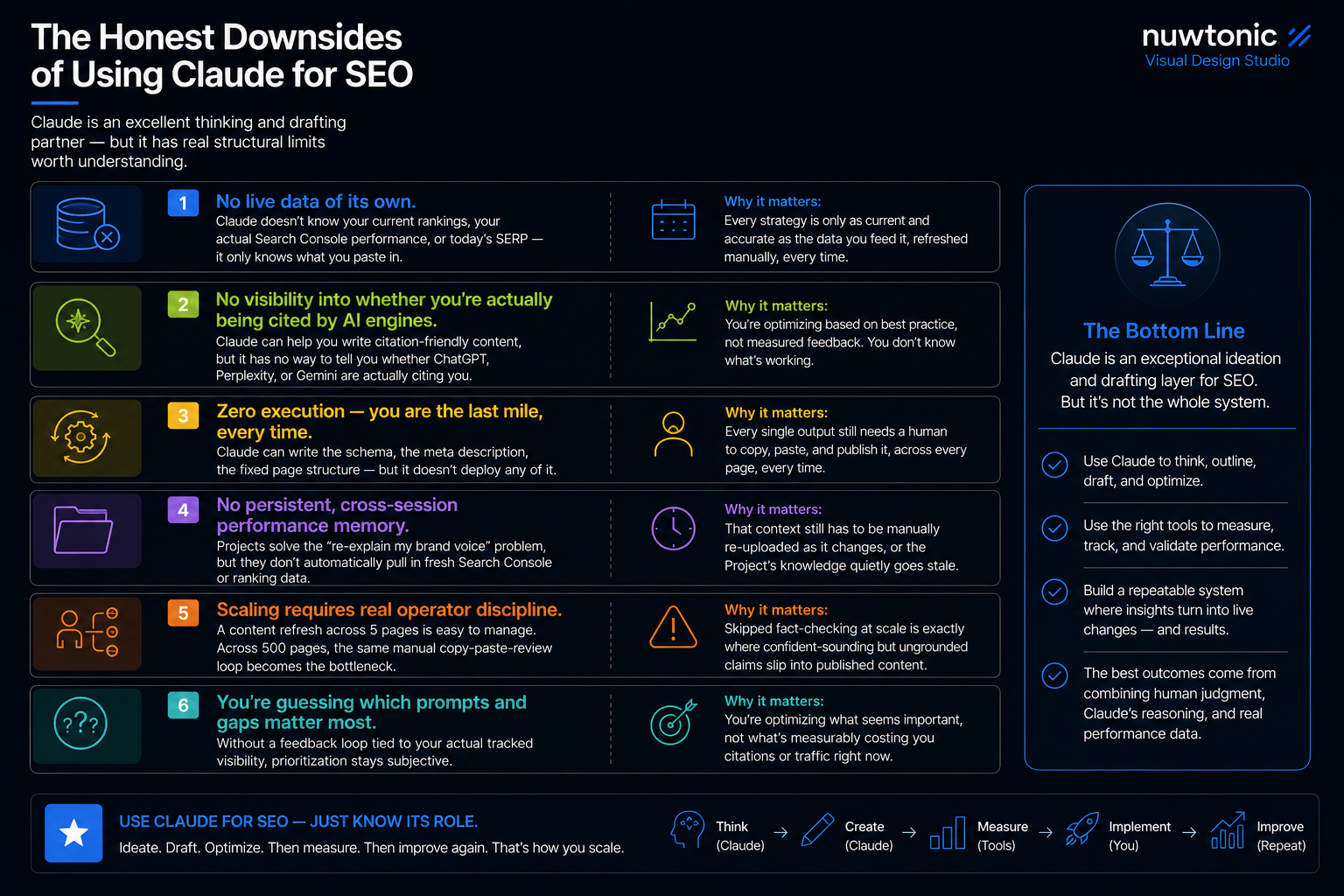
Every strategy above is real and works. But used on its own, Claude has structural limits worth being upfront about, because they compound as your site and content volume grow:
No live data of its own. Claude doesn't know your current rankings, your actual Search Console performance, or today's SERP — it only knows what you paste in. Every strategy above is only as current and accurate as the data you feed it, refreshed manually, every time.
No visibility into whether you're actually being cited by AI engines. Claude can help you write citation-friendly content, but it has no way to tell you whether ChatGPT, Perplexity, or Gemini are actually citing you for your target prompts after you publish. You're optimizing based on best practice, not measured feedback.
Zero execution — you are the last mile, every time. Claude can write the schema, the meta description, the fixed page structure — but it doesn't deploy any of it. Every single output above still needs a human to copy, paste, and publish it, across every page, every time something needs updating.
No persistent, cross-session performance memory. Projects solve the "re-explain my brand voice" problem, but they don't automatically pull in fresh Search Console or ranking data — that context still has to be manually re-uploaded as it changes, or the Project's knowledge quietly goes stale.
Scaling requires real operator discipline. A content refresh across 5 pages is easy to manage by hand. Across 500 pages, the same manual copy-paste-review loop becomes the bottleneck — and skipped fact-checking at that scale is exactly where confident-sounding but ungrounded claims slip through into published content.
You're guessing which prompts and gaps matter most. Without a feedback loop tied to your actual tracked visibility, prioritization stays subjective — you're optimizing what seems important, not what's measurably costing you citations or traffic right now.
None of this means don't use Claude for SEO — it's a genuinely excellent thinking and drafting partner for every strategy above, and it should stay in your workflow regardless of what else you use. It means Claude is the ideation and drafting layer, not the whole system.
Where [Nuwtonic](https://nuwtonic.com/) Fits: Closing the Gap Between Claude's Output and Your Live Site
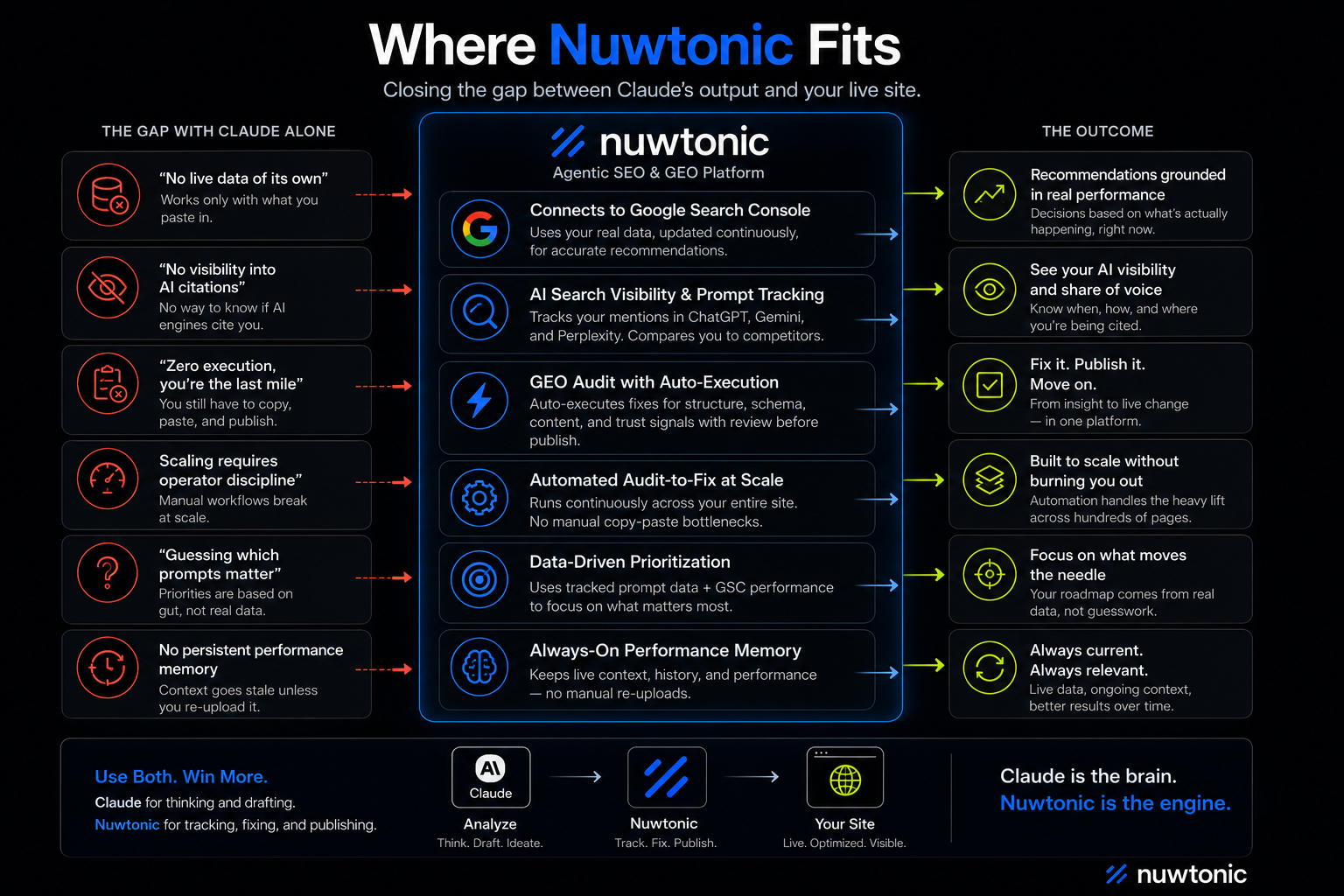
If most of the list above felt like working with an extremely capable analyst who has no memory of your site's real performance and can't touch your CMS — that's because that's exactly what it is. The six downsides above aren't really about Claude being weak; they're about the fact that a chat interface was never built to be a standing SEO system. That's the specific gap Nuwtonic is built to close, for the same underlying problems:
"No live data of its own" → Nuwtonic connects directly to Google Search Console, so its recommendations are grounded in your actual, current performance data — not a CSV you exported and pasted three weeks ago.
"No visibility into AI citations" → Nuwtonic's AI Search Visibility & Prompt Tracking watches how often you're mentioned and recommended in ChatGPT, Gemini, and Perplexity for the exact prompts your audience asks, and shows you how that compares to named competitors — the measured feedback loop Claude alone can't give you.
"Zero execution, you're the last mile" → this is the core difference. Nuwtonic's GEO Audit doesn't stop at a recommendation — it auto-executes the fix (structure, schema, trust/author signals, on-page content) with a review step before anything publishes, instead of handing you one more to-do list.
"Scaling requires operator discipline" → because the audit-to-fix loop runs automatically across your site rather than one conversation at a time, it doesn't degrade the way a manual copy-paste workflow does once you're past a handful of pages.
"Guessing which prompts matter" → prioritization comes from your own tracked prompt data and real GSC performance, not a best-guess based on general SEO knowledge.
FAQ on Claude SEO
Does using Claude to write my website content hurt my Google rankings?
Not because of the tool. Google's own developer guidance states plainly that content is evaluated on quality and helpfulness, not on whether AI was involved in producing it — automation for research and structuring content is explicitly allowed. What Google's spam policies actually target is "scaled content abuse": many pages produced primarily to manipulate rankings, regardless of who or what wrote them. The risk isn't Claude, it's publishing volume without the editorial judgment described in Strategy 3 above.
Does Claude keep or train on the SEO content and client data I paste in?
By default, no. Anthropic's stated policy for consumer plans (Free, Pro, Max) is that your inputs and outputs are not used to train Claude unless you explicitly opt in, or a conversation is flagged for a safety review. If you do opt in, retention extends up to five years for that data; if you don't, the standard shorter retention window applies. Team, Enterprise, and API usage are excluded from training by default regardless of the consumer setting. If you're pasting client or confidential site data in regularly, it's worth confirming your workspace's specific setting rather than assuming.
Which Claude model should I use for SEO work — the largest one available, or a smaller one?
It depends on the task, not on always picking the biggest model. A top-tier model is worth it for strategic, nuanced writing (long-form drafts, content gap analysis, anything where reasoning quality matters). A faster, lighter model is usually the better choice for high-volume, simpler tasks — bulk meta description rewrites across hundreds of URLs, for instance — where consistency and speed matter more than depth on any single output.
Can Claude actually browse my competitor's live webpage on its own?
Only if browsing is explicitly enabled. In a standard claude.ai conversation, Claude doesn't fetch live pages unless a web search or browsing tool is turned on for that chat. For genuine live navigation — visiting a competitor's site, clicking through pricing pages, pulling current content — you need Claude for Chrome specifically, which is a separate browser-extension feature, not something a plain chat does automatically.
How much content can I have Claude work with in one Project before it runs out of room?
Claude's standard context window is around 200,000 tokens, roughly the equivalent of a 500-page book, with larger context available on some plans and API configurations. In practice, this is generally enough to hold a full style guide, several competitor articles, and a long brief in a single conversation — but a Project with dozens of large uploaded documents will eventually shift into a retrieval mode that pulls in only the most relevant sections, rather than loading everything at once.
Can Claude tell me where my website currently ranks for a keyword?
No. Claude has no live connection to Google's search results or your site's ranking position — it can only reason over data you paste in, such as a Search Console export or a manually copied SERP screenshot. Anything framed as "ask Claude your current rank" still requires you to supply the current rank yourself.
Is AI-written content from Claude detectable, and does that actually matter?
It can often be detected by AI-content classifiers, but detection itself isn't the thing that determines ranking outcomes. Google's official guidance is that content is judged on quality and usefulness regardless of how it was produced; detection is used by Google's systems to help evaluate quality signals, not as an automatic penalty trigger on its own.
Can I connect Claude directly to my WordPress site so it publishes automatically?
Not natively. There's no built-in "publish to WordPress" action in standard Claude.ai. Getting from a Claude-drafted article to a live WordPress post currently requires a manual copy-paste, a custom API integration you build yourself, or a browser-automation workaround — it isn't a one-click connection out of the box.
Is Claude's free plan enough to do regular SEO work, or do I need to pay?
The free plan supports Projects only in a limited form, with tighter usage caps overall. Pro, Max, Team, and Enterprise plans unlock unlimited Projects and materially higher usage limits, which matters quickly once you're running persistent brand knowledge bases and daily content workflows rather than occasional one-off questions.
Can Claude do keyword research the same way Ahrefs or Semrush does?
No — and this is a common point of confusion. Claude has no proprietary database of search volume, keyword difficulty, or backlink data of its own. What it's genuinely good at is reasoning over keyword data you already have (clustering by intent, spotting cannibalization, prioritizing pillar pages) — it's a research analyst working with your data, not a replacement for the tools that generate that data in the first place.
Practically, that makes Nuwtonic less of a replacement for Claude and more of the missing back half of the workflow: keep using Claude for the thinking, drafting, and one-off analysis it's genuinely great at, and let a system built specifically for this job handle the parts that need to run continuously against your live site data — tracking, fixing, and publishing, without you as the manual bridge between the two.


