
How do I automate technical SEO?
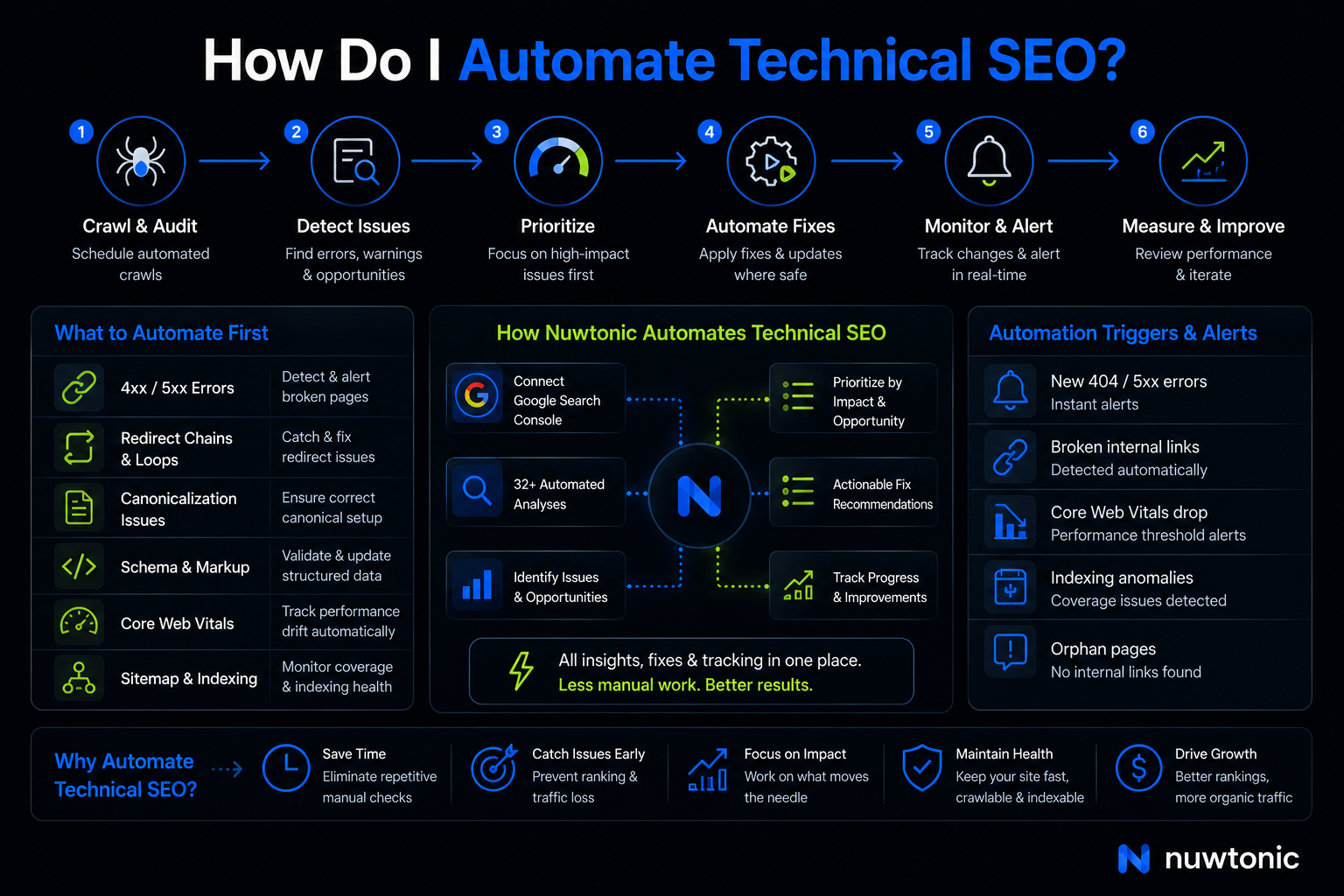
Alright, let's break this down—you automate technical SEO by turning repeatable checks into repeatable systems. That usually means scheduled crawls, GSC (Google Search Console) integrations, alerting, issue prioritization, and a clean process for turning findings into fixes. According to gracker.ai and MygomSEO, that core loop starts with automated crawling and scheduled audits, then expands into monitoring 4xx/5xx errors, soft 404s, canonicalization checks, and Core Web Vitals trend tracking. The practical question, though, is not whether to automate. It’s how to automate technical SEO without creating another messy stack of disconnected tools.
That’s where Nuwtonic fits.
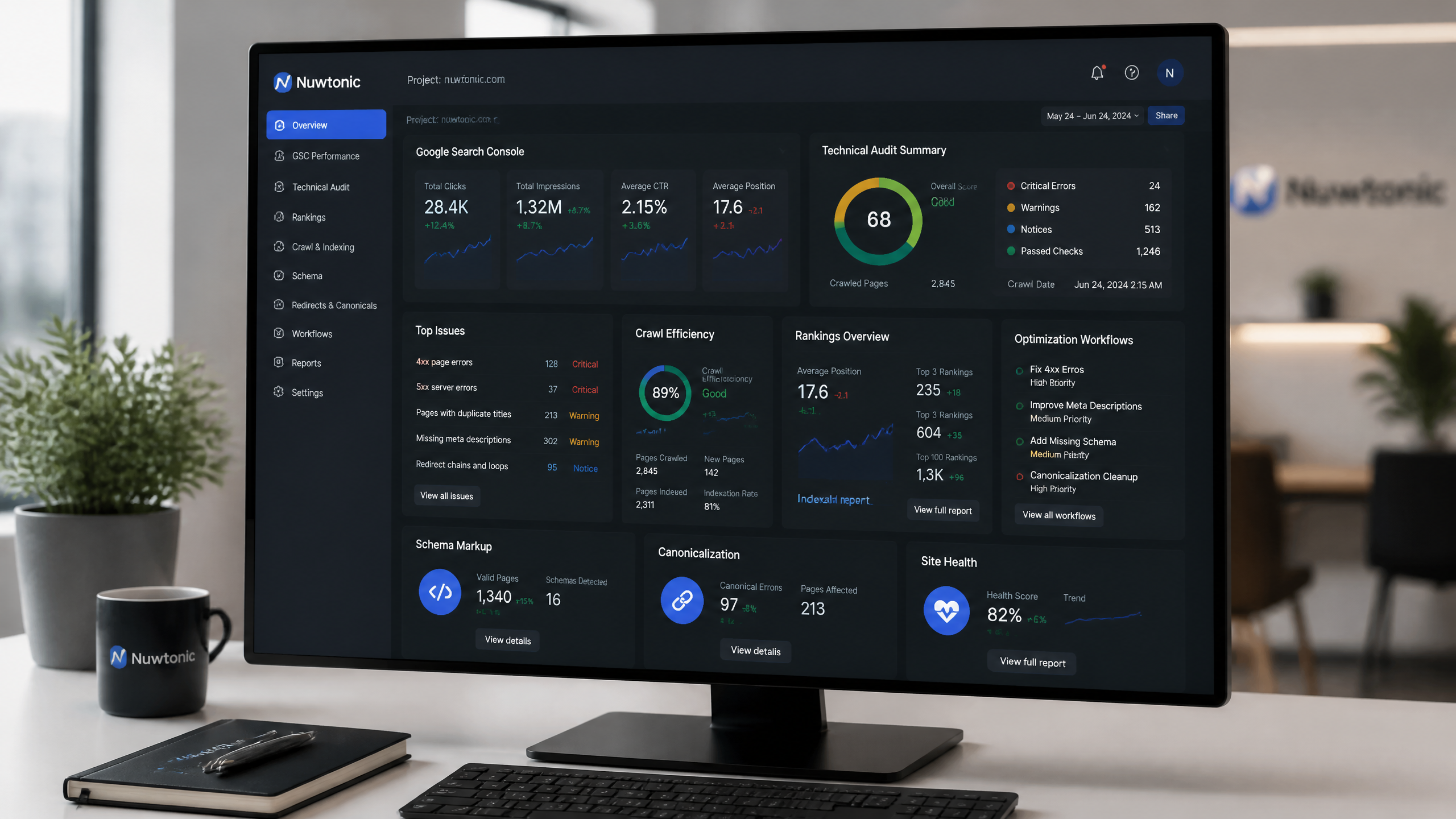
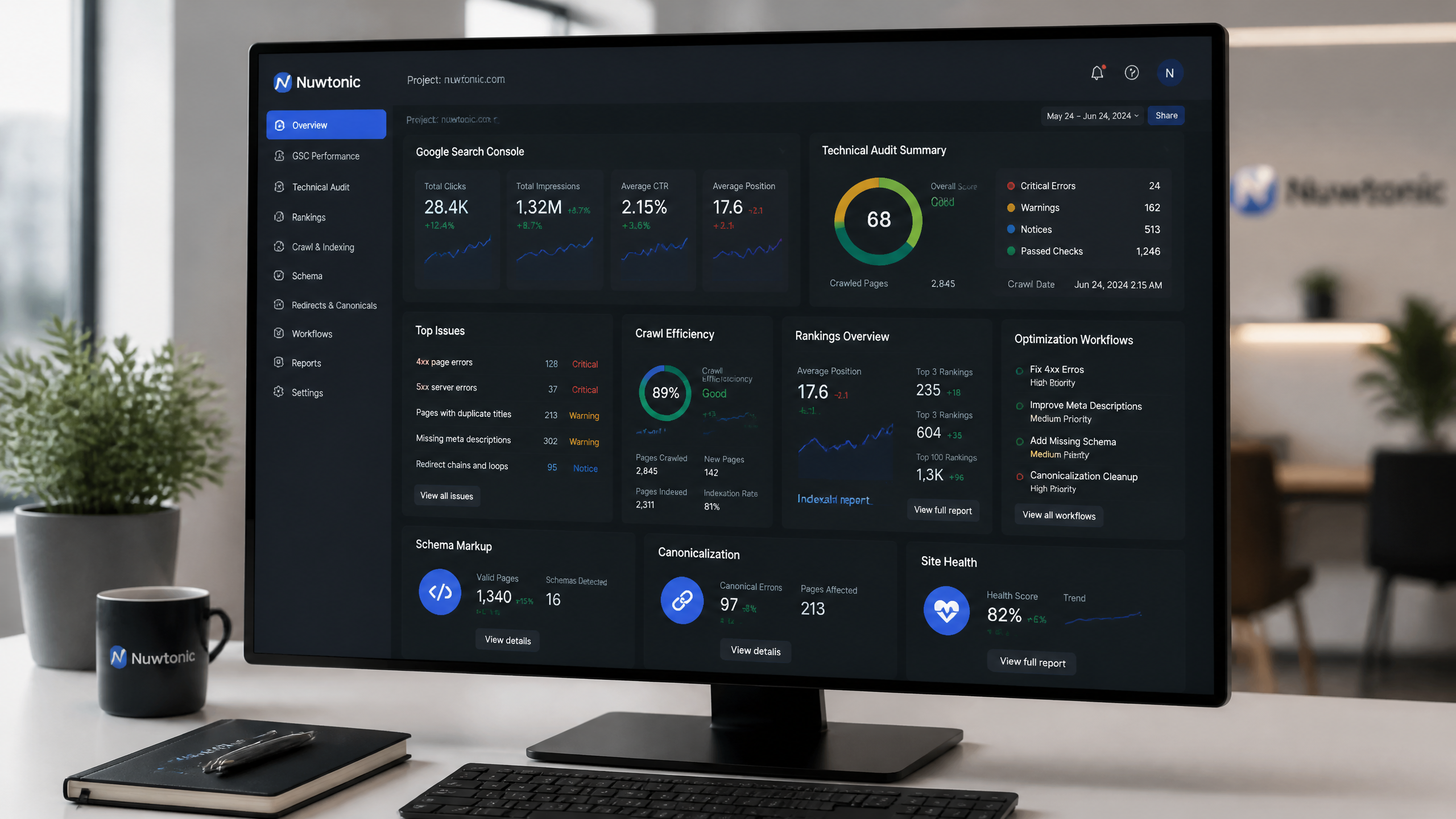
Instead of making you stitch together a crawler, a reporting layer, GSC exports, and a separate content or optimization workflow, Nuwtonic uses your actual Google Search Console data to surface technical and on-page SEO problems, prioritize them, and guide fixes in one place. Look, here’s the deal: most SEO automation tools are overhyped; the real magic often lies in simple scripts and common sense. But when a platform actually removes manual analysis work and makes the fix path clearer, that’s useful.
TL;DR
Technical SEO automation means using scheduled analysis, data integrations, and fix workflows to catch issues before they hurt rankings.
Industry guidance from sources like thesmarketers.com, MygomSEO, and thestacc points to scheduled crawls, 404 monitoring, schema checks, canonical checks, and Core Web Vitals tracking as the highest-value areas to automate.
Nuwtonic helps automate technical SEO by connecting to GSC, running 32+ automated analyses, surfacing ranking and site-health issues, and providing actionable fix recommendations.
It is especially useful if your current process involves too many dashboards, CSV exports, and “I’ll review that later” spreadsheets.
It does not replace every developer workflow, and you should still do manual checks on robots.txt, critical templates, and edge-case indexing problems.
Key Takeaways
• Start with detection first. You cannot automate fixes well if you are still discovering issues manually every few weeks.
• Use thresholds, not noise. thestacc recommends alerting for new 404 errors, broken internal links, and orphan pages rather than blasting your team with every historical issue.
• Tie technical issues to search data. Nuwtonic’s GSC-based setup matters because technical problems become more useful when they are connected to clicks, impressions, ranking gaps, and trust signals.
• Prioritization beats raw volume. I’ve seen too many sites get bogged down by fancy solutions when a straightforward sitemap update would have solved their problems.
• Automation still needs oversight. Don’t underestimate the power of good old-fashioned manual checks—they often catch what automation misses.
Table of Contents
What technical SEO automation actually means
The real definition is simpler than people make it sound
Technical SEO automation is the process of running recurring checks and workflows without manual repetition. Data from autoseo.it.com describes it as using scheduled crawl tools, monitoring systems, and automated remediation scripts to continuously identify issues that block crawling and indexing. MygomSEO and gracker.ai point to the same foundation: scheduled audits, recurring issue detection, and trend monitoring.
In practice, that means automating things like:
• Detection of 404 errors and broken internal links
• Monitoring for redirect chains and redirect loops
• Review of canonicalization problems across templates
• Alerts for indexing anomalies from GSC (Google Search Console)
• Tracking of Core Web Vitals drift over time
• Ongoing site audit checks on important page groups
The point is not to automate for the sake of it. The point is to reduce the lag between problem creation, problem discovery, and problem resolution.
The best automation targets are repetitive and measurable
A 2025 guide from thesmarketers.com highlights crawl monitoring, index-coverage alerts, schema generation, Core Web Vitals tracking, and canonical checks as top tasks that automate well. That lines up with what I see in the field. If a task is repeated, rule-based, and easy to verify, automate it. If a task requires judgment, context, or developer review, automate the detection and recommendation—but not the final decision.
Here’s a simple framework I use:
Task Type | Good for Automation? | Why | Nuwtonic Fit |
|---|---|---|---|
Repeated site checks | Yes | Same logic on every run | Strong |
Issue prioritization | Yes | Data patterns can be ranked | Strong |
robots.txt deployment | Partial | High risk if wrong | Review needed |
Template-level schema validation | Partial | Good to monitor, risky to auto-push | Moderate |
Strategic SEO judgment | No | Needs business context | Human-led |
Content or on-page fix suggestions | Yes | Rules plus performance data help | Strong |
Why disconnected tool stacks usually fail
Look, here’s the deal—most teams do not fail because they lack data. They fail because they have too much fragmented data. One tool crawls. Another tracks rankings. Another exports Core Web Vitals. Another stores tickets. Then someone has to explain what matters.
That’s why Nuwtonic’s position is relevant here. It is not trying to be “just another crawler.” It uses connected SEO context—especially GSC data—to tell you which issues matter, where the opportunity is, and what to do next.
What should be automated first
Start with scheduled auditing and issue monitoring
According to gracker.ai, MygomSEO, and greenwilltechs.com, automated technical SEO starts with scheduled site crawls that surface problems before they stack up into ranking losses. thestacc goes further and recommends weekly full-site crawls with automatic detection for new 404s, broken internal links, and orphan pages.
If you are building an automation sequence, start here:
Weekly site audit checks for site-wide issues
New 404 error monitoring instead of re-reporting old noise
Broken internal link detection
Canonicalization checks on important templates
Indexation review using GSC data
That order matters. I once forgot to update the robots.txt file and learned my lesson the hard way. Everyone was staring at dashboards while the actual problem was one bad rule blocking crawl paths. Fancy automation did not save us; a basic technical review did.
Use alert thresholds or you will drown in nonsense
One gap in most technical SEO guides is the lack of automation thresholds. Research from thestacc suggests useful examples: alert on new 404s, and for rankings, trigger a notification when a keyword drops by more than 5 positions. That same logic applies to technical monitoring.
A workable threshold model looks like this:
Issue Type | Suggested Alert Trigger | Why It Works | When to Adjust |
|---|---|---|---|
New 404 errors | More than 5 new URLs | Filters minor noise | Lower for small sites |
Broken internal links | More than 10 new links | Captures meaningful structural issues | Lower on lean sites |
Orphan pages | Any on revenue-critical templates | High business impact | Broaden later |
Core Web Vitals drift | Sustained decline over 28 days | Avoids snapshot panic | Shorten for volatile sites |
Ranking drop | More than 5 positions on priority terms | Matches thestacc guidance | Tighten for branded terms |
Fair warning: your mileage may vary. A 500-page B2B site should not use the same thresholds as a 2 million-URL marketplace.
Connect technical checks to search performance, not vanity reports
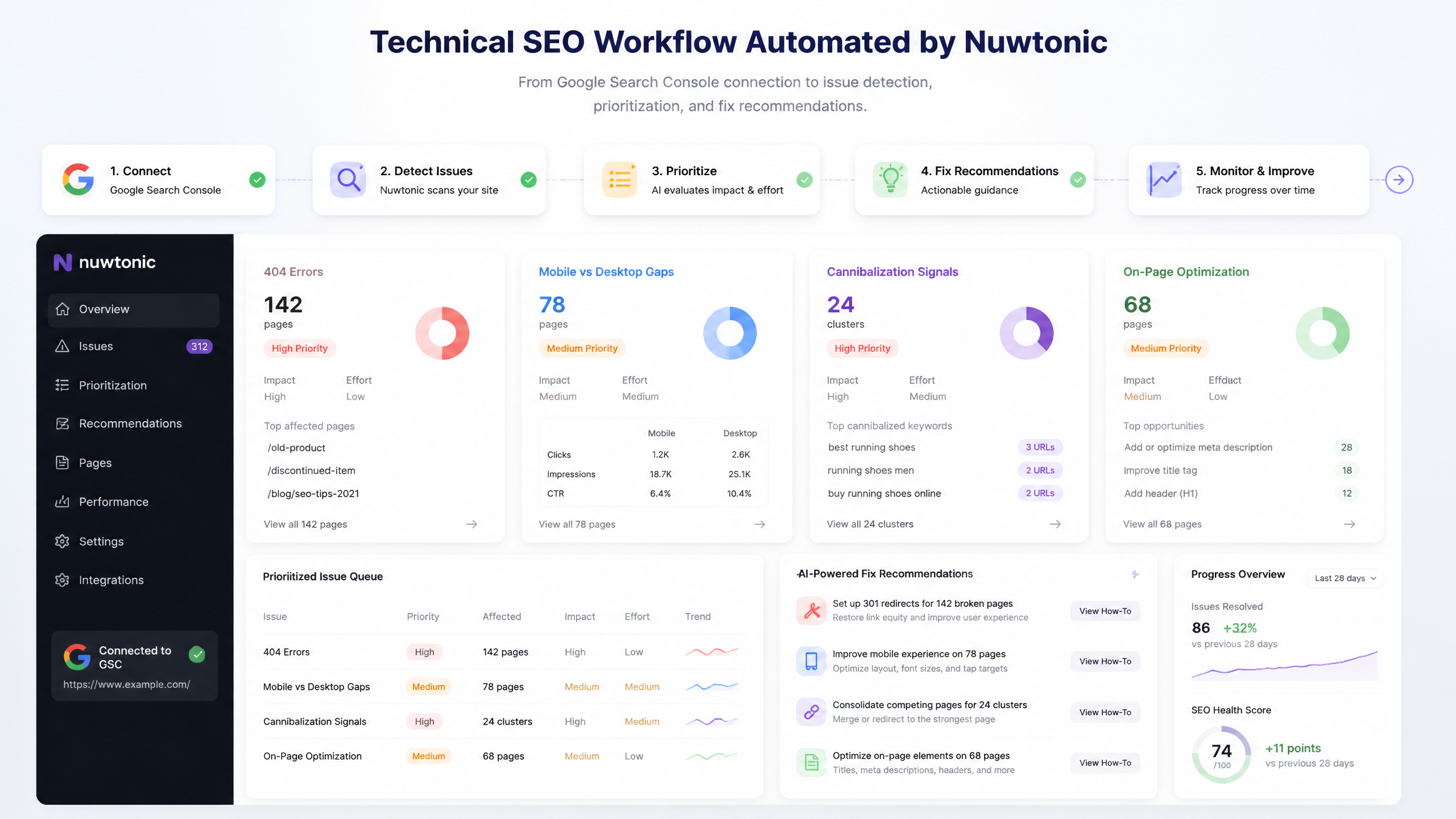
One reason Nuwtonic is useful here is that its workspace is built around your actual GSC performance data after connection. That matters because a technical issue without business context is just a spreadsheet row. A technical issue attached to clicks, impressions, topic clusters, cannibalization patterns, device gaps, and trust signals becomes a priority call.
This is one of the most practical differences between “audit software” and “automation that helps.”
How Nuwtonic automates technical SEO
It starts with GSC-driven analysis instead of manual exports
Once you connect Google Search Console, Nuwtonic builds a workspace around your own site data and automatically runs 32+ agentic analyses. That includes surfacing top movers, zero-CTR queries, mobile vs. desktop ranking gaps, topic clusters, cannibalization issues, and Google trust signals.
Now, to be precise, not all of those are purely technical SEO issues. But they are directly useful to technical SEO automation because they help answer a more important question: which URLs or sections deserve immediate audit attention?
Instead of doing this:
Export GSC data
Compare it with crawler output
Build your own pivot tables
Guess which templates are failing
Write notes for later
You can move toward this:
Connect GSC
Let Nuwtonic surface performance anomalies automatically
Review the affected pages or query groups
Use the audit and fix workflow on the URLs that matter most
That is a better operating model—less glamorous, more useful.
It automates diagnosis, not just detection
Most tools can tell you that a page has a problem. Great. Very brave. The harder part is explaining what changed and what should happen next.
Nuwtonic’s value in technical SEO automation is that it moves beyond issue spotting into guided remediation. Its on-page audit tool does not just flag problems; it generates optimized before-and-after content recommendations so you can see what to change.
For technical SEO teams, that helps in three ways:
• It reduces the time between issue discovery and action
• It makes handoff easier between SEO and content or dev stakeholders
• It gives less experienced teams a clearer fix path
It narrows the problem set through issue clustering
One hidden tax in SEO work is fragmented diagnosis. Maybe rankings dipped on mobile. Maybe a cluster lost CTR. Maybe pages are cannibalizing each other. Maybe the issue is not indexing at all. Nuwtonic’s automated analyses bring these signals together so the site audit process is more targeted.
That matters because automation should reduce work, not create a longer review queue.
Here is where Nuwtonic fits compared to a traditional stack:
Workflow Need | Traditional Process | Nuwtonic Approach | Practical Effect |
|---|---|---|---|
Find affected URLs | Manual exports from GSC and crawler | Automated GSC-based analysis | Faster prioritization |
Spot ranking anomalies | Separate rank tracker | Included analysis and tracking | Less tool switching |
Identify cannibalization | Spreadsheet review | Automated detection | Better clustering |
Review page-level optimization gaps | Manual on-page audit | Audit with suggested improvements | Faster implementation |
Tie findings to search behavior | Manual interpretation | Built around live site data | More useful issue ranking |
It helps automate AI-era technical visibility checks too
This article is about technical SEO, so I’m not going to drag in every Nuwtonic feature just because it exists. But one capability is relevant: Nuwtonic also tracks AI search visibility, citation presence, and structural content gaps for URLs.
Why mention that in a technical SEO article? Because modern technical SEO is increasingly tied to content structure, entity clarity, trust signals, and machine-readable formatting. If a page is technically crawlable but structurally weak for AI citation or rich interpretation, that is still a discoverability problem.
So while this is adjacent—not the core of technical SEO—it does strengthen Nuwtonic’s audit usefulness on pages where search visibility now spans both classic SERPs and AI-driven surfaces.
Where Nuwtonic is strongest for technical SEO workflows
Best use case: prioritizing issues across real business pages
Nuwtonic is strongest when the problem is not lack of data, but lack of prioritization.
I’ve seen this across dozens of SEO workflows: the team already has a crawler. They already have GSC. They may even have PageSpeed reporting. Yet they still do not know:
• Which pages to fix first
• Which issues are costing actual traffic
• Which changes deserve content updates versus technical escalation
• Which patterns are isolated versus template-wide
That is exactly where a GSC-centered, analysis-heavy platform helps.
Strong fit for SMEs and lean SEO teams
The research repeatedly points to a practical stack made up of a scheduled crawler, no-code automation layer, and analysis workflow. marketingseodirectory.com frames technical SEO automation around automated crawling, AI-driven analysis, and regular scheduling. Nuwtonic aligns especially well with the analysis and action layer for SMEs that do not want to maintain a patchwork stack.
Here’s my honest take:
Team Type | Nuwtonic Fit | Why |
|---|---|---|
Small marketing team | Very strong | Fewer exports, easier prioritization |
In-house SEO team at an SME | Very strong | GSC data becomes actionable faster |
SEO agency managing multiple client patterns | Strong | Helps standardize diagnosis and recommendations |
Enterprise technical SEO team with custom CI/CD | Moderate | Likely still needs separate engineering systems |
Developer-led SEO ops team with heavy scripting | Moderate | Good analysis layer, but not a full DevOps replacement |
Strong fit for on-page technical overlap
A lot of technical SEO issues are not purely server-side. They sit in the messy middle where on-page factors, content structure, and crawl efficiency overlap. Think:
• Weak internal linking patterns
• Pages with zero-CTR despite impressions
• Query-to-page mismatches
• Cannibalization that muddies canonical intent
• Thin pages that act like soft 404s even if they return 200 OK
That last one gets ignored far too often. MygomSEO recommends starting with soft 404s and server errors, and honestly, that’s sensible. A “live” page with no meaningful content wastes crawl budget, weakens site quality signals, and confuses reporting.
Nuwtonic helps surface those weak pages through performance and content pattern analysis even when the issue is not obvious from status codes alone.
What not to automate blindly
Do not auto-trust every issue score
What NOT to do:
Do not treat every flag as equally urgent
Do not automate fixes to robots.txt without review
Do not assume a 200-status URL is healthy
Do not let alerts fire without thresholds
Do not confuse reporting volume with progress
This is where a lot of teams go wrong. They automate issue collection, then create alert fatigue, then ignore the system entirely.
Some technical SEO work still needs manual review
Don’t underestimate the power of good old-fashioned manual checks—they often catch what automation misses. I mean things like:
• robots.txt conflicts after migrations
• Bad canonicalization logic on edge-case templates
• JavaScript-rendered content failures
• Incorrect pagination behavior
• Template regressions after CMS updates
MygomSEO’s practical guidance mentions GitHub Actions, regression workflows, and a 28-day window for stable template tracking. That is a smart reminder that automation should include validation over time, not just one-time reports.
One situation I keep seeing is this: a team automates weekly crawls, gets a beautiful dashboard, and still misses a template bug because the crawler did not reflect the user-facing rendering issue. A manual check catches it in ten minutes. Slightly annoying, very normal.
Crawl rate limits and API quotas are real constraints
Another thing most articles gloss over is the boring stuff that breaks automations: rate limits and API quotas. The research notes that many guides mention GSC and PageSpeed Insights API use but skip exact quota constraints. That omission matters.
So here’s the sane position:
• If you are crawling frequently, control crawl rate to avoid hammering the server
• If you are pulling APIs, assume quota limits exist and design around them
• If you are auditing huge sites, segment by template or directory instead of crawling everything all the time
Nuwtonic simplifies analysis after GSC connection, which reduces some manual API wrangling. But no platform removes the need for operational discipline.
A practical rollout plan using Nuwtonic
Phase 1: connect GSC and establish a baseline
Start simple.
Connect Google Search Console to Nuwtonic
Review the automated analyses for top movers, zero-CTR queries, device gaps, topic clusters, and cannibalization
Identify which page groups are underperforming
Create a baseline list of pages needing audit attention
This gives you a reality-based starting point, not a theoretical one.
Phase 2: audit the pages that matter most
Use Nuwtonic’s audit and optimization workflow on URLs that match one or more of these patterns:
• High impressions, low CTR
• Ranking drops on mobile versus desktop
• Cannibalization signals
• Trust or authority weakness on important pages
• Content/structure gaps that hurt search visibility
That is a more practical route than trying to “fix the whole site” in one pass.
Phase 3: turn findings into repeatable operating rules
Once patterns appear, define rules like these:
Signal in Nuwtonic | What to Do | Why |
|---|---|---|
Zero-CTR query clusters | Review title, intent match, snippet alignment | CTR waste often hides technical/content mismatch |
Mobile vs. desktop gaps | Inspect template rendering and CWV issues | Often points to layout or performance problems |
Cannibalization alerts | Review canonical intent and internal links | Helps consolidate authority |
Trust signal weakness | Improve page structure and supporting elements | Supports both rankings and citation visibility |
Underperforming topical clusters | Audit internal linking and content depth | Better crawl paths and relevance |
That is the point where automation stops being a report and becomes a system.
Phase 4: keep human review in the loop
This part matters more than vendors like to admit.
A common pattern looks like this: a team automates crawling weekly, then layers in trend tracking over a 28-day window for stable templates, similar to the MygomSEO approach. That catches regressions earlier, especially after template updates. Another budget-conscious setup, described by Guerillaseo, used cron, Scrapy, sitemap-fed crawling, and the PageSpeed Insights API on a weekly schedule to replace more expensive tools. Both examples prove the same thing: the best automation setups are not magic. They are disciplined.
Nuwtonic helps by shrinking the analysis burden and clarifying the fix path, but you should still review:
• Major structural changes
• Technical fixes with indexing risk
• Template-wide updates
• Any change touching robots.txt, canonicals, or redirect rules
FAQ
What are the best technical SEO tasks to automate first?
Scheduled site audits
New 404 error detection
Broken internal link checks
Canonicalization reviews
GSC-based indexation monitoring
Core Web Vitals trend tracking
Research from thesmarketers.com, MygomSEO, and thestacc consistently points to these as the highest-value starting points.
How does Nuwtonic automate technical SEO differently?
Nuwtonic focuses on automated analysis and issue prioritization tied to real GSC data. Instead of forcing you to combine separate exports, it builds a workspace around your search performance, identifies patterns like cannibalization and device gaps, and supports URL-level audit and fix decisions.
Can Nuwtonic replace a crawler like Screaming Frog?
Not completely—at least not if you rely heavily on deep raw crawl diagnostics. Screaming Frog, Sitebulb, and Lumar are still core entities in technical SEO automation according to gracker.ai and autoseo.it.com. Nuwtonic is better understood as a connected intelligence and action layer rather than just a crawler replacement.
Can I automate schema markup with Nuwtonic?
The broader research says JSON-LD is the preferred format for schema automation, and gracker.ai recommends validating it with Google’s Rich Results Test. Based on the knowledge base provided, Nuwtonic is more directly positioned around auditing, content structure, and optimization guidance than as a dedicated schema deployment engine. So if schema deployment is your primary need, keep expectations scoped.
How often should I automate technical SEO checks?
That depends on site volatility.
Site Type | Suggested Review Cadence | Reason |
|---|---|---|
Small stable brochure site | Bi-weekly or monthly | Fewer template changes |
SME content or e-commerce site | Weekly | Matches thestacc guidance for full-site crawls |
High-change site | Daily monitoring plus weekly review | Faster issue emergence |
Stable templates under trend review | 28-day window | Matches MygomSEO recommendation |
What technical SEO work should stay manual?
• robots.txt review
• Redirect rule validation
• Canonical edge cases
• JavaScript rendering checks
• Migration QA
• Template regression review after major releases
Automation can support these. It should not blindly own them.
Is technical SEO automation worth it for smaller teams?
Yes—especially if your current process involves too many tools and too much manual interpretation. A lean team benefits most when automation reduces analysis time and clarifies what to fix first. That is exactly where Nuwtonic is most practical.
Sources and references
• gracker.ai guidance highlights scheduled crawls using tools like Screaming Frog, SEMrush, and Ahrefs, plus JSON-LD schema validation practices.
• thesmarketers.com 2025 guidance identifies crawl monitoring, index-coverage alerts, schema generation, Core Web Vitals tracking, and canonical checks as strong automation candidates.
• autoseo.it.com describes technical SEO automation as a combination of scheduled crawlers, monitoring systems, and remediation scripts.
• MygomSEO recommends beginning with automated monitoring for 4xx/5xx errors and soft 404s, then layering in Core Web Vitals trend tracking and log-based validation with a 28-day window for stable templates.
• thestacc recommends weekly full-site crawls and alerts for new 404s, broken internal links, and orphan pages, plus rank alerts for drops greater than 5 positions.
• marketingseodirectory.com frames technical SEO automation around automated crawling, AI-driven analysis, and regular scheduling.
• Guerillaseo documents a budget setup using cron, Scrapy, sitemap-fed crawling, and the PageSpeed Insights API.
Final word
So, how do I automate technical SEO? You automate the repeatable parts first: monitoring, analysis, prioritization, and follow-up. Then you keep human judgment where it belongs—on risky changes, edge cases, and structural decisions.
If your current workflow is a pile of exports, disconnected alerts, and half-finished audits, Nuwtonic is a strong fit because it turns GSC data into actionable technical SEO priorities and fix paths without forcing you to juggle a dozen tools. That does not mean it should replace every crawler, script, or manual review. It means it can make the whole process a lot less chaotic—which, honestly, is half the battle.


