Which pages should I optimize first from GSC?
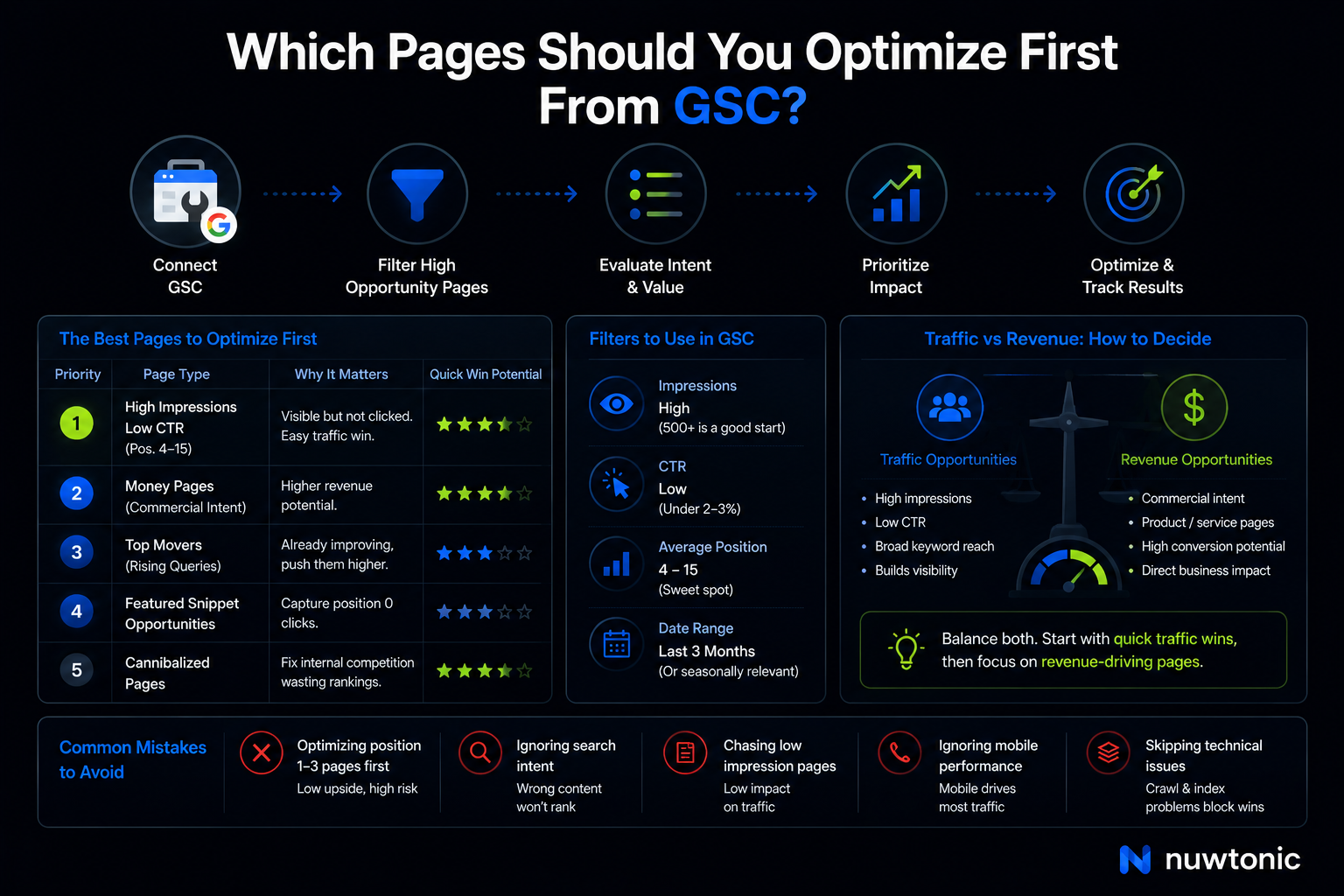
If you want the short answer to which pages should I optimize first from GSC, start with pages getting high impressions, low CTR (Click-Through Rate), and average positions between 4 and 15. That’s the sweet spot. These pages are already visible, already relevant, and usually only need a smarter title, better query alignment, or a content refresh to move.
Alright, let's be real, most people overcomplicate this. They open Google Search Console, stare at clicks, impressions, average position, device filters, and query data like it’s an IRS audit. It isn’t. GSC is just telling you where Google already sees potential. Your job is to stop guessing and prioritize the pages that can actually produce traffic or revenue next.

For teams using Nuwtonic, this process gets much easier because the platform connects directly to your GSC data and runs automated analyses that surface the exact opportunities you’d normally have to dig out manually. Not every SEO problem needs every feature in the toolbox. For this topic, what matters is Nuwtonic’s ability to identify zero CTR queries, mobile vs. desktop gaps, cannibalization, top movers, and page-level optimization opportunities tied to real search data.
TL;DR
Optimize pages in positions 4–15 first. They’re close enough to the top results to improve quickly.
Prioritize high-impression, low-CTR pages. If people see you but don’t click, fix the snippet before rewriting the whole page.
Put money pages ahead of vanity traffic. Commercial pages often deserve first dibs.
Ignore most position 1–3 pages at first. Ansira notes these pages are usually better left alone to preserve stability.
Check if the wrong page is ranking. Internal competition can waste weeks.
Use Nuwtonic to automate the triage. Its GSC-connected workspace highlights zero-CTR queries, ranking gaps, and cannibalization without spreadsheet gymnastics.
Key Takeaways
• Best first targets: pages with high impressions, low CTR, and rankings from position 4 to 15
• Best business-first targets: 3 to 5 money pages with commercial intent queries
• Best technical-first fixes: crawl errors, indexing issues, and snippet issues before heavy content rewrites
• Best time range in GSC: usually last 3 months, unless your site is seasonal
• Best Nuwtonic use case here: auto-surfacing quick wins from connected GSC data instead of manually filtering reports
Table of Contents
What to optimize first in GSC
The pages I prioritize before anything else
How to decide between traffic opportunities and revenue opportunities
The filters and thresholds I actually use
Where people waste time in GSC
How Nuwtonic solves this prioritization problem
FAQ
Sources and references
What to optimize first in GSC
Start with the pages already close to winning
If a page sits in positions 4 through 15, I pay attention. WSKPF describes positions 4 through 20 as the “sweet spot” because you’re close enough to gain clicks without needing a heroic SEO campaign. Grapefruit Digital also points to positions 6–15 as prime targets for improvement, and its analysis says the top six results capture the bulk of clicks. That’s exactly why these pages matter.
The logic is simple:
• Position 1 to 3 pages already get disproportionate click share
• Position 4 to 15 pages are relevant enough to move
• Position 21+ pages often need bigger structural work, not just light optimization
I’ve seen too many folks jump straight to the fancy stuff like schema markup when they haven’t even optimized their titles and meta descriptions. That’s backwards. If a page already ranks at 8 with strong impressions, a cleaner title and tighter query match can do more in 2 weeks than a month of random “SEO enhancements.”
High impressions plus low CTR means easy missed traffic
This is the second bucket I prioritize. If a page appears often but barely gets clicked, that’s not a visibility problem. It’s a search result packaging problem or a query mismatch problem.
The Digital Ring specifically highlights high-impression, low-CTR pages as immediate traffic opportunities. Grapefruit Digital also recommends ordering by impressions and identifying pages that are visible but light on clicks.
Here’s the practical interpretation I use:
Page pattern | What it usually means | What I do first |
|---|---|---|
High impressions, CTR under 2%, position 4–10 | Snippet is weak or mismatched | Rewrite title and meta description |
High impressions, CTR under 1%, position 10–20 | Snippet issue or intent mismatch | Check query intent and compare SERP wording |
High impressions, 0 clicks | Severe mismatch or wrong page ranking | Audit title, target query, and page relevance |
Moderate impressions, high CTR, poor position | Page is appealing but underpowered | Improve content depth and internal relevance |
Fair warning: there is no universal “good CTR” number because CTR changes heavily by position, device, and SERP clutter. A page at position 5 will naturally have a different CTR profile than a page at position 2. Still, if I see a page in position 5 with thousands of impressions and CTR below 2%, I investigate immediately.
Money pages should usually beat informational pages
Aqeel Ahmed’s LinkedIn guide argues for choosing three to five money pages that could drive revenue if they ranked better. I agree. Not because traffic doesn’t matter, but because traffic without commercial value can turn into a very polished distraction.
If you run an ecommerce or lead gen site, I’d prioritize:
• Product pages
• Category pages
• Service pages
• Pricing or comparison pages
• High-intent landing pages tied to buying keywords
Then I’d look at informational content that supports those pages.
A business can absolutely increase traffic by optimizing a blog post first. But if another page at position 8 is tied to a “buy,” “price,” or “best software for” query, that usually gets priority because the upside is clearer.
The pages I prioritize before anything else
My first-pass prioritization framework
When I open GSC, I’m usually classifying pages into four buckets.
Priority bucket | Criteria | Why it matters | Typical action |
|---|---|---|---|
Quick CTR wins | High impressions, low CTR, position 3–10 | Visibility already exists | Rewrite metadata and improve SERP match |
Low-hanging ranking wins | Position 4–15 with strong impressions | Near top results | Refresh content and tighten on-page targeting |
Revenue-first pages | Commercial intent keywords, position 4–20 | Highest business upside | Optimize page structure, copy, and internal relevance |
Wrong-page or cannibalization cases | Multiple URLs competing | Google is confused | Consolidate signals and optimize correct URL |
This framework works because it aligns with how GSC actually behaves. Impressions show potential. Position shows proximity. CTR shows whether the listing earns attention. Query mix shows whether the page is aligned with intent. SearchMaxxed’s playbook puts those same metrics at the center of keyword and page improvement decisions.
What I usually leave alone first
Not every page deserves immediate attention.
Ansira’s guidance is directionally right here: pages already ranking in positions 1–3 are often not the first optimization targets. Unless they’re declining, have severe CTR problems, or support a critical revenue term, I don’t rush to tinker with them.
I also avoid spending first-round effort on:
• Pages with nearly zero impressions and no clear target keyword
• Old posts with no evergreen value
• Thin pages with no commercial or strategic role
• Pages blocked by bigger technical problems like indexing issues
Alright, let's be real, trying to “optimize everything” is just procrastination with a nicer label.
A simple opportunity score helps cut through the noise
One of the better practical models comes from WSKPF:
Opportunity Score = Impressions × (20 - Position)
I like it because it rewards two things at once:
• Pages that already get seen a lot
• Pages close enough to the top 20 to be worth pushing
Example:
Page | Impressions | Avg Position | Opportunity Score |
|---|---|---|---|
Service Page A | 5,000 | 8 | 60,000 |
Blog Post B | 12,000 | 18 | 24,000 |
Category Page C | 3,500 | 5 | 52,500 |
By that math, Service Page A is the best first candidate, even though Blog Post B has more raw impressions. Why? Because Page A is much closer to where clicks happen.
This is one of those things many guides miss. Traffic potential is not just volume. It’s volume multiplied by proximity to meaningful rankings.
How to decide between traffic opportunities and revenue opportunities
Use a revenue-first filter before a pure traffic filter
If your site exists to sell, book, or generate leads, I’d start with commercial intent terms first. Aqeel Ahmed recommends filtering GSC queries for commercial language before identifying pages, and that’s smart.
Common commercial modifiers include:
• buy
• price
• pricing
• cost
• best
• review
• software
• service
• near me
• quote
Once you isolate those queries, map them back to pages. Those pages often become your first optimization set.
Blog posts versus service pages
This depends heavily on business model, so I’ll keep it honest.
Page type | Optimize first when | Avoid prioritizing first when |
|---|---|---|
Service pages | Leads or sales matter most | Search volume is tiny and page has weak relevance |
Product or category pages | Ecommerce revenue is tied directly to rankings | Technical issues make the page uncompetitive |
Blog posts | They support major topic authority or capture key top-funnel terms | They produce traffic but no business impact |
Evergreen guides | They rank in positions 4–15 and build authority into conversion pages | They are outdated and detached from your offers |
In my experience, service pages and category pages usually win first priority if they’re already on page one or page two. Blog posts come first when they act as strong authority builders or when they rank for highly strategic queries.
Evergreen beats outdated most of the time
Another easy rule: favor evergreen pages over temporary content. Ansira makes this point clearly, and I agree with it.
Optimize these first:
• Core services
• Product categories
• Foundational guides
• Comparison pages
• High-performing pillar content
Leave these for later unless there’s an unusual spike:
• Old news posts
• Expired seasonal pages
• Event recaps
• Time-sensitive trend posts with no long-term search value
The filters and thresholds I actually use
My default GSC setup
Most guides make it sound like you need a PhD to understand GSC, but honestly, the essentials are pretty straightforward.
When I’m deciding which pages to optimize first from GSC, I usually do this:
Set date range to last 3 months.
Open the Performance report.
Turn on Clicks, Impressions, CTR, and Average Position.
Review at both Pages and Queries level.
Filter by device if mobile and desktop performance differ.
Export if I need scoring or clustering.
Why last 3 months? Because it’s usually long enough to smooth noise and short enough to avoid stale patterns. If you’re in a seasonal niche, your mileage may vary. In that case, compare year over year or use a broader window carefully.
Query-level data beats page-level guesswork
A huge mistake I see: people optimize the page based only on aggregate page metrics without checking the specific queries driving impressions.
That’s how you end up rewriting the whole article when the real issue was one underperforming query cluster.
Use this quick rule:
View | Best use | Common mistake |
|---|---|---|
Pages report | Find candidate URLs | Assuming you know why the page underperforms |
Queries report | See actual search demand and intent | Looking at queries without tying them back to the right URL |
Query + Page combination | Best for prioritization | Skipping this and optimizing blindly |
If GSC were a person, it would be a really helpful but somewhat grumpy friend. It gives you the clues, but not in the order you’d prefer.
Mobile versus desktop can completely change priorities
This one gets ignored way too often.
A page might look “fine” overall, but split by device and suddenly you see:
• Mobile CTR is weak while desktop CTR is decent
• Mobile average position is two to five spots lower
• Core web vitals or page speed are hurting mobile visibility or clicks
Nuwtonic is especially useful here because it automatically surfaces mobile vs. desktop ranking gaps from connected GSC data. Instead of manually segmenting every report, you can identify pages where mobile underperformance is driving the problem.
Thresholds I use in practice
Since the research correctly notes that many articles never define “low CTR,” here’s the practical framework I use.
Position range | CTR signal I investigate | What it often suggests |
|---|---|---|
1–3 | Below expected historical baseline | SERP changes, title fatigue, or intent drift |
4–6 | Under 2% to 3% with strong impressions | Snippet weakness or poor match to query |
7–10 | Under 1.5% to 2% with strong impressions | Weak title, stronger competition, or SERP clutter |
11–20 | Near zero to 1% | Visibility exists but page may need better targeting |
That’s not a Google standard. It’s an operational threshold. Use it as a trigger to investigate, not a law of physics.
Where people waste time in GSC
Optimizing the wrong page
One situation I keep seeing is internal competition. A blog post ranks for a product query while the actual product page sits invisible. Then the team pours effort into “improving” the blog post because that’s what GSC shows getting impressions.
Bad move.
A pattern like this showed up in community discussions: a site found its blog page ranking for a product-style query instead of the intended commercial page. After updating internal links and strengthening the product page’s relevance, the correct page moved to position 5 in about 3 weeks. That’s not magic. That’s just fixing mixed signals.
Nuwtonic helps here by surfacing cannibalization issues automatically. That matters because finding these manually across dozens or hundreds of URLs is tedious, and tedious work is where mistakes breed.
Rewriting content when the real problem is the snippet
I’ve seen a service page with around 5,000 impressions and a 1.5% CTR get a simple title and meta rewrite based on GSC query language. Within 30 days, CTR moved to 4.2% and traffic effectively doubled without changing the body content. That kind of result is exactly why I start with snippet diagnostics before launching into massive rewrites.
Another pattern from practitioner discussions involved a page with 10,000 impressions and zero clicks. The issue was embarrassingly basic: the title didn’t clearly include the target term. After fixing that, the page picked up roughly 150 clicks within 2 weeks.
A lot of people overlook the power of fixing simple crawl errors first — it can have a massive impact on your site’s visibility. Same story with metadata. The boring fixes often pay first.
Ignoring declining pages that used to work
Not every opportunity is a fresh page climbing from position 11 to 6. Some are pages that used to rank well and quietly slipped.
Quattr’s content refresh logic, cited in the research summary, points to declining pages as strong candidates for optimization. These often respond well to a structured refresh:
Recheck query alignment.
Update outdated sections.
Expand missing subtopics.
Improve formatting and answer depth.
Tighten title and meta description.
I had a client a while back with an old category-support article that had drifted from position 4 to 12 over several months. The team wanted to build a replacement page. We didn’t. We refreshed the content, cleaned up the heading structure, added missing comparison details, and strengthened internal relevance. It bounced back faster than a net-new page ever would have.
How Nuwtonic solves this prioritization problem
It turns raw GSC data into actual decisions
Here’s the real issue: GSC gives you data, but not a clear operating system for prioritization. That’s where Nuwtonic is useful for this exact problem.
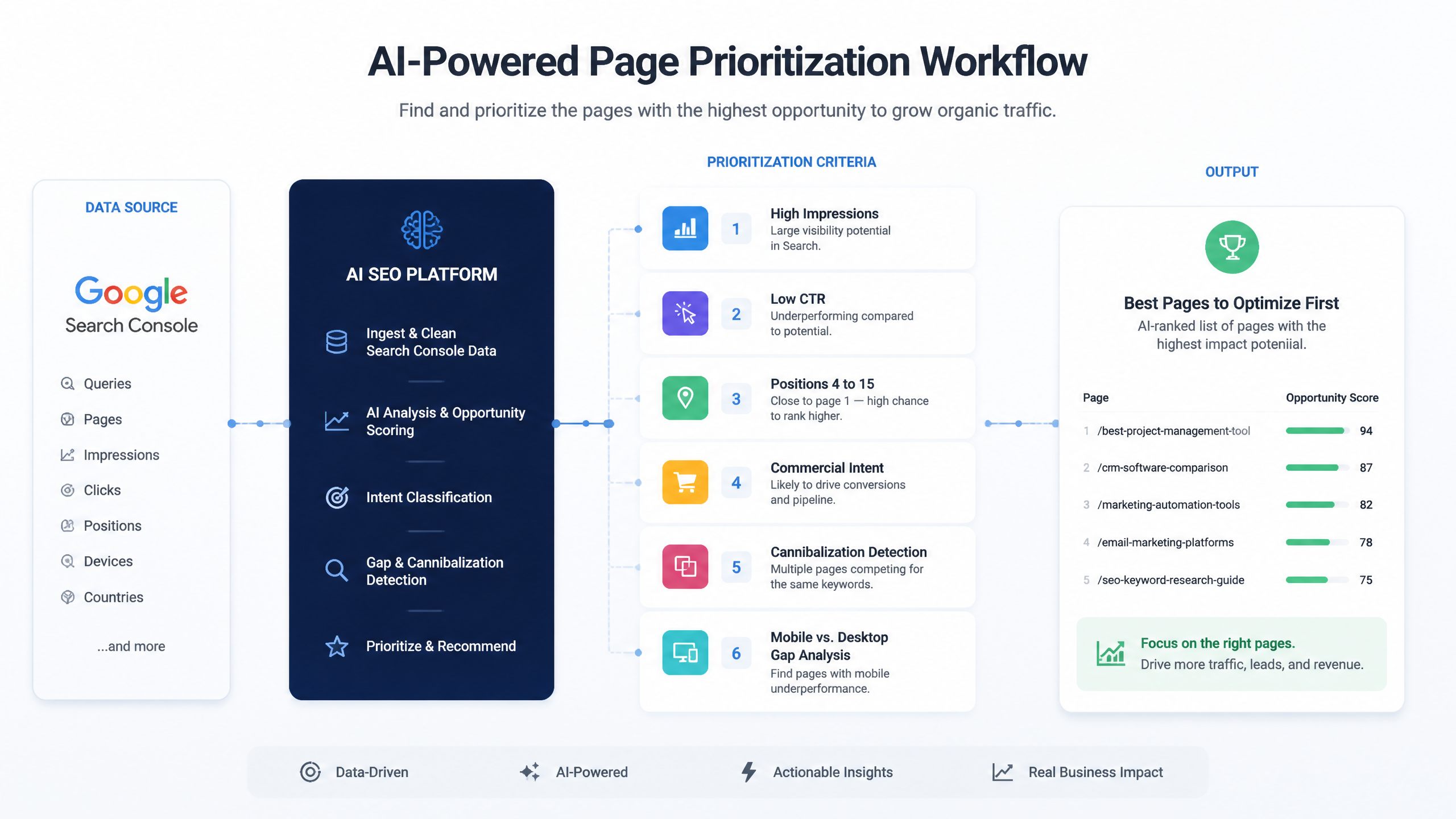
Once connected to Google Search Console, Nuwtonic builds a workspace around your real site data and runs 32+ automated analyses. For figuring out which pages to optimize first, the most relevant capabilities are:
• Top movers analysis to spot pages gaining or losing momentum
• Zero-CTR query detection to identify visible pages that fail to attract clicks
• Mobile vs. desktop ranking gap analysis to catch device-specific losses
• Cannibalization issue detection to surface the wrong-page ranking problem
• Topic cluster visibility to show where authority already exists and where page support is weak
This matters because the manual GSC workflow usually looks like this:
Manual GSC workflow | Nuwtonic workflow |
|---|---|
Export pages report | Connect GSC once |
Sort by impressions | Opportunity patterns are surfaced automatically |
Check CTR manually | Zero-CTR and low-click issues are identified for you |
Compare device segments | Mobile vs. desktop gaps are highlighted |
Hunt for cannibalization in spreadsheets | Cannibalization is flagged in-platform |
Guess what to do next | Recommendations are tied to the actual URL issue |
That’s the difference between having data and being able to act on it quickly.
It helps you focus on the right fix, not every fix
The user request here is important: don’t dump every Nuwtonic feature into the article just because the platform does a lot. Fair enough. So let’s keep it tight.
For which pages to optimize first from GSC, Nuwtonic is most useful in three practical ways:
It surfaces the pages with immediate upside.
If a page has impressions but poor CTR, or sits in a moveable ranking band, Nuwtonic helps bring that forward faster.It shows why the page underperforms.
Is it a zero-click snippet issue? A mobile gap? A cannibalization problem? A topic authority gap? Those are different problems and should not get the same fix.It shortens the path from diagnosis to action.
Instead of identifying the problem in one tool and solving it somewhere else, Nuwtonic can feed directly into optimization workflows.
That last point is underrated. Most SEO teams don’t fail because they can’t find data. They fail because diagnosis and execution live in separate places, and the handoff gets messy.
It reduces wasted effort on the wrong opportunities
One of the most useful outcomes from Nuwtonic’s GSC-connected analysis is what it helps you ignore.
It can keep you from spending time on:
• Pages with impressions but no realistic ranking path
• Queries where the wrong URL is competing
• Device-specific issues hidden inside blended averages
• Content refreshes when a simple CTR fix is enough
• New content ideas when existing pages already have low-hanging fruit
That’s a bigger deal than it sounds. In SEO, wasted effort is expensive precisely because it looks productive.
A practical workflow I’d use with GSC and Nuwtonic
The 30-minute prioritization method
If I were doing this for a small team today, here’s the process I’d use.
Connect GSC to Nuwtonic.
Review surfaced analyses for:
• zero-CTR queries
• top movers
• mobile vs. desktop gaps
• cannibalizationPull a shortlist of pages with:
• strong impressions
• low CTR
• positions 4–15 or 4–20Tag the shortlist by page type:
• money page
• supporting informational page
• outdated but recoverable pageCheck query intent on each page.
Apply the smallest fix likely to produce movement first.
The order of fixes I usually recommend
Problem | First fix | Second fix | Third fix |
|---|---|---|---|
High impressions, low CTR | Rewrite title | Rewrite meta description | Improve SERP intent match |
Position 4–15, decent CTR | Refresh content depth | Add missing subtopics | Improve internal relevance |
Wrong page ranking | Consolidate internal links | Strengthen correct page | Reduce overlap |
Mobile underperformance | Review mobile SERP snippet | Improve page speed | Check mobile UX and core web vitals |
Declining once-strong page | Update facts and sections | Improve structure | Re-expand query coverage |
This is where teams often mess up. They jump to the biggest fix first instead of the most probable fix first.
FAQ
Should I optimize pages ranking in positions 1–3 or focus on 4–15?
Focus on 4–15 first in most cases. Research summarized from Grapefruit Digital and WSKPF shows this range is where modest improvements can create meaningful traffic gains. Pages in 1–3 already benefit from top click share, and Ansira suggests they often should be left stable unless performance is slipping.
How do I filter GSC to find high-impression, low-CTR pages?
Open the Performance report.
Turn on Impressions, Clicks, CTR, and Position.
Go to the Pages tab.
Sort by Impressions descending.
Look for pages with strong impressions but weak CTR.
Then click into those pages and inspect the Queries tab.
Grapefruit Digital specifically recommends sorting by impressions and scanning for pages with visibility but poor clickthroughs.
What is a good CTR for a page ranking in position 5?
There isn’t one fixed benchmark. It depends on brand recognition, SERP features, device, and intent. Practically, if a page at position 5 has thousands of impressions and CTR under 2% to 3%, I’d investigate. That’s not a universal rule, just a working threshold.
Should I prioritize commercial intent pages over informational pages?
Usually, yes. Aqeel Ahmed’s framework of picking 3 to 5 money pages first is a smart business-first move. If your informational content supports those pages and sits close to page one, it can also be worth prioritizing, but revenue-linked URLs tend to go first.
How do I know if the wrong page is ranking?
Look for queries where:
• The ranking URL does not match search intent
• A blog post ranks instead of a service or product page
• Multiple pages get impressions for the same core term
Nuwtonic helps by flagging cannibalization issues, which is much faster than manually cross-checking pages and queries.
Is it better to sort by clicks or impressions?
Both are useful, but for different jobs.
Sort method | Best for |
|---|---|
Clicks | Finding pages already driving value and worth improving further |
Impressions | Finding underexposed opportunities with traffic upside |
Hive Digital’s 2024 guidance, cited in the research, says sorting by clicks is one of the easiest ways to identify pages needing help. I’d add this nuance: sort by impressions when you’re hunting for hidden upside, sort by clicks when you want proven performers first.
What date range should I use in GSC?
I usually start with last 3 months. It balances recency and sample size. If your niche is seasonal, compare against a longer range or year-over-year periods so you don’t misread normal demand swings as a performance problem.
How long does it take to see results after optimizing a page?
For pages already ranking in the 4–15 range, I often see movement in 2 to 6 weeks. The research examples support that timeline too: one case moved from position 12 to 4 in 4 weeks, while another CTR fix produced gains in 2 weeks. Fair warning: indexing delays, competition, and site health can stretch this.
Should I fix technical issues before content optimization?
If the issue is crawl errors, indexing issues, or severe page speed problems, yes. Fix the blocker first. If the page is indexed and already earning impressions, a CTR or content alignment fix may produce faster gains. This depends on what’s actually limiting performance.
Sources and references
• Grapefruit Digital’s guidance on finding optimization targets in GSC: Grapefruit Digital GSC optimization guide
• Aqeel Ahmed’s revenue-first page prioritization framework: Aqeel Ahmed on optimizing money pages
• WSKPF’s opportunity scoring and position sweet spot method: WSKPF Search Console opportunity method
• Ansira’s perspective on leaving top-ranking pages alone and prioritizing evergreen assets: Ansira on which pages to optimize for SEO
Final takeaway
If you’ve been asking which pages should I optimize first from GSC, the answer is not “all of them,” and it’s definitely not “whatever has the most clicks.” Start with pages that are already visible, close to top rankings, and commercially meaningful. That usually means high-impression, low-CTR pages and URLs ranking in positions 4–15, especially if they are money pages or evergreen assets.
Nuwtonic helps by turning messy GSC analysis into a clear shortlist: what’s underperforming, why it’s underperforming, and which pages are worth your effort first. And honestly, that’s the part most teams need. Not more dashboards. Better prioritization.