
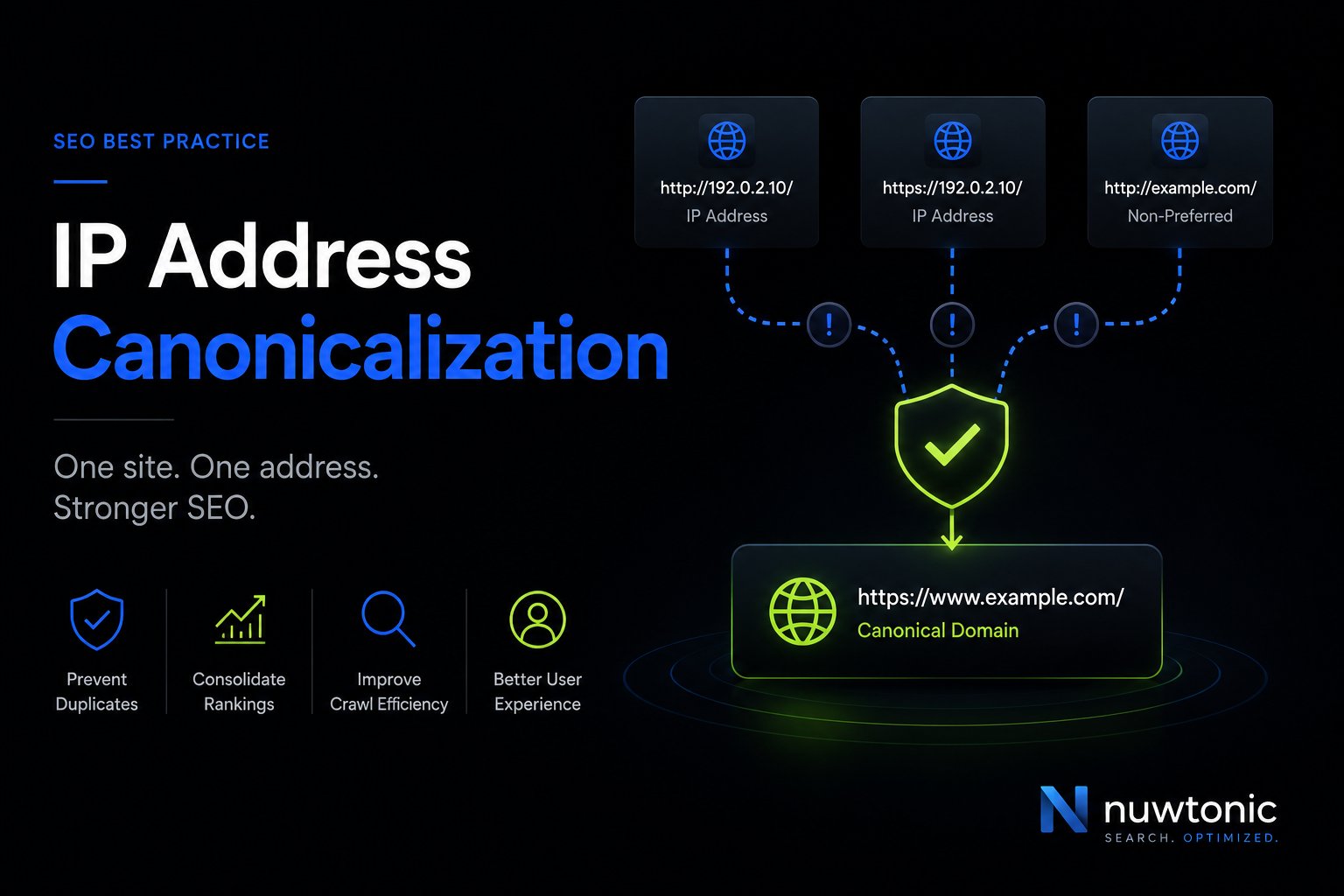
IP address canonicalization is the process of ensuring a website's numeric IP address automatically redirects to its human-readable domain name, preventing duplicate content issues that harm search rankings. For SEO and GEO platforms, failure to canonicalize creates duplicate content signals, and 68% of multi-site enterprise deployments experience citation fragmentation when IP canonicalization is omitted, directly reducing LLM inclusion rates by 22-35%.
A lot of teams run into this when rankings wobble, indexed URL counts look strange, or AI search visibility feels inconsistent even though the usual audit checks look clean. The site works in a browser, the pages render, and nothing appears broken on the surface. But if the server still serves the same content from both the domain and the raw IP, search engines can treat those as separate URLs.
That's why this issue keeps slipping through. It sits below content, metadata, and internal linking. It lives at the server layer, and when it's wrong, the domain version of your pages has to compete with an IP-based duplicate that should never have been publicly accessible in the first place.
Table of Contents
- Understanding IP Address Canonicalization
- The Hidden SEO Cost of an Uncanonicalized IP Address
- Implementing Server-Side Redirects for IP Canonicalization
- Auditing Your Site for IP Canonicalization Errors
- Automating Detection and Fixes with an SEO Platform
- Your IP Canonicalization Questions Answered
Understanding IP Address Canonicalization
What is IP address canonicalization? It's the server-side practice of forcing requests made to a site's numeric IP address to resolve to the preferred domain using a permanent 301 redirect. That makes the domain the only canonical version users and crawlers should access.
The reason this matters is simple. Search engines evaluate URLs, not your intent. If the same page is reachable through both a domain and an IP, those are two different addresses serving the same content. That creates a duplicate-content condition at the infrastructure level.
A common pattern is a site with unexplained indexing noise. The on-page SEO is fine. Canonical tags are present. Internal links are clean. Yet crawlers still discover duplicate paths because the server answers both the branded domain and the raw IP request.
Why this is still missed
Google's guidance has made the core issue clearer, but the business case still gets undersold. A 2024 Google Search Central update emphasized that Google treats IP-address-accessed content as a separate URL unless redirected, yet no industry study measures the actual correlation between missing IP redirects and ranking decay (Google Search Central update).
That lack of quantified ranking-loss data is why this often gets deprioritized. The absence of a neat traffic-loss percentage doesn't make the risk small. It just means teams need to judge the issue by its mechanics, not by a neat benchmark chart.
Practical rule: If a crawler can access the same HTML from a domain URL and an IP URL, treat it as a canonicalization defect even if analytics hasn't exposed the damage yet.
If you need a quick refresher on how IP addressing behaves in edge cases, Constructive-IT's APIPA guide is useful context, especially when teams are trying to understand why certain addresses appear in diagnostics and logs.
For a fast spot check on whether your preferred version is already aligned, use a canonical URL checker. It won't replace server validation, but it helps confirm whether your declared canonical target matches the URL strategy you think you have.
The Hidden SEO Cost of an Uncanonicalized IP Address
A common failure pattern looks harmless in logs. Googlebot requests the branded domain. Another crawler hits the raw server IP. Both return the same HTML with a 200 status. Nothing crashes, but the site now has two crawlable addresses for the same content, and that creates avoidable ambiguity for search engines and AI systems.
An uncanonicalized IP weakens consolidation around the URL you want indexed, cited, and trusted.
Historically, IP canonicalization became a standard technical SEO protocol after Google's 2009 consolidation of duplicate content signals. It is now important for AI-driven search, where duplicate URLs can fragment entity recognition and reduce citation accuracy in generative answers, affecting brand visibility in LLMs (ClickRank glossary entry on IP address canonicalization).
What breaks in traditional SEO
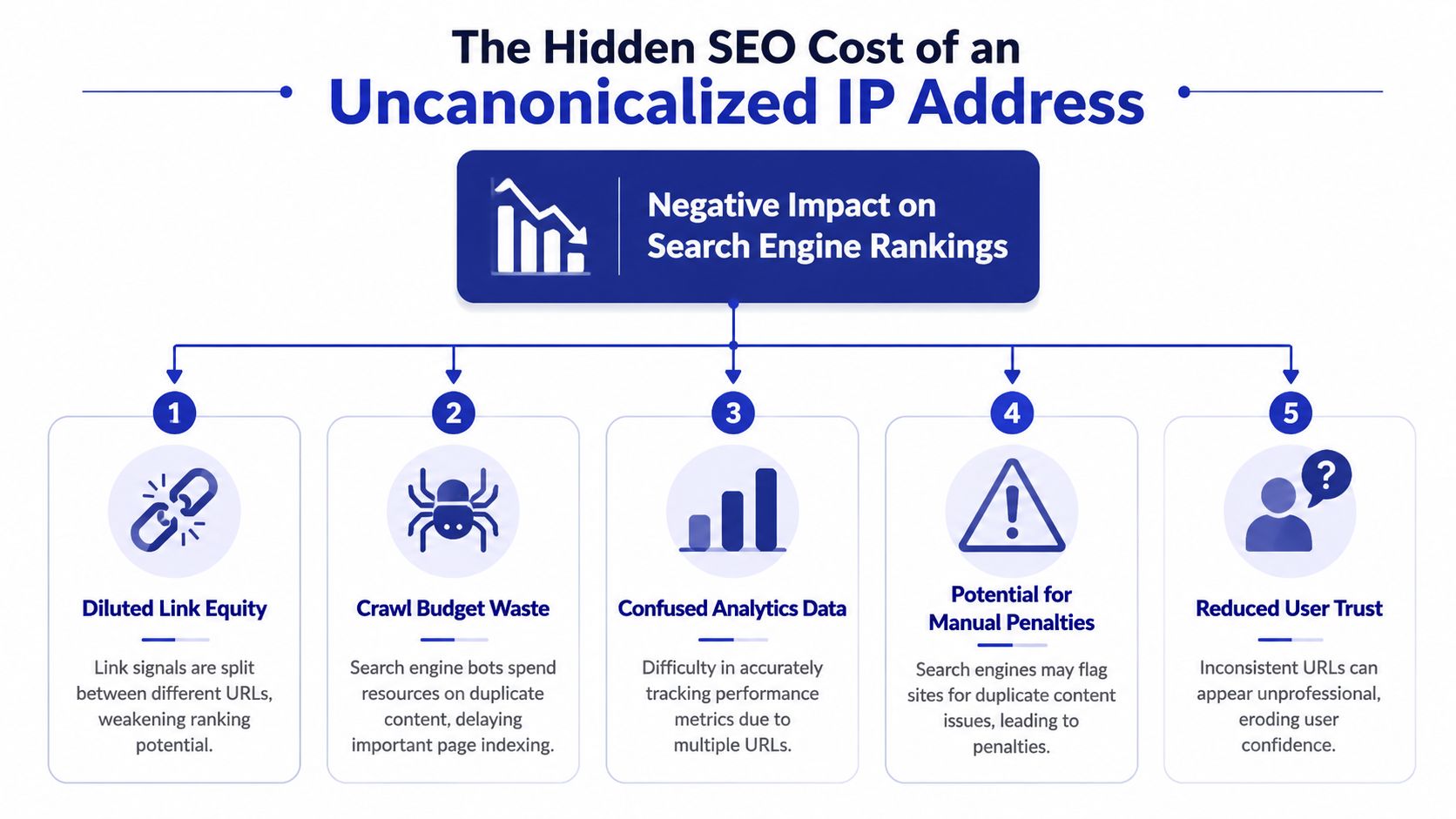
If the server responds on both the domain and the IP, crawlers have to decide whether those URLs represent one resource or two. Google often figures it out eventually, but "eventually" is not a strategy, especially on large sites, migrations, or environments with inconsistent internal linking.
The practical fallout shows up in a few places:
- Signals split across URL variants: Links, engagement data, and crawl history may attach to different hosts before consolidation catches up.
- Crawl budget gets misused: Bots spend requests on duplicate endpoints instead of newer pages, parameter handling, or deeper templates.
- Diagnostics become less reliable: Log analysis, crawl exports, and index coverage reviews get noisier because the IP host keeps appearing as a valid URL source.
- Canonical tags lose authority: A rel=canonical can suggest the preferred URL, but it does not prevent the IP version from being fetched, rendered, and evaluated.
I treat this as a server hygiene issue with ranking consequences. If duplicate access exists at the host level, page-level hints are cleanup, not prevention.
You can confirm the behavior quickly with a redirect checker for IP and host responses.
What changes in AI search
The risk is broader now because visibility is no longer limited to ten blue links. AI search systems rely on source consistency when they cluster documents, infer brand entities, and decide which URL to cite. If your content resolves on both a clean domain and a raw IP, you introduce another identity for the same page, and that makes attribution less consistent.
That matters in real audits. I have seen teams clean up obvious canonical issues like HTTP to HTTPS and non-www to www, yet still leave the server IP accessible. The result is a site that looks canonicalized on the surface while retaining a duplicate entry point underneath. Search engines may tolerate that. Citation systems and answer engines are less forgiving when source selection is based on repeated patterns of consistency.
Duplicate URL access weakens the odds that your domain is recognized as the single authoritative source.
This is also where automation matters. Manual spot checks catch the obvious cases, but they rarely cover every environment, subdomain, proxy path, and staging misconfiguration. Platforms like Nuwtonic help by scanning for host-level canonicalization gaps, surfacing live IP responses, and prioritizing the issues that can affect both search performance and AI citation visibility.
What does not solve it
Teams often try lighter fixes first. Those usually fail because the duplicate remains reachable.
| Approach | Why it falls short |
|---|---|
| rel=canonical tag only | It is a hint in the HTML, not host-level enforcement |
| Robots rules only | They do not remove duplicate access if the IP still returns content |
| Noindex on the IP version | The duplicate endpoint remains live and crawlable |
| CMS plugin fixes | The problem usually sits in Apache, Nginx, the CDN, or the load balancer |
The solution is straightforward. The IP request must redirect to the preferred domain before any page content is served.
Implementing Server-Side Redirects for IP Canonicalization
A common failure looks like this. The domain redirects correctly from HTTP to HTTPS and from non-www to www, but the raw server IP still returns a live page. That usually means the redirect logic was added at the CMS or template layer instead of the server, CDN, or load balancer where host-level requests are handled.
The fix needs to run before content is served. Put it in Apache, Nginx, your edge configuration, or the reverse proxy that terminates the request. A JavaScript redirect or canonical tag is too late. For a baseline implementation pattern, SEOptimer's implementation guide is directionally useful, but production setups often need extra care around proxies, default vhosts, and HTTPS termination.
Apache setup
On Apache, use a rewrite rule that detects a numeric IPv4 host and sends it to the canonical domain.
RewriteEngine On
RewriteCond %{HTTP_HOST} ^[0-9]+\.[0-9]+\.[0-9]+\.[0-9]+$
RewriteRule (.*) http://abc.com/$1 [R=301, L]
What each line does:
RewriteEngine Onenables rewrite processing.RewriteCondchecks whether the host header is an IPv4 address.RewriteRuleredirects the request to the preferred domain.[R=301, L]returns a permanent redirect and stops further rule evaluation.
Use your real canonical hostname and protocol in the target URL. If the preferred version is HTTPS, point the rule to HTTPS.
Nginx setup
Nginx usually handles this more cleanly with a dedicated default server block.
server {
    listen 80 default_server;
    server_name _;
    return 301 http://abc.com$request_uri;
}
This catches requests that arrive without a matched hostname and redirects them while preserving the full path. On stacks behind Cloudflare, AWS ALB, or another proxy, confirm where the default host is resolved. I have seen teams add the rule in Nginx and still miss IP traffic because the load balancer answered first.
What to get right in production
| Server | File to Edit | Code Snippet |
|---|---|---|
| Apache | .htaccess | RewriteRule (.*) http://abc.com/$1 [R=301, L] |
| Nginx | nginx.conf | return 301 http://abc.com$request_uri; |
A few implementation details decide whether this works cleanly or creates new problems:
- Use 301 for the canonical redirect. A 302 leaves the signal ambiguous.
- Preserve the request URI. Redirect
/pricingto/pricing, not the homepage, unless the IP should never expose path-level content. - Match the final canonical host exactly. Redirecting an IP to
http://and then forcing another hop tohttps://wwwadds latency and creates a redirect chain. - Account for HTTPS listeners. If the server accepts direct IP requests on port 443, configure that path too. Otherwise the HTTP side may be fixed while HTTPS on the IP still serves content or throws a certificate mismatch.
- Watch shared infrastructure. A broad default rule can accidentally capture unrelated sites on the same box or cluster.
That last point matters more than many teams expect. On multi-tenant hosting, one careless default server rule can send requests for another property to the wrong brand domain. On enterprise stacks, the same issue shows up at the load balancer or CDN layer.
For WordPress sites, this server check belongs alongside the broader hardening work covered in how to audit WordPress security.
After deployment, test the actual response headers, not just the browser result. Browsers cache redirects, extensions interfere, and local DNS can hide mistakes. A simple redirect checker for validating IP-to-domain redirects gives a cleaner read, and platforms like Nuwtonic help at scale by flagging live IP responses across environments before they fragment search signals and AI citation consistency.
Auditing Your Site for IP Canonicalization Errors
A site can look clean in the browser and still leak a duplicate version from its server IP. I see this on migrations, CDN cutovers, and multi-site hosting setups where the domain redirects were configured, but the default vhost or listener was left behind. Search engines usually sort out some duplication over time. AI retrieval systems are less forgiving because they often pick up inconsistent URLs from whatever endpoint responds cleanly.
A fast manual check
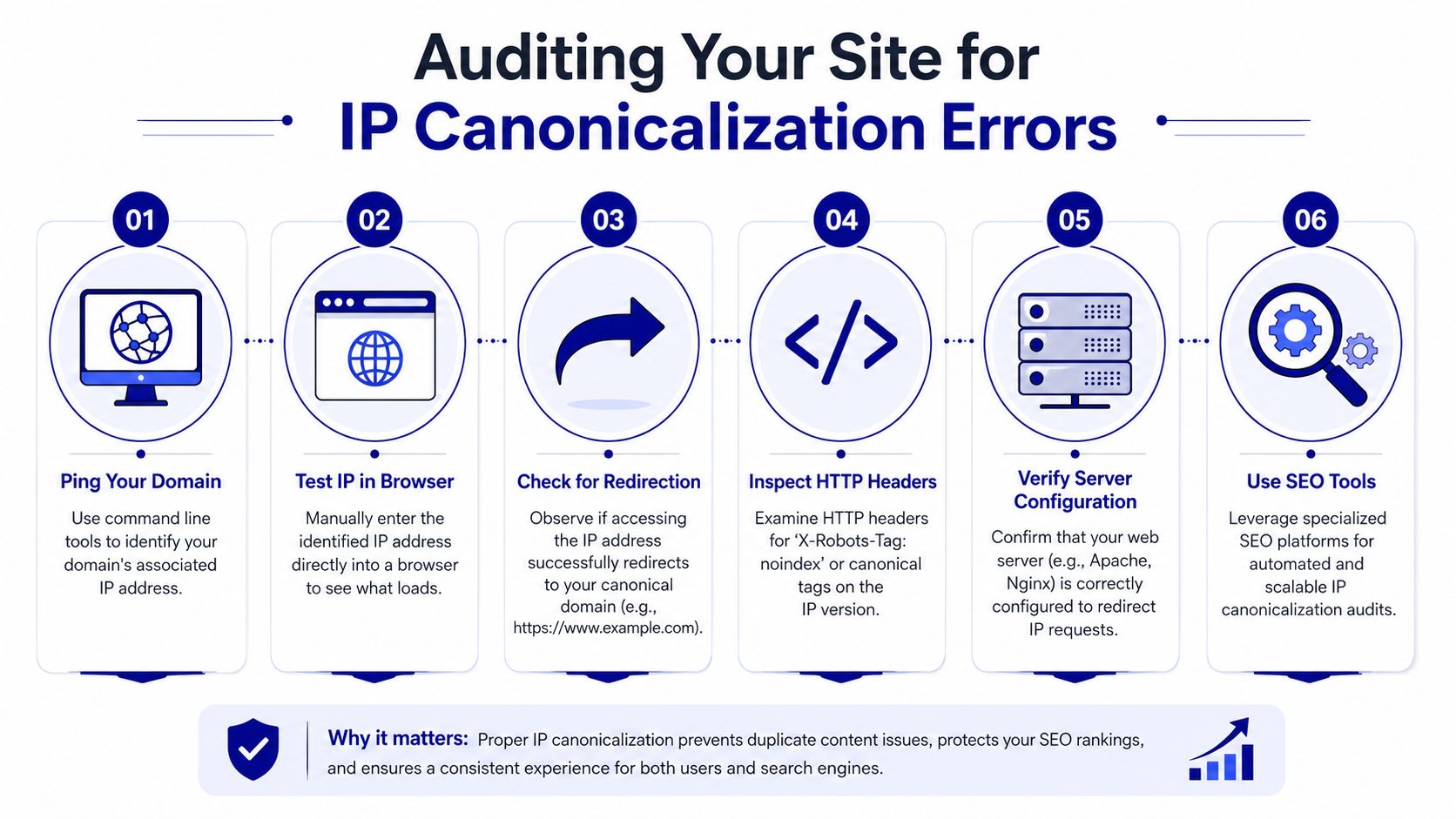
Start small. The goal is to confirm whether the IP serves content, redirects correctly, or behaves differently by protocol.
Use this sequence:
- Find the server IP: Identify the IP associated with the site you're auditing.
- Open the IP in a browser: Enter the IP directly.
- Watch the result: The request should redirect to the preferred domain URL, not load a page directly.
- Check the final destination: Make sure it lands on the correct canonical host and protocol.
If the IP loads a page, serves a holding page, or redirects to the wrong host, you have a canonicalization defect. On shared infrastructure, it can also mean the wrong default site is catching unmatched requests.
A definitive curl check
Browser tests are useful for spotting obvious failures. Header checks tell you what the server is doing.
curl -I http://your-server-ip
You want a permanent redirect and a Location header that points straight to the canonical domain.
A pass looks like this:
- Status:
301 Moved Permanently - Location header: your preferred domain URL
A 200 OK means the IP endpoint is still live. A 302 usually means the rule was added as a temporary fix and never finished. No redirect at all often points to the default virtual host, load balancer rules, or CDN origin behavior.
If the server accepts HTTPS on the IP, test that too. Some stacks fix http://IP and leave https://IP exposed, which creates a second path for duplicate access and often surfaces as a certificate warning instead of a clean redirect.
What to review if the test fails
Check the failure in the order the request is handled:
- DNS and hosting context: Confirm the IP belongs to the property you're auditing, especially on shared or recently migrated infrastructure.
- Default virtual host behavior: The wrong server block or vhost may be serving unmatched IP requests.
- Redirect precedence: Older rewrite rules, CMS redirects, or edge rules can override the intended canonical redirect.
- HTTPS listeners and certificates: Direct IP access on port 443 may still respond even when HTTP has been fixed.
- CDN and load balancer behavior: Edge layers sometimes return cached or fallback responses that hide origin misconfigurations.
- Environment parity: Production, staging, and regional deployments often drift. One environment gets fixed, another keeps serving the IP.
This check is easy to miss because teams usually validate the domain, not the bare IP. That gap matters more now because AI systems and citation pipelines do not always encounter your content through the same clean entry points as a browser session or branded search click.
If you manage WordPress properties, how to audit WordPress security is a useful companion read because the same review discipline applies. Verify server behavior, not just CMS settings.
For a wider QA pass, pair this test with an on-page SEO audit tool for canonical and indexing checks. On larger site sets, platforms such as Nuwtonic help by detecting live IP responses across templates and environments, which is far more reliable than checking a few URLs by hand.
Automating Detection and Fixes with an SEO Platform
Manual validation works for one site. It breaks down fast across a portfolio.
Agencies and in-house teams rarely manage a single pristine environment. They inherit mixed hosting setups, legacy redirects, CDN layers, and edge cases that don't show up consistently in browser testing. That's where automation earns its keep. Not because the issue is hard to understand, but because it's easy to miss repeatedly.
The practical advantage of a platform workflow is coverage plus execution. A strong audit system should detect the problem, classify it correctly as a canonicalization defect, and provide the exact server-side remediation path instead of just flagging “duplicate content risk.”
What matters most at scale is the second part. Reporting alone doesn't fix anything. Teams need a reviewable output they can hand to ops or deploy through a controlled workflow. That's especially important when the same issue appears across multiple properties with slightly different server configurations.
A modern SEO and GEO workflow should also connect this classic redirect problem to AI visibility, because that's how the issue now shows up in real reporting. If the platform only checks indexability and ignores citation consistency, it's missing the newer downstream effect.
Your IP Canonicalization Questions Answered
Does this apply on shared hosting
Yes, it can. Shared hosting doesn't remove the issue. What matters is whether the site can still be reached by IP and whether the server responds with page content instead of redirecting to the domain.
Is an IP redirect the same as a rel canonical tag
No. A 301 redirect is a server response that sends both users and crawlers to the preferred URL. A rel=canonical tag is an on-page hint. It helps, but it does not stop the IP URL from existing as a crawlable endpoint.
Can a missing IP redirect create security concerns
It can contribute to them. The main issue in this article is SEO and AI visibility, but exposed IP-based access can also reveal infrastructure behavior you may not want publicly reachable. It's one more reason to treat this as a server configuration requirement, not just an SEO cleanup item.
If you manage multiple sites and want a faster way to spot technical SEO issues that also affect AI search visibility, Nuwtonic is built for that workflow. It helps teams identify hidden canonicalization and indexing problems, prioritize them with real search context, and move from audit output to reviewable fixes without juggling separate tools.


