Choosing the right SEO toolkit can feel like deciding between a reliable, customized off-road vehicle and a sleek, high-speed jet. Both will get you to your destination, but the ride—and the cost—will be entirely different. In the green corner, we have SEO PowerSuite, a desktop-based powerhouse composed of four distinct tools. In the blue corner, we have Ahrefs, the cloud-based industry gold standard known for its massive index and intuitive user interface.
Having spent over seven years executing search strategies for tech startups and e-commerce brands, I have used both platforms extensively. I have used them to salvage tanking organic traffic, build high-authority link profiles, and diagnose complex technical issues.

Table of Contents
• TL;DR Summary
• Key Takeaways
• Architecture and Workflow: Desktop App vs. Cloud Platform
• Backlink Profile Analysis and Link Building Capabilities
• Keyword Research and SERP Tracking Capabilities
• Site Audit and Technical SEO Diagnostics
• Pricing, Limits, and Total Cost of Ownership
• Frequently Asked Questions
• The Final Verdict
TL;DR Summary
If you are short on time, here is the direct breakdown. SEO PowerSuite is a one-time annual license model that runs locally on your computer, offering unlimited data extraction at the cost of system resources and proxy setup. Ahrefs is a cloud-based SaaS platform that offers unmatched backlink data and ease of use but limits your usage through strict, credit-based pricing.
Feature / Metric | SEO PowerSuite | Ahrefs |
|---|---|---|
Platform Type | Desktop App (Windows, macOS, Linux) | Cloud-Based SaaS |
Pricing Model | Annual flat-fee subscription | Monthly credit-based subscription |
Backlink Database | Medium (uses proprietary WebMeUp index) | Extremely Large (industry-leading live index) |
Keyword Tracking | Unlimited keywords, manual/scheduled checks | Limited by tier, automated daily/weekly updates |
Site Auditing | Unlimited pages (limited only by computer RAM) | Limited by monthly crawl credits |
Ease of Use | Steep learning curve, complex setup | Intuitive, beginner-friendly interface |
Best For | Independent consultants, agencies on a budget | Mid-to-large agencies, enterprise marketing teams |
Key Takeaways
• Data Ownership: SEO PowerSuite allows you to store all crawl and keyword data locally, meaning you never lose historical records due to subscription tier downgrades.
• Backlink Superiority: Ahrefs remains the undisputed king of backlink analysis. Most users overlook the importance of a solid backlink profile when choosing between tools — it's a game-changer.
• Resource Requirements: SEO PowerSuite requires a robust machine and a reliable proxy network to run large-scale, automated tracking without IP blocks.
• Budget Efficiency: If you manage dozens of client websites, SEO PowerSuite's flat-rate model will save you thousands of dollars compared to Ahrefs' pay-per-credit system.

Architecture and Workflow: Desktop App vs. Cloud Platform
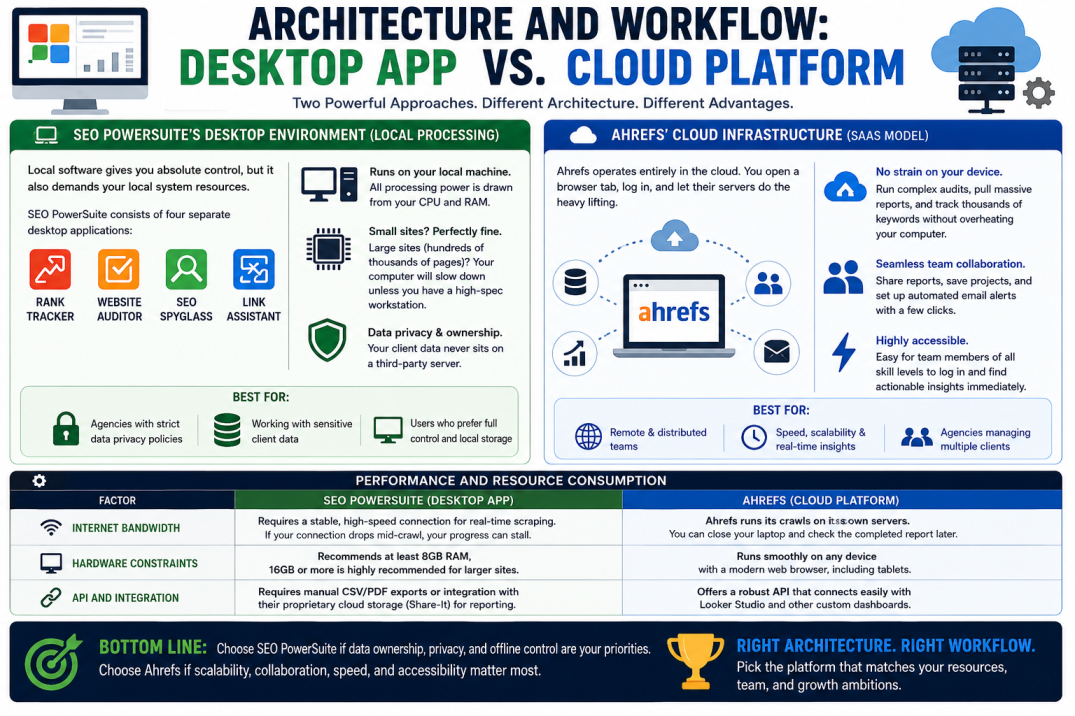
SEO PowerSuite's Desktop Environment (Local Processing)
Look, here's the thing about local software: it gives you absolute control, but it also demands your local system resources. SEO PowerSuite consists of four separate desktop applications: Rank Tracker, WebSite Auditor, SEO SpyGlass, and LinkAssistant.
Because the software runs on your local machine, all processing power is drawn from your CPU and RAM. For small sites, this is perfectly fine. However, if you are analyzing a site with hundreds of thousands of pages, your computer will slow down significantly unless you are running a high-spec workstation. The primary benefit here is data privacy and ownership—your client data never sits on a third-party server.
Ahrefs' Cloud Infrastructure (SaaS Model)
Ahrefs operates entirely in the cloud. You open a browser tab, log in, and let their servers do the heavy lifting. This means you can run complex technical audits, pull massive backlink reports, and track thousands of keywords without hearing your computer's cooling fans scream.
This cloud architecture enables seamless team collaboration. You can share reports, save projects, and set up automated email alerts with a few clicks. It is highly accessible, making it easy for team members of all skill levels to log in and find actionable insights immediately. If you want to see how Ahrefs stacks up against lighter cloud tools, check out our Ahrefs vs Ubersuggest comparison.
Performance and Resource Consumption
To understand how these architectural differences affect daily operations, let us examine their hardware and operational requirements:
Internet Bandwidth: SEO PowerSuite requires a stable, high-speed connection for real-time scraping. If your connection drops mid-crawl, your progress can stall. Ahrefs runs its crawls on its own servers, so you can close your laptop and check the completed report later.
Hardware Constraints: SEO PowerSuite recommends at least 8GB of RAM, though 16GB or more is highly recommended for larger sites. Ahrefs runs smoothly on any device with a modern web browser, including tablets.
API and Integration: Ahrefs offers a robust API that connects easily with Looker Studio and other custom dashboards. SEO PowerSuite requires manual CSV/PDF exports or integration with their proprietary cloud storage (Share-It) for reporting.
Backlink Profile Analysis and Link Building Capabilities
Ahrefs' Backlink Index and Live Crawling
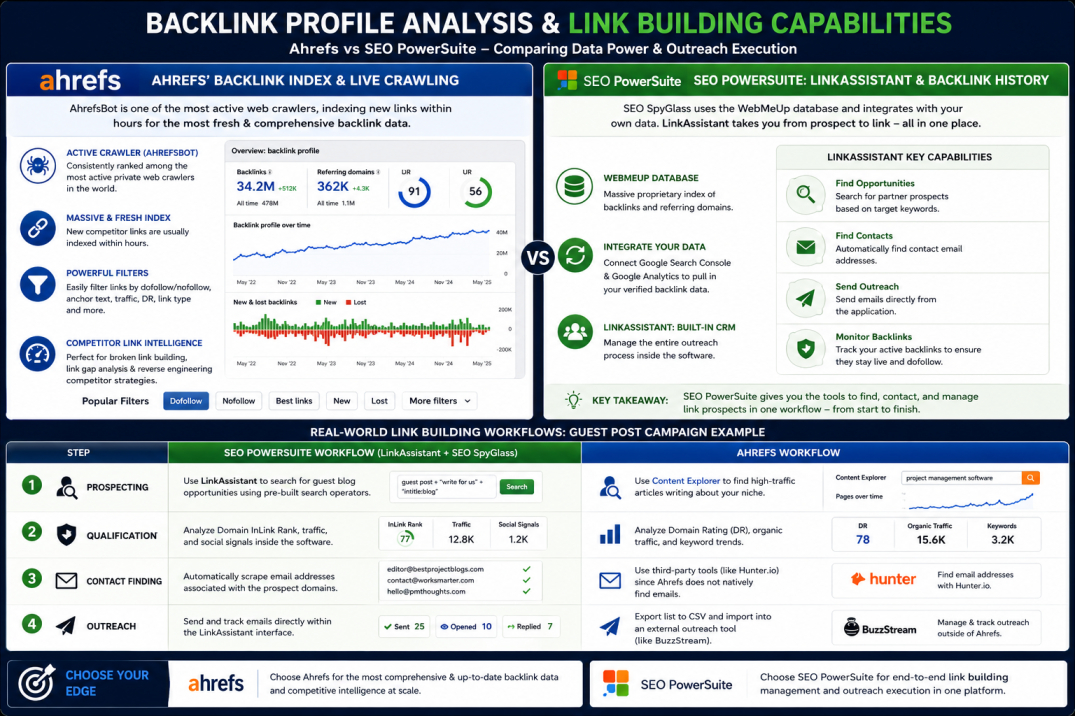
When it comes to mapping out a competitor's link building footprint, Ahrefs has historically held the crown. Their active crawler, AhrefsBot, is consistently ranked as one of the most active private web crawlers in the world.
This massive crawling capacity translates into a highly fresh and comprehensive backlink profile analysis. When a competitor gets a new link, Ahrefs usually indexes it within hours. The UI makes it incredibly simple to filter links by dofollow status, anchor text, and traffic metrics. If your primary SEO strategy relies on broken link building or identifying competitor link gaps, Ahrefs' speed and index size are difficult to match.
SEO PowerSuite's LinkAssistant and Backlink History
SEO PowerSuite utilizes SEO SpyGlass for backlink analysis, pulling data from its proprietary WebMeUp database. While WebMeUp is massive, it is not as fast or comprehensive as Ahrefs. To compensate, SEO SpyGlass allows you to integrate your Google Search Console and Google Analytics accounts directly to pull in your own verified backlink data.
Where the suite shines is in LinkAssistant, a dedicated tool designed specifically for outreach management. Unlike Ahrefs, which only helps you find link opportunities, LinkAssistant acts as a built-in CRM. It allows you to:
• Search for partner prospects based on target keywords.
• Find contact email addresses automatically.
• Send outreach emails directly from the application.
• Monitor your active backlinks to ensure they do not get removed or changed to nofollow.
Real-World Link Building Workflows
To compare these approaches, let us look at how you would execute a standard guest post campaign in each tool:
Step | SEO PowerSuite Workflow | Ahrefs Workflow |
|---|---|---|
1. Prospecting | Use LinkAssistant to search for guest blog opportunities using pre-built search operators. | Use Content Explorer to find high-traffic articles writing about your niche. |
2. Qualification | Analyze Domain InLink Rank, traffic, and social signals inside the software. | Analyze Domain Rating (DR), organic traffic, and keyword trends. |
3. Contact Finding | Automatically scrape email addresses associated with the prospect domains. | Use third-party tools (like Hunter.io) since Ahrefs does not natively find emails. |
4. Outreach | Send and track emails directly within the LinkAssistant interface. | Export list to CSV and import into an external outreach tool (like BuzzStream). |
Keyword Research and SERP Tracking Capabilities
Keyword Difficulty and Search Volume Metrics
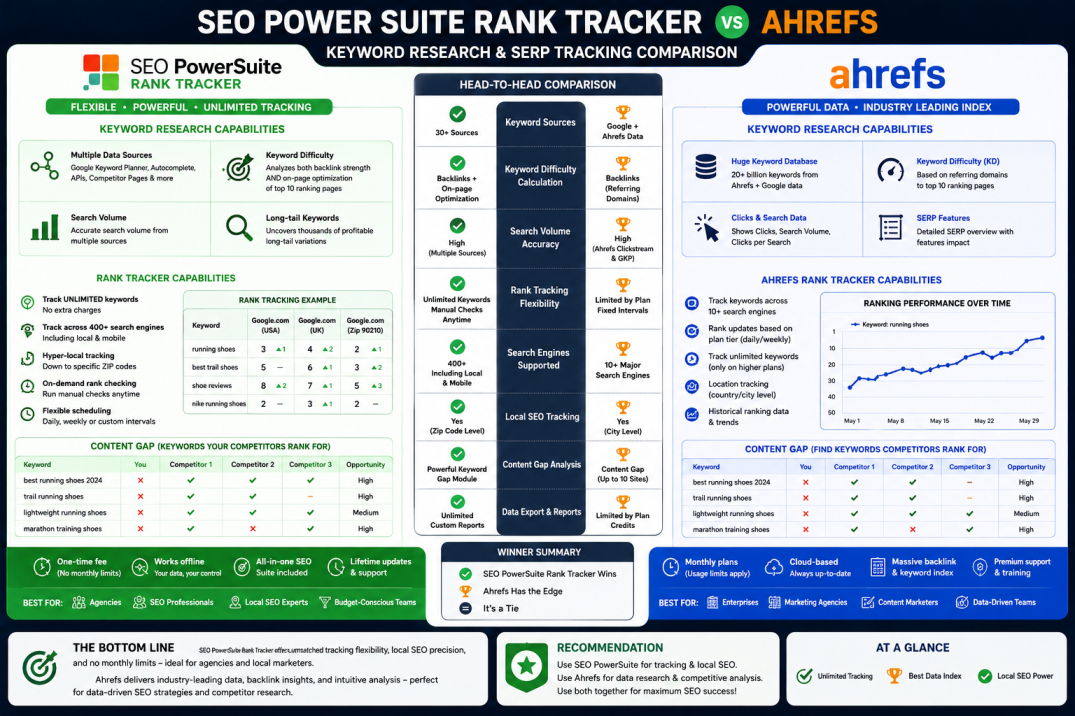
Both platforms provide robust keyword research suites, but they calculate metrics differently. Ahrefs uses a proprietary keyword difficulty formula based on the number of referring domains pointing to the top 10 ranking pages. This is a highly reliable starting point, but it sometimes overlooks on-page optimization quality.
SEO PowerSuite's Rank Tracker pulls keyword suggestions from dozens of sources, including Google Keyword Planner, autocomplete APIs, and competitor landing pages. It calculates keyword difficulty by analyzing both the backlink strength and the on-page optimization level of the top-ranking competitors on the SERP. This dual approach often provides a more nuanced view of what it will take to rank.
Rank Tracker vs. Ahrefs Rank Tracker
I've seen many teams get lost in the data without focusing on actionable insights; the best tool is the one that aligns with your goals. When tracking daily ranking fluctuations, the difference in flexibility is stark.
SEO PowerSuite can be a bit overwhelming for beginners, while Ahrefs offers a more intuitive interface. With SEO PowerSuite's Rank Tracker, you can track an unlimited number of keywords across hundreds of search engines (including localized search down to specific zip codes) without paying extra. You can manually force a rank check whenever you want.
With Ahrefs, your tracking frequency is determined by your plan tier (often weekly updates on lower tiers), and tracking additional keywords quickly eats into your monthly account limits. If you need daily, hyper-local tracking for multiple local SEO clients, SEO PowerSuite is the clear winner.
SERP Analysis and Content Gap Identification
Both tools excel at identifying content gaps—keywords your competitors rank for, but you do not. Ahrefs' Content Gap tool is highly visual and intuitive, allowing you to compare up to ten competitors at once. SEO PowerSuite's Rank Tracker features a similar "Keyword Gap" module that is equally powerful, though it requires a few more clicks to configure. To understand how these features compare to other major players in the industry, take a look at our comprehensive analysis of Ahrefs vs Semrush vs Moz.
Site Audit and Technical SEO Diagnostics
WebSite Auditor's Deep Crawl Diagnostics
Before you dive into buying a massive list of private proxies to run SEO PowerSuite at scale, stop. I've seen too many junior SEOs burn their budget on cheap proxies only to get their IP blocked by Google within ten minutes.
When configured correctly, SEO PowerSuite's WebSite Auditor is an exceptional tool for finding crawl errors, broken links, and duplicate content. I remember a site migration project back in 2023 where we had to crawl a 150,000-page e-commerce site. Running that through a cloud crawler would have eaten up all our monthly crawl credits in an afternoon. WebSite Auditor saved us hundreds of dollars because we ran it locally on a dedicated machine.
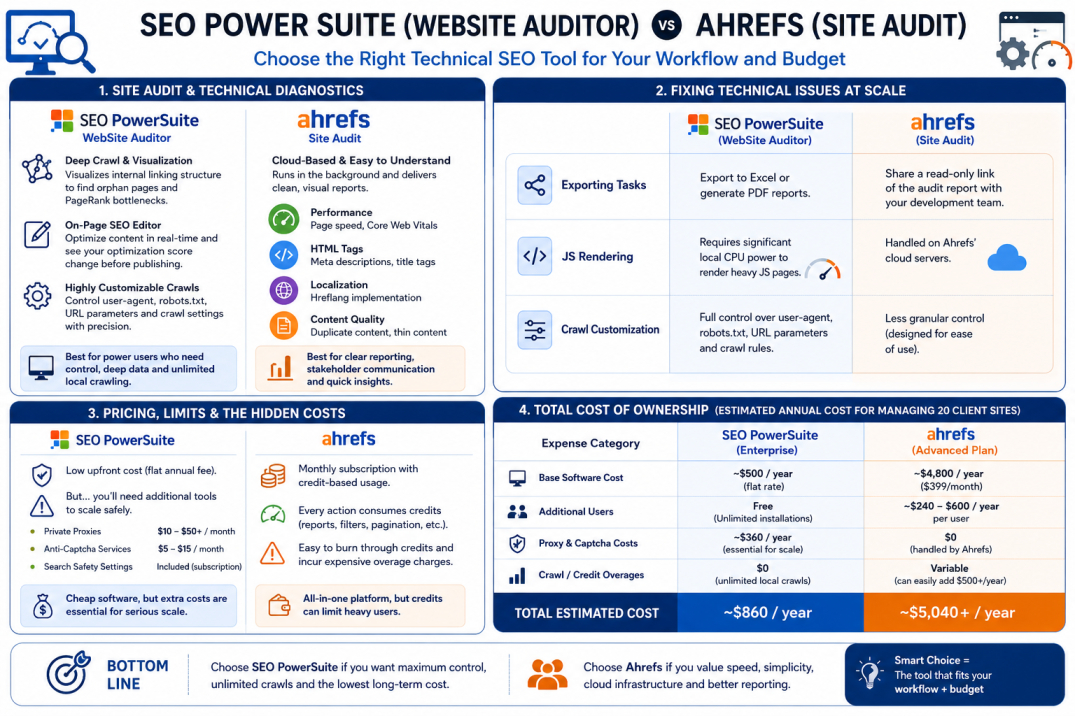
WebSite Auditor provides an interactive visualization of your site's internal linking structure, helping you identify orphan pages and PageRank bottlenecks. It also includes an in-app on-page SEO editor, allowing you to optimize your content in real-time and see how your optimization score changes before publishing.
Ahrefs Site Audit and Crawl Errors
Ahrefs' Site Audit tool is cloud-based, meaning it runs in the background and sends you a clean, visual report when finished. It categorizes technical issues into clear groups:
• Performance (page speed, Core Web Vitals)
• HTML tags (meta descriptions, title tags)
• Localization (hreflang implementation)
• Content quality (duplicate content, thin content)
It is exceptionally clean and easy to read. If you are presenting technical issues to a client or a non-technical stakeholder, Ahrefs' visual graphs and explanations of why an issue matters are far superior to SEO PowerSuite's dense data sheets.
Fixing Technical Issues at Scale
While both tools find technical errors, the workflow for fixing them differs:
Exporting Tasks: Ahrefs allows you to share a read-only link of the audit report directly with your web development team. SEO PowerSuite requires you to export the data to an Excel sheet or generate a PDF report.
JS Rendering: Both tools support JavaScript rendering to crawl dynamic websites, but Ahrefs handles this on their cloud servers, whereas SEO PowerSuite will require significant local CPU power to render heavy JS pages.
Crawl Customization: WebSite Auditor allows you to customize your user-agent, respect or ignore robots.txt instructions, and append custom URL parameters with surgical precision.
Pricing, Limits, and Total Cost of Ownership
The Hidden Costs of Captchas and Proxies
On paper, SEO PowerSuite is incredibly cheap. They offer a free version with limited features, and their Professional and Enterprise licenses are priced as flat annual fees. However, there is a catch.
Because you are scraping search engines directly from your local IP address, search engines will quickly present you with Captchas. To run automated, large-scale rank tracking or keyword research, you will need to purchase:
• Private Proxies: Dedicated IP addresses to rotate your requests (costing $10 to $50+ per month).
• Anti-Captcha Services: Automated solving services to handle verification prompts (costing $5 to $15 per month).
• Search Safety Settings: Subscription to SEO PowerSuite's search safety network, which helps mitigate IP blocks.
Ahrefs' Credit-Based Pricing Model
Ahrefs operates on a monthly subscription model, and in recent years, they transitioned to a strict credit-based system. Every time you open a report, apply a filter, or click to the next page of results, you consume one credit.
For heavy users, agencies, or teams who love to explore data, these limits can be highly restrictive. It is very easy to burn through your monthly allotment of credits halfway through the billing cycle, forcing you to pay for expensive overage packs. If this pricing model feels too restrictive for your workflow, you may want to look into the Best alternatives to Ahrefs.
Which Tool Offers Better ROI?
Let us break down the estimated annual cost of ownership for an agency managing 20 client sites:
Expense Category | SEO PowerSuite (Enterprise) | Ahrefs (Advanced Plan) |
|---|---|---|
Base Software Cost | ~$500 / year (flat rate) | ~$4,800 / year ($399/month) |
Additional Users | Free (unlimited installations) | ~$240 - $600 / year per user |
Proxy & Captcha Costs | ~$360 / year (essential for scale) | $0 (handled by Ahrefs) |
Crawl/Credit Overages | $0 (unlimited local crawls) | Variable (can easily add $500+/year) |
Total Estimated Cost | ~$860 / year | ~$5,040+ / year |
Frequently Asked Questions
Can I use SEO PowerSuite on macOS?
Yes, SEO PowerSuite is fully compatible with macOS, Windows, and Linux. However, since it is built on Java, macOS users may need to ensure their Java Runtime Environment is updated for optimal performance.
Does SEO PowerSuite have a cloud version?
No. While they offer a cloud storage service called "Share-It" for saving and sharing project files, the core analytical engines and software must be installed and run locally on a computer.
Why are Ahrefs' backlink metrics different from SEO PowerSuite's?
Every SEO tool uses its own crawler and database index. Ahrefs has a larger, faster-updating crawler network, which generally results in a more complete and up-to-date backlink profile than SEO PowerSuite's WebMeUp database.
Is Ahrefs suitable for local SEO tracking?
Yes, but it can be expensive. Ahrefs tracks rankings at the country or city level, but tracking multiple zip codes for local businesses will consume a large portion of your keyword tracking limits.
The Final Verdict
Choosing between these two platforms comes down to your budget, your workflow, and how you value data limits.
If you are an independent consultant, a small agency, or an in-house marketer managing large sites on a tight budget, SEO PowerSuite offers unparalleled value. It gives you the freedom to crawl millions of pages, track thousands of keywords, and manage outreach campaigns without worrying about monthly usage limits—provided you are willing to manage proxies and run the software on a capable computer.
On the other hand, if you are a fast-growing agency or an enterprise marketing team where time is money, Ahrefs is worth the premium. Its cloud-based speed, industry-leading backlink index, and intuitive workflow allow your team to extract insights and build strategies rapidly, without the technical headaches of managing local software.
Sources and References
• Industry-standard technical specifications and crawler details sourced directly from official Ahrefs documentation.
• Pricing structures, proxy requirements, and software performance limits verified via official SEO PowerSuite user manuals and support resources.
• Real-world usage scenarios based on historical performance data from digital marketing campaigns executed between 2020 and 2026.