

A PWA can look healthy in product analytics and still underperform badly in search. Users load cached pages fast, install prompts convert, and repeat visits feel smooth. Meanwhile, Googlebot misses key routes, stale HTML survives a deploy, and structured data never makes it into the rendered output that search engines evaluate.
PWA SEO breaks at the boundaries between systems. Rendering affects indexability. Service worker rules affect freshness and crawl behavior. Route handling affects canonical signals and discovery. Mobile parity affects what Google can trust and rank. Teams usually own these pieces separately, which is why production issues slip through until traffic or rich results start dropping.
This guide pulls those failure points into one working playbook.
The eight tactics here focus on specialized PWA SEO work that generic technical SEO checklists usually skip. Each one pairs implementation guidance with a real production concern, along with examples and monitoring workflows you can use to verify the fix. The goal is simple: keep the app-like experience users want without sacrificing crawl access, index coverage, canonical control, or Core Web Vitals.
Table of Contents
- 1. Google Search Console API Integration for PWA Indexing & Core Web Vitals Monitoring
- 2. Structured Data & Schema Markup Optimization for PWA App Shell + Dynamic Content Separation
- 3. Service Worker Cache Strategy Optimization for SEO Performance & Crawlability Balance
- 4. Dynamic Rendering & Pre-rendering Evaluation Matrix Choosing Between SSR SSG and Client-Side Rendering for SEO
- 5. Canonical URL & Parameter Handling in Single-Page PWAs Preventing Duplicate Index and Query String Confusion
- 6. Mobile-First Indexing Verification & Desktop Content Parity Testing for PWAs
- 7. Sitemap & URL Discovery Optimization for Client-Side Rendered PWAs XML vs HTML Sitemaps & Dynamic Route Registration
- 8. Implementations & Tooling Summary for PWA SEO Strategies
- PWA SEO, 8-Point Strategy & Tools Comparison
- Putting PWA SEO Into Action
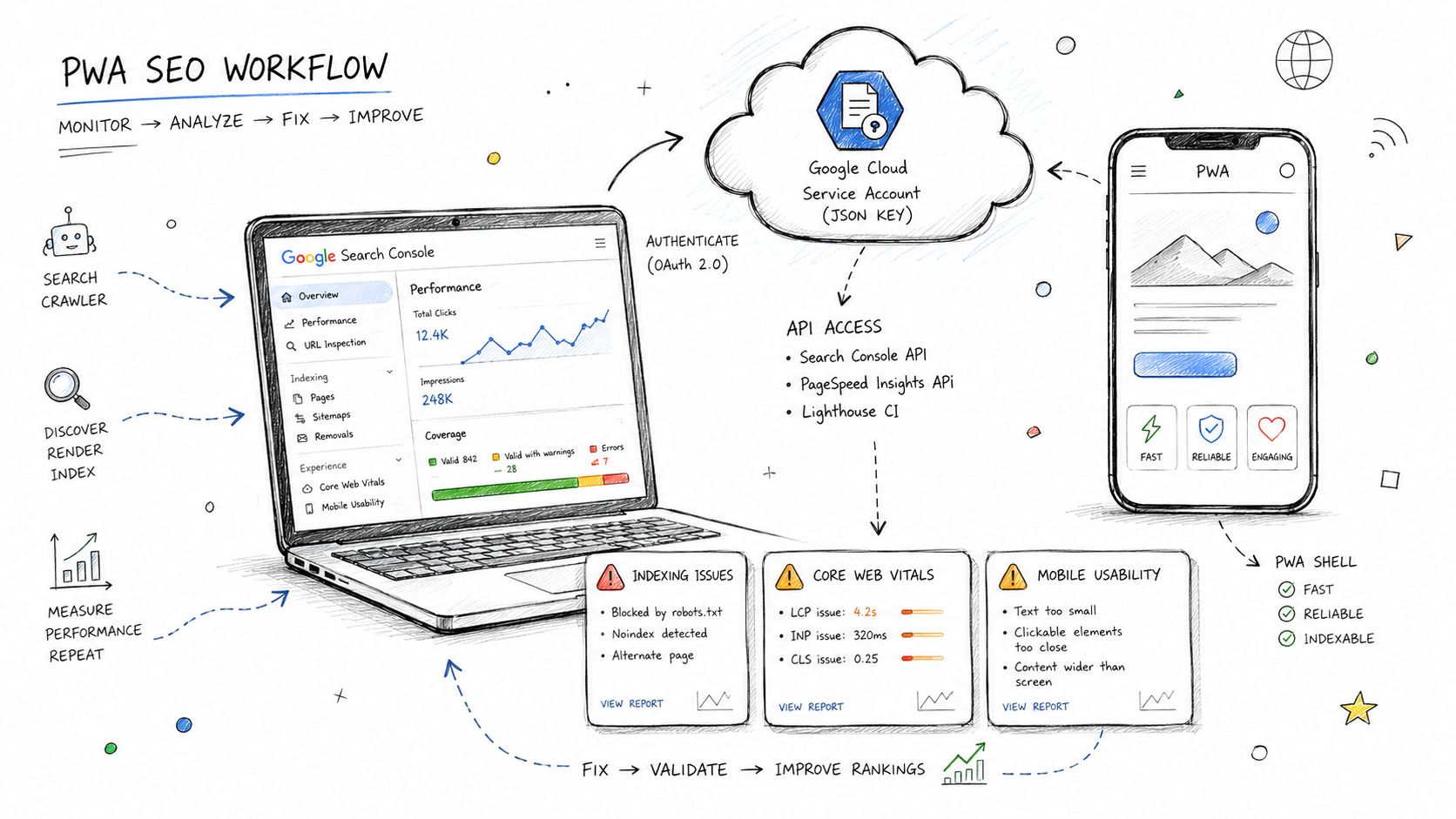
1. Google Search Console API Integration for PWA Indexing & Core Web Vitals Monitoring
A familiar PWA launch problem goes like this. Pages render fine in local testing, routing feels fast, and then a few days after release, Search Console starts reporting excluded URLs, a mobile Core Web Vitals decline, or a sharp drop in impressions on a route set that used to perform well. By the time someone checks the interface manually, the bad deploy has already been crawled.
Search Console API integration fixes the timing problem. It turns indexing and page experience checks into part of release monitoring instead of a weekly review task. For PWAs, that matters because failures rarely hit every route equally. The shell can stay healthy while product pages, docs routes, or filtered category states lose visibility.
Connect the property with least privilege
Set up a dedicated Google Cloud service account for Search Console automation and give it Editor access only on the property you need to monitor. Keep it separate from deployment, analytics, and CMS credentials. That keeps incident scope smaller and makes permission reviews much easier.
Poll on a schedule that matches the product, not your anxiety. Search Console data is delayed and aggregated, so high-frequency polling adds noise and burns quota. I usually cache responses for 24 hours, store the fetch timestamp, and track deltas by route group rather than chasing every single API refresh.
One practical rule saves a lot of confusion. Monitor shell routes and indexable content routes separately. A healthy /app or homepage tells you very little about whether /blog/pwa-seo-guide, /category/running-shoes, or /docs/install is indexed and receiving impressions.
Build route-aware monitoring
Group reporting by template type first. Product detail pages, category pages, articles, docs, local landing pages, and app shell URLs behave differently in both indexing and Core Web Vitals. If you collapse them into one property-level report, you lose the pattern that points to the underlying issue.
Then add device segmentation and release annotations. If mobile clicks fall only on product detail pages after a service worker change, that usually points to a rendering, cache, or route discovery problem, not a sitewide demand shift. That is the kind of diagnosis a generic dashboard misses.
A common example is faceted navigation. An ecommerce PWA may expose URLs like /products?color=blue&size=10, but only some filtered states deserve indexation. Search Console API data helps confirm whether the intended URLs are getting impressions and whether the excluded ones stay excluded. If the wrong set appears, check canonicals, internal links, route registration, and robots handling before you submit anything for reindexing.
For structured validation during triage, pair Search Console checks with a schema markup checker for route-level validation. That combination is useful when a route is indexed but underperforming because the rendered HTML and the metadata output no longer match.
Alert on thresholds you can act on
Set alerts around operational thresholds, not vanity metrics. Good examples include a meaningful drop in indexed pages for a route group, a sudden spike in “Crawled, currently not indexed,” or a sustained mobile LCP regression on templates tied to revenue pages. Those alerts should create tickets with the affected route pattern, deploy window, and owner.
Do not waste time inspecting every URL. For large PWAs, sample the pages that drive clicks, revenue, or link equity, then inspect a rotating set from each major template. That gives you a monitoring workflow you can keep running after launch, which is the point of this entire eight-part PWA SEO system.
2. Structured Data & Schema Markup Optimization for PWA App Shell + Dynamic Content Separation
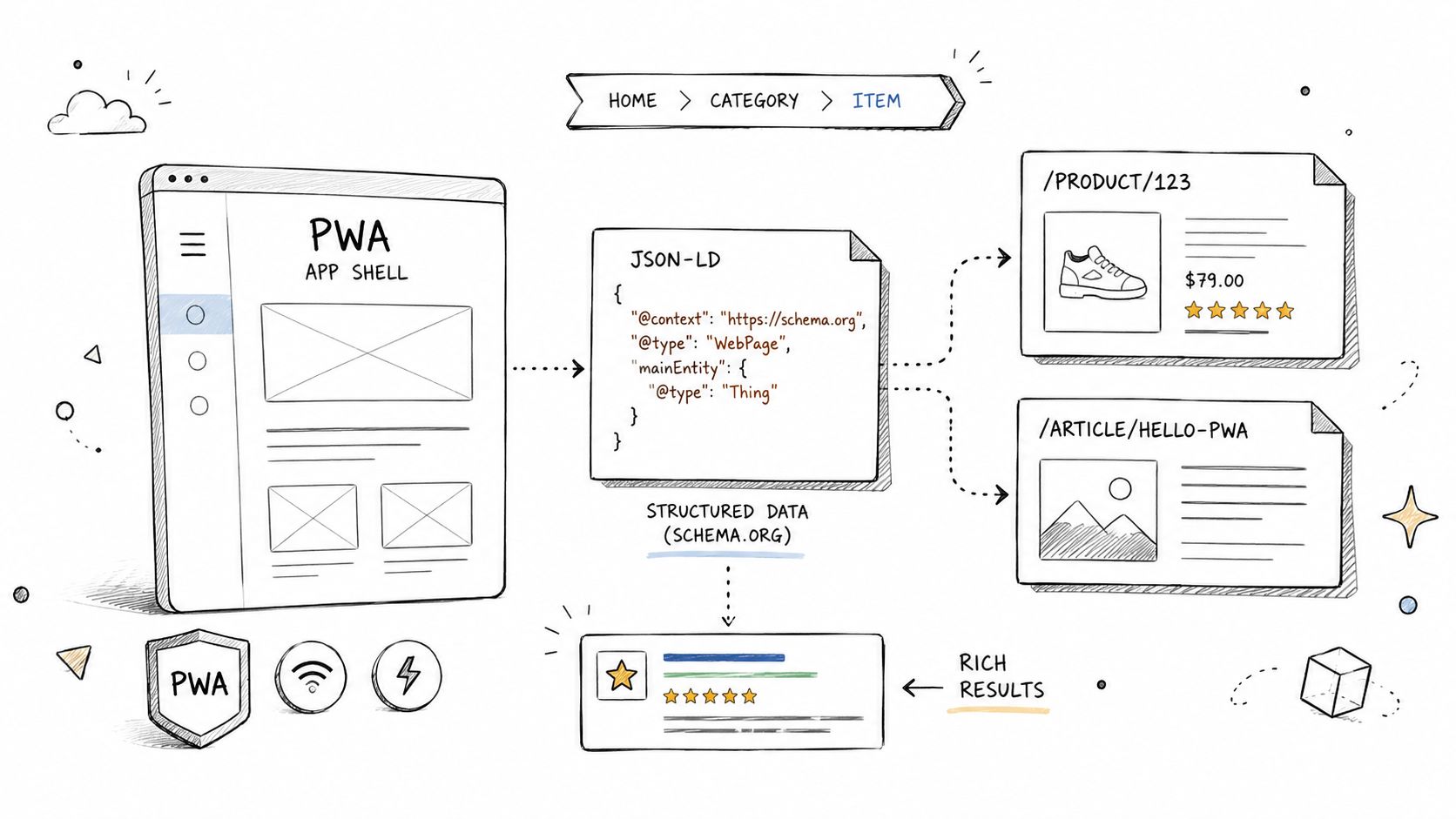
PWAs often blur the line between permanent interface and page-specific content. The navigation, install prompt, footer, and shell layout persist across routes, while the actual indexable entity changes with each view. If your schema follows the shell instead of the content, Google gets mixed signals.
The fix is to model both layers intentionally. Keep shell-level markup stable, and inject route-level schema in the initial document output before hydration. Don't wait for client-side state to decide whether a Product, Article, or BreadcrumbList exists.
Split shell schema from route schema
On an ecommerce PWA, the shell can carry Organization or LocalBusiness markup. Product detail routes should then output Product schema in the <head> during SSR or pre-rendering. On a SaaS PWA, the shell might include site-level navigation or organization signals, while public feature pages or docs routes carry Article or breadcrumb schema tied to the current path.
Put structured data in the head, not the body. In practice, body-injected JSON-LD often “works” in browser inspection and still fails in crawler rendering edge cases.
A reliable workflow looks like this:
- Pre-render critical schema: Use build-time or server-rendered data for public routes so the initial HTML already contains the correct entity markup.
- Version schema changes: Track schema logic in source control and increment internal versions in comments or deployment notes so rollbacks are traceable.
- Validate route by route: Use a schema validator such as Nuwtonic's Schema Markup Checker after deployment, especially on templates with lazy-loaded reviews, ratings, or price blocks.
Validate pre-rendered output not hydrated output
The subtle bug is dynamic fields that change after hydration. Aggregate ratings, inventory text, or author metadata often load from APIs after the route becomes interactive. If the crawler doesn't see those values in the initial HTML, your schema can become incomplete or invalid.
If a value matters for rich results, render a server-side fallback for it. Don't assume hydration will rescue missing markup.
After launch, monitor Search Console enhancement reports for any error count that persists across several days. On one store, I've seen product pages carry valid shell schema on every route while route-level product markup failed unnoticed only on pages with personalization flags. The page looked fine to users. Search engines saw a much thinner entity.
3. Service Worker Cache Strategy Optimization for SEO Performance & Crawlability Balance
Service workers are where PWA speed wins and SEO mistakes often meet. Teams optimize for returning users, then accidentally serve stale HTML to crawlers or delay fresh page content after deployment. Good PWA SEO depends on choosing cache behavior by resource type, not applying one strategy everywhere.
For HTML, freshness usually matters more than raw repeat-visit speed. For versioned assets, aggressive caching is usually fine. The technical baseline is straightforward: use a network-first strategy for HTML requests so Googlebot doesn't get stale cached pages, and use cache-first for static assets with versioned filenames, as explained in this technical guide to PWA SEO and service worker caching.
Use different strategies for HTML and assets
For content routes, start with network-first or carefully controlled stale-while-revalidate, depending on how often the content changes. For CSS, JS, fonts, and images, cache-first is usually the right move if filenames are content-hashed. That lets the browser reuse expensive assets without risking stale textual content.
An ecommerce example makes the trade-off obvious. Product images can use cache-first because image URLs are versioned and don't change unless the asset changes. Inventory and pricing data should hit the network first because users and crawlers need the current state. The same page can use both approaches without conflict.
A practical pattern many teams use:
- HTML requests: Prefer network-first and fall back to cache only if the network fails.
- Static assets: Use cache-first with content-hash filenames so deploys naturally invalidate old bundles.
- Precache scope: Keep precache manifests narrow. Over-precaching route HTML creates freshness problems fast.
Here's a good companion read on broader website performance advice from ARPHost, LLC, especially if your frontend team needs alignment on asset handling.
Watch freshness after deploys
Deploys are where stale content gets sticky. If the new service worker waits too long to activate, users and bots can keep receiving old shells or route responses. Implement skip-waiting and verify that cache cleanup runs against old versions during activation.
Cached HTML should be treated like milk, not canned food. It expires fast.
Measure the effect of cache changes in two directions. Compare Core Web Vitals before and after service worker updates, and also inspect live rendered HTML after release to confirm content freshness. A SaaS PWA can look faster after aggressive prefetching while its mobile LCP gets worse because the browser starts competing requests too early. That's a real trade-off, and it's why service worker changes belong in SEO review.
4. Dynamic Rendering & Pre-rendering Evaluation Matrix Choosing Between SSR SSG and Client-Side Rendering for SEO
The wrong rendering strategy can make a well-built PWA invisible. Public content rendered only in the client often reaches users fine and still underperforms in indexing. Search bots don't fail on purpose. They fail because your critical content arrives too late or in the wrong state.
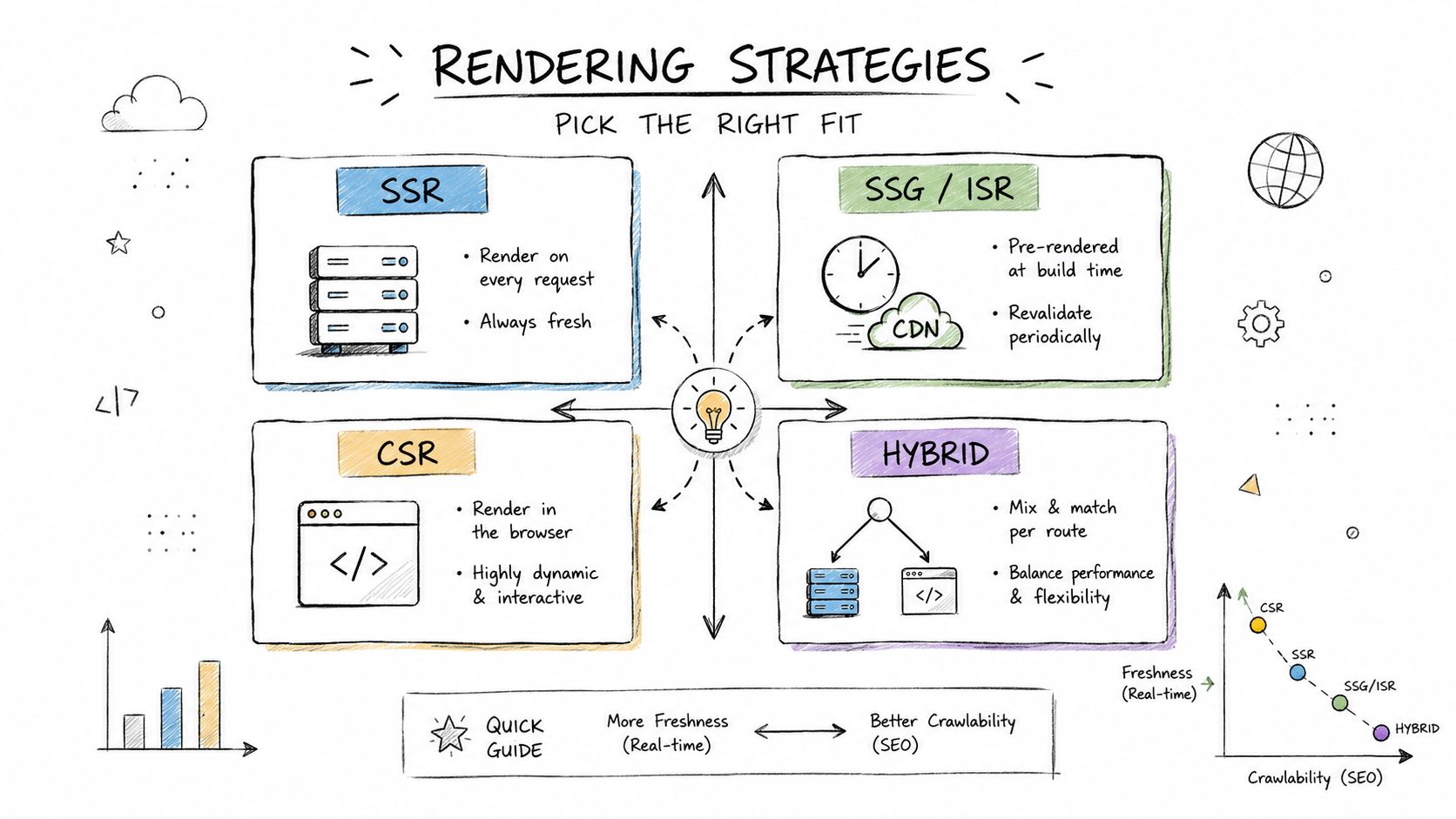
For SEO-sensitive PWA routes, the first load should be rendered on the server or at build time, because client-side JavaScript alone often prevents Googlebot from seeing critical content before hydration, as noted in this guidance on PWA development and indexing. SSR isn't always mandatory for every route, but CSR-only should be reserved for areas you don't need indexed.
Match rendering to content type
Use SSG for stable pages like help docs, about pages, and evergreen landing pages. Use SSR for public pages that must stay fresh, such as pricing, availability-sensitive product pages, and timely editorial content. Reserve CSR for authenticated dashboards, account areas, and tools that shouldn't be indexed.
This hybrid model works well in practice:
- Docs and evergreen marketing pages: Build-time rendering keeps output consistent and cheap to serve.
- Frequently updated public pages: SSR keeps content fresh while still delivering crawlable HTML.
- User-specific interfaces: CSR avoids wasting server render budget on private content.
Test what Googlebot actually receives
SSR is not a silver bullet. A 2025 audit of 1,200 PWAs found that 34% of sites using SSR still had partial indexing because Googlebot's rendering pipeline skipped JavaScript-dependent dynamic content injected after the initial HTML load, according to this analysis of SEO for progressive web apps. That's the kind of failure you only catch when comparing the intended SSR output with the rendered HTML Googlebot processes.
Run route-level tests after every significant rendering change. Don't just test the homepage. Check faceted categories, paginated collections, public docs subpages, and templates that rely on API data during hydration.
Rendering strategy should follow content risk. The more a route drives search demand, the less you should rely on delayed client execution.
Also track mobile LCP by rendering mode. Public routes still need to meet the good threshold for LCP, and rendering choice directly affects that.
5. Canonical URL & Parameter Handling in Single-Page PWAs Preventing Duplicate Index and Query String Confusion
Single-page PWAs multiply URLs easily. Routing libraries preserve query strings, analytics tags append campaign parameters, faceted navigation creates variants, and session state can leak into the address bar. Without canonical discipline, Google ends up choosing URL versions you didn't intend.
The first rule is simple. Don't use hash-based URLs for indexable content. Googlebot ignores the part of a URL after # or #!, which means routes like /#/pricing won't be crawlable as distinct pages, as explained in this PWA SEO note on hash URLs and the History API.
Normalize URLs before the router mutates state
Your canonical logic should run from a normalized route model, not from whatever the current browser URL happens to contain. Strip session IDs and tracking parameters first. Then decide whether the route is self-canonical, folded into a parent page, or canonicals to a paginated series member.
Examples are usually cleaner than rules. /products should usually canonicalize to itself. /products?utm_source=fb should almost always canonicalize to /products. /products?page=2 may need to self-canonicalize if page two contains unique indexable listings and internal links support it.
Use a validator in the deployment flow. Nuwtonic's Canonical URL Checker is useful for spot checks on route variations that come from campaign tags, filters, and client-side state changes.
Handle pagination and tracking parameters differently
Teams often over-canonicalize all parameterized URLs back to the first page or root category. That's a mistake when a parameter defines a distinct indexable view. Pagination, language versions, and versioned docs often deserve separate canonicals. Tracking, sorting noise, and temporary session values don't.
A good router hook updates the canonical tag on every route change before hydration completes. Put the tag in the head and verify that server-rendered output already contains the expected canonical for direct visits.
- Tracking parameters: Strip them before canonical generation.
- Pagination: Keep self-referential canonicals where each page is intended to be indexed.
- Version parameters: Preserve them only when the underlying content differs.
When Search Console reports duplicate, Google-chose-different-canonical behavior on a PWA, the problem is often not the canonical tag alone. It's usually a mix of internal links, sitemap inclusion, and parameter handling all disagreeing at once.
6. Mobile-First Indexing Verification & Desktop Content Parity Testing for PWAs
A familiar PWA failure looks fine in QA and still loses search visibility after launch. The desktop version has full copy, review content, and internal links. The mobile template trims half of it behind UI patterns that depend on JavaScript timing or user interaction. Google indexes the mobile experience first, so that trimmed version becomes the SEO reality.
PWAs often start from a mobile design system, but mobile-first indexing verification is still a separate test track. I treat it as parity work, not just responsive QA. The job is to confirm that mobile Googlebot can access the same primary content, links, metadata, and structured data that desktop users get.
Check rendered parity, not just layout parity
Start with two captures for the same URL: one rendered as mobile, one as desktop. Compare what exists in the DOM after rendering and what ships in the initial HTML. Product copy, FAQs, reviews, specs, breadcrumbs, related links, and heading structure should remain available on both versions.
Hidden content is not automatically a problem. Missing content is.
A common ecommerce pattern is collapsing reviews, specs, or shipping details on mobile to reduce visual load. That can work if the content still renders in the DOM and the section uses accessible markup. Problems start when the mobile build omits the block entirely, fetches it only after a user tap, or swaps crawlable HTML for a client-only component that fails under slower execution conditions.
Use a repeatable verification flow:
- Rendered HTML diff: Compare mobile and desktop output with the same URL set, then flag missing text blocks, internal links, and schema fields.
- Googlebot-style testing: Use mobile user agent testing in Chrome or your rendering pipeline to confirm what a crawler can access without interaction.
- CSS and component review: Inspect
display:none, conditional rendering, accordion logic, and viewport-based component suppression on SEO-relevant modules. - Release checks: Put parity checks into PR review so mobile regressions get caught before deployment.
Test mobile navigation as a crawl system
On PWAs, navigation issues often hurt discovery before they hurt rankings. A docs PWA or ecommerce storefront may push category links, support pages, or related routes into a hamburger menu that only populates after hydration. Users can still browse. Crawlers may see a much thinner internal link graph on first render.
That trade-off is common. Cleaner mobile navigation reduces clutter, but every hidden route has to stay discoverable through crawlable links somewhere in the rendered page set.
Use Nuwtonic's Mobile Opportunity Gap feature to identify pages where mobile visibility lags behind desktop potential. Then inspect the affected templates. In practice, the cause is often one of three things: internal links missing from mobile modules, content blocks deferred too aggressively, or a route transition that works for users but leaves weak crawl signals in the HTML.
Validate on real devices and in monitoring workflows
Browser emulation catches a lot, but real devices expose failures that desktop QA misses. Slow CPUs, memory pressure, and flaky network conditions can delay hydration long enough to suppress content that looked available in local testing. I check at least a small device set before sign-off, especially for templates that depend on accordions, tabs, or client-side route transitions.
This is also where process matters. Teams that already use simplified XML sitemap processes should extend that discipline to mobile parity monitoring. Track a fixed sample of priority URLs, compare mobile and desktop rendered output after releases, and log any drop in internal link count, text length, schema presence, or indexable modules.
A mobile layout can stay compact without stripping ranking signals. Hide clutter. Keep the content, links, and structured data accessible to mobile crawlers.
7. Sitemap & URL Discovery Optimization for Client-Side Rendered PWAs XML vs HTML Sitemaps & Dynamic Route Registration
Client-side routing makes route creation easy and route discovery easy to forget. If URLs are generated from APIs, user-generated content, or faceted combinations, some of your best pages may never surface through normal crawling unless you explicitly register them.
This matters more on PWAs because route transitions can feel instant to users while leaving very little traditional crawl path in the initial HTML. Search discovery still needs stable URLs, internal links, and sitemap coverage.
Generate sitemaps from public route sources
Build XML sitemaps from the same public route sources your app uses to generate pages. Don't dump raw database tables into a sitemap generator. Use the route allowlist your frontend exposes, plus rules for excluding private, temporary, or low-value parameter combinations.
A good setup for a content PWA often includes one static sitemap for evergreen URLs and additional dynamic sitemaps generated from the content API. For ecommerce, split product, category, and editorial routes into separate sitemap files so monitoring is easier and stale sections are easier to isolate.
- Use content update dates: Set
lastmodto the actual content update date, not the crawl date. - Cache generation: Generate once per day or on demand after meaningful content changes, not per request.
- Use sitemap indexes: They keep large route sets manageable and easier to debug.
If your team needs implementation help, this overview of simplified XML sitemap processes is a useful operational reference.
Support XML with HTML discovery
XML sitemaps don't replace internal linking. Keep an HTML sitemap or browsable index pages for important route clusters like docs, categories, brands, or location pages. This is especially useful when your frontend router creates deep states that users can reach through search and in-app navigation but bots may not discover efficiently from the homepage alone.
On a docs PWA, I prefer a plain HTML library page with crawlable links to every major section and article family. On stores, category hubs and brand indexes can play the same role. This also gives you a human-readable place to verify which routes the business considers public and indexable.
8. Implementations & Tooling Summary for PWA SEO Strategies
The hardest part of PWA SEO isn't knowing the tactics. It's operationalizing them so rendering, schema, cache rules, canonicals, and discovery don't drift apart every release. Teams usually fail when SEO lives in a slide deck while the app ships from CI.
The fix is boring in the best way. Treat SEO like production configuration with tests, alerts, ownership, and rollback paths.
Centralize monitoring and remediation
Put Search Console signals, Core Web Vitals tracking, Lighthouse CI, schema validation, sitemap validation, and log-based route checks into one dashboard. You need one place where a developer or SEO lead can answer four questions quickly: what changed, which routes were affected, whether users were affected, and whether Googlebot was affected.
For automation, connect alerting and remediation flows with something your team can maintain. The production-ready n8n approach for SEO automation workflows is a practical pattern for wiring API checks, webhook triggers, and human review into one pipeline.
A useful operational split looks like this:
- Pre-deploy checks: Lighthouse CI, schema validation, canonical checks, and route rendering tests.
- Post-deploy checks: Search Console trend monitoring, sitemap fetch validation, and live rendered HTML spot checks.
- Remediation hooks: Re-request indexing, purge affected caches, and push a hotfix service worker when freshness breaks.
Treat SEO rules as deployable config
Parameter allowlists, canonical rules, sitemap inclusion logic, robots directives, and schema templates should all live in source control. That makes changes reviewable and auditable, especially when multiple teams own the PWA.
Least-privilege access matters here too. Search Console editor rights should stay scoped to target properties, and deploy rights for cache or robots changes should require review. Most serious PWA SEO issues aren't caused by one big architectural mistake. They come from small mismatches between the app router, the cache layer, and the crawl layer.
When teams document those rules and test them in CI, SEO stops being a cleanup task after launch. It becomes part of how the app ships.
PWA SEO, 8-Point Strategy & Tools Comparison
| Solution | Core capabilities | Primary benefit | Target audience | Effort & ROI |
|---|---|---|---|---|
| Google Search Console API Integration (PWA Indexing & Core Web Vitals) | OAuth2 service account, URL inspection automation, device‑segmented CWV queries, 365‑day sync | Early detection of indexing & CWV regressions; automated remediation workflows | SEO/devops for PWAs, high‑traffic e‑commerce & apps | Intermediate (2–3w) · ROI: High, catch issues days earlier |
| Structured Data & Schema Markup Optimization (PWA shell + dynamic content) | Dual‑schema JSON‑LD, hydration state markers, validation & rich snippet tracking | Increases rich results, AI citations, sitelinks / knowledge panel eligibility | SEO engineers, content teams, e‑commerce & publishers | Intermediate (1–2w) · ROI: Very High, CTR & AI visibility gains |
| Service Worker Cache Strategy Optimization | Cache‑First / Network‑First / SWR patterns, cache versioning, hit/miss monitoring | Improves Core Web Vitals while preserving freshness and crawlability | Frontend engineers, performance & SEO teams | Intermediate (2–3w) · ROI: Very High, direct CWV & freshness impact |
| Dynamic Rendering & Pre‑rendering Evaluation Matrix (SSR/SSG/ISR/CSR) | Decision matrix, hybrid patterns, ISR/SSR/SSG configs, hydration optimization | Optimal rendering per content type → better crawlability, freshness, performance | Architects, engineering leads, SEO strategy teams | Intermediate‑Advanced (3–4w) · ROI: Very High, affects indexing speed & CWV |
| Canonical URL & Parameter Handling (SPA/PWA) | Dynamic canonical injection, parameter normalization, pagination & hreflang rules | Prevents duplicate indexing, consolidates ranking signals, saves crawl budget | SEO engineers, SPA teams, content ops | Intermediate (1–2w) · ROI: High, prevents ranking dilution |
| Mobile‑First Indexing Verification & Desktop Parity Testing | DevTools emulation, Fetch as Google diffs, Lighthouse mobile CI, usability checks | Ensures mobile content parity and prevents mobile‑only regressions that harm rankings | QA, mobile/frontend teams, SEO | Intermediate (2–3w) · ROI: High, mobile indexing is primary signal |
| Sitemap & URL Discovery Optimization (CSR PWAs) | Dynamic XML/HTML sitemaps, sitemap index, RSS feeds, automated submission & monitoring | Faster discovery and prioritized crawling of dynamic routes | CMS owners, content sites, SEO teams | Intermediate (varies) · ROI: High, speeds indexation and discovery |
| Implementations & Tooling Summary (PWA SEO) | Consolidated tech stack, monitoring & webhook alerts, CI automation, remediation hooks | Centralized operations, automated remediations, reduced MTTR for SEO regressions | Platform/ops teams, SEOs managing workflows | Varies (1–4w per area) · ROI: Operational efficiency & lower time‑to‑fix |
Putting PWA SEO Into Action
A PWA launch often looks fine on the surface. Pages load fast in a warm browser session, app navigation feels smooth, and the team signs off. Then impressions flatten, key routes stay excluded or partially indexed, and nobody can agree whether the problem is rendering, canonicals, cache freshness, or route discovery.
That is why PWA SEO has to be run as an operating system, not a one-time setup. The eight tactics in this article work together. Search Console monitoring shows you where indexing or Core Web Vitals slip. Rendering decisions determine what Googlebot can see. Schema, canonical rules, service worker behavior, mobile parity checks, and sitemap coverage all shape whether an important route gets crawled, understood, and trusted.
Start with the pages that already drive revenue or qualified traffic. Typically, that means product detail pages, category templates, pricing pages, feature pages, location pages, and high-value documentation. Validate each route in a fixed order: initial HTML response, render output, canonical target, indexability directives, structured data presence, mobile parity, then cache freshness. I use that sequence because it catches the failures that cause the most damage in production and keeps teams from chasing Lighthouse scores while indexable content is missing.
Use the list strategically.
If engineering time is tight, pick one tactic from this article for each failure class. Use Search Console API exports for indexing and CWV trends. Use schema testing on shell versus hydrated content for rich result eligibility. Review service worker cache rules on HTML separately from static assets. Choose SSR, SSG, pre-rendering, or CSR by route type instead of forcing one rendering model across the whole application. Lock down canonical and parameter behavior before campaign URLs and faceted states create duplicates. Test mobile HTML against desktop output in CI. Keep dynamic routes discoverable through XML and HTML sitemaps, not just client-side navigation.
The trade-offs are real. SSR usually improves crawlability on public pages, but it raises infrastructure and debugging costs. Aggressive caching improves repeat visits, but stale HTML can keep updated copy, pricing, or canonicals out of Google's fetches. CSR can be fine for logged-in or low-value app states, but public landing pages and product routes need more predictable HTML output.
Performance still matters, but only in context. A fast shell with incomplete content is still an SEO problem. A clean canonical on a route Google rarely discovers is still an SEO problem. The win comes from combining speed, discoverability, render completeness, and content parity into one release workflow with monitoring attached.
That is also the practical value of this eight-point framework. It gives SEO, frontend, platform, and QA teams a shared checklist, plus a way to assign ownership and verify results after deployment instead of arguing from assumptions.
Nuwtonic helps teams turn this kind of PWA SEO work into a repeatable system. It connects with Google Search Console, surfaces ranked technical issues, highlights mobile and AI visibility gaps, and gives teams a reviewable way to fix schema, metadata, canonicals, and content structure before problems spread across a release. If you manage multiple sites, run an in-house SEO program, or need one workspace for audits, content operations, and execution, Nuwtonic is built for that workflow.


