
Look, Shopify is a brilliant e-commerce platform, but out of the box, its architectural choices can make a seasoned SEO specialist weep. If you are running an online store, you cannot rely solely on basic on-page optimization. To win in search engine rankings in 2026, you must roll up your sleeves and address the underlying infrastructure. This comprehensive guide to technical seo for shopify will show you exactly how to optimize your store's crawlability, page speed, and indexing structure without breaking your theme.
Key Takeaways and Quick Summary
TL;DR Summary
This guide provides actionable, developer-friendly solutions to Shopify's most notorious technical SEO flaws. We cover fixing duplicate collection URLs, customizing robots.txt with Liquid logic, optimizing Core Web Vitals by auditing apps, implementing advanced JSON-LD schema markup, and managing 301 redirects at scale.
Key Takeaways
• Duplicate URLs are Shopify's default state: Shopify automatically generates multiple paths for the same product, requiring custom Liquid fixes to avoid ranking dilution.
• Crawl budget is easily wasted: Built-in tag filters and search pages will eat up your crawl budget unless you explicitly block them in your robots.txt file.
• Apps are the real speed killers: While many merchants stress over image sizes, third-party app scripts are almost always the primary bottleneck for Core Web Vitals.
• Schema is your secret weapon: Properly configured JSON-LD schema markup is essential for rich search results, yet it is routinely neglected by most store owners.
• Native sitemaps are automated but limited: Shopify auto-generates your XML sitemap, but you must manually submit it to Google Search Console (GSC) to ensure reliable indexing.
Table of Contents
• Resolving Shopify's Inherent Duplicate Content Architecture
• Controlling Search Crawlers: Robots.txt and XML Sitemaps
• Core Web Vitals and Performance Optimization
• Structured Data and Rich Snippets Strategy
• Handling URL Migrations and Crawl Errors
• Technical SEO for Shopify FAQ
• Sources and References
Resolving Shopify's Inherent Duplicate Content Architecture
The Mechanics of the Collection URL Dilemma
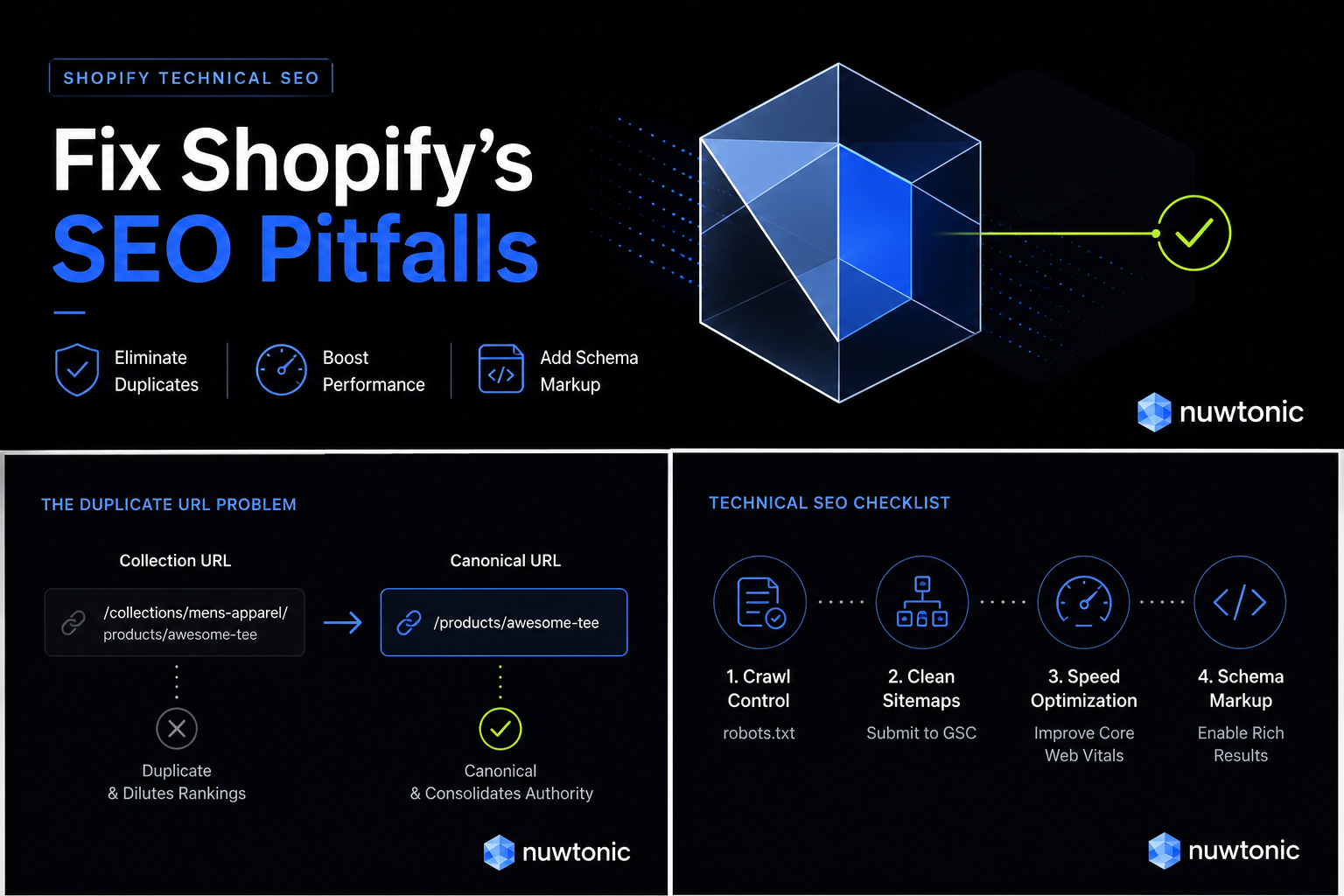
Honestly, this is the single most frustrating aspect of Shopify's default setup. When you add a product to a collection, Shopify generates two distinct URLs for that exact same product:
The canonical root path:
/products/your-awesome-productThe collection-specific path:
/collections/mens-apparel/products/your-awesome-product
According to Shopify’s official SEO guidelines, having duplicate content across multiple URLs can severely harm your search engine rankings because search engines do not know which version to prioritize . While Shopify attempts to solve this by adding canonical tags pointing back to the root path, Google frequently ignores canonical tags if the internal linking structure of the site points heavily to the collection-specific URLs. This results in crawl budget waste and split link equity.
How to Override Default Canonical Tags Using Liquid Code
To fix this, we need to modify the site's theme files so that internal links point directly to the canonical /products/ URL rather than the nested /collections/.../products/ URL.
I once worked with a medium-sized fashion merchant whose collection filters had created thousands of indexable, duplicate tag URLs. Their organic traffic had completely plateaued. By editing the collection template file in their Liquid code, we forced the theme to output only the clean root URL.
Here is what you need to look for in your product-grid-item.liquid or product-card.liquid file:
liquid
{% comment %} Replace this default link structure {% endcomment %}
{% comment %} With this clean, direct structure {% endcomment %}
By removing the | within: collection filter, you ensure that every internal link across your collection pages goes straight to the master product page. This simple adjustment consolidates all your internal authority and helps Google index your primary product pages quickly.
The Product Variant Indexing Matrix
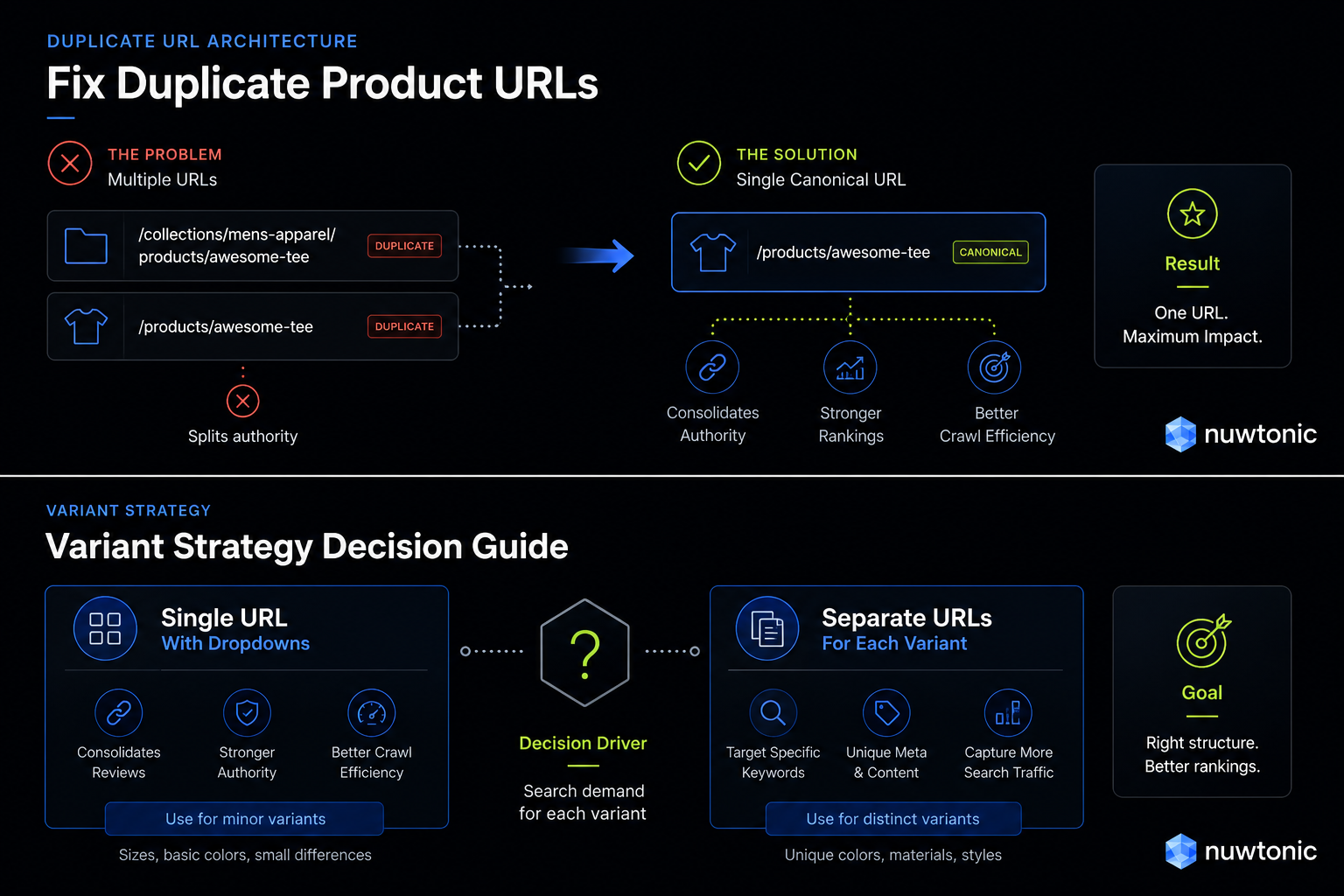
When you offer products in multiple colors, sizes, or configurations, you face a critical architectural decision: should you use separate product URLs for each variant, or use a single product page with a dropdown selector? This decision directly impacts how Google crawls and indexes your catalog.
Variant Strategy | Best For | SEO Pros | SEO Cons | Decision Criteria |
|---|---|---|---|---|
Single URL with Dropdowns | Standard products with minor variations (e.g., sizes, basic colors). | Consolidates all reviews, backlinks, and authority into a single high-performing URL. | Cannot target specific long-tail keywords for individual variants in search. | Choose this if search volume for specific variant colors or sizes is negligible. |
Separate Variant URLs | Highly distinct options with unique search volume (e.g., "Red Leather Jacket" vs "Black Leather Jacket"). | Allows you to write unique meta tags, alt text, and product descriptions for each variant . | Risk of duplicate content issues if descriptions are not sufficiently unique; dilutes link equity. | Choose this if users actively search for the specific variant attributes separately. |
Controlling Search Crawlers: Robots.txt and XML Sitemaps
Customizing Robots.txt with Liquid Logic
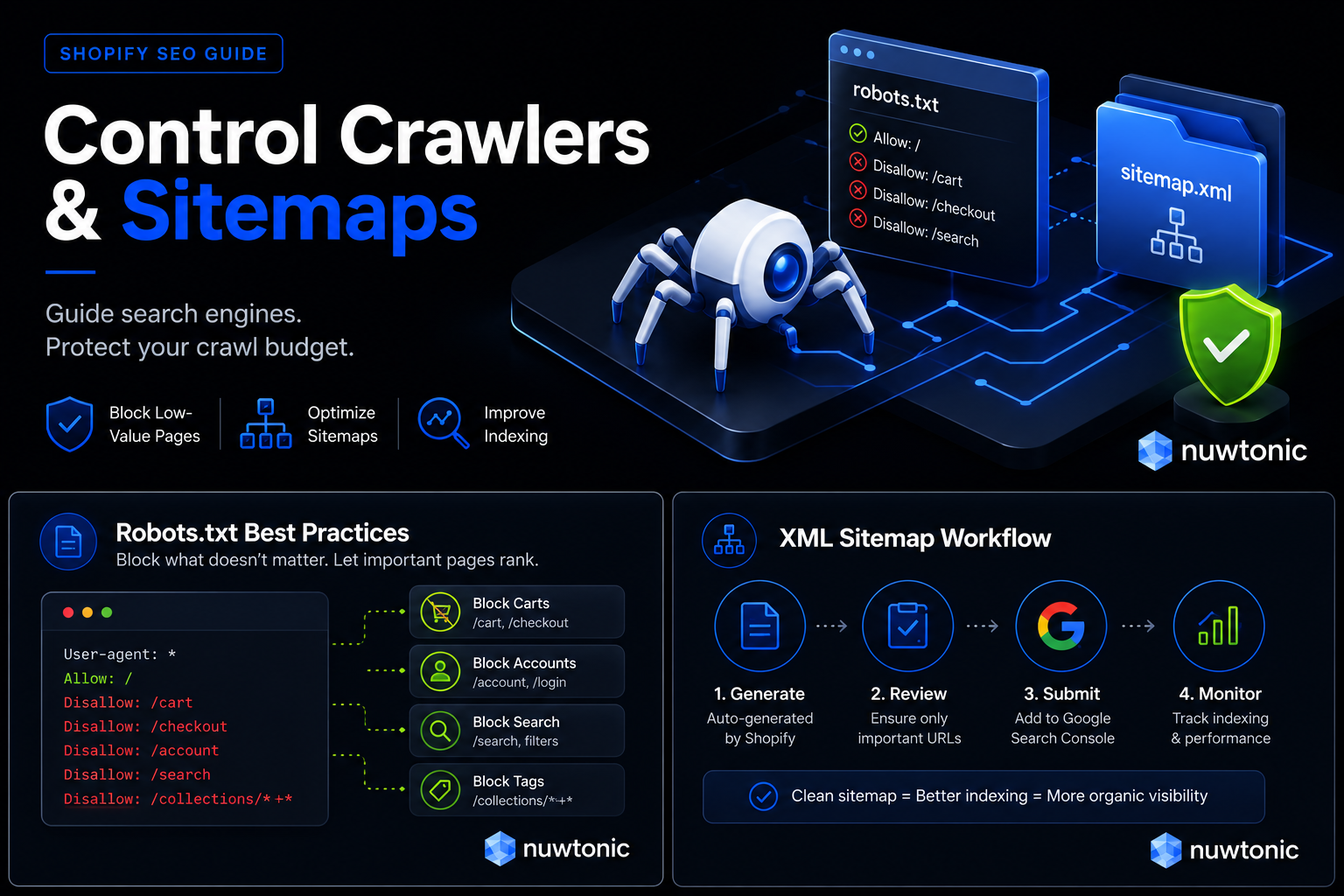
For years, Shopify did not allow merchants to edit the robots.txt file. Thankfully, that limitation is gone. You can now create a custom robots.txt.liquid template in your theme to gain precise control over your crawl budget.
Look, you do not want search engine bots wasting their limited crawl budget indexing your shopping cart, internal search results, or endless tag archives. A standard technical recommendation is to block low-value URLs like /cart, /checkout, and internal tag queries to optimize how Google crawls your site .
Here is how you can use Liquid logic to dynamically inject rules into your robots.txt file:
liquid
User-agent: *
Disallow: /checkout
Disallow: /carts
Disallow: /account
Disallow: /collections/+
Disallow: /collections/%2b
Disallow: /search
This snippet blocks the standard checkout and cart paths, but also crucially blocks tag combinations (/collections/*+*), which prevent infinite crawl loops generated by faceted navigation filters.
Streamlining XML Sitemaps in Google Search Console
Shopify automatically generates a fully functional XML sitemap located at yourstore.com/sitemap.xml. It acts as an index of indexes, pointing to separate sitemaps for your products, collections, pages, and blog posts.
While the sitemap is created automatically, Google will not find it instantly. You must manually submit your sitemap to Google Search Console (GSC) to ensure new products are discovered and indexed as soon as they go live.
I always recommend setting up GSC the day you launch your store. Once verified, navigate to "Sitemaps" in the sidebar, enter sitemap.xml, and click submit. Monitor this dashboard regularly to spot any crawl errors or indexation anomalies before they impact your sales.
Managing Low-Value Tag and Search Result Pages
Faceted navigation is a conversion booster but an SEO nightmare. If your Shopify theme allows users to filter collections by size, color, or price, it likely generates unique URLs for every single selection. If search engines find and crawl these URLs, you will quickly face massive duplicate content issues.
To prevent this, ensure that your collection filter pages utilize canonical tags pointing back to the main collection page. If you notice that Google is still indexing these filtered pages, you can add a meta robots noindex tag specifically to pages that contain query parameters. In your theme.liquid layout file, add this logic inside the <head> section:
liquid
{% if template contains 'collection' and current_tags %}
{% endif %}
This ensures that while bots can follow the links to find products, they will not index the low-value, filtered collection views.
Core Web Vitals and Performance Optimization
The Truth About Page Speed and Theme Bloat
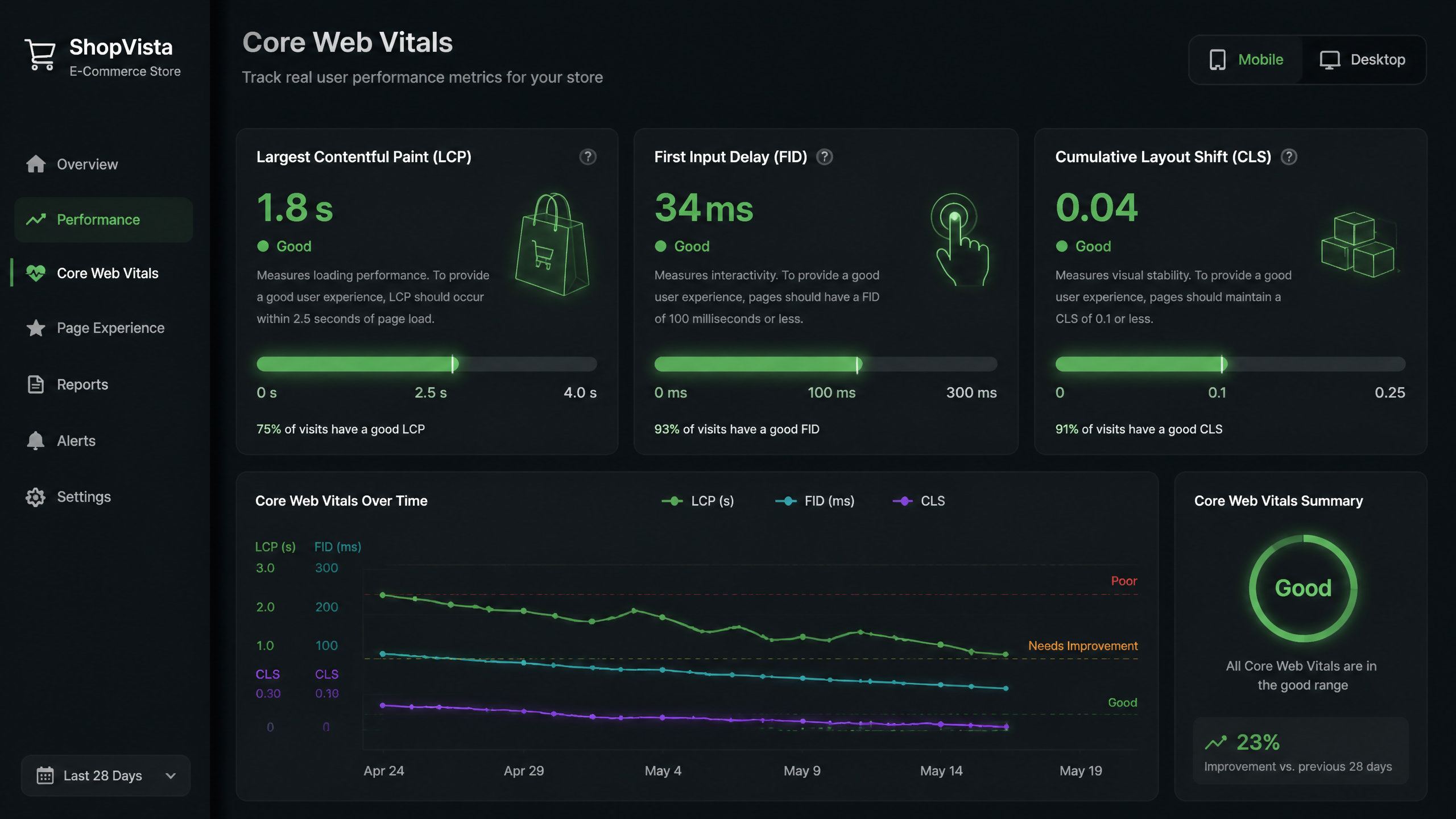
Let's get something straight: the page speed issue is often overhyped; focusing on key elements tends to yield better results than trying to shave off every millisecond. You do not need a perfect 100/100 score on Google PageSpeed Insights to rank well. Instead, you need to provide a stable, fast user experience that satisfies Google's Core Web Vitals (LCP, FID, and CLS) .
I've seen many merchants waste time on fancy themes with complex video backgrounds and animations, when simple, clean designs often perform significantly better for both SEO and conversion rates. Keep your code clean, limit visual clutter, and prioritize the mobile experience above all else.
Identifying and Removing Unused CSS with PurgeCSS
As you install and uninstall themes or add custom styles, your theme's stylesheet becomes bloated with dead code. This unused CSS increases file sizes and delays page rendering, directly hurting your Largest Contentful Paint (LCP) score.
To clean this up, developers can use a tool like PurgeCSS to scan your theme templates and identify unused CSS selectors . Once identified, you can safely remove these dead styles from your main CSS file (typically theme.css or application.css), drastically reducing the code payload sent to mobile browsers.
Image Compression and the WebP Standard
Images are almost always the heaviest assets on an e-commerce site. If you upload uncompressed, raw product photos, your page speed will plummet.
To keep your site fast, follow these image optimization rules:
• Target Size: Compress every product image to under 200 KB before uploading.
• Format: Use WebP or modern AVIF formats, which provide superior compression compared to traditional JPEG and PNG formats.
• Lazy Loading: Ensure your theme uses native lazy loading (loading="lazy") for images below the fold so they do not block the initial page render.
• Alt Text: Always write descriptive alt text for your images to improve accessibility and rank in Google Image Search.
Auditing Third-Party App Scripts
Every time you install a Shopify app—whether it is a review widget, a pop-up builder, or a live chat tool—it injects third-party scripts into your theme. Even after you uninstall an app, its leftover code often remains in your theme.liquid file, silently dragging down your loading times.
In my experience, limiting apps is the single most effective way to improve Core Web Vitals . One of my past clients had 28 active apps. By conducting a thorough audit, we realized they only used 10. Removing the 18 unused apps and cleaning up their residual JavaScript immediately cut their mobile load times in half.
Structured Data and Rich Snippets Strategy
Why Schema Markup Is Your Undervalued Asset
Most Shopify store owners overlook the importance of schema markup — it can really boost your visibility in search results. Structured data acts as a translator, helping search engines understand the exact contents of your page so they can display eye-catching rich snippets (like star ratings, prices, and stock availability) directly in search results.
By helping Google understand your products through machine-readable code, you increase your organic click-through rates (CTR) and drive highly qualified traffic to your store .
Deploying and Validating JSON-LD Structured Data
To get rich snippets, your product pages must output valid JSON-LD schema markup that includes critical structured data properties .
[{
"@context": "]({{ product.url }})https://schema.org/",
"@type": "Product",
"name": "Premium Leather Boots",
"image": "https://yourstore.com/cdn/boots.jpg",
"description": "Handcrafted premium leather boots built to last.",
"offers": {
"@type": "Offer",
"priceCurrency": "USD",
"price": "189.00",
"availability": "https://schema.org/InStock"
}
}
Ensure your schema code dynamically pulls in your Shopify product variables (like product.title, product.price, and product.description). Once implemented, always run your URLs through the Google Rich Results Test to verify that your JSON-LD is valid and free of errors.
Enhancing Navigation with Breadcrumbs
Breadcrumbs are small, clickable navigation links (e.g., Home > Clothing > Shoes) that sit at the top of your product and collection pages. They are essential for improving site navigation for users and providing clear context about your site hierarchy to search engine crawlers .
Make sure your breadcrumbs are marked up with BreadcrumbList schema. This allows Google to display clean, hierarchical search snippets instead of ugly, long URL strings.
Handling URL Migrations and Crawl Errors
Managing 301 Redirects at Scale
When you migrate to Shopify from another platform, or when you restructure your collections, your URL paths will change. If you do not point the old URLs to the new ones, users and search engines will hit "404 Not Found" pages, destroying your hard-earned SEO authority.
According to Shopify’s documentation, 301 redirects must be set up manually when moving or discontinuing products to preserve your traffic and search rankings.
Shopify has a built-in URL Redirects tool (found under Online Store > Navigation > URL Redirects) where you can map old paths to new ones. If you are migrating hundreds of pages, you can import them in bulk using a CSV file. Just be careful to avoid redirect chains (e.g., Page A redirecting to Page B, which redirects to Page C), as these degrade site performance and exhaust crawl budgets.
Handling Deleted Products and 404 Page Audits
In e-commerce, products sell out or get discontinued constantly. How you handle these deleted pages is critical for technical SEO.
Instead of letting deleted product pages default to a generic 404 error, use this decision matrix:
• Seasonal Products: Keep the page live, state that the item is temporarily out of stock, and use internal links to suggest similar products .
• Permanently Discontinued Products (with Search Traffic): Create a 301 redirect pointing to the most relevant parent collection page or a highly similar replacement product .
• Discontinued Products (No Traffic or Backlinks): Let the page return a clean 404 or 410 status code so Google knows to remove it from the index permanently.
Regularly monitor the "Indexing" report in Google Search Console to catch unexpected crawl errors and resolve them before they impact your site's overall search performance.
Technical SEO for Shopify FAQ
Resolving Duplicate Product URL Issues
How do I fix the duplicate URL issue between /products/x and /collections/y/products/x in Shopify?
To fix this issue, you need to edit your theme's Liquid files (usually product-grid-item.liquid or product-card.liquid) and remove the | within: collection filter from product links. This ensures that all internal links point directly to the clean /products/x canonical URL, consolidating your search authority.
Does Shopify automatically generate canonical tags, and when should I override them?
Yes, Shopify automatically generates canonical tags for products, collections, and pages. However, because Shopify also generates duplicate collection-nested URLs, these automatic tags are not always enough to prevent indexing issues. You should override or adjust your theme's internal linking structure so that the links themselves match the canonical URLs, preventing search engines from getting confused.
Is it better to use a single product page with variants or separate product pages for SEO in Shopify?
This depends entirely on search volume. If users search for specific variants individually (e.g., "men's black leather boots size 10"), creating separate product pages allows you to target those specific long-tail keywords. If the variations are minor (like size options), stick to a single product page with dropdowns to consolidate your backlink authority and reviews.
Managing Robots.txt and Crawl Budgets
Can I customize the robots.txt file in Shopify to block internal search pages?
Yes. You can customize your robots.txt file by creating a robots.txt.liquid file in your Shopify theme templates. This allows you to write custom disallow rules to block search result pages (/search) and tag archives, saving your valuable crawl budget for high-value product pages .
How do I submit my Shopify sitemap to Google Search Console and ensure it updates automatically?
Shopify automatically generates and updates your sitemap at yourstore.com/sitemap.xml. To submit it, log into Google Search Console, navigate to the "Sitemaps" section, type sitemap.xml into the submission field, and click submit. Google will periodically recrawl this file to find new products and collections.
Does Shopify support international SEO (hreflang) tags natively, or do I need an app?
Shopify supports international SEO natively if you use Shopify Markets to manage multi-language and multi-currency localized subfolders (e.g., yourstore.com/fr). Shopify will automatically generate the correct hreflang tags in your theme's header. If you are using separate Shopify expansion stores for different countries, you will need to manually write Liquid code or use an app to map your hreflang tags across stores.
Speed, App Auditing, and Schema Validation
How do I remove unused CSS and JavaScript from a Shopify theme to improve Core Web Vitals?
To remove unused CSS, you can use developer tools like PurgeCSS to analyze your theme templates and identify unused style blocks . For JavaScript, you must audit your third-party apps, disable those you do not use, and manually clean up any leftover script tags left behind in your theme.liquid file.
What is the best image format (WebP vs. JPG) and size limit for Shopify product images?
WebP is the recommended format for Shopify because it provides excellent image quality at a fraction of the file size of JPG or PNG. You should aim to compress all product images to under 200 KB before uploading them to your store .
How do I verify that my Shopify store’s JSON-LD schema is valid for Google?
To verify your structured data, copy the URL of a product page and paste it into the official Google Rich Results Test tool. The tool will highlight any errors or missing required fields in your Product or Breadcrumb schema so you can fix them in your theme code .
Sources and References
Official Platform Documentation
• Shopify SEO Guidelines: Official documentation stating that unique, high-quality content is required to prevent duplicate content issues and preserve rankings.
• Shopify Help Center: Instructions on configuring manual 301 redirects when moving or discontinuing products to preserve organic search authority .
• Shopify SEO Checklist: Guide on submitting sitemaps to Google Search Console and optimizing meta descriptions to stay under 105 characters to avoid truncation .
Industry Benchmark Guides
• 2025 Shopify Technical Optimization Study: Comprehensive analysis of image compression targets (under 200 KB), PurgeCSS implementation, and robots.txt customization .
• Core Web Vitals Benchmark Report: Industry insights on the performance impact of third-party Shopify apps and theme selection on site speed .



