When optimizing enterprise websites at Nuwtonic, we consistently find digital marketing teams misunderstanding the difference between alt text and title text. This confusion leads to bloated code, missed ranking opportunities in Google Images, and significant accessibility compliance risks.
In 2026, as search engines rely heavily on computer vision and machine learning to understand visual content, providing accurate HTML image metadata is no longer optional. You must understand exactly how these two attributes function, when to deploy them, and how they impact both human users and AI crawlers.
TL;DR Summary
• Alt Text (Alternative Text) is a mandatory HTML attribute that describes an image for search engines and screen readers. It directly impacts SEO and accessibility compliance.
• Title Text is an optional global attribute that provides supplementary information, displaying as a tooltip on desktop hover. It has minimal SEO value and does not render on mobile devices.
Table of Contents
The Core Difference Between Alt Text and Title Text
How Search Engines and AI Interpret Image Metadata
Accessibility Standards and Legal Compliance
Strategic Implementation for SEO ROI
Frequently Asked Questions (FAQ)
The Core Difference Between Alt Text and Title Text
Defining the HTML Attributes
To understand the distinction, we must look at the raw HTML specification. According to the W3C HTML5 specification, the alt attribute is a required component of the img element. It provides a text alternative that serves an equivalent function to the image for users who cannot view it.
Conversely, the title attribute is a global attribute providing advisory information about an element. It is not specific to images and can be applied to links, paragraphs, or buttons. In our analysis, treating these two attributes interchangeably is the most common technical error content publishers make.
Visual Behavior Across Devices
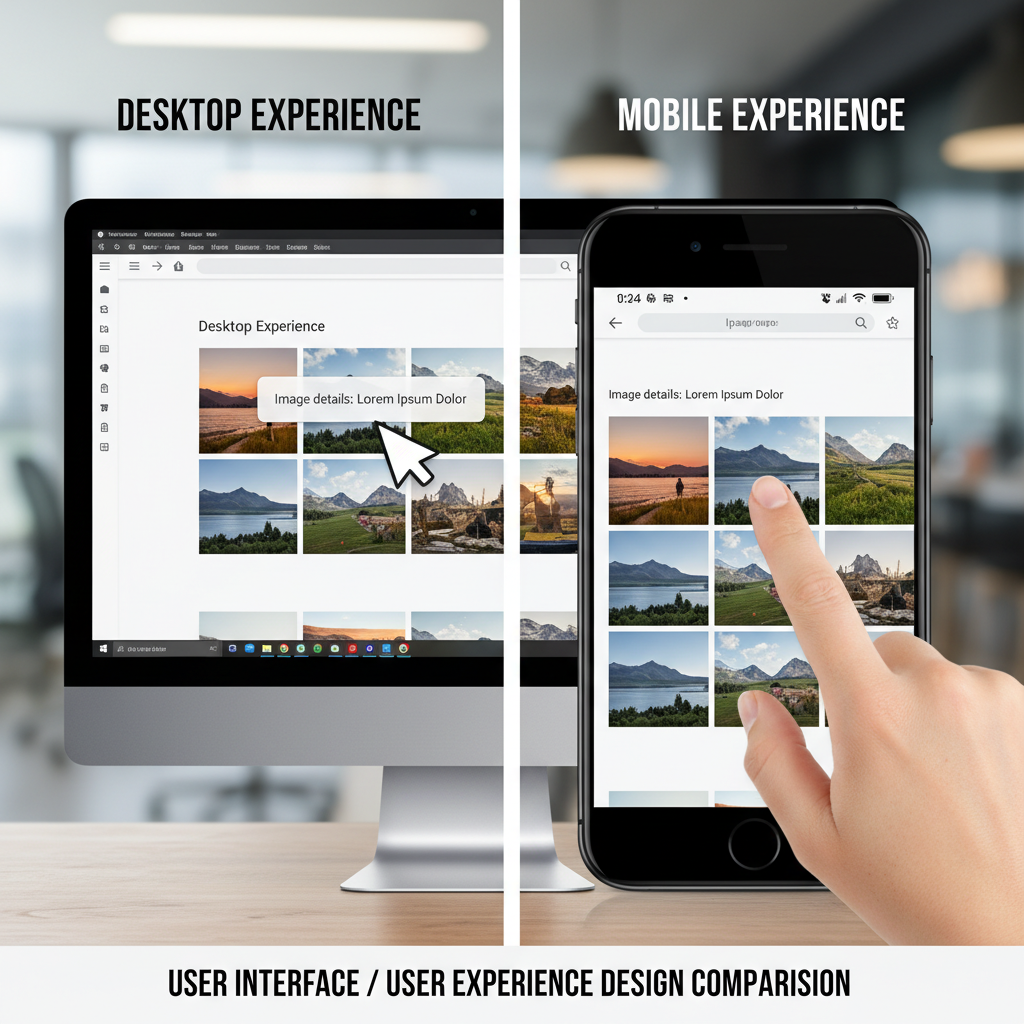
The user experience of these attributes varies drastically depending on the device. Title text triggers a tooltip—a small pop-up box—when a user hovers their mouse cursor over the image on a desktop browser.
However, because touch devices do not have a native "hover" state, title text is entirely invisible to mobile users. With mobile devices driving over 60% of global web traffic, optimizing heavily for an attribute that most of your audience will never see is an inefficient use of resources. Alt text, meanwhile, remains invisible to sighted users unless the image fails to load, at which point it displays as fallback text.
The Semantic Purpose in Modern Web Design
Semantic HTML requires using markup to convey meaning, not just presentation. Alt text carries the semantic weight of the image's content. If you remove the image, the alt text should seamlessly bridge the gap in the narrative. Title text merely offers a supplementary comment or a non-essential caption.
Feature | Alt Text ( | Title Text ( |
|---|---|---|
Primary Function | Functional replacement for the image | Advisory tooltip on desktop hover |
SEO Impact | High (Confirmed image search ranking factor) | Low to None (Not a direct ranking signal) |
Accessibility | Mandatory for WCAG compliance | Optional; ignored by most screen readers |
Mobile Visibility | Reads via screen readers; displays if image breaks | Invisible (No hover state on touch screens) |
HTML Requirement | Required for all | Optional global attribute |
How Search Engines and AI Interpret Image Metadata
Googlebot’s Approach to Image Indexing
Google's image search documentation explicitly states that alt text is a ranking factor for Google Images. When Googlebot crawls a page, it uses the alt attribute to understand the subject matter of the image and the surrounding context of the page. While it does not drastically influence overall page rankings in general web search, it is the primary driver of organic image search traffic.
As noted by major SEO authorities, optimizing your alternative text increases page relevance and reduces bounce rates by providing a clearer context for search algorithms.
The Impact of Computer Vision and Machine Learning
In 2026, search engines utilize advanced computer vision and machine learning (ML) to "see" and categorize images directly. Google's Cloud Vision API can identify objects, read embedded text, and detect sentiment without any manual metadata.
Does this render alt text obsolete? Absolutely not. While AI can identify that an image contains "a blue shoe," it cannot determine that the image represents "the limited edition Nuwtonic running shoe, size 10, designed for marathon training." Manual metadata provides the specific, brand-relevant context that raw AI object detection lacks.
Why Manual Optimization Still Matters in 2026
Despite AI advancements, manual metadata bridges the gap between visual identification and search intent. A 2023 analysis by HubSpot demonstrated that optimizing alt text contributed to a 779% increase in blog image search traffic in under a year. This resulted in 160,000 additional organic views. We consistently see similar ROI when our clients utilize the Nuwtonic platform to automate and scale their image optimization strategies, proving that explicit textual signals still guide AI algorithms effectively.
Accessibility Standards and Legal Compliance
WCAG 2.1 Guidelines and W3C Specifications
The Web Content Accessibility Guidelines (WCAG) 2.1 Level A success criterion 1.1.1 mandates that all non-text content must have a text alternative. This is not merely an SEO suggestion; it is a normative standard. The W3C dictates that alt text should describe the image's meaning and function, not just its visual characteristics. Title text cannot fulfill this requirement and should never be used as a substitute for proper alternative text.
Screen Reader Interactions and ARIA Attributes
Screen readers like JAWS, NVDA, and VoiceOver rely on alt text to communicate visual information to visually impaired users. When a screen reader encounters an image, it announces "image" followed by the alt text.
If you use the title attribute instead, most modern screen readers will ignore it entirely. In complex web applications, developers might use ARIA (Accessible Rich Internet Applications) attributes like aria-label or aria-describedby to supplement image context, but standard alt text remains the foundational requirement for standard images.
The Real-World Cost of Non-Compliance
Failing to implement proper image metadata carries significant risk. Recent accessibility audit data reveals that missing or inadequate alt text remains one of the most common errors on the web, affecting roughly 60% to 70% of major websites.
Beyond poor user experience, this exposes organizations to legal liability under the ADA (Americans with Disabilities Act) and Section 508 regulations. Adding descriptive alt text is the most cost-effective way to mitigate legal risk while simultaneously boosting SEO.
Strategic Implementation for SEO ROI
Writing High-Converting Alternative Text
Writing effective alt text requires balancing descriptive accuracy with keyword relevance. At Nuwtonic, we recommend a specific framework for generating optimal metadata:
Keep it under 125–150 characters to ensure screen readers do not cut off the description.
Do not start with "Image of" or "Picture of" because assistive technologies already announce the element type.
Include target keywords naturally, but avoid keyword stuffing at all costs.
Describe the specific function of the image within the context of the article.
When to Use (and Ignore) the Title Attribute
We generally advise clients to ignore the title attribute for images unless there is a specific user experience requirement for a desktop tooltip. If you do choose to use it, keep it incredibly brief (under 100 characters) and ensure it provides advisory information, such as copyright attribution or a brief joke related to a comic strip. Never rely on it for critical information, as mobile users will never see it.
Handling Edge Cases: Decorative Images and SVGs
Not every image requires a long description. You must differentiate between functional images and decorative elements.
Image Type | Definition | Alt Text Strategy | Title Text Strategy |
|---|---|---|---|
Functional | Conveys important information, data, or context. | Descriptive text (e.g., | Omit or use for brief advisory tooltip. |
Decorative | Purely aesthetic (e.g., background patterns, dividers). | Empty attribute (e.g., | Omit completely. |
Linked Image | Acts as a button or hyperlink. | Describe the destination or action (e.g., | Omit completely. |
Using alt="" for decorative images signals screen readers to skip them entirely, reducing cognitive load for visually impaired users.
Nuwtonic streamlines alt text management with two tools:
Free Alt Text Generator and free Alt Text Checker from Nuwtonic — Upload a single image and get highly accurate, context-aware alt text powered by Nuwtonic's vision model.
URL-Based Generator — Enter a URL and automatically generate alt text for every image on the page , for this you can sign and get a good amount or free credits to do this.
According to SEO and accessibility best practices, omitting the attribute entirely causes screen readers to read the raw filename aloud, creating a terrible user experience.
Frequently Asked Questions (FAQ)
Which attribute matters more for SEO?
Alt text is significantly more important for SEO. Google explicitly uses the alt attribute to rank images in Google Image Search and to understand the topical relevance of the surrounding page. The title attribute provides virtually zero direct SEO benefit and is primarily a desktop user experience enhancement.
Can these two attributes be identical?
While technically possible, we strongly advise against making them identical. If a screen reader happens to be configured to read both attributes, the user will hear the exact same phrase repeated twice, causing frustration. Furthermore, because they serve different purposes—alt for functional replacement, title for supplementary advice—identical text usually means one attribute is being misused.
How do filenames factor into this equation?
Image metadata optimization is a three-pillar strategy. While alt text describes the image for accessibility, utilizing descriptive filenames (e.g., blue-hiking-boots.jpg instead of IMG_9842.jpg) provides search engines with pre-crawl context. Filenames act as the foundation, alt text provides the semantic description, and title text offers optional desktop tooltips.