In our continuous pursuit of flawless website architecture, identifying the best broken link checker tool has become a mandatory step for modern digital marketing. When a user or a search engine bot clicks a link expecting a resource and hits a dead end, the resulting friction harms both user experience and crawl budget. In our analysis of 2026's top SEO workflows, we have found that automating this detection process is the most efficient way to maintain site integrity and protect your rankings.
Whether you manage a boutique local business site or a massive enterprise domain, relying on manual checks is no longer viable. You need a systematic approach to detect 4xx and 5xx errors, parse redirect chains, and handle dynamic JavaScript rendering seamlessly.
TL;DR & Key Takeaways
• Standards Matter: True broken link detection is grounded in IETF RFC 7231 standards. Understanding the difference between a 404 (Not Found) and a 429 (Rate Limited) prevents false positives.
• Tool Variety: The market is segmented into cloud-based scanners, desktop applications, and CMS-native plugins, each serving distinct technical requirements.
• Impact: Fixing broken links directly improves user retention. One 2026 case study demonstrated a 15% traffic increase and an 8% bounce rate reduction after a comprehensive link cleanup.
• Automation: Free tiers usually limit scans to 500 URLs. Serious SEOs require paid tiers for unlimited, automated daily or weekly monitoring.
Table of Contents
- Why Finding the Best Broken Link Checker Tool Matters
- Top Broken Link Checker Tools Compared (2026)
- How We Evaluate Crawl Methodologies
- Building Your Broken Link Workflow
- Frequently Asked Questions (FAQ)
- Conclusion and Next Steps
Why Finding the Best Broken Link Checker Tool Matters
The Hidden Cost of 404s and 5xx Errors
Broken links are more than just an annoyance; they actively disrupt the flow of PageRank throughout your website. When Googlebot encounters a high volume of dead links, it signals poor site maintenance. While Google's official documentation notes that 404s are a normal part of the web, excessive internal 404s trap crawlers in dead ends, preventing them from discovering your most valuable, newly published content.
In our experience managing large-scale sites, we typically see a direct correlation between clean link architecture and improved Core Web Vitals. Redirect chains and broken resources (like missing CSS or image files) delay page rendering, directly impacting your user experience scores.
HTTP Standards: What Actually Makes a Link "Broken"?
To understand how these tools operate, we must look at the underlying protocols. According to IETF RFC 7231, which defines HTTP/1.1 semantics, specific status codes indicate failure.
A reliable broken link checker does not just look for 404s. It categorizes:
• 4xx Client Errors: 403 (Forbidden), 404 (Not Found), 410 (Gone).
• 5xx Server Errors: 500 (Internal Server Error), 502 (Bad Gateway), 503 (Service Unavailable).
Tools that fail to distinguish between a permanent 410 and a temporary 503 will flood your reports with false positives, wasting your technical team's time.
Top Broken Link Checker Tools Compared (2026)
Cloud-Based Scanners vs. Desktop Crawlers
According to 2026 industry analyses, the market is dominated by a mix of deployment models. Cloud-based tools like Broken Link Scan and Dr. Link Check process everything on remote servers, saving your local bandwidth. Conversely, desktop software like Screaming Frog uses your machine's processing power, offering granular control over crawl speed and custom HTTP headers.
Feature and Pricing Comparison Matrix
To help you make an informed decision, we have synthesized the data into a comprehensive comparison of the top market leaders.
| Tool Name | Deployment Type | Best Use Case | Free Tier Availability | Starting Paid Price (Est.) |
|---|---|---|---|---|
| Broken Link Scan | Web-based | Speed & Simplicity | On-demand basic | $49/year |
| Screaming Frog | Desktop App | Technical SEOs | Up to 500 URLs | £199/year |
| Ahrefs | Web Suite | Enterprise Agencies | N/A (Part of suite) | $99/month |
| Dead Link Checker Pro | WP Plugin | WordPress Native | Weekly basic | $49/year |
| Dr. Link Check | Web-based | Security & Compliance | Up to 1,500 links | $99/year |
WordPress Plugins for Native Management
For users heavily invested in specific Content Management Systems, native plugins offer distinct workflow advantages. Tools like Dead Link Checker Pro run directly within your dashboard. This allows content managers to identify and fix custom field links or page builder elements (like Divi or Elementor) without ever leaving the CMS environment.
How We Evaluate Crawl Methodologies
Headless Browsers vs. Simple HTTP Requests
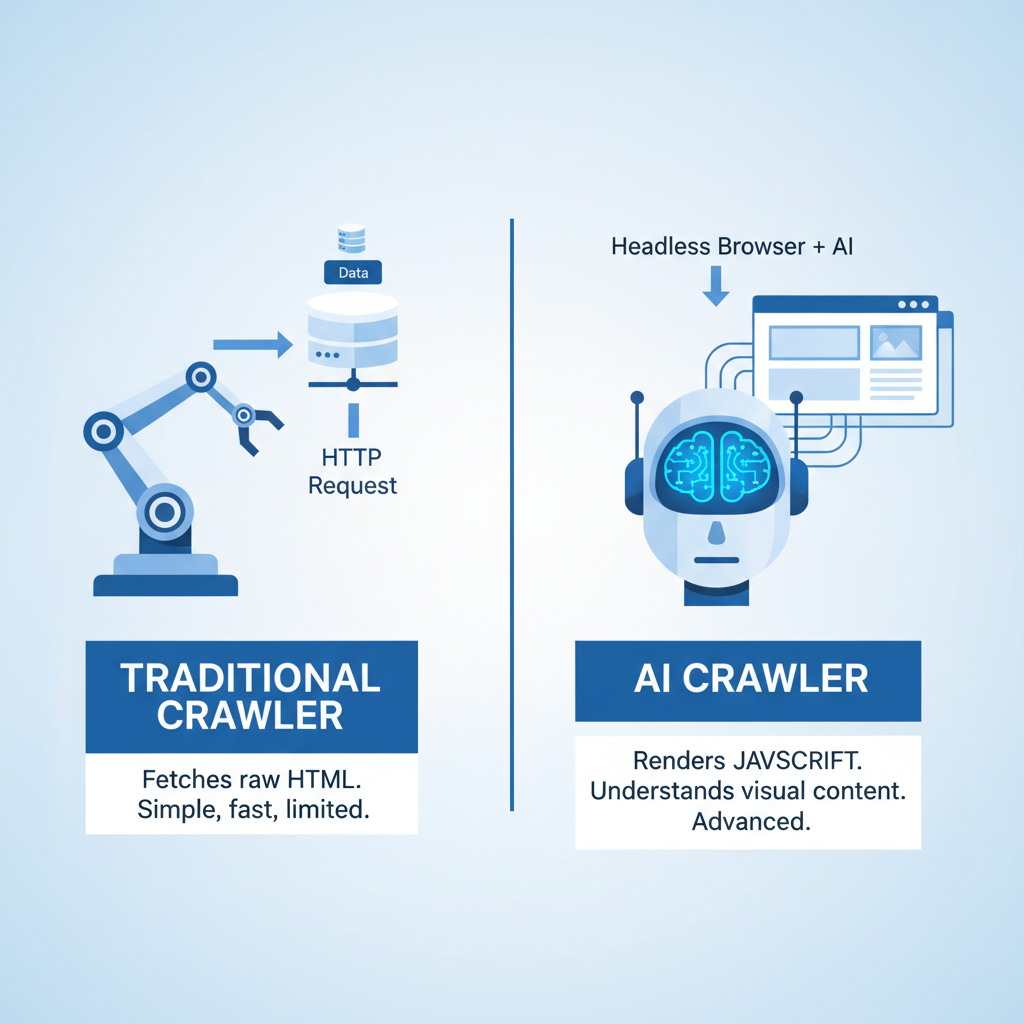
Not all crawlers are built the same. Basic tools send simple HTTP GET requests to URLs and read the response. However, modern websites rely heavily on JavaScript frameworks (React, Angular, Vue). If a link is injected into the Document Object Model (DOM) via JavaScript after the initial load, a simple HTTP request will completely miss it.
Advanced tools utilize headless browsers (like Chrome DevTools Protocol) to render the page exactly as a user would see it, capturing dynamically loaded links. When evaluating options, you might start with a dedicated Broken Link Checker Tool to quickly identify 404s, but ensure it supports JavaScript rendering if your site requires it.
Managing False Positives and Rate Limits
One of the most frustrating aspects of link auditing is dealing with false positives. This occurs when a tool flags a functional link as broken. Common culprits include:
• 429 Rate Limiting: The target server blocks the crawler for making too many requests too quickly.
• 403 Forbidden: The target server employs firewall protections (like Cloudflare) that block known bot user-agents.
• Geo-blocking: Content restricted to specific countries returning errors to cloud servers located elsewhere.
Professional-grade tools allow you to throttle crawl speed and spoof user-agents to bypass these basic security measures, giving you a highly accurate dataset.
Building Your Broken Link Workflow
Auditing Internal vs. External Links
Your strategy must differentiate between internal and external links. Internal links are entirely within your control and are critical for your site's architecture. Fixing an internal 404 is usually as simple as updating the URL or implementing a 301 redirect. Pairing your link audit with a reliable Redirect Checker Tool ensures your newly implemented 301s aren't causing infinite loops.
External links, however, point to third-party domains. While you cannot fix the target site, you must remove or replace the dead link to maintain your own site's quality signals. Interestingly, SEO tools often detect broken external backlinks through their link monitoring features, which agencies use for broken link building campaigns—reaching out to competitors' broken link sources to suggest their own content as a replacement.
Bulk Fixing and Automation Strategies
Manual remediation is not scalable. For SMBs, current pricing shows free web-based tools cover basic needs, but mid-market organizations must invest in automation.
We recommend the following workflow for bulk management:
- Schedule Automated Scans: Configure your tool to run weekly crawls during off-peak server hours.
- Export to CSV/JSON: Pull the data into a spreadsheet, filtering by HTTP status code.
- Prioritize by Traffic: Cross-reference the broken URLs with your analytics data. Fix the links on your highest-trafficked pages first.
- Execute Bulk Actions: Use database queries or CMS plugins to update URLs en masse.
For a holistic view, integrating these checks into broader On-Page SEO Audit Tools provides maximum visibility into how dead links affect your overall site health.
Frequently Asked Questions (FAQ)
How often should I scan my site?
For sites publishing content daily, automated daily scans are highly recommended. For static brochure sites, a monthly scan suffices. E-commerce platforms with fluctuating inventory should utilize real-time or daily API-based monitoring to catch broken product links immediately.
Do broken links directly impact Google rankings?
Google has stated that broken links do not trigger a direct algorithmic penalty. However, they degrade the user experience, inflate bounce rates, and waste crawl budget. Over time, these secondary effects can suppress your organic visibility, making remediation a crucial SEO maintenance task.
What is the difference between a 404 and a soft 404?
• Standard 404: The server correctly returns a 404 status code, telling the bot the page is gone.
• Soft 404: The server returns a 200 (OK) success code, but the page displays "Not Found" text or is functionally empty. Soft 404s are harder for basic tools to detect and require advanced content analysis to identify.
Conclusion and Next Steps
Choosing Your Tool
Selecting the best broken link checker tool ultimately depends on your specific technical environment and budget. If you require deep, localized crawling with total control, desktop software like Screaming Frog remains the industry standard. If you prefer automated, hands-off monitoring with security checks, cloud platforms like Dr. Link Check or Broken Link Scan are excellent choices.
We advise starting with a comprehensive audit of your current site architecture. Identify your URL limits, assess your JavaScript rendering needs, and choose a tool that aligns with your operational workflow.
Sources and References
• Internet Engineering Task Force (IETF) RFC 7231: HTTP/1.1 Semantics and Content.
• Google Search Central Documentation on Crawl Budget and 404 Handling.
• 2026 Industry Analyses on SEO Tool Market Positioning.