Verificador de Redirecciones Gratis
Rastrea cada salto desde el origen hasta el destino. Audita tus redirecciones de URL para asegurar tiempos de carga rápidos y señales SEO claras.
What Is Redirect Checking?
The Core Definition of Redirect Validation
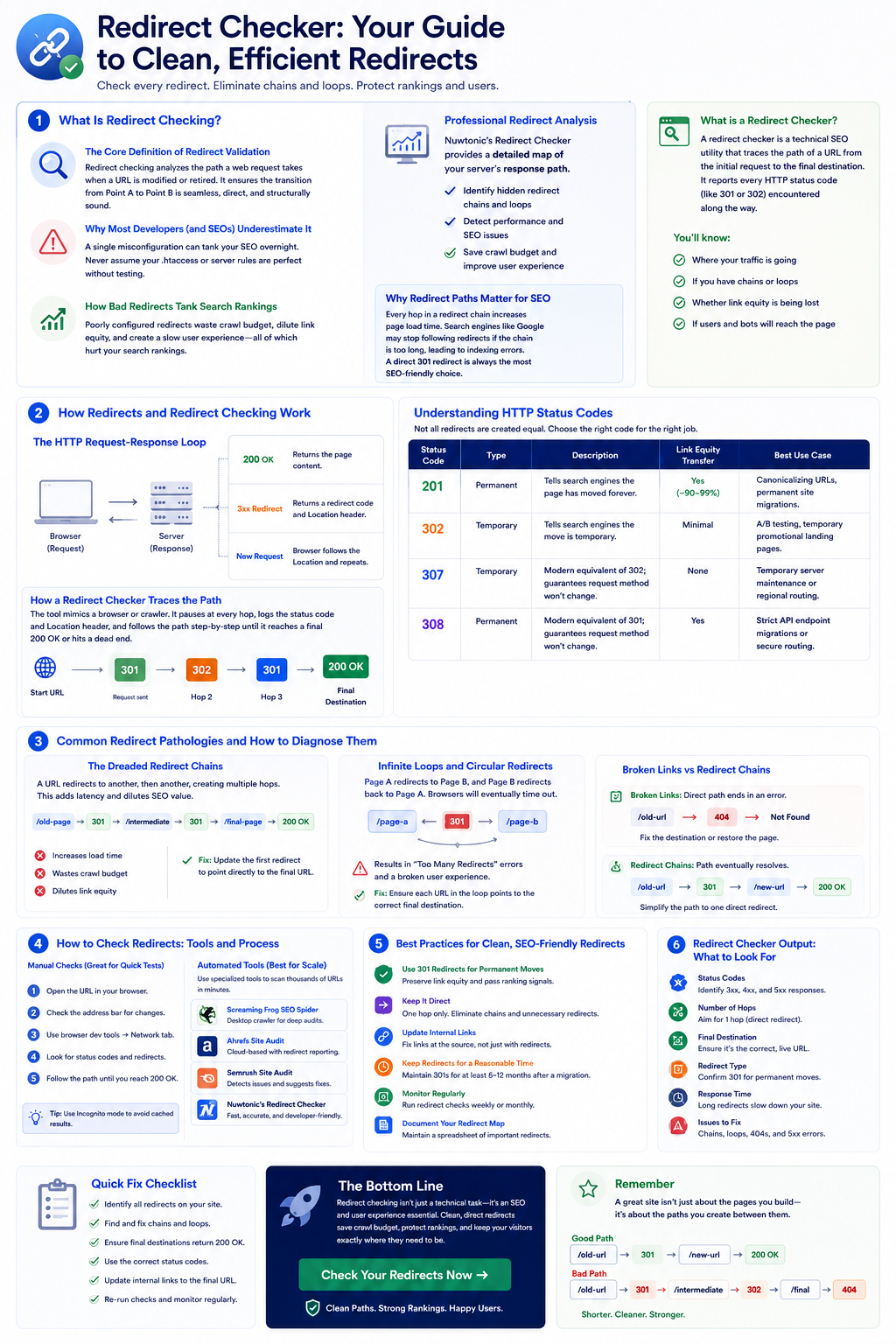
At its most basic level, redirect checking is the practice of analyzing the path a web request takes when a URL is modified or retired. When a user clicks a link or types an address into their browser, the server responds with specific instructions. If that page has moved, the server returns a redirection status code. Redirect checking inspects this server response to ensure the transition from Point A to Point B is seamless, direct, and structurally sound. It is the digital equivalent of testing a railroad switch before letting a high-speed train pass through.
Why Most Developers (and SEOs) Underestimate It
Now, here's the thing—most people underestimate the importance of redirect checking — a single misconfiguration can tank your SEO overnight. I have seen brilliant engineers spend weeks building beautiful front-end interfaces, only to completely ignore the underlying URL routing rules. When you migrate a site, launch an e-commerce platform, or restructure your content, you cannot just write a few regex rules in your .htaccess or Nginx configuration and hope for the best. Without rigorous validation, you risk sending your historical traffic into a black hole of broken links.
How Bad Redirects Tank Search Rankings
When search engine bots crawl your website, they follow the paths you lay out for them. If those paths are broken, convoluted, or sluggish, search engines will penalize your site. Every time a crawler encounters a poorly configured redirect, it wastes a portion of your site's crawl budget. If the crawler has to jump through five hops to find a single page, it may give up entirely, stripping away your link equity and causing your organic search rankings to plummet.
Professional Redirect Analysis
Nuwtonic's Redirect Checker provides a detailed map of your server's response path. We help you identify hidden redirect chains and loops that can slow down your site and waste your search engine crawl budget.
Why Redirect Paths Matter for SEO
Every hop in a redirect chain increases page load time. Search engines like Google may stop following redirects if the chain is too long, which can lead to indexing errors. A direct 301 redirect is always the most SEO-friendly choice.
What is a Redirect Checker?
A redirect checker is a technical SEO utility that traces the path of a URL from the initial request to the final destination. It reports every HTTP status code (like 301 or 302) encountered along the way.
How Redirects and Redirect Checking Work
The HTTP Request-Response Loop
To understand redirect checking, we have to look under the hood at how the web handles requests. When you enter a URL, your browser sends an HTTP request to the hosting server. Under normal circumstances, the server returns a status code of 200 OK along with the page content. However, when a redirect is in place, the server responds with a 3xx redirection code and a Location header specifying the destination URL. The browser reads this header and immediately fires off a new request to the new address.
Understanding HTTP Status Codes
Not all redirects are created equal. Knowing which HTTP status code to use is the difference between preserving your search rankings and starting from scratch. Let's break down the primary redirection codes:
| Status Code | Type | Description | Link Equity Transfer | Best Use Case |
|---|---|---|---|---|
| 301 Permanent | Permanent | Tells search engines the page has moved forever. | Yes (~90-99%) | Canonicalizing URLs, permanent site migrations. |
| 302 Found | Temporary | Tells search engines the move is temporary. | Minimal | A/B testing, temporary promotional landing pages. |
| 307 Temporary | Temporary | Modern equivalent of 302; guarantees request method won't change. | None | Temporary server maintenance or regional routing. |
| 308 Permanent | Permanent | Modern equivalent of 301; guarantees request method won't change. | Yes | Strict API endpoint migrations or secure routing. |
How a Redirect Checker Traces the Path
An automated redirect checker works by mimicking a web browser or search engine crawler. It sends an HTTP request to the target URL, but instead of automatically rendering the final page, it pauses at every single hop. It logs the exact status code returned, inspects the Location header, and follows the path step-by-step until it reaches a final 200 OK status or hits a dead end. This step-by-step analysis allows you to pinpoint exactly where a redirect sequence is losing efficiency.
Common Redirect Pathologies and How to Diagnose Them
The Dreaded Redirect Chains
Redirect chains can be a real pain, and I've learned that simplifying redirects is often the best approach. A redirect chain occurs when a URL redirects to another URL, which then redirects to a third URL, and sometimes even a fourth or fifth. This usually happens organically over years of site updates. For example, your old /about-us page redirects to /about, which later redirects to /our-story. Every extra hop in a chain degrades your user experience (UX) by adding latency, and it dilutes your SEO juice along the way.
Infinite Loops and Circular Redirects
I'll never forget a midnight deployment where a junior developer accidentally configured Page A to redirect to Page B, while Page B was still configured to redirect to Page A. The result? An infinite redirect loop that crashed our application servers and left users staring at a "Too Many Redirects" error screen. Circular redirects are disastrous because browsers will eventually time out and stop trying, leaving your users with a completely broken experience. A redirect checker immediately flags these loops before they can impact your live audience.
Broken Links vs Redirect Chains: The Core Differences
It is vital to distinguish between a broken link and a redirect chain, as they require entirely different remediation strategies.
- Broken Links: Direct paths that point to a non-existent page (returning a 404 Not Found or 410 Gone code).
- Redirect Chains: Paths that eventually reach a working page, but take multiple unnecessary hops to get there.
- Impact: While both harm your website's performance, broken links completely halt user progress, whereas redirect chains slowly erode performance and crawl efficiency.
Practical Guide: How to Check Redirects Across Different Environments
Checking Redirects in Google Chrome DevTools
If you want to quickly check a redirect without third-party tools, your browser's built-in developer tools are your best friend. Here is how to do it in Google Chrome:
- 1
Open Chrome and press F12 (or right-click and select Inspect) to open DevTools.
- 2
Navigate to the Network tab.
- 3
Check the Preserve log checkbox at the top of the panel (this is critical, otherwise the log clears when the page redirects).
- 4
Type the redirected URL into your browser's address bar and hit enter.
- 5
Look for the initial request in the Network log; you will see the 301 or 302 status code and can inspect the headers.
Testing HTTP to HTTPS and DNS-Level Redirects
When securing a site, you must ensure that all HTTP traffic automatically upgrades to HTTPS. To test this, try requesting your site using http://yourdomain.com and verify that it returns a 301 redirect to https://yourdomain.com. Similarly, check your DNS-level redirects (such as redirecting the non-www version of your domain to the www version). If these are misconfigured, search engines may index both versions of your site, leading to duplicate content issues and splitting your link equity.
Automated Validation with Advanced Tooling
While manual testing works for a handful of pages, it is completely unfeasible for large-scale websites. If you are managing an e-commerce store with thousands of products, you need automated solutions. Using an automated platform allows you to run bulk checks across your entire site structure. This ensures that every single internal link is direct, clean, and functioning perfectly without requiring hours of manual labor.
Best Practices for Setting Up and Managing Redirects
Keep It Clean: The One-Hop Rule
When it comes to URL routing, simplicity is supreme. Always aim for the One-Hop Rule: every redirect should go directly from the source URL to the final destination URL in a single step. If you find yourself with an existing redirect chain, do not just add another redirect to the end of it. Instead, go back and update all previous redirect rules to point directly to the newest destination. This keeps your server configurations clean and your load times lightning-fast.
Preserving Link Equity and SEO Juice
To maximize the transfer of search engine authority during a migration, you must use the correct redirection type. A permanent 301 redirect is the standard for transferring search ranking power. Never use a temporary 302 redirect for permanent content moves. Search engines treat 302 redirects as temporary, meaning they will keep the old URL in their index and may not pass any link equity to the new page.
Why Broken Links Hurt SEO and How to Fix Them
I've seen too many developers ignore 404 errors, thinking they don't matter; trust me, they do — especially for user retention. If a user clicks a link from search results and lands on a dead end, they will immediately bounce back to the search results. This signal tells search engines that your site is untrustworthy or outdated. Proactively audit your redirect paths and fix broken links before they erode your crawl efficiency and search visibility.
Technical Path Scope
This tool evaluates the presence of redirects, specific types (301, 302, 307), total redirect chain length, and verifies the final destination URL's accessibility.
How to Audit Your Redirects
Enter the old or current URL you want to analyze.
Run the check to see the full redirection path.
Review the number of hops and the HTTP status codes.
Fix long chains by pointing the source directly to the final destination.
Understanding Status Codes
301 - Permanent
This tells search engines the old page has moved forever. This is best for SEO.
302 - Temporary
Used for short-term changes. It doesn't pass ranking power to the new URL.
Redirect chain
Multiple redirects in a row. These should be shortened to a single hop.
Final URL
The 200 OK destination where users and search bots finally land.
Audit Disclaimer
Redirects can behave differently based on the user's location or device. This tool provides a standard server-side check of the redirection path.
Frequently Asked Questions About Redirect Checking
Common Redirect SEO Questions Answered
How do I check if a 301 redirect is working?
You can check a 301 redirect by using a web-based redirect checker, running a curl -I command in your terminal, or inspecting the Network tab in your browser's DevTools. Look for a status code of 301 Moved Permanently and verify that the Location header matches your intended destination.
How do I check for multiple redirect errors?
To identify multiple redirect errors across an entire domain, run a site-wide crawl using an automated SEO tool or a dedicated link validation crawler. These tools will generate a report flagging all redirect chains, loops, and broken URLs on your site.
Can redirect chains cause a performance penalty?
Yes. Each step in a redirect chain requires an additional round-trip request to the server, which adds physical latency to your page load speed. Slow load speeds harm your user experience and can negatively impact your search engine rankings.
Prueba nuestras otras herramientas gratuitas de SEO e IA
Hemos reunido algunas de nuestras herramientas gratuitas que podrían ayudarte en tus esfuerzos de SEO.
Filtrar qué herramientas ver
Generador de Títulos Meta Gratis
Genera etiquetas de título con alto CTR optimizadas para Google usando IA.
Herramienta Gratis de Keyword Clustering
Agrupa keywords relacionadas en clusters temáticos para una estrategia SEO más sólida.
Buscador de Keywords para AI Overview
Detecta keywords que activan AI Overviews y evalúa oportunidades de citación con señales de volatilidad.
Buscador de Keywords de Baja Competencia
Encuentra SERPs débiles, oportunidades dominadas por foros y keywords donde sitios de baja autoridad pueden ganar.
Buscador de Keywords de Reddit
Extrae preguntas recurrentes, puntos de dolor e intención de compra desde Reddit y foros.
Herramienta de Keywords de Pregunta
Encuentra keywords estilo FAQ y preguntas comunes de usuarios.
Buscador de Keywords con Intención de Compra
Filtra específicamente keywords comerciales y transaccionales.
Buscador de Keywords de Cero Volumen
Descubre keywords emergentes u ocultas que las herramientas tradicionales no detectan.
Verificador de Longitud de Título Gratis
Verifica si tus títulos se ajustan a los límites de píxeles para evitar que se corten.
Generador de Meta Descripciones Gratis
Crea descripciones atractivas que resuman tu contenido y aumenten los clics.
Verificador de Longitud de Meta Descripción Gratis
Verifica si tus meta descripciones se ajustan a los límites de píxeles.
Simulador de SERP de Google Gratis
Simula cómo se verían tu título y descripción en los resultados de Google.
Verificador de Marcado Schema Gratis
Valida tus datos estructurados para asegurar que sean legibles por los buscadores.
Prueba de Resultados Enriquecidos Gratis
Determina si tu página es apta para resultados enriquecidos en Google.
Verificador de Texto Alt Gratis
Identifica textos alt faltantes, vacíos o duplicados en tus imágenes.
Generador de Texto Alt Gratis
Genera instantáneamente textos alt descriptivos y accesibles para tus imágenes.
Generador de Nombres de Archivo Gratis
Convierte texto plano en nombres de archivo de imagen optimizados para SEO.
Herramienta de Auditoría SEO On-Page Gratis
Ejecuta una auditoría on-page para páginas de servicios SEO, procesos de technical SEO audit y mejoras de SEO optimization.
Verificador de Etiquetas H1 Gratis
Identifica la presencia y el contenido de las etiquetas H1 en cualquier página.
Verificador de Estructura de Encabezados Gratis
Audita tus etiquetas H1-H6 para asegurar una estructura lógica y amigable para el SEO.
Verificador de URL Canónica Gratis
Identifica las URLs canónicas declaradas y analiza las señales asociadas.
Herramienta de Auditoría EEAT Gratis
Analiza tu contenido para señales de Experiencia, Experticia, Autoridad y Confiabilidad de Google.
Herramienta de Auditoría AIO y GEO Gratis
Optimiza tu contenido para Resúmenes de IA y Experiencia Generativa de Búsqueda con una auditoría detallada.
Verificador de Enlaces Rotos Gratis
Escanea una página para identificar enlaces que devuelven errores.
Últimos artículos relacionados con SEO e IA
Explorar todos los artículos
¿Cómo empezar con Generative Engine Optimization (GEO)?

How to Create a Topical Map for AI Search: Guía de Autoridad Semántica

How to Rank in Google AI Overviews: Guía Definitiva de SEO para IA
Google has indexed page but not ranking fix: Guía de diagnóstico

Cómo Optimizar para Perplexity AI Search en 2026: Guía de SEO Generativo