Seeing the "Discovered – currently not indexed" status in Google Search Console is incredibly frustrating. You spent time creating content, Google knows the page exists, yet it refuses to crawl and index it. As an SEO professional, I have analyzed thousands of indexing reports, and I can tell you that this status is rarely a random glitch. It is a specific signal from Google regarding your server capacity, crawl budget, or internal link architecture.
In this guide, we will cover exactly how to fix Discovered currently not indexed. We will bypass the generic advice and focus on concrete action items you can implement today to force Google's bots to prioritize your URLs.
TL;DR Summary
• The Problem: Google found your URL (usually via a sitemap or a link) but decided that crawling it right now would overload your server, or it deemed the URL too low-priority to spend crawl budget on.
• The Immediate Fix: Improve internal linking to the orphaned page, verify your server is not blocking Googlebot, and use the URL Inspection Tool to request indexing.
• The Long-Term Solution: Clean up crawl traps, remove low-quality pages draining your crawl budget, and utilize automated tools like Nuwtonic to monitor your technical SEO health continuously.
Table of Contents
• Understanding the "Discovered – currently not indexed" Status
• Step-by-Step Guide on How to Fix Discovered currently not indexed
• Advanced Troubleshooting for Persistent Indexing Issues
• Measuring Your Indexing Success Over Time
• Frequently Asked Questions (FAQ Section)
• Sources and References
Understanding the "Discovered – currently not indexed" Status
Before we execute the fixes, we must understand the mechanics of Google's crawling queue. Google operates on a strict resource allocation model.
What Does This Status Actually Mean?
When Google assigns a page the "Discovered – currently not indexed" status, it means Googlebot has added the URL to its crawling queue but has deliberately delayed the crawl. Google's official documentation states that this typically happens because crawling the page might overload the site's server. However, in our practical experience, it also heavily correlates with crawl budget limitations and poor internal link equity. Google simply does not think the page is important enough to crawl right now.
Crawled vs. Discovered: The Key Differences
It is common to confuse this status with "Crawled - currently not indexed." They require entirely different troubleshooting approaches.
Feature | Discovered – currently not indexed | Crawled – currently not indexed |
|---|---|---|
Googlebot Action | Has NOT visited the page yet. | Has visited and read the page. |
Primary Cause | Server overload, poor internal linking, or low crawl budget. | Thin content, duplicate content, or lack of user value. |
Immediate Action | Improve server response time and add internal links. | Rewrite the content to add unique value and depth. |
Time to Resolve | Can be fixed quickly if server issues are resolved. | Requires significant content overhaul and re-evaluation. |
Why Google Delays Crawling Your URLs
Google evaluates the "cost" of crawling your site against the expected "value" of your content. If your server response time drops during a crawl, Googlebot will back off to prevent crashing your site. Alternatively, if your site has 10,000 pages of low-quality content, Google will lower your total crawl budget, leaving new, high-quality pages stuck in the "Discovered" queue.
Step-by-Step Guide on How to Fix Discovered currently not indexed
To move a page from Discovered to Indexed, you must increase its perceived value to Googlebot while ensuring your technical foundation is flawless.
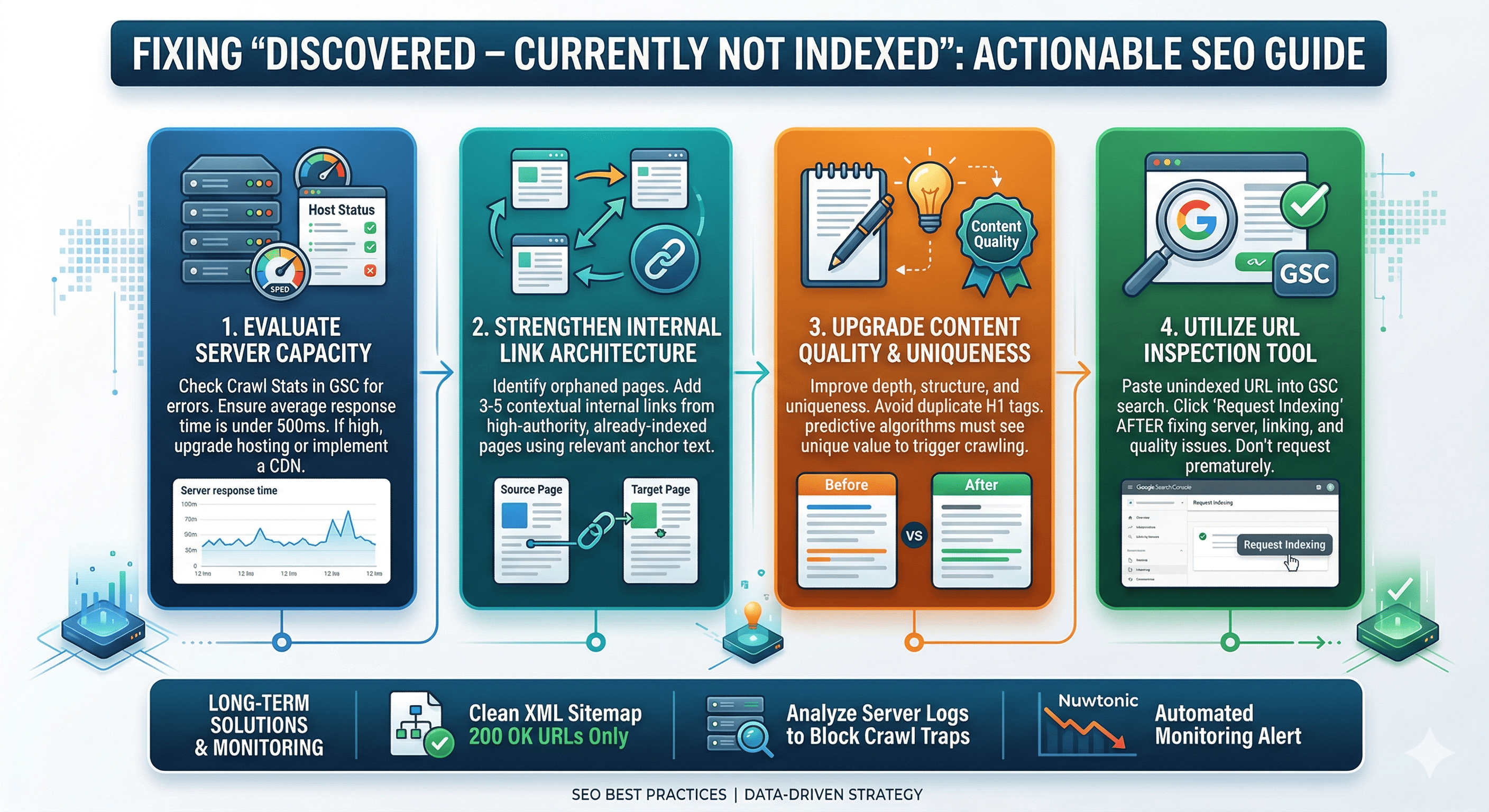
Step 1: Evaluate Server Capacity and Crawl Budget
The first technical check must be your server's health. Navigate to the "Crawl Stats" report in Google Search Console (found under Settings).
Check the "Host status" section. If you see red error markers for server connectivity or DNS resolution, you have found your culprit.
Look at the "Average response time" graph. If your server takes more than 500ms to respond, Googlebot will likely reduce its crawl rate.
Upgrade your hosting plan or implement a Content Delivery Network (CDN) if you consistently hit server bottlenecks.
Step 2: Strengthen Internal Link Architecture
Pages with zero internal links (orphaned pages) are the most common victims of the "Discovered" status. Google uses internal links to pass PageRank and determine the hierarchy of your site.
Identify the unindexed URL.
Find 3 to 5 highly authoritative, already-indexed pages on your website that share a topical relationship with the unindexed URL.
Add exact-match or highly relevant contextual internal links from those strong pages pointing to the "Discovered" page.
This directs Googlebot directly to the URL through a path it already trusts.
Step 3: Upgrade Content Quality and Uniqueness
While "Discovered" means Google hasn't read the page yet, predictive algorithms often guess the value of a URL based on its URL string or the patterns of similar pages on your site. If you are bulk-publishing programmatic SEO pages, Google will throttle crawling.
Ensure your content is structured logically. For example, on-page technicalities matter. Resolving issues with duplicate H1 tags can clean up your HTML, making it easier for Googlebot to parse your site architecture once it does arrive.
Step 4: Utilize the URL Inspection Tool
Once you have improved the server response and added internal links, you must manually push the URL back into the priority queue.
Paste the unindexed URL into the top search bar of Google Search Console.
Hit Enter to run the URL Inspection.
Click "Request Indexing."
Do not do this without fixing the underlying internal linking or server issues first, as Google will simply ignore the request if the core problem persists.
Advanced Troubleshooting for Persistent Indexing Issues
If the basic steps fail, you must audit your site's broader technical ecosystem.
Analyzing XML Sitemap Health
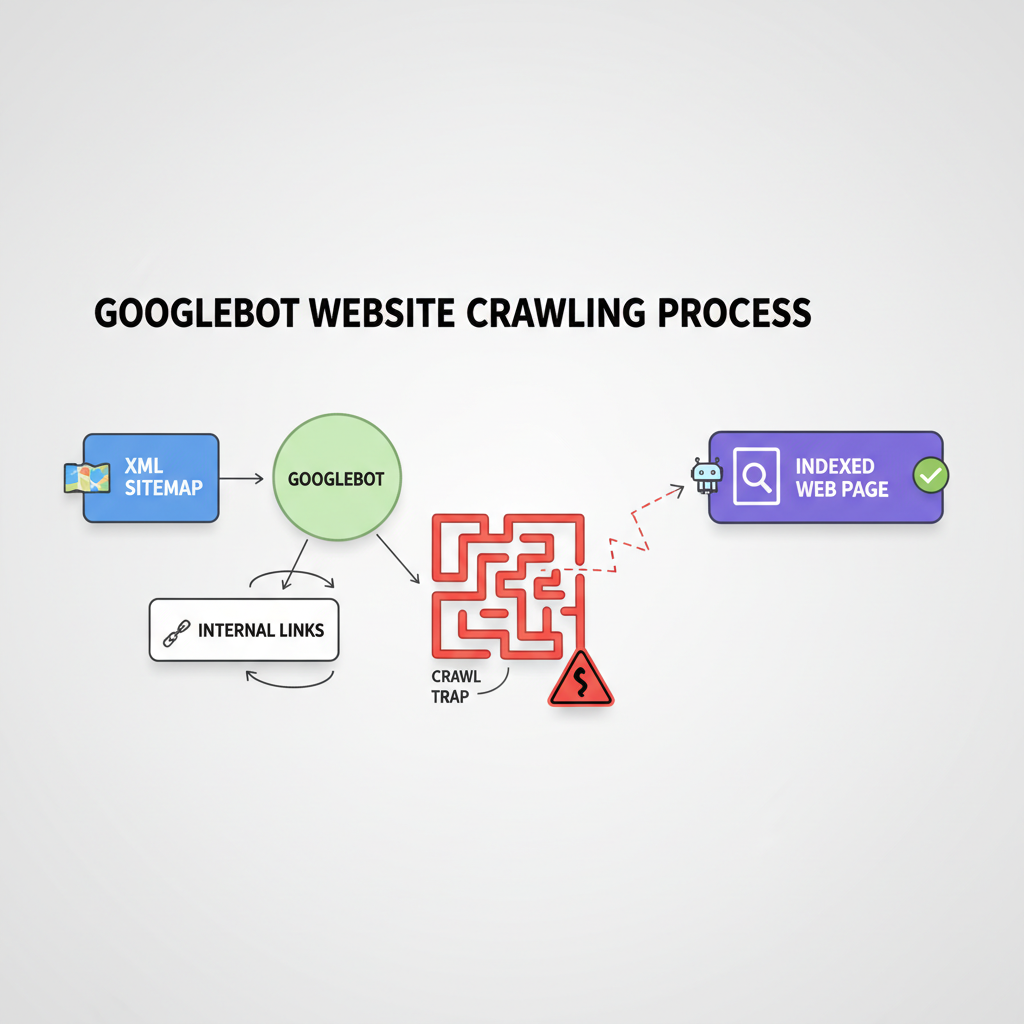
Your XML sitemap is your direct line of communication with Google. If your sitemap contains redirect chains, 404 errors, or non-canonical URLs, Google will lose trust in it and stop crawling the URLs listed within.
Crawl budget is wasted on 404s. Understanding the impact of broken links on SEO is critical, as every dead link Googlebot follows is a wasted opportunity to crawl your new, valid pages. Ensure your sitemap only contains HTTP 200, indexable, canonical URLs. While some WordPress SEO plugins handle basic sitemap generation, you must manually verify the output.
Identifying and Removing Crawl Traps
Crawl traps are infinite loops of dynamically generated URLs (like calendar plugins or faceted navigation filters) that trap Googlebot.
Check your server logs to see where Googlebot is spending its time.
If you notice thousands of hits on parameter URLs (e.g.,
?sort=price&color=red), you have a crawl trap.Use the robots.txt file to block crawling of these low-value parameter URLs, freeing up crawl budget for your "Discovered" pages.
Larger sites might require enterprise SEO platforms to monitor these server logs effectively.
Using Nuwtonic SEO Audit for Automated Fixes
Manually hunting down orphaned pages and server bottlenecks is time-consuming. This is where the Nuwtonic SEO Audit and Auto Fix capabilities become essential.
Nuwtonic automatically scans your entire website architecture, identifying URLs that lack internal link equity. Instead of manually searching for places to insert links, Nuwtonic's AI suggests the most semantically relevant internal linking opportunities and can deploy them instantly. By automating the technical cleanup, Nuwtonic ensures your site maintains a pristine crawl budget, drastically reducing the chances of pages getting stuck in the "Discovered" queue.
Measuring Your Indexing Success Over Time
Fixing the issue is only half the battle; you must verify that your interventions actually worked.
Tracking Changes in Google Search Console
Monitor the "Pages" report in GSC weekly. You are looking for a downward trend in the "Discovered – currently not indexed" graph and a corresponding upward trend in the "Indexed" graph. Be patient; this transition can take anywhere from a few days to several weeks depending on your site's overall crawl rate.
Correlating Indexing with Organic Traffic
Getting a page indexed does not guarantee traffic. Once indexed, you might face a new challenge. Read our guide on Fixing indexed pages that aren't ranking to bridge the gap between technical visibility and actual organic acquisition. Furthermore, using comprehensive content analysis tools can highlight semantic gaps that prevent newly indexed pages from ranking on page one.
Setting Up Automated Monitoring Alerts
Do not rely on manual checks alone. Set up custom alerts in your SEO platform (like Nuwtonic) to notify you immediately if the ratio of unindexed to indexed pages spikes. Proactive monitoring prevents a small server hiccup from turning into a massive indexing failure.
Frequently Asked Questions (FAQ Section)
How long does it take for Google to index a discovered page?
There is no exact timeline. If you fix server bottlenecks and provide strong internal links, Google can index a discovered page within 24 to 72 hours. However, if left untouched, a page can remain in the "Discovered" status for months.
Does a forced index guarantee ranking?
Absolutely not. Forcing an index via the URL Inspection Tool only guarantees that Googlebot will read the page. Where that page ranks depends entirely on its relevance, quality, and authority compared to competing pages.
Will deleting the page and republishing fix the issue?
No. Deleting and republishing with a new URL is a band-aid solution that does not address the root cause. If your server is overloaded or your internal linking is weak, the new URL will likely end up in the exact same "Discovered – currently not indexed" queue.
Key Takeaways
The "Discovered – currently not indexed" status means Google knows the URL exists but delayed crawling due to server load or crawl budget limits.
Your first line of defense is ensuring your server responds quickly and is not blocking Googlebot.
Adding internal links from high-authority pages is the most effective way to force Googlebot to crawl an orphaned page.
Clean up your XML sitemap and block crawl traps in your robots.txt to preserve your crawl budget.
Utilize Nuwtonic's automated SEO auditing to continuously monitor and fix internal linking and technical issues before they impact indexation.
Sources and References
• Google Search Central Documentation on Page Indexing Reports.
• Nuwtonic Internal Data on Automated SEO Auditing and Link Equity.