
In my years auditing enterprise websites and optimizing platforms at Nuwtonic, I consistently see the same critical error: treating alternative text as a dumping ground for SEO keywords. If you want to master alt text best practices for google images, you must first understand that Google's algorithms and assistive technologies prioritize human context above all else.

We need to stop viewing alt text merely as an SEO checkbox. Instead, we must treat it as a vital translation layer between visual content, screen readers, and modern computer vision algorithms. In this guide, I will walk you through the precise frameworks, character limits, and compliance standards necessary to execute alt text flawlessly.
TL;DR Summary
• Keep alt text between 80–125 characters to prevent screen reader truncation.
• Never use "image of" or "picture of"; screen readers announce this automatically.
• Use an empty alt attribute (alt="") for purely decorative images.
• Prioritize the image's purpose and context within the surrounding text over literal visual descriptions.
• Alt text is an accessibility requirement (WCAG 2.1, Section 508), not a primary SEO ranking factor.
Key Takeaways
Screen Reader Constraints: Software like JAWS and NVDA cuts off at specific character counts. Precision is mandatory.
Context dictates content: The identical image requires different alt text depending on the paragraph surrounding it.
Compliance over manipulation: Keyword stuffing actively harms accessibility and is ignored by modern search algorithms.
Table of Contents
The Anatomy of Perfect Alt Text
The Decorative vs. Informative Decision Framework
Accessibility Standards and Legal Compliance
SEO Myths vs. Computer Vision Realities
Technical Implementation and Auditing Workflows
Frequently Asked Questions (FAQ)
Sources and References
The Anatomy of Perfect Alt Text
Writing effective alt text requires balancing descriptive clarity with strict technical constraints. I often tell content teams that alt text is like writing a telegram: every word must earn its place.
Why 80–125 Characters is the Sweet Spot
One of the most common oversights in digital marketing is ignoring how assistive technology actually processes HTML. Screen reading software, such as JAWS, NVDA, and Apple's VoiceOver, does not read infinitely. Multiple accessibility authorities recommend staying between 80–125 characters because screen readers typically pause or cut off text beyond this limit.
If you bury the critical context of an image at character 140, a visually impaired user will never hear it.
Screen Reader | Typical Cutoff Behavior | Recommended Action |
|---|---|---|
JAWS | Splits text into chunks of ~125 characters. | Keep core message under 125 chars. |
NVDA | User-configurable, but defaults to similar chunking. | Front-load essential information. |
VoiceOver | Reads continuously but causes cognitive overload if long. | Use concise phrasing, end with a period. |
Context vs. Literal Description
The goal is not to describe what the image looks like, but what the image means in the context of the page.
Consider an image of a Dalmatian puppy playing fetch. If this image sits on a veterinary clinic's page about canine joint health, the literal description fails the user.
• Ineffective: alt="Dalmatian puppy playing fetch in a green park"
• Effective: alt="Dalmatian puppy demonstrating healthy joint mobility while running"
Avoiding Redundancy and Keyword Stuffing
If the text immediately adjacent to the image already describes the visual, repeating it in the alt text creates a frustrating, repetitive auditory experience for screen reader users. Furthermore, packing the attribute with target keywords violates core accessibility guidelines.
According to Google's Search Central documentation, you should not embed important text inside images, nor should you use alt attributes for keyword stuffing, as this provides a poor user experience and can be flagged as spam.
The Decorative vs. Informative Decision Framework
Not every image requires a description. In fact, over-describing decorative elements is a hallmark of amateur web development.
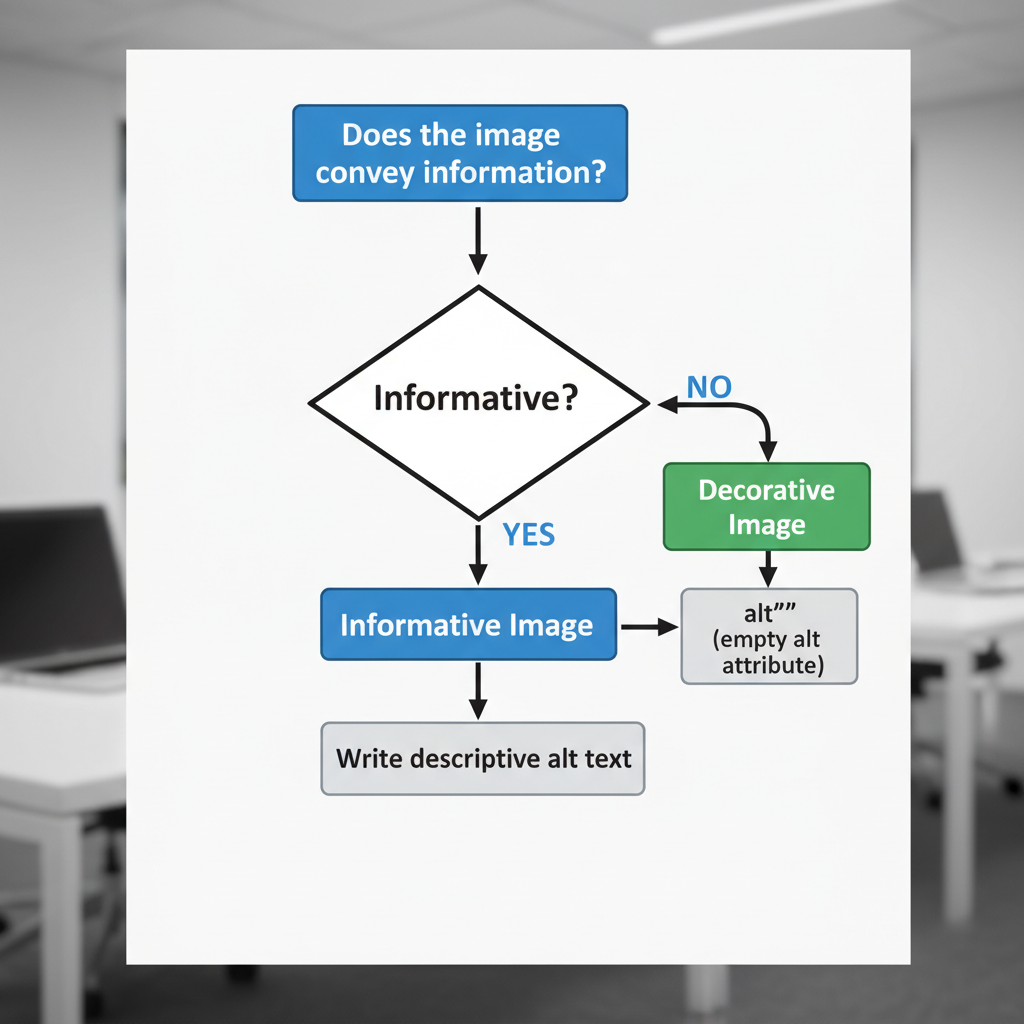
When to Use the Empty Alt Attribute
Decorative images serve no informational purpose. They exist purely for aesthetic layout. In these cases, you must use an empty alt attribute (alt=""). This explicitly tells assistive technologies to skip the image entirely.
Here is the decision matrix I use when training SEO and content teams:
Image Characteristic | Classification | Required Action |
|---|---|---|
Adds new data or context to the text | Informative | Write concise, specific alt text. |
Illustrates a concept already fully explained in text | Redundant | Use empty alt attribute ( |
Brand logo serving as a home link | Functional | Describe the destination ( |
Background pattern or stylistic divider | Decorative | Use empty alt attribute ( |
Handling Complex Images and Data Visualizations
Charts, graphs, and infographics cannot be summarized in 125 characters. For complex images, the alt text should identify the data's core takeaway, while the surrounding body text (or a linked ARIA description) provides the granular data.
State the chart type: Identify if it is a bar chart, line graph, or pie chart.
State the main trend: Summarize the conclusion.
Provide the data source: Point the user to the adjacent table or text.
Functional Images and Hyperlinks
When an image acts as a hyperlink, its alt text must describe the destination or action, not just the image itself. If a magnifying glass icon submits a search query, the alt text should be alt="Search", not alt="Magnifying glass".
Accessibility Standards and Legal Compliance
Alt text is not merely a best practice; it is a legally enforceable standard in many jurisdictions.
WCAG 2.1 and Section 508 Requirements
The Web Content Accessibility Guidelines (WCAG) 2.1 Level AA is the global benchmark for web accessibility. In the United States, the U.S. federal accessibility standard (Section 508) mandates that alt text must communicate the same information as the visual content.
Failure to comply with these standards can result in legal action, particularly for government agencies, educational institutions, and large e-commerce platforms.
Language Matching for Multilingual Sites
If you manage international websites, your alt text must match the language of the page content. Screen readers switch language profiles based on the HTML lang attribute. If a Spanish page contains English alt text, the screen reader will attempt to pronounce the English words using Spanish phonetic rules, resulting in unintelligible audio.
The Role of Screen Reader Parsing
Punctuation matters. Always end your alt text with a period. Screen readers recognize terminal punctuation and will pause briefly before moving to the next element. Without a period, the screen reader will run the alt text directly into the following paragraph, confusing the listener.
SEO Myths vs. Computer Vision Realities
The intersection of SEO and accessibility is filled with outdated advice. Let's clarify how modern search engines actually process images.
Google's Stance on Alt Text as a Ranking Factor
Alt text is an accessibility feature, not a magic SEO ranking dial. While Google uses alt text to understand the subject matter of an image—which helps the image rank in Google Images—it does not directly boost the ranking of the web page itself.
How Computer Vision Supplements Missing Data
In 2026, Google does not rely solely on your alt text. Google's computer vision algorithms analyze the pixel data of the image, the surrounding text, and the page title to determine context. If you leave an alt attribute blank, Google can still understand that a photo contains a "coffee cup on a wooden desk."
However, computer vision cannot deduce why that coffee cup matters to your specific article. That is the true value of alt text: providing human intent.
AI Visibility and Modern Search
With AI Overviews and generative search models dominating the landscape, explicit context is more critical than ever. AI models synthesize information by connecting entities. When your alt text clearly links a visual entity to the semantic context of your article, you increase the likelihood of being cited as an authoritative source in AI-generated responses.
Technical Implementation and Auditing Workflows
Knowing what to write is only half the battle. Executing it at scale requires rigid workflows.
Platform-Specific Syntax
Different platforms require different implementation methods. Here is how we standardize it:
Platform | Implementation Method | Best Practice |
|---|---|---|
Raw HTML |
| Always include the attribute, even if empty. |
WordPress | Media Library "Alternative Text" field | Fill this out upon upload to ensure site-wide consistency. |
Markdown |
| Do not leave the brackets empty unless decorative. |
Cross-Functional Team Responsibilities
Alt text quality often falls through the cracks because no single department owns it.
• Content Writers: Responsible for drafting the alt text, as they understand the narrative context.
• Developers: Responsible for ensuring the CMS outputs valid semantic HTML and supports ARIA labels for complex graphics.
• SEO/Accessibility Specialists: Responsible for auditing the final output using automated tools and manual screen reader testing.
Validating Compliance with Audit Tools
You cannot manage what you do not measure. I recommend running routine audits using tools like WAVE, Axe DevTools, or Nuwtonic's automated technical SEO auditor or Nuwtonic's free Alt Text checker .These tools will flag missing alt attributes, but remember: automated tools cannot judge the quality or accuracy of the text. Manual review is still required.
Frequently Asked Questions (FAQ)
Core Alt Text Queries
What is the difference between the alt attribute and the title attribute?
The alt attribute provides a text alternative for screen readers and search engines when an image cannot be viewed. The title attribute creates a visual tooltip when a user hovers over the element with a mouse. They serve entirely different purposes.Should I use file names as alt text?
Never. Screen readers will read "IMG underscore 4921 dot JPG" aloud, which provides zero contextual value and creates a frustrating user experience.
Advanced Implementation Queries
How do I write alt text for a headshot?
Keep it simple and focused on identity and role. Example:alt="Jane Doe, Chief Marketing Officer at Nuwtonic."What if the image contains text?
If an image includes critical text (like a promotional banner), that exact text must be transcribed into the alt attribute. However, as a general rule, you should avoid embedding important text in images entirely.
Sources and References
Verified Citations
• The VA's Digital Service guidance emphasizes focusing on purpose and context over generic visual descriptions.
• Web Content Accessibility Guidelines (WCAG) 2.1 Level AA specifications.
• Insights on screen reader parsing limits from industry accessibility standards.
• Google Search Central documentation regarding image optimization and accessibility.